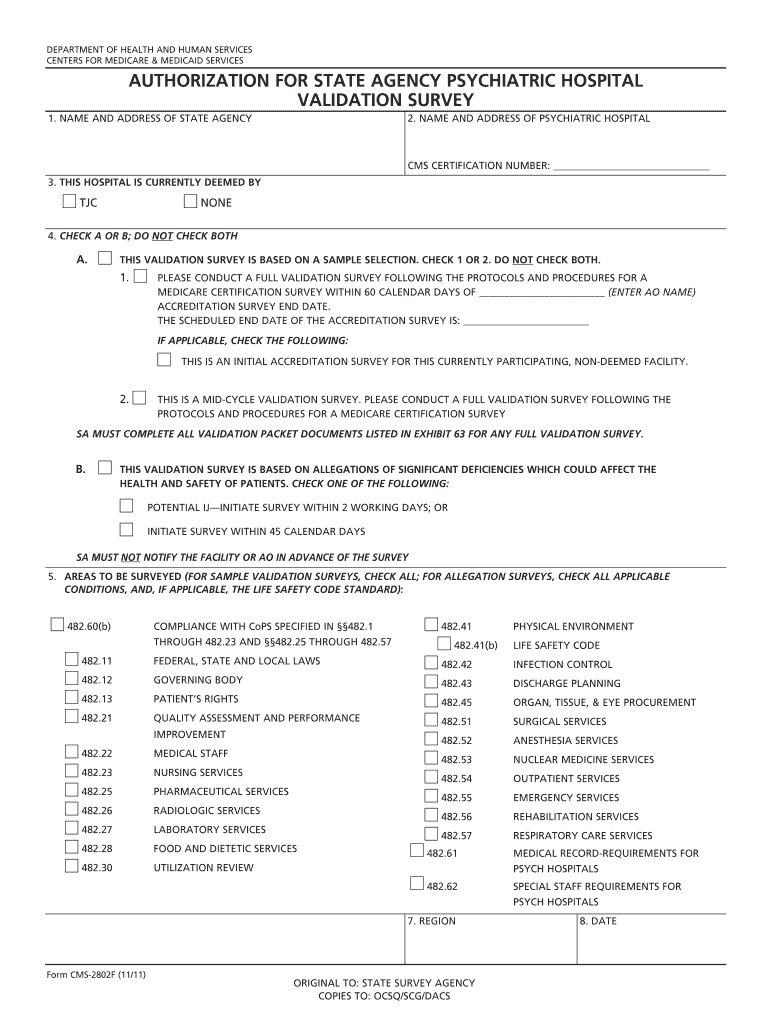
DEPARTMENT of HEALTH and HUMAN SERVICES CENTERS for MEDICARE &amp Form


What is the Department of Health and Human Services Centers for Medicare?
The Department of Health and Human Services Centers for Medicare is a federal agency that administers the nation's major healthcare programs. It primarily focuses on Medicare, which provides health coverage to individuals aged sixty-five and older, as well as younger individuals with disabilities. This agency plays a crucial role in ensuring access to healthcare services, managing costs, and maintaining quality standards across various healthcare providers.
How to Use the Department of Health and Human Services Centers for Medicare
Using the services offered by the Department of Health and Human Services Centers for Medicare involves understanding the various programs and benefits available. Individuals can access information through the official website, where they can learn about eligibility requirements, coverage options, and enrollment processes. Additionally, beneficiaries can find resources for managing their healthcare, including how to file claims and appeal decisions regarding coverage.
Steps to Complete the Department of Health and Human Services Centers for Medicare Forms
Completing forms related to the Department of Health and Human Services Centers for Medicare typically involves several steps:
- Gather necessary personal information, including Social Security numbers and health history.
- Review the specific form requirements and instructions carefully.
- Fill out the form accurately, ensuring all sections are completed.
- Submit the form through the designated method, whether online, by mail, or in person.
- Keep a copy of the submitted form for your records.
Required Documents for the Department of Health and Human Services Centers for Medicare
When applying for benefits or services through the Department of Health and Human Services Centers for Medicare, certain documents are typically required. These may include:
- Proof of identity, such as a government-issued photo ID.
- Social Security card or number.
- Medical records or documentation of disabilities, if applicable.
- Financial information to determine eligibility for assistance programs.
Eligibility Criteria for the Department of Health and Human Services Centers for Medicare
Eligibility for programs under the Department of Health and Human Services Centers for Medicare is generally based on age, disability status, and income level. Individuals must be at least sixty-five years old or have a qualifying disability to receive Medicare benefits. Additionally, income and resource limits may apply for certain programs, such as Medicaid, which works in conjunction with Medicare to provide comprehensive healthcare coverage.
Application Process & Approval Time for the Department of Health and Human Services Centers for Medicare
The application process for benefits through the Department of Health and Human Services Centers for Medicare typically involves submitting the required forms along with supporting documentation. Once submitted, the approval time can vary based on the type of application and the completeness of the provided information. Generally, applicants can expect to receive a decision within a few weeks to a few months, depending on the complexity of their case.
Quick guide on how to complete department of health and human services centers for medicare ampamp 5975175
Complete [SKS] effortlessly on any device
Online document administration has become increasingly popular with companies and individuals alike. It offers an ideal eco-friendly alternative to traditional printed and signed papers, allowing you to locate the correct form and securely store it online. airSlate SignNow equips you with all the necessary tools to create, edit, and eSign your documents swiftly without delays. Manage [SKS] on any device using the airSlate SignNow Android or iOS applications and simplify any document-related process today.
The easiest way to modify and eSign [SKS] with minimal effort
- Obtain [SKS] and click Get Form to begin.
- Make use of the tools we provide to fill out your form.
- Emphasize pertinent sections of the documents or obscure sensitive details with tools that airSlate SignNow offers specifically for that purpose.
- Create your signature using the Sign feature, which takes just seconds and carries the same legal authority as a conventional wet ink signature.
- Review all the details and click on the Done button to save your modifications.
- Select your preferred method for submitting your form, whether by email, SMS, or invite link, or download it to your computer.
Forget about lost or misplaced documents, frustrating form navigation, or mistakes that require the printing of new document copies. airSlate SignNow meets your document management needs in just a few clicks from any device you choose. Modify and eSign [SKS] to ensure seamless communication at every step of the form preparation process with airSlate SignNow.
Create this form in 5 minutes or less
Related searches to DEPARTMENT OF HEALTH AND HUMAN SERVICES CENTERS FOR MEDICARE &amp
Create this form in 5 minutes!
How to create an eSignature for the department of health and human services centers for medicare ampamp 5975175
How to create an electronic signature for a PDF online
How to create an electronic signature for a PDF in Google Chrome
How to create an e-signature for signing PDFs in Gmail
How to create an e-signature right from your smartphone
How to create an e-signature for a PDF on iOS
How to create an e-signature for a PDF on Android
People also ask
-
What is the DEPARTMENT OF HEALTH AND HUMAN SERVICES CENTERS FOR MEDICARE & Medicaid?
The DEPARTMENT OF HEALTH AND HUMAN SERVICES CENTERS FOR MEDICARE & Medicaid is a federal agency that administers the nation's major healthcare programs. It focuses on improving healthcare access, quality, and affordability. Understanding its requirements is crucial for businesses dealing with healthcare documents.
-
How can airSlate SignNow benefit my company when dealing with the DEPARTMENT OF HEALTH AND HUMAN SERVICES CENTERS FOR MEDICARE & Medicaid?
airSlate SignNow provides a streamlined method for sending and signing important documents related to the DEPARTMENT OF HEALTH AND HUMAN SERVICES CENTERS FOR MEDICARE & Medicaid. This ensures compliance and saves time with an easy-to-use interface. It allows users to maintain organized records and enhance communication.
-
Is airSlate SignNow cost-effective for small businesses dealing with the DEPARTMENT OF HEALTH AND HUMAN SERVICES CENTERS FOR MEDICARE & Medicaid?
Yes, airSlate SignNow offers competitive pricing tailored for small businesses working with the DEPARTMENT OF HEALTH AND HUMAN SERVICES CENTERS FOR MEDICARE & Medicaid. The solution is designed to be budget-friendly, allowing companies to manage their documentation without overspending. Flexible pricing plans cater to various business sizes and needs.
-
What features of airSlate SignNow are particularly useful for compliance with DEPARTMENT OF HEALTH AND HUMAN SERVICES CENTERS FOR MEDICARE & Medicaid regulations?
airSlate SignNow includes features such as secure e-signatures, audit trails, and customizable templates, which help businesses ensure compliance with DEPARTMENT OF HEALTH AND HUMAN SERVICES CENTERS FOR MEDICARE & Medicaid regulations. These features enhance security and facilitate the tracking of document changes over time, crucial for compliance audits.
-
Does airSlate SignNow integrate with existing tools related to the DEPARTMENT OF HEALTH AND HUMAN SERVICES CENTERS FOR MEDICARE & Medicaid?
Absolutely, airSlate SignNow offers a variety of integrations with popular tools and platforms that are often used in conjunction with DEPARTMENT OF HEALTH AND HUMAN SERVICES CENTERS FOR MEDICARE & Medicaid. This seamless connectivity allows businesses to enhance their workflow without disrupting current operations. Popular integrations include CRM systems, document management tools, and more.
-
How secure is airSlate SignNow for handling documents related to the DEPARTMENT OF HEALTH AND HUMAN SERVICES CENTERS FOR MEDICARE & Medicaid?
Security is a top priority for airSlate SignNow, especially when dealing with sensitive information from the DEPARTMENT OF HEALTH AND HUMAN SERVICES CENTERS FOR MEDICARE & Medicaid. The platform employs advanced encryption and security protocols to protect data. Users can feel confident processing their documents in a secure environment.
-
Can airSlate SignNow help reduce turnaround times on documents with the DEPARTMENT OF HEALTH AND HUMAN SERVICES CENTERS FOR MEDICARE & Medicaid?
Yes, airSlate SignNow accelerates the document signing process, which helps reduce turnaround times for documents submitted to the DEPARTMENT OF HEALTH AND HUMAN SERVICES CENTERS FOR MEDICARE & Medicaid. Quick and secure e-signatures and automated workflows minimize delays. This efficiency is vital in the fast-paced healthcare environment.
Get more for DEPARTMENT OF HEALTH AND HUMAN SERVICES CENTERS FOR MEDICARE &amp
- Patient form taylor michigan podiatrist
- Living will form 23114
- Fkec rebate central ac form florida keys electric cooperative
- Rbtcc student application form about rhema coimbatore rhemacoimbatore
- Actor deal memo 236260917 form
- Maryland quitclaim deed from husband and wife to husband and wife form
- Gsharesgtmsbamsba res re commreal property formsrpf 21 well disclosurerpf2105c final wpd mnbar
- Arion care solutions timesheet form
Find out other DEPARTMENT OF HEALTH AND HUMAN SERVICES CENTERS FOR MEDICARE &amp
- How To eSignature Michigan Disclosure Notice
- How To Electronic signature Ohio Product Defect Notice
- Electronic signature California Customer Complaint Form Online
- Electronic signature Alaska Refund Request Form Later
- How Can I Electronic signature Texas Customer Return Report
- How Do I Electronic signature Florida Reseller Agreement
- Electronic signature Indiana Sponsorship Agreement Free
- Can I Electronic signature Vermont Bulk Sale Agreement
- Electronic signature Alaska Medical Records Release Mobile
- Electronic signature California Medical Records Release Myself
- Can I Electronic signature Massachusetts Medical Records Release
- How Do I Electronic signature Michigan Medical Records Release
- Electronic signature Indiana Membership Agreement Easy
- How Can I Electronic signature New Jersey Medical Records Release
- Electronic signature New Mexico Medical Records Release Easy
- How Can I Electronic signature Alabama Advance Healthcare Directive
- How Do I Electronic signature South Carolina Advance Healthcare Directive
- eSignature Kentucky Applicant Appraisal Form Evaluation Later
- Electronic signature Colorado Client and Developer Agreement Later
- Electronic signature Nevada Affiliate Program Agreement Secure