EET 497 Internship Form CSET Minnesota State University Cset Mnsu


What is the EET 497 Internship Form CSET Minnesota State University Cset Mnsu
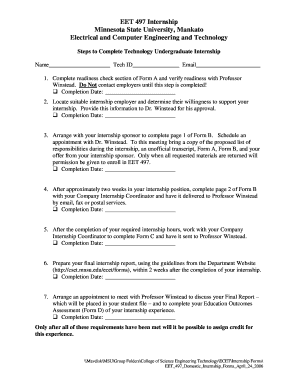
The EET 497 Internship Form is a crucial document for students enrolled in the CSET program at Minnesota State University. This form is designed to facilitate the process of securing and documenting internships that are integral to the educational experience. It serves as a formal agreement between the student, the university, and the internship provider, outlining the expectations and responsibilities of all parties involved. The form ensures that students gain practical experience in their field of study, which is essential for their professional development.
How to use the EET 497 Internship Form CSET Minnesota State University Cset Mnsu
Using the EET 497 Internship Form involves several key steps. First, students must complete the form with accurate information regarding their internship details, including the name of the organization, the supervisor's contact information, and the duration of the internship. Once completed, the form should be submitted to the appropriate department for approval. It is important for students to keep a copy of the submitted form for their records. The form can also serve as a reference during evaluations and discussions with faculty advisors.
Steps to complete the EET 497 Internship Form CSET Minnesota State University Cset Mnsu
Completing the EET 497 Internship Form requires careful attention to detail. Here are the steps to follow:
- Gather necessary information about the internship, including the organization’s name, address, and contact details.
- Fill out personal details, including your name, student ID, and contact information.
- Provide a description of the internship role and responsibilities.
- Obtain signatures from both the internship supervisor and a faculty advisor.
- Submit the completed form to the designated office within the university.
Key elements of the EET 497 Internship Form CSET Minnesota State University Cset Mnsu
The EET 497 Internship Form includes several key elements that are essential for its validity and effectiveness. These elements typically include:
- Student information: Name, student ID, and contact details.
- Internship details: Organization name, address, and supervisor information.
- Internship description: A brief overview of the tasks and responsibilities expected during the internship.
- Signatures: Required signatures from the student, supervisor, and faculty advisor to confirm agreement and understanding.
Legal use of the EET 497 Internship Form CSET Minnesota State University Cset Mnsu
The legal use of the EET 497 Internship Form is vital for protecting the rights and responsibilities of all parties involved. By signing the form, students and internship providers agree to the terms outlined, which may include confidentiality agreements and liability waivers. It is important for students to understand that this form is a legal document, and any misrepresentation or failure to comply with its terms could have consequences. Ensuring that all information is accurate and that all parties are informed is essential for a successful internship experience.
How to obtain the EET 497 Internship Form CSET Minnesota State University Cset Mnsu
Students can obtain the EET 497 Internship Form through several channels. The form is typically available on the Minnesota State University website, specifically within the CSET program section. Additionally, students may request a copy from their academic advisor or the internship coordinator. It is advisable to check for the most current version of the form to ensure compliance with any updated requirements or procedures.
Quick guide on how to complete eet 497 internship form cset minnesota state university cset mnsu
Complete [SKS] effortlessly on any device
Online document management has gained popularity among businesses and individuals. It offers an ideal eco-friendly substitute for traditional printed and signed documents, as you can find the correct form and securely store it online. airSlate SignNow provides all the tools you need to create, modify, and eSign your documents rapidly without delays. Handle [SKS] on any device with airSlate SignNow Android or iOS applications and enhance any document-related task today.
How to modify and eSign [SKS] effortlessly
- Find [SKS] and then click Get Form to begin.
- Utilize the tools we offer to complete your form.
- Emphasize important sections of your documents or obscure sensitive information with tools that airSlate SignNow offers specifically for that purpose.
- Create your eSignature with the Sign tool, which takes mere seconds and holds the same legal validity as a traditional handwritten signature.
- Review all the details and then click the Done button to save your changes.
- Select how you wish to send your form, by email, text message (SMS), or invite link, or download it to your computer.
Forget about lost or misplaced files, tedious form searching, or errors that necessitate printing new document copies. airSlate SignNow meets all your needs in document management in just a few clicks from any device you prefer. Edit and eSign [SKS] and ensure excellent communication at any stage of the form preparation process with airSlate SignNow.
Create this form in 5 minutes or less
Create this form in 5 minutes!
How to create an eSignature for the eet 497 internship form cset minnesota state university cset mnsu
How to create an electronic signature for a PDF online
How to create an electronic signature for a PDF in Google Chrome
How to create an e-signature for signing PDFs in Gmail
How to create an e-signature right from your smartphone
How to create an e-signature for a PDF on iOS
How to create an e-signature for a PDF on Android
People also ask
-
What is the EET 497 Internship Form CSET Minnesota State University Cset Mnsu?
The EET 497 Internship Form CSET Minnesota State University Cset Mnsu is a crucial document for students pursuing their internship in the Electrical Engineering Technology program. This form helps students outline their internship details and ensures they meet the necessary academic requirements. Completing this form is essential for receiving credit for your internship experience.
-
How can I access the EET 497 Internship Form CSET Minnesota State University Cset Mnsu?
You can easily access the EET 497 Internship Form CSET Minnesota State University Cset Mnsu through the Minnesota State University website or directly from your academic advisor. Additionally, airSlate SignNow provides a streamlined process for filling out and submitting this form electronically, making it more convenient for students.
-
What are the benefits of using airSlate SignNow for the EET 497 Internship Form CSET Minnesota State University Cset Mnsu?
Using airSlate SignNow for the EET 497 Internship Form CSET Minnesota State University Cset Mnsu offers several benefits, including ease of use and quick electronic signatures. This platform allows you to complete and submit your form from anywhere, saving time and ensuring that your submission is secure and compliant with university standards.
-
Is there a cost associated with using airSlate SignNow for the EET 497 Internship Form CSET Minnesota State University Cset Mnsu?
airSlate SignNow offers a cost-effective solution for managing documents, including the EET 497 Internship Form CSET Minnesota State University Cset Mnsu. While there may be subscription plans available, many features can be accessed for free, making it an affordable option for students looking to streamline their paperwork.
-
Can I integrate airSlate SignNow with other tools for the EET 497 Internship Form CSET Minnesota State University Cset Mnsu?
Yes, airSlate SignNow supports integrations with various tools and platforms, enhancing your experience with the EET 497 Internship Form CSET Minnesota State University Cset Mnsu. You can connect it with popular applications like Google Drive, Dropbox, and more, allowing for seamless document management and storage.
-
What features does airSlate SignNow offer for the EET 497 Internship Form CSET Minnesota State University Cset Mnsu?
airSlate SignNow provides a range of features for the EET 497 Internship Form CSET Minnesota State University Cset Mnsu, including customizable templates, electronic signatures, and real-time tracking. These features ensure that your form is completed accurately and submitted on time, enhancing your overall internship experience.
-
How does airSlate SignNow ensure the security of the EET 497 Internship Form CSET Minnesota State University Cset Mnsu?
Security is a top priority for airSlate SignNow when handling the EET 497 Internship Form CSET Minnesota State University Cset Mnsu. The platform employs advanced encryption and secure data storage practices to protect your personal information and ensure that your documents are safe from unauthorized access.
Get more for EET 497 Internship Form CSET Minnesota State University Cset Mnsu
- Dental claimgroup benefitsmanulife use this form to submit dental claims to the group benefits plan
- Www kuleuven be english admissionsadmissions admissions office ku leuven form
- 6th grade math ratios proportions project mr ca form
- 18002259916 form
- Fire radio manual delaware county firemens association form
- Marching band order form auxiliary copy lhbands
- Form u 1a manufacturers data report for pressure vessels
- American legion riders application illegion form
Find out other EET 497 Internship Form CSET Minnesota State University Cset Mnsu
- How To eSign Michigan Car Dealer Document
- Can I eSign Michigan Car Dealer PPT
- How Can I eSign Michigan Car Dealer Form
- Help Me With eSign Kansas Business Operations PPT
- How Can I eSign Mississippi Car Dealer Form
- Can I eSign Nebraska Car Dealer Document
- Help Me With eSign Ohio Car Dealer Document
- How To eSign Ohio Car Dealer Document
- How Do I eSign Oregon Car Dealer Document
- Can I eSign Oklahoma Car Dealer PDF
- How Can I eSign Oklahoma Car Dealer PPT
- Help Me With eSign South Carolina Car Dealer Document
- How To eSign Texas Car Dealer Document
- How Can I Sign South Carolina Courts Document
- How Do I eSign New Jersey Business Operations Word
- How Do I eSign Hawaii Charity Document
- Can I eSign Hawaii Charity Document
- How Can I eSign Hawaii Charity Document
- Can I eSign Hawaii Charity Document
- Help Me With eSign Hawaii Charity Document