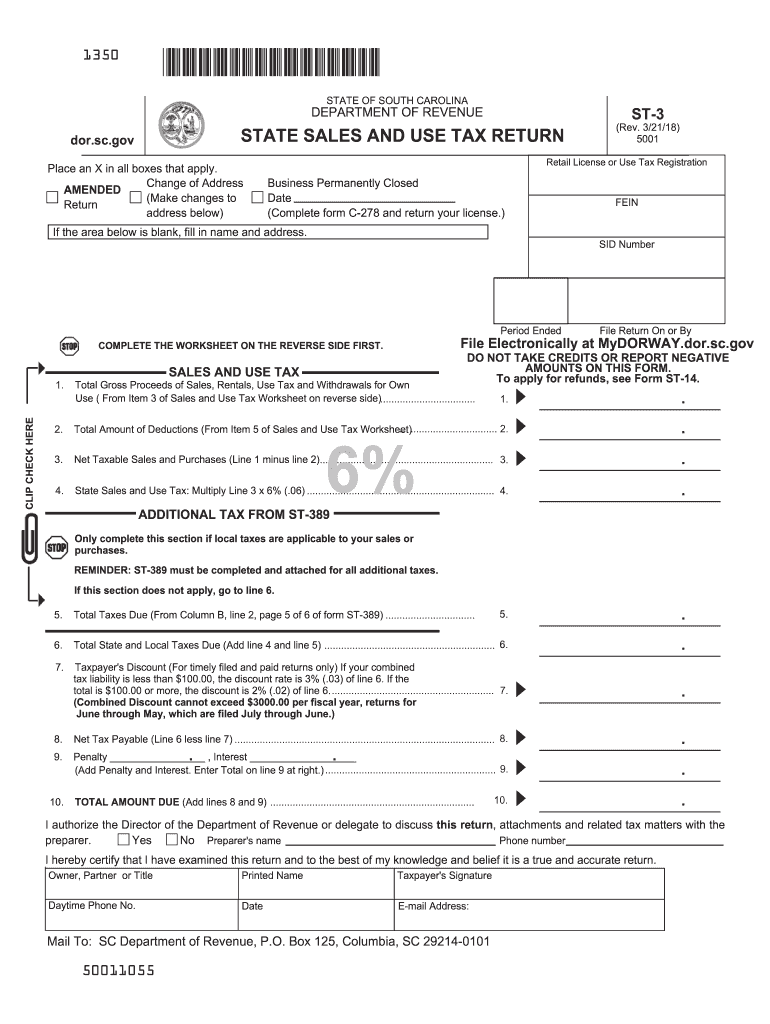
St 3 Form 2018


What is the St 3 Form
The St 3 Form is a sales and use tax exemption certificate used in South Carolina. It allows qualifying purchasers to claim exemption from sales tax on certain purchases. This form is particularly relevant for organizations and individuals who meet specific criteria under South Carolina tax law. By properly completing and submitting the St 3 Form, taxpayers can avoid unnecessary tax expenses on eligible transactions.
How to use the St 3 Form
To use the St 3 Form effectively, individuals or businesses must first determine if their purchases qualify for tax exemption. The form should be filled out completely, providing necessary details such as the purchaser's name, address, and the nature of the exempt purchase. Once completed, the form can be presented to the seller at the time of purchase to ensure that sales tax is not charged. It is essential to retain a copy of the St 3 Form for record-keeping and compliance purposes.
Steps to complete the St 3 Form
Completing the St 3 Form involves several straightforward steps:
- Obtain the St 3 Form from the South Carolina Department of Revenue website or a trusted source.
- Fill in the purchaser's name and address accurately.
- Specify the reason for the exemption, referencing the applicable statute.
- Provide details about the items being purchased, ensuring they align with the exemption criteria.
- Sign and date the form to validate it.
After completing the form, present it to the seller to avoid sales tax on qualifying purchases.
Legal use of the St 3 Form
The legal use of the St 3 Form is governed by South Carolina tax laws. It is crucial for users to understand that misuse of the form, such as claiming exemptions for ineligible purchases, can lead to penalties. The form must be completed accurately and used in compliance with state regulations to ensure its validity. Keeping thorough records of transactions where the St 3 Form is utilized is advisable for audit purposes.
Filing Deadlines / Important Dates
While the St 3 Form itself does not have a specific filing deadline, it is essential to present it at the time of purchase to avoid sales tax. Businesses should be aware of any changes in tax regulations or deadlines related to sales tax filings in South Carolina. Staying informed about important dates can help ensure compliance and avoid unnecessary tax liabilities.
Who Issues the Form
The St 3 Form is issued by the South Carolina Department of Revenue (SCDOR). This state agency is responsible for administering tax laws and ensuring compliance among taxpayers. For any questions regarding the St 3 Form or its usage, individuals can contact the SCDOR for guidance and clarification.
Quick guide on how to complete form st 3 2018 2019
Your assistance manual on preparing your St 3 Form
If you're looking to find out how to develop and submit your St 3 Form, here are several straightforward directions on simplifying your tax declaration process.
To begin, all you need to do is create an airSlate SignNow account to revolutionize the way you manage documents online. airSlate SignNow is an exceptionally intuitive and powerful document solution that enables you to edit, draft, and finalize your tax papers with ease. With its editor, you can toggle between text, checkboxes, and eSignatures, returning to modify answers as necessary. Streamline your tax administration with advanced PDF editing, eSigning, and easy sharing.
Follow the instructions below to complete your St 3 Form in no time:
- Set up your account and begin editing PDFs within moments.
- Utilize our directory to find any IRS tax form; sift through different versions and schedules.
- Click Get form to access your St 3 Form in our editor.
- Populate the necessary fillable fields with your information (text, numbers, check marks).
- Employ the Sign Tool to add your legally-recognized eSignature (if applicable).
- Review your document and fix any mistakes.
- Save changes, print your copy, send it to your recipient, and download it to your device.
Utilize this guide to submit your taxes electronically using airSlate SignNow. Keep in mind that submitting on paper may lead to increased return errors and delays in refunds. Naturally, before electronically filing your taxes, consult the IRS website for submission guidelines in your state.
Create this form in 5 minutes or less
Find and fill out the correct form st 3 2018 2019
FAQs
-
How do I fill out the MHT-CET MBA exam application form in detail?
DTE Maharashtra has discharged MHT CET 2018 application form as on January 18 in online mode, can be filled by competitors by following the means said in how to fill MHT CET application frame 2018. Applicants who need to enlist themselves for the selection test should take after the means as given in how to fill MHT CET 2018 application form to maintain a strategic distance from oversights and entire method to go smooth and bother free. The means to fill the application type of MHT CET 2018 incorporates enlistment, filling of required subtle elements, transferring of filtered reports, instalment and affirmation page download. Hopefuls are required to fill the application type of MHT CET 2018 painstakingly to stay away from dismissal by the specialists. It is essential to take the application shape filling methodology of MHT CET genuinely on the grounds that exclusive those hopefuls who will present their structures effectively will get concede cards. Such applicants who will have legitimate MHT CET 2018 concede cards will be permitted to show up in the exam.Competitors must read the means offered underneath to fill and submit MHT CET 2018 application frame in a sorted-out way:Stage 1 – RegistrationApplicants should enrol themselves and give the required details. Candidate should concur whether he or she is an Indian resident or not.Proceeding onward, they will be required to fill the accompanying individual subtle elements:Full name (as showing up on the announcement of characteristics of SSC tenth or proportional exam), Father’s name, Mother’s first name, Last name, Gender, Contact Information, Address for correspondence, House No/Street, Area Name, Town/City , State, District, Pin code, Country, Mobile Number, Primary Email Id (Email will be sent to this email ID), Alternate Email Id (Parent’s Email ID, if accessible), Contact Telephone No. (with STD Code), Permanent Residence in Village/Town/City, Domicile of Maharashtra/Disputed Maharashtra Karnataka Border (MKB)/Outside Maharashtra, Reservation, Category of competitor (Caste perceived in Maharashtra state), Candidates having a place with SC, ST, VJ(A), NT(B), NT(C), NT(D), OBC and SBC classes must have their individual standing authentications, Candidates having a place with Non Creamy Layer (NCL) should create substantial testament upto March 31, 2019, Other DetailsRegardless of whether the candidate has a place with – PWD class or not (competitors qualified who are qualified under this classification ought to have under 40% incapacity), visually impaired, low vision. Orthopedically debilitated and competitors influenced with Cerebral Palsy and Dyslexia, who are not in a situation to compose, can benefit a copyist/author for the MHT-CET 2018 examRegardless of whether the applicant is a J&K vagrant or notReligionOther placement tests that applicant has enrolled for (JEE Main/NEET/None)Add up to Annual Family IncomeAadhaar NumberFinancial balance DetailsName of the record holder according to Bank recordName of the BankName of the Bank BranchKind of Account (Savings/Current)Financial balance NumberIFSC CodePoints of interest of HSC (twelfth/Equivalent Examination)Regardless of whether hopeful has passed/showed up for confirmation in Pharmacy (just for Biology applicants)Place from where hopeful has finished HSC (twelfth)/proportional exam showing up/Passed from school/Jr. School arranged (Maharashtra/Outside Maharashtra)Subtle elements required for MHT-CET 2018Subjects for CET examination (Physics, Chemistry, Mathematics, Biology)Dialect for the exam (English, Marathi, Urdu)Enter secret keyCompetitors should make a secret word (least 8 and most extreme 15 characters and should have one capitalized, one lower case and one numeric)In the wake of entering the secret key, competitors should affirm it. This secret word will be utilized for future logins.Statement by the hopefulApplicants should read the revelation composed and after that tap on “I Agree”Applicants need to enter the security key as gave and after that tap on “Next” catchStage 2 – Confirmation and SubmissionIn the wake of filling the previously mentioned subtle elements, hopefuls will have the capacity to check the data filled and alter certain things in the application frame.Applicants can backpedal and change or alter the accompanying particulars (as noticeable in green shading) before accommodation:Exam focusSubjects pickedDialect of the examIndividual with handicap choiceIn any case, there are particulars (as unmistakable in blue shading) that can’t be altered at this stage once submitted:Father’s nameLast nameDate of birthVersatile numberEmail IDSubsequent to rolling out the improvements, if required, hopefuls should present the shape.Stage 3 – Application number gotApplicants will get a message on the screen in regards to effective enlistment for MHT CET 2018 with their application number. A similar number will be sent to them gave email ID. Competitors can see and check their entered data in this progression.Stage 4 – Edit and Upload photo and markApplicants will have the capacity to alter the points of interest they have filled in the application frame. In any case, regardless they won’t have the capacity to alter their full name, father’s name, last name, date of birth, versatile number and email ID. In the event that candidates would prefer not to alter any points of interest, they can move to the subsequent stage of transferring their photo and mark in the arrangement recommended by the experts.Stage 5 – Uploading photo and markApplicants should transfer their current identification estimate shading photo and mark in the configuration given in the table underneath. On the off chance that, applicants are not ready to transfer the right photographs/marks, they should reload the right records and afterward transfer.Stage 6 – VerificationCompetitors will get a message on their screens with respect to fruitful transferring of photo and mark. They will likewise have the capacity to see a connection saying ” Click here to make payment “. Applicants should tap on the connection to enter the instalment entryway.Stage 7 – Payment gatewayHopefuls will have the capacity to see every one of the subtle elements filled by them alongside their transferred photo and mark on their screens. The application expense sum will likewise be noticeable in this progression, which they should pay in the wake of perusing the revelation. It is to noticed that competitors will have the capacity to change their subjects they are applying for.Applicants will have the capacity to influence application to charge payment through credit/check card, net saving money, plastic (ATM PIN), wallets and then some. They should influence instalment of the application to sum with comfort charge and expense.After instalment of utilisation charge, competitors will have the capacity to see a message on their screen with respect to accomplishment of exchange. Applicants must remove a print from this page.Stage 8 – Acknowledgment pageCompetitors must take a print from the affirmation page and keep it securely for some time later.Hope this Helps!!
-
Which ITR form should an NRI fill out for AY 2018–2019 to claim the TDS deducted by banks only?
ITR form required to be submitted depends upon nature of income. As a NRI shall generally have income from other sources like interest, rental income therefore s/he should file ITR 2.
-
Which ITR form should an NRI fill out for AY 2018–2019 for salary income?
File ITR 2 and for taking credit of foreign taxes fill form 67 before filling ITR.For specific clarifications / legal advice feel free to write to dsssvtax[at]gmail or call/WhatsApp: 9052535440.
-
Can I fill the form for the SSC CGL 2018 which will be held in June 2019 and when will the form for 2019 come out?
No, you can’t fill the form for SSC CGL 2018 as application process has been long over.SSC CGL 2019 : No concrete information at this time. Some update should come by August-September 2019.Like Exambay on facebook for all latest updates on SSC CGL 2018 , SSC CGL 2019 and other upcoming exams
-
How will a student fill the JEE Main application form in 2018 if he has to give the improvement exam in 2019 in 2 subjects?
Now in the application form of JEE Main 2019, there will be an option to fill whether or not you are appearing in the improvement exam. This will be as follows:Whether appearing for improvement Examination of class 12th - select Yes or NO.If, yes, Roll Number of improvement Examination (if allotted) - if you have the roll number of improvement exam, enter it.Thus, you will be able to fill in the application form[1].Footnotes[1] How To Fill JEE Main 2019 Application Form - Step By Step Instructions | AglaSem
Create this form in 5 minutes!
How to create an eSignature for the form st 3 2018 2019
How to make an electronic signature for your Form St 3 2018 2019 online
How to create an electronic signature for your Form St 3 2018 2019 in Google Chrome
How to create an electronic signature for signing the Form St 3 2018 2019 in Gmail
How to create an eSignature for the Form St 3 2018 2019 from your smartphone
How to make an electronic signature for the Form St 3 2018 2019 on iOS devices
How to make an electronic signature for the Form St 3 2018 2019 on Android devices
People also ask
-
What is the St 3 Form and how can airSlate SignNow help?
The St 3 Form is a crucial document used for specific tax reporting purposes. With airSlate SignNow, you can easily create, send, and eSign your St 3 Form, ensuring compliance and accuracy while streamlining your workflow.
-
Is airSlate SignNow suitable for filing the St 3 Form?
Yes, airSlate SignNow is an excellent solution for filing the St 3 Form. Our platform allows you to digitally sign and send the form securely, making the submission process quick and efficient.
-
What features does airSlate SignNow offer for managing the St 3 Form?
airSlate SignNow offers a variety of features for managing the St 3 Form, including customizable templates, automated workflows, and real-time tracking. These features help you streamline the process and ensure all necessary steps are completed efficiently.
-
How much does it cost to use airSlate SignNow for the St 3 Form?
airSlate SignNow offers flexible pricing plans tailored to fit different business needs. You can choose a plan that suits your budget while gaining access to powerful tools for generating and signing the St 3 Form.
-
Can I integrate airSlate SignNow with other software for managing the St 3 Form?
Absolutely! airSlate SignNow seamlessly integrates with various applications, allowing you to manage your St 3 Form alongside your existing tools. This integration helps enhance productivity and ensures a smooth workflow.
-
What are the benefits of using airSlate SignNow for the St 3 Form?
Using airSlate SignNow for the St 3 Form provides numerous benefits, including time savings, enhanced security, and improved accuracy. Our intuitive platform simplifies the signing process, making it easier for individuals and businesses to manage their documentation.
-
How secure is airSlate SignNow when handling the St 3 Form?
airSlate SignNow prioritizes security and compliance when handling the St 3 Form. Our platform employs advanced encryption and security protocols, ensuring that your sensitive information remains protected at all times.
Get more for St 3 Form
Find out other St 3 Form
- eSign Utah Education Warranty Deed Online
- eSign Utah Education Warranty Deed Later
- eSign West Virginia Construction Lease Agreement Online
- How To eSign West Virginia Construction Job Offer
- eSign West Virginia Construction Letter Of Intent Online
- eSign West Virginia Construction Arbitration Agreement Myself
- eSign West Virginia Education Resignation Letter Secure
- eSign Education PDF Wyoming Mobile
- Can I eSign Nebraska Finance & Tax Accounting Business Plan Template
- eSign Nebraska Finance & Tax Accounting Business Letter Template Online
- eSign Nevada Finance & Tax Accounting Resignation Letter Simple
- eSign Arkansas Government Affidavit Of Heirship Easy
- eSign California Government LLC Operating Agreement Computer
- eSign Oklahoma Finance & Tax Accounting Executive Summary Template Computer
- eSign Tennessee Finance & Tax Accounting Cease And Desist Letter Myself
- eSign Finance & Tax Accounting Form Texas Now
- eSign Vermont Finance & Tax Accounting Emergency Contact Form Simple
- eSign Delaware Government Stock Certificate Secure
- Can I eSign Vermont Finance & Tax Accounting Emergency Contact Form
- eSign Washington Finance & Tax Accounting Emergency Contact Form Safe