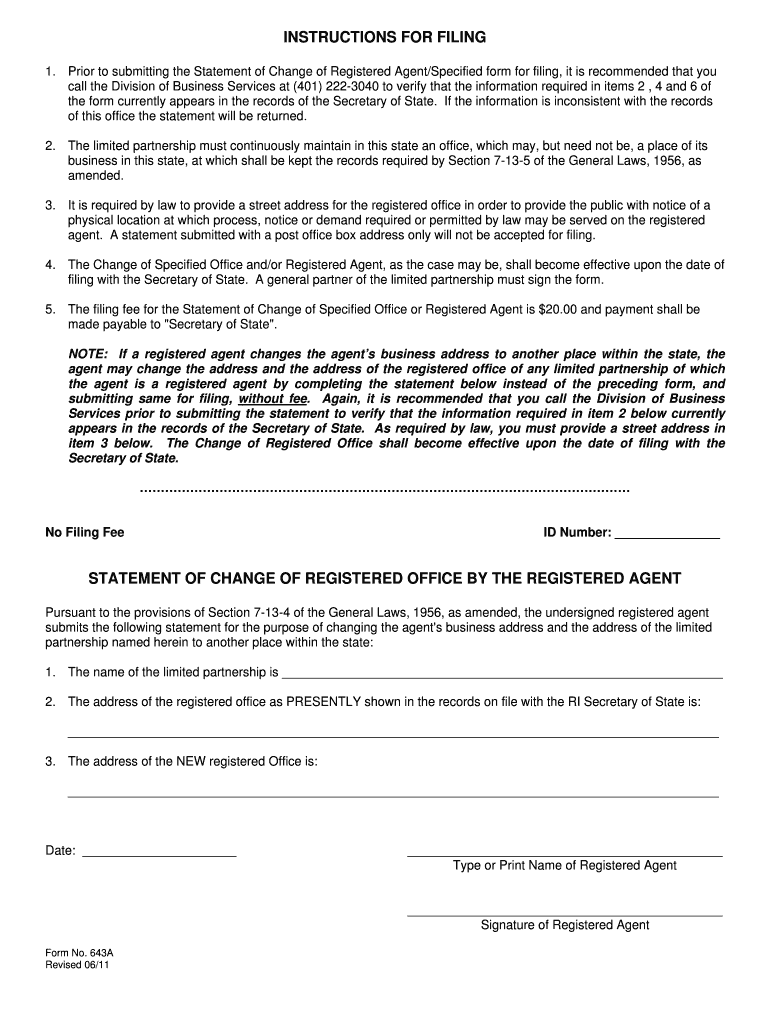
643 a Change of Registered Office ONLY Rhode Island Office of Form


What is the 643 A Change Of Registered Office ONLY Rhode Island Office Of
The 643 A Change Of Registered Office ONLY is a specific form used in Rhode Island for businesses to officially change their registered office address. This form is essential for maintaining accurate records with the Rhode Island Secretary of State. A registered office is the official address where legal documents and notices can be served to a business entity. Completing this form ensures that the state has the correct contact information, which is crucial for compliance and communication purposes.
Steps to complete the 643 A Change Of Registered Office ONLY Rhode Island Office Of
Completing the 643 A Change Of Registered Office ONLY involves several key steps:
- Gather necessary information, including the current registered office address and the new address.
- Obtain the form from the Rhode Island Secretary of State’s website or office.
- Fill out the form accurately, ensuring all details are correct to avoid delays.
- Submit the completed form either online, by mail, or in person, depending on your preference.
It is important to review the form for accuracy before submission to prevent any issues with the processing of your request.
Required Documents
To successfully file the 643 A Change Of Registered Office ONLY, certain documents may be necessary. Typically, you will need:
- The completed form itself.
- Proof of the new registered office address, such as a utility bill or lease agreement.
- Identification or documentation that verifies your authority to make changes on behalf of the business.
Having these documents ready can streamline the process and ensure compliance with state regulations.
Form Submission Methods
The 643 A Change Of Registered Office ONLY can be submitted through various methods:
- Online: If available, this is often the quickest method, allowing for immediate processing.
- By Mail: Complete the form and send it to the appropriate address listed on the form or the Secretary of State's website.
- In-Person: Visit the Rhode Island Secretary of State’s office to submit the form directly.
Choosing the right submission method depends on your preference for speed and convenience.
Legal Use of the 643 A Change Of Registered Office ONLY Rhode Island Office Of
The 643 A Change Of Registered Office ONLY is a legally recognized document that serves to update the official records of a business entity in Rhode Island. Filing this form is not only a matter of compliance but also essential for ensuring that legal documents are delivered to the correct location. Failure to maintain an accurate registered office can lead to legal complications, including missed court dates or failure to receive important notices.
State-Specific Rules for the 643 A Change Of Registered Office ONLY Rhode Island Office Of
Rhode Island has specific rules regarding the filing of the 643 A Change Of Registered Office ONLY. These include:
- The form must be filed within a certain timeframe after the change of address occurs.
- Fees may apply for processing the change, which should be verified on the Secretary of State's website.
- All business entities must ensure their registered office is a physical address, not a P.O. Box.
Adhering to these rules helps avoid penalties and ensures that your business remains in good standing with the state.
Quick guide on how to complete 643 a change of registered office only rhode island office of
Prepare [SKS] effortlessly on any device
Online document management has gained increased popularity among businesses and individuals. It offers a perfect environmentally-friendly alternative to traditional printed and signed documents, enabling you to access the necessary form and securely save it online. airSlate SignNow provides all the tools required to create, edit, and eSign your documents quickly without interruptions. Manage [SKS] on any device with airSlate SignNow's Android or iOS applications and enhance any document-related process today.
The easiest way to modify and eSign [SKS] seamlessly
- Find [SKS] and click on Get Form to begin.
- Make use of our provided tools to fill out your form.
- Emphasize pertinent sections of the documents or obscure sensitive information with the tools that airSlate SignNow offers specifically for that purpose.
- Create your signature using the Sign tool, which takes seconds and carries the same legal validity as a conventional wet ink signature.
- Review the details and click on the Done button to save your changes.
- Select your preferred method of sending your form, whether by email, text message (SMS), or invite link, or download it to your computer.
Eliminate concerns about lost or misplaced files, tedious document searches, or errors that necessitate printing new copies. airSlate SignNow fulfills your needs in document management with just a few clicks from any device of your choice. Edit and eSign [SKS] and ensure effective communication at any phase of the form preparation process with airSlate SignNow.
Create this form in 5 minutes or less
Related searches to 643 A Change Of Registered Office ONLY Rhode Island Office Of
Create this form in 5 minutes!
How to create an eSignature for the 643 a change of registered office only rhode island office of
How to create an electronic signature for a PDF online
How to create an electronic signature for a PDF in Google Chrome
How to create an e-signature for signing PDFs in Gmail
How to create an e-signature right from your smartphone
How to create an e-signature for a PDF on iOS
How to create an e-signature for a PDF on Android
People also ask
-
What is the process for filing a 643 A Change Of Registered Office ONLY in Rhode Island?
To file a 643 A Change Of Registered Office ONLY in Rhode Island, you need to complete the necessary form and submit it to the Rhode Island Secretary of State. This process can be streamlined using airSlate SignNow, which allows you to eSign and send documents quickly and securely. Ensure that all required information is accurate to avoid delays.
-
How much does it cost to file a 643 A Change Of Registered Office ONLY in Rhode Island?
The filing fee for a 643 A Change Of Registered Office ONLY in Rhode Island varies, so it's best to check the Rhode Island Secretary of State's website for the most current fee schedule. Using airSlate SignNow can help you save on costs by providing a cost-effective solution for document management and eSigning, making the process more affordable.
-
What features does airSlate SignNow offer for managing a 643 A Change Of Registered Office ONLY?
airSlate SignNow offers a range of features to assist with the 643 A Change Of Registered Office ONLY process, including customizable templates, secure eSigning, and document tracking. These features ensure that your documents are handled efficiently and securely, allowing you to focus on your business operations.
-
What are the benefits of using airSlate SignNow for my 643 A Change Of Registered Office ONLY?
Using airSlate SignNow for your 643 A Change Of Registered Office ONLY provides numerous benefits, including increased efficiency, reduced paperwork, and enhanced security. The platform simplifies the eSigning process, allowing you to complete necessary filings quickly and with confidence.
-
Can I integrate airSlate SignNow with other software for my 643 A Change Of Registered Office ONLY?
Yes, airSlate SignNow offers integrations with various software applications, making it easy to manage your 643 A Change Of Registered Office ONLY alongside other business tools. This integration capability enhances your workflow and ensures that all your documents are in sync across platforms.
-
Is airSlate SignNow compliant with Rhode Island regulations for a 643 A Change Of Registered Office ONLY?
Absolutely! airSlate SignNow is designed to comply with all relevant regulations, including those pertaining to the 643 A Change Of Registered Office ONLY in Rhode Island. You can trust that your documents will meet legal standards when using our platform.
-
How can I ensure my documents are secure when filing a 643 A Change Of Registered Office ONLY?
airSlate SignNow prioritizes document security, employing advanced encryption and secure storage solutions. When you file a 643 A Change Of Registered Office ONLY through our platform, you can rest assured that your sensitive information is protected throughout the process.
Get more for 643 A Change Of Registered Office ONLY Rhode Island Office Of
- Mc 003 juror questionnaire for expedited jury trials judicial council forms courts ca
- Mc100 form word doc
- Name form 2014 2019
- Cr 184mil 184 order for dismissal military personnel judicial council forms courts ca
- 2017 i 119 instructions for wisconsin schedule t form
- 2017 ic 092 form 9b miscellaneous income
- 2017 wi form
- 2017 wi homestead form
Find out other 643 A Change Of Registered Office ONLY Rhode Island Office Of
- How Do I Electronic signature Nevada Car Dealer PDF
- How To Electronic signature South Carolina Banking Document
- Can I Electronic signature New York Car Dealer Document
- How To Electronic signature North Carolina Car Dealer Word
- How Do I Electronic signature North Carolina Car Dealer Document
- Can I Electronic signature Ohio Car Dealer PPT
- How Can I Electronic signature Texas Banking Form
- How Do I Electronic signature Pennsylvania Car Dealer Document
- How To Electronic signature South Carolina Car Dealer Document
- Can I Electronic signature South Carolina Car Dealer Document
- How Can I Electronic signature Texas Car Dealer Document
- How Do I Electronic signature West Virginia Banking Document
- How To Electronic signature Washington Car Dealer Document
- Can I Electronic signature West Virginia Car Dealer Document
- How Do I Electronic signature West Virginia Car Dealer Form
- How Can I Electronic signature Wisconsin Car Dealer PDF
- How Can I Electronic signature Wisconsin Car Dealer Form
- How Do I Electronic signature Montana Business Operations Presentation
- How To Electronic signature Alabama Charity Form
- How To Electronic signature Arkansas Construction Word