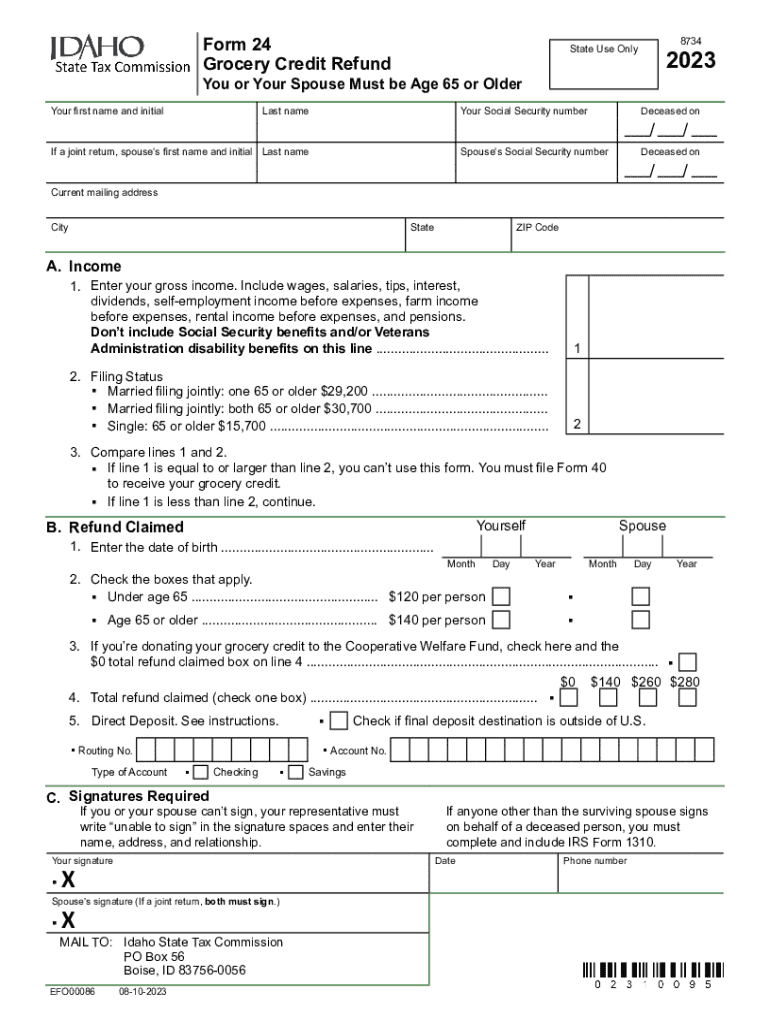
Form 24, Grocery Credit Refund and Instructions 2023


Understanding the Grocery Credit Refund Form 24
The Idaho Grocery Credit Refund Form 24 is designed for residents of Idaho to claim a credit for grocery purchases made throughout the year. This form provides financial relief to eligible individuals and families, helping to offset the costs of essential food items. The credit is available to those who meet specific income and residency requirements, making it an important resource for many Idahoans.
How to Complete the Grocery Credit Refund Form 24
Filling out the Grocery Credit Refund Form 24 involves several key steps. Start by gathering necessary personal information, including your Social Security number, income details, and residency status. Next, accurately report your grocery expenses for the year. Ensure that all figures are correct to avoid delays in processing. After completing the form, review it for any errors before submission.
Eligibility Criteria for the Grocery Credit Refund
To qualify for the Idaho Grocery Credit Refund, applicants must meet certain criteria. These include being a resident of Idaho for the entire tax year and having a qualifying income level. The income limits are adjusted annually, so it is essential to check the latest guidelines to determine eligibility. Additionally, applicants must have purchased groceries during the year to claim the credit.
Important Filing Deadlines for the Grocery Credit Refund
Timely submission of the Grocery Credit Refund Form 24 is crucial. The deadline for filing is typically aligned with the state income tax filing deadline, which is usually April 15. However, it is advisable to confirm the exact date each year, as it may vary. Late submissions may result in the loss of the refund, so planning ahead is important.
Submitting the Grocery Credit Refund Form 24
The Grocery Credit Refund Form 24 can be submitted through multiple methods. Residents have the option to file online, which is often the quickest method, or they may choose to mail the completed form to the appropriate state agency. In-person submissions may also be available at designated locations. It is important to keep a copy of the submitted form for personal records.
Required Documents for the Grocery Credit Refund
When applying for the Grocery Credit Refund, certain documents may be required to support your claim. This typically includes proof of residency, such as a utility bill or lease agreement, and documentation of grocery expenses. Keeping detailed records throughout the year can simplify the process of gathering these documents when it comes time to file.
Common Mistakes to Avoid When Filing the Grocery Credit Refund
When completing the Grocery Credit Refund Form 24, there are common pitfalls to be aware of. Failing to report all income accurately can lead to disqualification. Additionally, neglecting to include all necessary documentation may delay processing. Double-checking all information and ensuring that the form is complete can help avoid these issues.
Quick guide on how to complete form 24 grocery credit refund and instructions
Effortlessly Prepare Form 24, Grocery Credit Refund And Instructions on Any Device
Digital document management has gained traction among businesses and individuals alike. It serves as an ideal eco-friendly alternative to conventional printed and signed documents, allowing you to locate the necessary form and securely store it online. airSlate SignNow provides all the tools required to create, modify, and electronically sign your files quickly without delays. Manage Form 24, Grocery Credit Refund And Instructions on any platform with airSlate SignNow's Android or iOS applications and enhance any document-centric task today.
The Easiest Way to Modify and Electronically Sign Form 24, Grocery Credit Refund And Instructions Without Any Hassle
- Locate Form 24, Grocery Credit Refund And Instructions and then click Get Form to begin.
- Utilize the tools we provide to complete your document.
- Emphasize pertinent sections of the documents or mask sensitive information with tools that airSlate SignNow uniquely offers for that purpose.
- Create your electronic signature using the Sign tool, which takes just seconds and holds the same legal validity as a traditional handwritten signature.
- Review the details and then click the Done button to save your changes.
- Select your preferred method to send your form, whether by email, text message (SMS), invite link, or download it to your computer.
Eliminate concerns about lost or mislaid documents, tedious form navigation, or errors that necessitate printing new document copies. airSlate SignNow meets your document management needs in just a few clicks from any device you choose. Modify and electronically sign Form 24, Grocery Credit Refund And Instructions while ensuring exceptional communication at every step of the form preparation process with airSlate SignNow.
Create this form in 5 minutes or less
Find and fill out the correct form 24 grocery credit refund and instructions
Create this form in 5 minutes!
How to create an eSignature for the form 24 grocery credit refund and instructions
How to create an electronic signature for a PDF online
How to create an electronic signature for a PDF in Google Chrome
How to create an e-signature for signing PDFs in Gmail
How to create an e-signature right from your smartphone
How to create an e-signature for a PDF on iOS
How to create an e-signature for a PDF on Android
People also ask
-
What is the Idaho grocery credit refund?
The Idaho grocery credit refund is a tax refund available to eligible residents of Idaho, designed to help offset the cost of groceries. This refund can provide financial relief for families and individuals, making it easier to manage grocery expenses. Understanding this credit is essential for maximizing your tax benefits.
-
How can I apply for the Idaho grocery credit refund?
To apply for the Idaho grocery credit refund, you need to complete the appropriate tax forms during the filing season. Ensure you meet the eligibility requirements and provide all necessary documentation. Utilizing airSlate SignNow can streamline the eSigning process for your tax documents, making your application more efficient.
-
What are the eligibility requirements for the Idaho grocery credit refund?
Eligibility for the Idaho grocery credit refund typically includes being a resident of Idaho and meeting specific income thresholds. It's important to review the latest guidelines from the Idaho State Tax Commission to ensure you qualify. This credit is designed to assist low to moderate-income households.
-
When can I expect to receive my Idaho grocery credit refund?
The processing time for the Idaho grocery credit refund can vary, but most refunds are issued within a few weeks after filing. If you eFile your tax return and use airSlate SignNow for document signing, you may expedite the process. Always check the Idaho State Tax Commission's website for the most current timelines.
-
Can I track the status of my Idaho grocery credit refund?
Yes, you can track the status of your Idaho grocery credit refund through the Idaho State Tax Commission's online portal. By entering your information, you can see updates on your refund status. Keeping your documents organized with airSlate SignNow can help you quickly access the information needed for tracking.
-
What documents do I need for the Idaho grocery credit refund?
To apply for the Idaho grocery credit refund, you will need your tax return, proof of residency, and any supporting documents that demonstrate your eligibility. It's crucial to gather all necessary paperwork before filing. Using airSlate SignNow can help you securely sign and send these documents electronically.
-
Is there a cost associated with filing for the Idaho grocery credit refund?
Filing for the Idaho grocery credit refund itself does not incur a fee, but you may need to consider costs associated with tax preparation services. If you choose to use software or professional help, those services may have fees. airSlate SignNow offers a cost-effective solution for managing your documents, helping you save time and money.
Get more for Form 24, Grocery Credit Refund And Instructions
- Motion for dismissal form
- Heredity webquest answer key 215238646 form
- Bca submission form
- Extended family visits washington state form
- Quotation template document form
- Lots and vacant land data input form name ad number lease
- Farm tax organizer form
- Governor kathy hochul new york state government form
Find out other Form 24, Grocery Credit Refund And Instructions
- Can I eSignature Louisiana Education Document
- Can I eSignature Massachusetts Education Document
- Help Me With eSignature Montana Education Word
- How To eSignature Maryland Doctors Word
- Help Me With eSignature South Dakota Education Form
- How Can I eSignature Virginia Education PDF
- How To eSignature Massachusetts Government Form
- How Can I eSignature Oregon Government PDF
- How Can I eSignature Oklahoma Government Document
- How To eSignature Texas Government Document
- Can I eSignature Vermont Government Form
- How Do I eSignature West Virginia Government PPT
- How Do I eSignature Maryland Healthcare / Medical PDF
- Help Me With eSignature New Mexico Healthcare / Medical Form
- How Do I eSignature New York Healthcare / Medical Presentation
- How To eSignature Oklahoma Finance & Tax Accounting PPT
- Help Me With eSignature Connecticut High Tech Presentation
- How To eSignature Georgia High Tech Document
- How Can I eSignature Rhode Island Finance & Tax Accounting Word
- How Can I eSignature Colorado Insurance Presentation