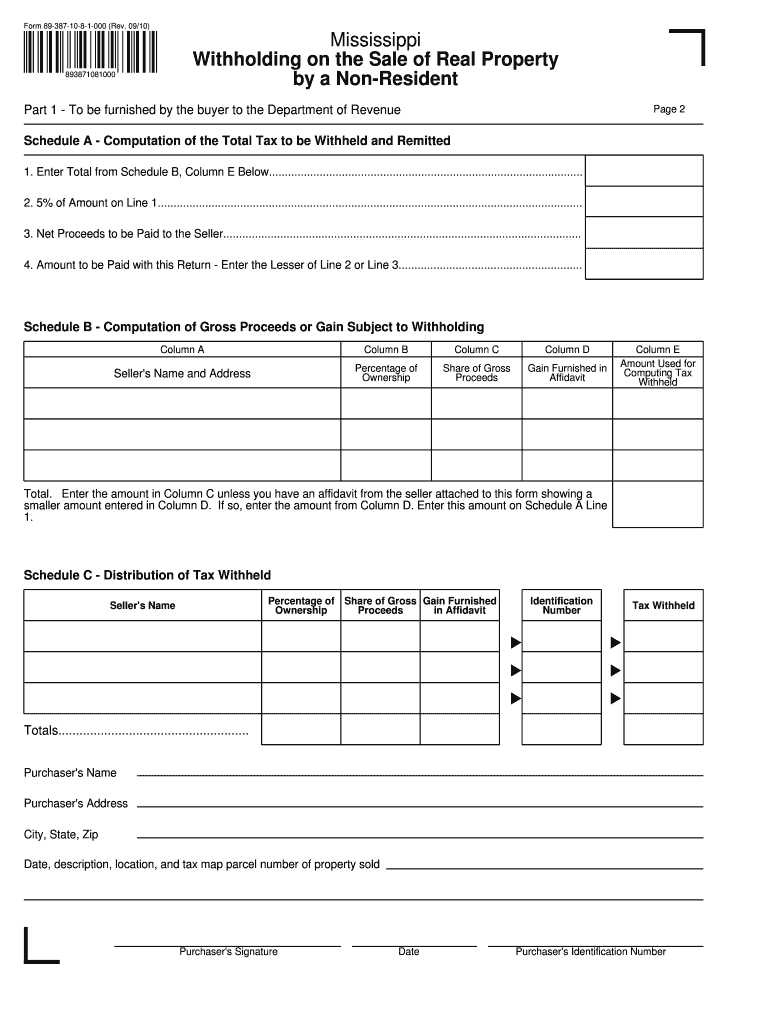
Mississippi Form 89 387 2010-2026


What is the Mississippi Form 89 387
The Mississippi Form 89 387 is a tax form used by non-residents to report income earned within the state. This form is essential for individuals who do not reside in Mississippi but have generated taxable income from sources within the state. It ensures compliance with state tax regulations and helps facilitate accurate reporting of earnings.
How to use the Mississippi Form 89 387
Using the Mississippi Form 89 387 involves several key steps. First, gather all necessary financial documents that detail your income earned in Mississippi. Next, accurately fill out the form, providing all required information, including your personal details and income sources. After completing the form, review it for accuracy before submitting it to ensure compliance with state tax laws.
Steps to complete the Mississippi Form 89 387
Completing the Mississippi Form 89 387 requires careful attention to detail. Follow these steps:
- Obtain the latest version of the form from the Mississippi Department of Revenue.
- Fill in your personal information, including name, address, and Social Security number.
- Report all income earned in Mississippi, including wages, interest, and dividends.
- Calculate your total tax liability based on the income reported.
- Sign and date the form to certify that the information provided is accurate.
Legal use of the Mississippi Form 89 387
The Mississippi Form 89 387 is legally binding when filled out correctly and submitted on time. It is crucial for non-residents to use this form to comply with state tax laws. Failure to file or inaccuracies in reporting can lead to penalties or legal consequences, making it essential to ensure all information is correct and submitted as required.
Filing Deadlines / Important Dates
Filing deadlines for the Mississippi Form 89 387 typically align with the federal tax filing deadlines. Non-residents should ensure their forms are submitted by April fifteenth of the following tax year to avoid late fees. It is advisable to check for any updates or changes to deadlines each tax year, as state regulations may vary.
Form Submission Methods (Online / Mail / In-Person)
The Mississippi Form 89 387 can be submitted in several ways to accommodate different preferences. Taxpayers can file online through the Mississippi Department of Revenue's website, which provides a secure platform for electronic submissions. Alternatively, the form can be mailed to the appropriate tax office or submitted in person at designated locations. Ensure that you keep a copy of the submitted form for your records.
Quick guide on how to complete form 89 387 10 8 1 000 rev
Your assistance manual on how to prepare your Mississippi Form 89 387
If you’re interested in learning how to create and submit your Mississippi Form 89 387, here are a few straightforward tips on making tax filing easier.
To begin, you just need to set up your airSlate SignNow account to transform how you manage documents online. airSlate SignNow is an incredibly user-friendly and robust document solution that enables you to alter, produce, and finalize your income tax forms with ease. With its editor, you can toggle between text, check boxes, and eSignatures and return to modify answers as necessary. Streamline your tax oversight with advanced PDF editing, eSigning, and simple sharing.
Follow the instructions below to finish your Mississippi Form 89 387 in no time:
- Create your account and start editing PDFs in just a few minutes.
- Utilize our catalog to obtain any IRS tax form; browse through variations and schedules.
- Click Get form to access your Mississippi Form 89 387 in our editor.
- Complete the mandatory fields with your details (text, numbers, check marks).
- Use the Sign Tool to add your legally-binding eSignature (if required).
- Review your document and amend any mistakes.
- Save adjustments, print your copy, send it to your recipient, and download it to your device.
Utilize this guide to file your taxes electronically with airSlate SignNow. Please remember that submitting in paper form can cause return errors and delay refunds. It goes without saying, before e-filing your taxes, verify the IRS website for filing regulations in your state.
Create this form in 5 minutes or less
Find and fill out the correct form 89 387 10 8 1 000 rev
FAQs
-
How can one make 10,000 out of the digits 1, 2, 3, 4, 5, 6, 7, 8, and 9, in order?
[math](1\!+\!2\!+\!3\!+\!4)^{5+6-7} \cdot (-8\!+\!9) = 10000[/math]
-
How much electricity is needed by a 1 kW pump to fill a tank of 10,000 litres which is 8m high?
(Assuming fluid is dropped from top of tank)Same as to lift weight of 10,000 litres of liquid for 8m height.in case the liquid is water, mass = volume x density = 10,000 kgEnergy = mass x g x height = 10,000 x 9.81 x 8 = 784,800 Joules = 0.218 kWh of electricity.PS: In case pump output is connected at bottom of tank, we require integration.
-
Is it possible to turn $720,000 to $1,000,000 legally in 10 days? If yes, how? Excluding any form of Gambling.
it's very easy.... you can'tinterest on all markets now are less than 10% (and I'm nice) so you're about to take huge risk try and gain over 35% in 10 days.is it possible, yes... but huge risk contain more than 90% of gambling factorWhat you had in mindGive the money to magician - Don't!!!Play on stocks - Don't !!!sorry
-
If I was at a Casino and lost over $20,000 in a slot machine before hitting a $10,000 jackpot, will I still have to fill out a tax form and declare that as income even thought I really lost $10,000?
There are two ways to handle slot winnings/losses. The “regular” way is that all winnings (whether you receive a W-2G or not) are reported on your 1040 as “other income”, and your losses that you can substantiate are deducted on your Schedule A (assuming that you itemize, etc.). Under that method, yes, you would report the $10K jackpot (plus any other winnings that came out of the machine(s)), and you would deduct your losses up to the amount of your reported winnings as an itemized deduction.The other way to do it is the technically correct way — and that is to net your slot results on a “session” basis. That is, from the time that you pull your first lever (or push your first “spin” button”) of the day until you stop playing the slots, other than short breaks — but not beyond midnight — you total your net winnings/losses, and that’s your winnings or losses for the “session” that are reportable on your tax return. That method, for example, enables you to take advantage of losses even if you don’t itemize deductions. Now, that’s not going to match up with any W-2G’s that you get, because the casinos don’t report on that basis (they don’t even report on the basis of a midnight-to-midnight day). But the IRS has ways in which you can indicate that on your return.So the answer to your question is, maybe. It depends on (i) when did you lose the $20K and win the $10K?, (ii) what kind of records do you have (a “players’ card” statement would be great), and (iii) what else did you win gambling?
-
A 9 × 12 piece of paper has a 1 × 8 hole in the middle. How can you cut the paper into two parts so that the two pieces can be put together to form a 10 × 10 square piece of paper without any hole?
This is what I think should be the solution:You have a 9 x 12 block.first divide it into 2 parts:one 9 x 10 block and other 9 x 2 So now you have it's 2 parts doneNow the 9 x 2 block is same as 2 blocks of 9 x 1Now take one 9 x 1 blockCut it so you have 8 x 1 block and 1 x 1 block .Now use the 8 x 1 block to fill the gap in the middleNow you have a completely filled 9 x 10 block ,a 1 x 1 block and a 9 x 1 blockJoin the the 1 x 1 block to the 9 x 1 block So you get a 10 x 1 blocktake this 10 x 1 block and join it to the 9 x 10 block Now what you get is a 10 x 10 block , completely filled.
-
If you played one of those $10,000 a spin slot machines in Vegas would that mean that anytime it won anything even one credit I would still have to fill out a tax form?
Yes, although they can set the machine to accumulated credit mode, and a staffer will sit by recording each jackpot on a form, then quickly resetting the machine so it’s ready to go again. You get a single W2G at the end of the session.It’s close to impossible to play extremely high-limit machines at any decent speed by feeding it currency and stopping for traditional hand-pays.
-
If 8 pipes are required to fill a tank in 1 hour and 10 minutes, how long will it take if only 5 pipes of the same type are used?
1 hr and 10 mins will be 70minsSo 8 pipes take 70 mins to fill a tank.The more number of pipes, the less time it takes to fill a tank. In this case, the tank is a constant as there is only 1 tank needed to be filled.y=k/xlet y be timelet x be number of pipes70=k/8k= 70(8)k= 560y=560/5y= 112minsy= 1hr 52mins
Create this form in 5 minutes!
How to create an eSignature for the form 89 387 10 8 1 000 rev
How to make an electronic signature for the Form 89 387 10 8 1 000 Rev in the online mode
How to generate an eSignature for your Form 89 387 10 8 1 000 Rev in Google Chrome
How to generate an eSignature for putting it on the Form 89 387 10 8 1 000 Rev in Gmail
How to generate an eSignature for the Form 89 387 10 8 1 000 Rev from your smartphone
How to make an eSignature for the Form 89 387 10 8 1 000 Rev on iOS devices
How to create an electronic signature for the Form 89 387 10 8 1 000 Rev on Android devices
People also ask
-
What is Mississippi Form 89 387?
Mississippi Form 89 387 is a crucial document used for various official purposes in the state of Mississippi. It is essential for individuals and businesses to understand how to properly complete and submit this form to ensure compliance with state regulations.
-
How can airSlate SignNow help with Mississippi Form 89 387?
airSlate SignNow simplifies the process of completing and eSigning Mississippi Form 89 387 by providing a user-friendly platform. With our solution, you can easily fill out the form, add signatures, and securely send it to the relevant parties, making the entire process more efficient.
-
Is there a cost associated with using airSlate SignNow for Mississippi Form 89 387?
Yes, airSlate SignNow offers various pricing plans that cater to different needs, including those who need to manage Mississippi Form 89 387. Our plans are designed to be cost-effective, ensuring that you get great value while accessing all the features necessary for seamless document management.
-
What features does airSlate SignNow offer for managing Mississippi Form 89 387?
airSlate SignNow provides a range of features for managing Mississippi Form 89 387, including customizable templates, automated workflows, and secure cloud storage. These features allow users to streamline their document processes and ensure that all necessary information is captured accurately.
-
Can I integrate airSlate SignNow with other applications for Mississippi Form 89 387?
Absolutely! airSlate SignNow seamlessly integrates with various applications, enabling you to manage Mississippi Form 89 387 alongside your existing tools. Whether it's CRMs, cloud storage solutions, or project management software, our integrations enhance your workflow efficiency.
-
What are the benefits of using airSlate SignNow for Mississippi Form 89 387?
Using airSlate SignNow for Mississippi Form 89 387 offers numerous benefits, including increased efficiency, reduced paperwork, and enhanced security. Our platform allows you to track the status of your forms in real-time, ensuring that you never miss a deadline.
-
Is airSlate SignNow compliant with Mississippi regulations for Form 89 387?
Yes, airSlate SignNow is designed to comply with all relevant regulations for Mississippi Form 89 387. Our solution ensures that your electronically signed documents are legally binding and adhere to state laws, providing peace of mind for our users.
Get more for Mississippi Form 89 387
- American red cross professional rescuer activity report form
- The tom stockert foundation scholarships harrison county schools form
- Auto debit arrangement enrollment form
- Letter of authorization for the request of historical usage information date expiration date no expiration list tdu list tdus
- Form 102 sample of stamp paper for articleship
- Opposing affidavit rejecting the adverse possessor s claim format texas
- Assessment contract template form
- Film producer contract template form
Find out other Mississippi Form 89 387
- How To Electronic signature Florida CV Form Template
- Electronic signature Mississippi CV Form Template Easy
- Electronic signature Ohio CV Form Template Safe
- Electronic signature Nevada Employee Reference Request Mobile
- How To Electronic signature Washington Employee Reference Request
- Electronic signature New York Working Time Control Form Easy
- How To Electronic signature Kansas Software Development Proposal Template
- Electronic signature Utah Mobile App Design Proposal Template Fast
- Electronic signature Nevada Software Development Agreement Template Free
- Electronic signature New York Operating Agreement Safe
- How To eSignature Indiana Reseller Agreement
- Electronic signature Delaware Joint Venture Agreement Template Free
- Electronic signature Hawaii Joint Venture Agreement Template Simple
- Electronic signature Idaho Web Hosting Agreement Easy
- Electronic signature Illinois Web Hosting Agreement Secure
- Electronic signature Texas Joint Venture Agreement Template Easy
- How To Electronic signature Maryland Web Hosting Agreement
- Can I Electronic signature Maryland Web Hosting Agreement
- Electronic signature Michigan Web Hosting Agreement Simple
- Electronic signature Missouri Web Hosting Agreement Simple