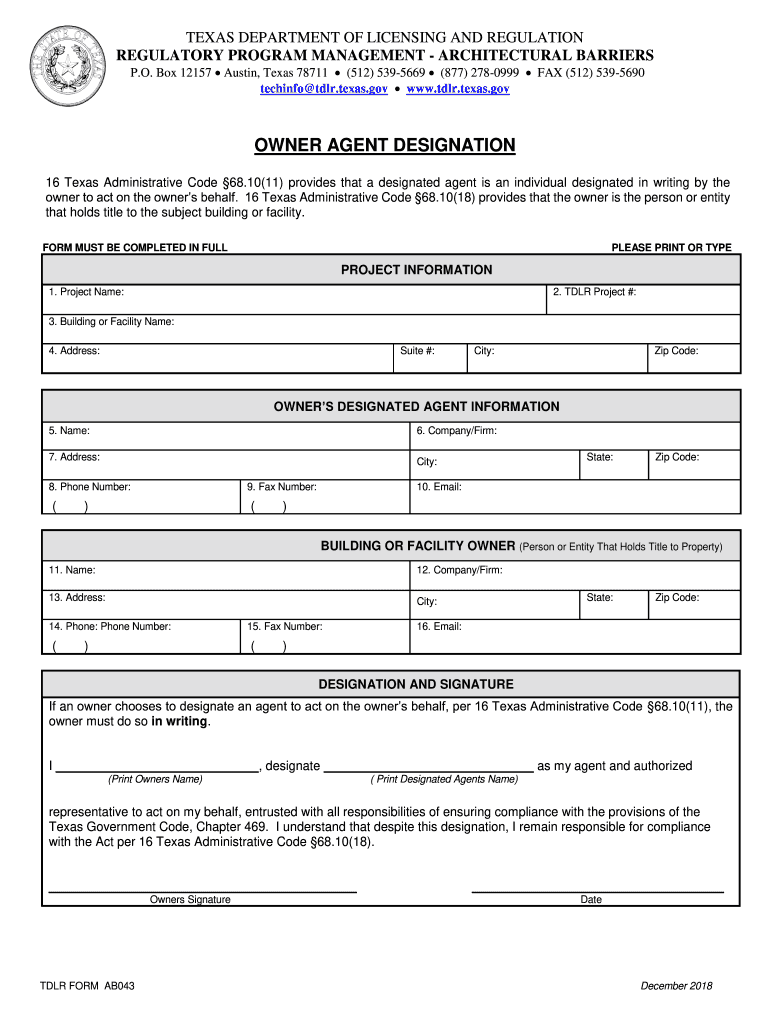
Tdlr Owner Agent Designation 2018-2026


What is the TDLR Owner Agent Designation
The TDLR Owner Agent Designation is a specific designation required for individuals acting as agents in architectural projects in Texas. This designation is essential for ensuring that the individual has met certain educational and professional standards set by the Texas Department of Licensing and Regulation (TDLR). It enables a qualified person to represent an owner in matters related to architectural services, ensuring compliance with state regulations and legal requirements.
How to Obtain the TDLR Owner Agent Designation
To obtain the TDLR Owner Agent Designation, candidates must complete a series of steps that typically include educational requirements, submission of an application, and payment of applicable fees. Candidates should ensure that they meet all eligibility criteria, which may involve providing proof of relevant experience or education in architecture or a related field. After fulfilling these requirements, applicants can submit their designation form to the TDLR for review.
Steps to Complete the TDLR Owner Agent Designation
Completing the TDLR Owner Agent Designation involves several key steps:
- Review the eligibility criteria set by TDLR.
- Gather necessary documentation, including proof of education and experience.
- Fill out the owner agent designation form accurately.
- Submit the completed form along with any required fees to TDLR.
- Await confirmation of your designation from TDLR.
Legal Use of the TDLR Owner Agent Designation
The legal use of the TDLR Owner Agent Designation is crucial for ensuring that all architectural projects comply with Texas laws. This designation allows an individual to legally represent an owner in architectural matters, which includes signing contracts and other documents on behalf of the owner. It is important to understand the legal implications of this designation, as improper use can lead to penalties or legal disputes.
Required Documents
When applying for the TDLR Owner Agent Designation, applicants must prepare and submit several key documents. These typically include:
- A completed owner agent designation form.
- Proof of educational qualifications related to architecture.
- Documentation of relevant work experience.
- Payment receipt for any associated application fees.
State-Specific Rules for the TDLR Owner Agent Designation
Each state may have specific rules governing the TDLR Owner Agent Designation. In Texas, these rules are outlined by the TDLR and include requirements for educational background, experience, and ongoing compliance with state regulations. Understanding these rules is essential for maintaining the validity of the designation and ensuring that all architectural practices are conducted legally.
Quick guide on how to complete 16 texas administrative code 68
Effortlessly Prepare Tdlr Owner Agent Designation on Any Device
Digital document management has gained traction among businesses and individuals alike. It offers an ideal environmentally friendly substitute for conventional printed and signed documents, since you can easily locate the appropriate form and securely store it online. airSlate SignNow provides you with all the tools necessary to create, modify, and electronically sign your documents quickly and without hassles. Manage Tdlr Owner Agent Designation on any device with the airSlate SignNow applications for Android or iOS and simplify any document-driven task today.
The Easiest Way to Edit and Electronically Sign Tdlr Owner Agent Designation
- Locate Tdlr Owner Agent Designation and then click Get Form to begin.
- Utilize the tools we provide to fill out your document.
- Emphasize important sections of your documents or obscure sensitive information with the tools that airSlate SignNow has specifically for that purpose.
- Generate your eSignature using the Sign feature, which is completed in seconds and carries the same legal authority as a traditional handwritten signature.
- Review all the details and then click on the Done button to store your modifications.
- Select how you wish to send your form—via email, text message (SMS), invitation link, or download it to your computer.
Put aside lost or misplaced documents, tedious form searching, or mistakes that require printing new document copies. airSlate SignNow caters to your document management needs with just a few clicks from any device of your preference. Modify and electronically sign Tdlr Owner Agent Designation, ensuring outstanding communication at every stage of your form preparation process with airSlate SignNow.
Create this form in 5 minutes or less
Create this form in 5 minutes!
How to create an eSignature for the 16 texas administrative code 68
How to generate an electronic signature for your 16 Texas Administrative Code 68 online
How to generate an eSignature for the 16 Texas Administrative Code 68 in Google Chrome
How to create an electronic signature for signing the 16 Texas Administrative Code 68 in Gmail
How to create an electronic signature for the 16 Texas Administrative Code 68 from your smart phone
How to make an electronic signature for the 16 Texas Administrative Code 68 on iOS
How to generate an eSignature for the 16 Texas Administrative Code 68 on Android devices
People also ask
-
What is the Tdlr Owner Agent Designation and why is it important?
The Tdlr Owner Agent Designation is a certification required in Texas for individuals representing property owners in real estate transactions. Understanding this designation is crucial for compliance and professionalism in the real estate industry, ensuring that agents operate within legal frameworks while protecting the interests of property owners.
-
How can airSlate SignNow assist with the Tdlr Owner Agent Designation process?
airSlate SignNow streamlines the document management process for those seeking the Tdlr Owner Agent Designation. With our easy-to-use eSignature features, you can efficiently obtain signatures on necessary documents, ensuring timely submissions and compliance with state regulations.
-
What are the costs associated with obtaining the Tdlr Owner Agent Designation using airSlate SignNow?
Using airSlate SignNow is a cost-effective solution when obtaining your Tdlr Owner Agent Designation. Our pricing plans are designed to fit various budgets, ensuring that you have access to essential eSignature tools without incurring high costs.
-
What features does airSlate SignNow offer to support Tdlr Owner Agent Designation applicants?
airSlate SignNow offers a variety of features that support Tdlr Owner Agent Designation applicants, including customizable templates, secure cloud storage, and real-time tracking of document status. These features enhance efficiency and ensure that you remain organized throughout the designation process.
-
Can airSlate SignNow integrate with other platforms for the Tdlr Owner Agent Designation?
Yes, airSlate SignNow integrates seamlessly with various platforms such as CRM systems and cloud storage services, making it easier for users working towards their Tdlr Owner Agent Designation. This integration helps centralize document management and enhances workflow efficiency.
-
What benefits does airSlate SignNow provide for those pursuing the Tdlr Owner Agent Designation?
By utilizing airSlate SignNow, individuals pursuing the Tdlr Owner Agent Designation can enjoy increased efficiency, reduced paperwork, and enhanced document security. Our platform simplifies the signing process, allowing agents to focus more on their clients and less on administrative tasks.
-
Is airSlate SignNow suitable for real estate professionals seeking the Tdlr Owner Agent Designation?
Absolutely! airSlate SignNow is specifically designed for real estate professionals, making it an ideal choice for those seeking the Tdlr Owner Agent Designation. Our user-friendly interface and robust features support agents in managing their documents with ease.
Get more for Tdlr Owner Agent Designation
- Form n 426 request for certification of military or naval service request for certification of military or naval service
- Form i 821d consideration of deferred actionfor childhood arrivals consideration of deferred actionfor childhood arrivals
- Claimant handbook a guide to unemployment benefits form
- All of the following scholarships require the student to form
- Verzoekschrift beroepschrift regulieraan he cent form
- Ised isde 2904e initial registered office address and first board of directors form 2 initial registered office address and
- Www templateroller comtemplate2186028form 10 03 f ampquotcivil stalking protection order or civil
- Filling out and filing an appearance form
Find out other Tdlr Owner Agent Designation
- How To eSign Arizona Course Evaluation Form
- How To eSign California Course Evaluation Form
- How To eSign Florida Course Evaluation Form
- How To eSign Hawaii Course Evaluation Form
- How To eSign Illinois Course Evaluation Form
- eSign Hawaii Application for University Free
- eSign Hawaii Application for University Secure
- eSign Hawaii Medical Power of Attorney Template Free
- eSign Washington Nanny Contract Template Free
- eSignature Ohio Guaranty Agreement Myself
- eSignature California Bank Loan Proposal Template Now
- Can I eSign Indiana Medical History
- eSign Idaho Emergency Contract Form Myself
- eSign Hawaii General Patient Information Fast
- Help Me With eSign Rhode Island Accident Medical Claim Form
- eSignature Colorado Demand for Payment Letter Mobile
- eSignature Colorado Demand for Payment Letter Secure
- eSign Delaware Shareholder Agreement Template Now
- eSign Wyoming Shareholder Agreement Template Safe
- eSign Kentucky Strategic Alliance Agreement Secure