Commercial Plumbing Inspection District Map Dsps Wi Gov 2023-2026


Understanding the 9927 Template
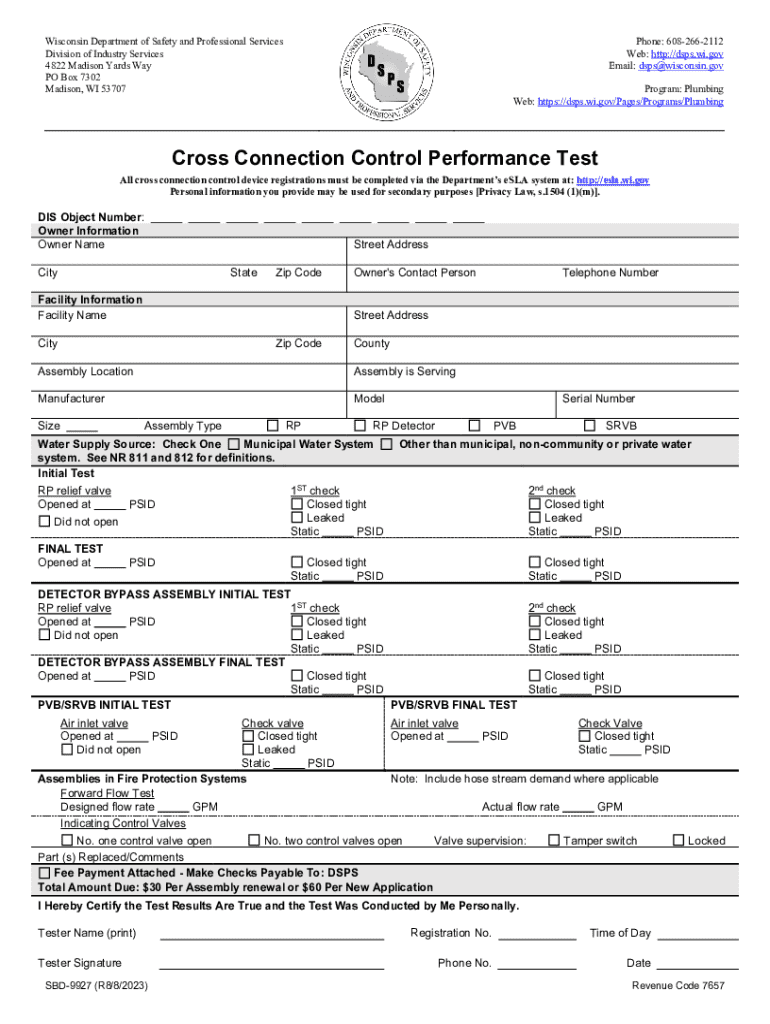
The 9927 template, also known as the Wisconsin Cross Connection Control Performance Form, is essential for documenting plumbing inspections in the state of Wisconsin. This form is used to verify compliance with state regulations regarding cross-connection control, which is crucial for protecting the public water supply. The form is designed to be straightforward, allowing inspectors to record findings and ensure that all necessary checks are completed.
Steps to Complete the 9927 Template
Completing the 9927 template involves several key steps to ensure accuracy and compliance. First, gather all relevant information about the property being inspected, including the address and any previous inspection records. Next, follow these steps:
- Fill in the property details, including the owner's name and contact information.
- Document the specific cross-connection devices present at the site.
- Record the results of the inspection, noting any issues or necessary repairs.
- Sign and date the form to confirm that the inspection was conducted.
Ensure that the form is submitted to the appropriate local authority to maintain compliance with state regulations.
Legal Use of the 9927 Template
The 9927 template is legally recognized in Wisconsin as a formal document for plumbing inspections. It serves as proof that a cross-connection inspection has been conducted in accordance with state laws. Proper completion and submission of this form can help avoid potential legal issues related to water safety and compliance. It is advisable to keep a copy of the completed form for your records.
Required Documents for the 9927 Template
When preparing to complete the 9927 template, certain documents may be required to ensure a thorough inspection. These include:
- Previous inspection reports, if available.
- Documentation of any repairs or maintenance performed on cross-connection devices.
- Manufacturer specifications for installed devices.
Having these documents on hand can facilitate a more efficient inspection process and help ensure that all necessary information is accurately recorded on the form.
Who Issues the 9927 Template
The 9927 template is issued by the Wisconsin Department of Safety and Professional Services (DSPS). This department oversees plumbing regulations in the state and provides the necessary forms and guidelines for compliance. It is important for inspectors and property owners to stay informed about any updates or changes to the form by regularly checking the DSPS website.
Examples of Using the 9927 Template
Practical applications of the 9927 template include various scenarios where plumbing inspections are required. For instance:
- When a new commercial building is constructed, the 9927 template is used to ensure that all plumbing systems meet safety standards.
- Existing buildings undergoing renovations may require a cross-connection inspection documented on the 9927 template to ensure compliance with updated regulations.
- Regular inspections of public facilities, such as schools and hospitals, utilize the 9927 template to maintain water safety standards.
These examples illustrate the importance of the 9927 template in maintaining public health and safety in Wisconsin.
Quick guide on how to complete commercial plumbing inspection district map dsps wi gov
Complete Commercial Plumbing Inspection District Map Dsps wi gov effortlessly on any gadget
Online document management has become increasingly popular with businesses and individuals. It offers an ideal eco-friendly substitute for conventional printed and signed documents, as you can access the appropriate form and securely store it online. airSlate SignNow equips you with all the resources you need to create, modify, and eSign your documents quickly without delays. Handle Commercial Plumbing Inspection District Map Dsps wi gov on any device using airSlate SignNow Android or iOS applications and simplify any document-related procedure today.
How to modify and eSign Commercial Plumbing Inspection District Map Dsps wi gov with ease
- Obtain Commercial Plumbing Inspection District Map Dsps wi gov and click Get Form to begin.
- Use the tools we provide to fill out your document.
- Mark important sections of your documents or obscure sensitive details with tools that airSlate SignNow offers specifically for that purpose.
- Create your signature with the Sign tool, which takes seconds and carries the same legal validity as a conventional wet ink signature.
- Review all the information and click the Done button to save your updates.
- Select how you wish to share your form, by email, text message (SMS), or invitation link, or download it to your computer.
Forget about lost or disorganized documents, tedious form navigation, or errors that require reprinting new document copies. airSlate SignNow meets all your document management needs in just a few clicks from any device you prefer. Modify and eSign Commercial Plumbing Inspection District Map Dsps wi gov and ensure outstanding communication at any stage of the form preparation process with airSlate SignNow.
Create this form in 5 minutes or less
Find and fill out the correct commercial plumbing inspection district map dsps wi gov
Create this form in 5 minutes!
How to create an eSignature for the commercial plumbing inspection district map dsps wi gov
How to create an electronic signature for a PDF online
How to create an electronic signature for a PDF in Google Chrome
How to create an e-signature for signing PDFs in Gmail
How to create an e-signature right from your smartphone
How to create an e-signature for a PDF on iOS
How to create an e-signature for a PDF on Android
People also ask
-
What is the 9927 template and how can it benefit my business?
The 9927 template is a customizable document template designed to streamline your eSigning process. By using the 9927 template, businesses can save time and reduce errors, ensuring that all necessary fields are completed accurately. This template is particularly useful for organizations looking to enhance their document management efficiency.
-
How much does the 9927 template cost?
The 9927 template is available as part of airSlate SignNow's subscription plans, which are competitively priced to suit various business needs. Pricing may vary based on the features and number of users required. For detailed pricing information, it's best to visit our pricing page or contact our sales team.
-
Can I customize the 9927 template to fit my specific needs?
Yes, the 9927 template is fully customizable, allowing you to modify fields, add your branding, and adjust the layout to meet your specific requirements. This flexibility ensures that the template aligns perfectly with your business processes and enhances your document workflow.
-
What features are included with the 9927 template?
The 9927 template includes features such as electronic signatures, document tracking, and automated reminders. These features help streamline the signing process and improve overall efficiency. Additionally, users can integrate the template with other tools to further enhance functionality.
-
Is the 9927 template secure for sensitive documents?
Absolutely! The 9927 template is designed with security in mind, utilizing encryption and secure access controls to protect your sensitive documents. airSlate SignNow complies with industry standards to ensure that your data remains safe throughout the signing process.
-
What integrations are available with the 9927 template?
The 9927 template can be integrated with various applications, including CRM systems, cloud storage services, and productivity tools. This allows for seamless document management and enhances your overall workflow. Check our integrations page for a complete list of compatible applications.
-
How can I get started with the 9927 template?
Getting started with the 9927 template is easy! Simply sign up for an airSlate SignNow account, and you can access the template from your dashboard. From there, you can customize it to fit your needs and start sending documents for eSignature right away.
Get more for Commercial Plumbing Inspection District Map Dsps wi gov
- Nyandarua county bursary form
- Interstate seniorsapplication for a gold seniorpensioner form
- Britam unit trusts redemption switch form
- Studio 88 account application form
- Driver license or id card application for adult texas dps form
- Support path is here to help form
- Herbert protocol form metropolitan police
- Breach of settlement contract template form
Find out other Commercial Plumbing Inspection District Map Dsps wi gov
- How To eSign Arizona Profit and Loss Statement
- How To eSign Hawaii Profit and Loss Statement
- How To eSign Illinois Profit and Loss Statement
- How To eSign New York Profit and Loss Statement
- How To eSign Ohio Profit and Loss Statement
- How Do I eSign Ohio Non-Compete Agreement
- eSign Utah Non-Compete Agreement Online
- eSign Tennessee General Partnership Agreement Mobile
- eSign Alaska LLC Operating Agreement Fast
- How Can I eSign Hawaii LLC Operating Agreement
- eSign Indiana LLC Operating Agreement Fast
- eSign Michigan LLC Operating Agreement Fast
- eSign North Dakota LLC Operating Agreement Computer
- How To eSignature Louisiana Quitclaim Deed
- eSignature Maine Quitclaim Deed Now
- eSignature Maine Quitclaim Deed Myself
- eSignature Maine Quitclaim Deed Free
- eSignature Maine Quitclaim Deed Easy
- How Do I eSign South Carolina LLC Operating Agreement
- Can I eSign South Carolina LLC Operating Agreement