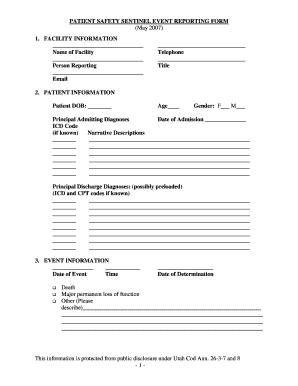
Sentinel Event Reporting Form 2007-2026


What is the sentinel event reporting form
The sentinel event reporting form is a crucial document used in healthcare and other sectors to report significant incidents that result in harm to patients or clients. These events are unexpected and indicate a serious problem in the safety or quality of care. The form serves as a tool for organizations to identify, analyze, and learn from these events, ultimately aiming to improve safety protocols and prevent future occurrences. It is essential for maintaining transparency and accountability within healthcare systems.
How to use the sentinel event reporting form
Using the sentinel event reporting form involves several key steps to ensure accurate and thorough reporting. First, identify the sentinel event that occurred, ensuring it meets the criteria for reporting. Next, gather all relevant information, including the date, time, location, and individuals involved. Complete the form by providing detailed descriptions of the event, contributing factors, and any immediate actions taken. Finally, submit the form to the appropriate department within your organization for review and further action.
Steps to complete the sentinel event reporting form
Completing the sentinel event reporting form requires careful attention to detail. Follow these steps for effective completion:
- Start by entering the date and time of the incident.
- Provide a clear and concise description of the sentinel event.
- List all individuals involved, including staff and patients.
- Document any immediate actions taken in response to the event.
- Identify potential contributing factors that may have led to the event.
- Review the completed form for accuracy before submission.
Legal use of the sentinel event reporting form
The legal use of the sentinel event reporting form is vital for compliance with regulatory standards. Organizations must ensure that the form is completed accurately and submitted in a timely manner to fulfill legal obligations. Proper documentation can protect the organization in case of litigation and contribute to quality improvement efforts. It is essential to understand the legal implications of the information provided, as it may be subject to scrutiny in legal proceedings.
Key elements of the sentinel event reporting form
Key elements of the sentinel event reporting form include essential details that provide a comprehensive overview of the incident. These elements typically consist of:
- Date and time of the event
- Location where the event occurred
- Description of the event
- Individuals involved
- Immediate actions taken
- Contributing factors
- Recommendations for future prevention
Examples of using the sentinel event reporting form
Examples of using the sentinel event reporting form can illustrate its importance in various scenarios. Common examples include:
- Patient falls resulting in injury
- Medication errors leading to adverse drug reactions
- Unexpected deaths in a healthcare setting
- Incorrect surgical procedures performed
Each of these examples highlights the need for thorough reporting and analysis to enhance patient safety and care quality.
Quick guide on how to complete sentinel event form 2007 2019
Finalize Sentinel Event Reporting Form seamlessly on any device
Digital document management has gained traction among businesses and individuals. It offers a superb eco-friendly alternative to traditional printed and signed documents, allowing you to locate the necessary form and securely archive it online. airSlate SignNow equips you with all the resources required to create, modify, and electronically sign your documents swiftly, without unnecessary delays. Manage Sentinel Event Reporting Form on any platform using airSlate SignNow's Android or iOS applications, simplifying any document-related task today.
How to modify and electronically sign Sentinel Event Reporting Form effortlessly
- Locate Sentinel Event Reporting Form and click Get Form to begin.
- Utilize the tools we provide to fill out your document.
- Highlight signNow sections of the documents or obscure sensitive information using tools that airSlate SignNow specifically offers for this purpose.
- Create your electronic signature with the Sign feature, which takes mere seconds and carries the same legal validity as a traditional ink signature.
- Review all the details and click on the Done button to save your modifications.
- Select your preferred method to send your form - via email, SMS, or invitation link, or download it to your computer.
Eliminate concerns about lost or misplaced documents, tedious form navigation, or errors that necessitate printing new document copies. airSlate SignNow addresses your document management needs in just a few clicks from your chosen device. Modify and electronically sign Sentinel Event Reporting Form to ensure excellent communication throughout all stages of the form preparation process with airSlate SignNow.
Create this form in 5 minutes or less
Create this form in 5 minutes!
How to create an eSignature for the sentinel event form 2007 2019
How to create an eSignature for the Sentinel Event Form 2007 2019 in the online mode
How to create an electronic signature for the Sentinel Event Form 2007 2019 in Google Chrome
How to create an eSignature for signing the Sentinel Event Form 2007 2019 in Gmail
How to create an eSignature for the Sentinel Event Form 2007 2019 from your smart phone
How to make an eSignature for the Sentinel Event Form 2007 2019 on iOS
How to make an eSignature for the Sentinel Event Form 2007 2019 on Android
People also ask
-
What is a Sentinel Event Reporting Form and how does it work?
A Sentinel Event Reporting Form is a crucial tool used by organizations to document and analyze signNow adverse events that occur in healthcare settings. With airSlate SignNow, you can easily create and customize this form, ensuring that all necessary information is captured efficiently. Our solution allows for secure electronic signatures, making the reporting process streamlined and compliant.
-
How can airSlate SignNow improve my Sentinel Event Reporting process?
Using airSlate SignNow enhances your Sentinel Event Reporting process by providing a user-friendly interface and advanced features like automated workflows and document tracking. This ensures that every report is completed accurately and on time, reducing the risk of errors. Additionally, our platform allows for real-time collaboration among team members, making it easier to address incidents promptly.
-
What are the pricing options for using the Sentinel Event Reporting Form with airSlate SignNow?
airSlate SignNow offers flexible pricing plans that cater to businesses of all sizes. Whether you need a basic plan for small teams or a more comprehensive package for larger organizations, we have options that include access to the Sentinel Event Reporting Form and other essential features. You can easily compare plans on our website to find the best fit for your needs.
-
Is it easy to integrate the Sentinel Event Reporting Form with other systems?
Yes, airSlate SignNow is designed with integration in mind. Our platform seamlessly connects with various healthcare management systems and software, allowing you to use the Sentinel Event Reporting Form alongside your existing tools. This integration capability helps streamline your workflow and enhances data accuracy across your operations.
-
What are the benefits of using airSlate SignNow for Sentinel Event Reporting?
Using airSlate SignNow for Sentinel Event Reporting offers numerous benefits, including improved efficiency and compliance. The electronic signature feature ensures that reports are authorized quickly, while automated reminders help keep your team on track. Furthermore, the ability to track changes and access reports in real-time enhances accountability and transparency.
-
Can I customize the Sentinel Event Reporting Form in airSlate SignNow?
Absolutely! airSlate SignNow allows you to fully customize the Sentinel Event Reporting Form to meet your organization’s specific needs. You can modify fields, add instructions, and even design the layout to ensure that the form captures all necessary information effectively.
-
Is training available for using the Sentinel Event Reporting Form with airSlate SignNow?
Yes, airSlate SignNow provides comprehensive training resources to help you and your team effectively use the Sentinel Event Reporting Form. We offer tutorials, webinars, and customer support to ensure you can maximize the benefits of our platform. Our goal is to make your transition to digital reporting as smooth as possible.
Get more for Sentinel Event Reporting Form
- Applicationredetermination for chlid care english accessible pdf form
- Vehicle reference chart form
- Aviso de baja del trabajador afil 04 form
- Stamp swap out form under 200
- Oi fig achomhairc least shisialaigh social welfare form
- Ihss referral form 672652719
- Canada direct deposit enrolment formformulaire dinscription au dpt direct au canada
- Police certificate application form
Find out other Sentinel Event Reporting Form
- How To eSign Maryland Plumbing Document
- How Do I eSign Mississippi Plumbing Word
- Can I eSign New Jersey Plumbing Form
- How Can I eSign Wisconsin Plumbing PPT
- Can I eSign Colorado Real Estate Form
- How To eSign Florida Real Estate Form
- Can I eSign Hawaii Real Estate Word
- How Do I eSign Hawaii Real Estate Word
- How To eSign Hawaii Real Estate Document
- How Do I eSign Hawaii Real Estate Presentation
- How Can I eSign Idaho Real Estate Document
- How Do I eSign Hawaii Sports Document
- Can I eSign Hawaii Sports Presentation
- How To eSign Illinois Sports Form
- Can I eSign Illinois Sports Form
- How To eSign North Carolina Real Estate PDF
- How Can I eSign Texas Real Estate Form
- How To eSign Tennessee Real Estate Document
- How Can I eSign Wyoming Real Estate Form
- How Can I eSign Hawaii Police PDF