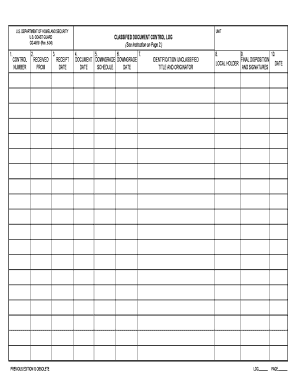
Classified Document Register Form


Understanding the Classified Document Register
The classified document register is a vital tool used to track and manage classified documents within an organization. It serves as an official record that details the handling, storage, and dissemination of sensitive information. This register ensures compliance with federal regulations and helps organizations maintain the integrity and security of classified materials. By documenting each classified document, organizations can monitor access and prevent unauthorized disclosures, thereby protecting national security interests.
Key Elements of the Classified Document Register
A comprehensive classified document register typically includes several essential elements:
- Document Title: The name of the classified document.
- Classification Level: The security classification, such as Confidential, Secret, or Top Secret.
- Date of Creation: When the document was originally created.
- Owner/Originator: The individual or department responsible for the document.
- Access Log: A record of individuals who have accessed the document, including dates and times.
- Destruction Date: If applicable, the date when the document is scheduled for destruction.
These elements work together to provide a clear and thorough overview of the document's lifecycle, ensuring accountability and security.
Steps to Complete the Classified Document Register
Completing a classified document register involves several key steps:
- Gather Document Information: Collect all necessary details about the classified documents, including titles, classification levels, and ownership.
- Enter Data: Input the gathered information into the register, ensuring accuracy and completeness.
- Review for Compliance: Verify that all entries comply with relevant regulations and organizational policies.
- Maintain Access Logs: Regularly update the access log to reflect who has accessed each document and when.
- Audit Regularly: Conduct periodic audits of the register to ensure all documents are accounted for and that the register is up to date.
Following these steps helps maintain the integrity of the classified document management process.
Legal Use of the Classified Document Register
The classified document register is not only a best practice but also a legal requirement under various federal regulations. Organizations handling classified information must adhere to guidelines set forth by the National Archives and Records Administration (NARA) and the Department of Defense (DoD). These regulations mandate the proper management of classified documents to prevent unauthorized access and ensure national security. Failure to maintain an accurate register can result in significant legal penalties, including fines and loss of security clearance.
Examples of Using the Classified Document Register
Organizations across various sectors utilize the classified document register to enhance their security protocols. For example:
- Government Agencies: Federal agencies maintain registers to track sensitive documents related to national security.
- Defense Contractors: Private companies working with government contracts use the register to ensure compliance with security requirements.
- Research Institutions: Academic institutions handling classified research use the register to manage sensitive data responsibly.
These examples illustrate the importance of the classified document register in safeguarding sensitive information across different environments.
Quick guide on how to complete classified document register
Accomplish Classified Document Register seamlessly on any device
Digital document administration has surged in popularity among businesses and individuals. It offers an ideal eco-conscious substitute to conventional printed and signed papers, allowing you to locate the appropriate form and securely store it online. airSlate SignNow provides all the tools necessary to create, modify, and eSign your documents promptly without delays. Manage Classified Document Register on any device using airSlate SignNow's Android or iOS applications and enhance any document-related task today.
The easiest method to alter and eSign Classified Document Register with ease
- Locate Classified Document Register and click on Get Form to initiate.
- Utilize the tools we offer to complete your form.
- Emphasize important sections of your documents or obscure confidential information with tools that airSlate SignNow specifically provides for that purpose.
- Create your eSignature using the Sign tool, which takes mere seconds and carries the same legal validity as a conventional wet ink signature.
- Verify all the details and click on the Done button to save your changes.
- Choose how you want to send your form, via email, SMS, or an invitation link, or download it to your computer.
Eliminate concerns about lost or misfiled documents, tedious form searching, or mistakes that require reprinting new copies. airSlate SignNow addresses your document management needs in just a few clicks from any device you prefer. Modify and eSign Classified Document Register and guarantee outstanding communication at every stage of your form preparation process with airSlate SignNow.
Create this form in 5 minutes or less
Create this form in 5 minutes!
How to create an eSignature for the classified document register
How to create an electronic signature for a PDF online
How to create an electronic signature for a PDF in Google Chrome
How to create an e-signature for signing PDFs in Gmail
How to create an e-signature right from your smartphone
How to create an e-signature for a PDF on iOS
How to create an e-signature for a PDF on Android
People also ask
-
What is a classified document control log?
A classified document control log is a systematic record-keeping tool that helps organizations track and manage sensitive documents. It ensures that all classified documents are accounted for, monitored, and securely handled throughout their lifecycle.
-
How does airSlate SignNow support classified document control logs?
airSlate SignNow provides features that facilitate the creation and management of classified document control logs. With its eSigning capabilities and document tracking, businesses can ensure that all classified documents are signed, stored, and monitored efficiently.
-
What are the benefits of using a classified document control log?
Using a classified document control log enhances security, accountability, and compliance within an organization. It minimizes the risk of unauthorized access and ensures that all classified documents are properly managed and disposed of when necessary.
-
Is airSlate SignNow cost-effective for managing classified document control logs?
Yes, airSlate SignNow offers a cost-effective solution for managing classified document control logs. Its pricing plans are designed to accommodate businesses of all sizes, ensuring that you can efficiently manage your classified documents without breaking the bank.
-
What features does airSlate SignNow offer for classified document control logs?
airSlate SignNow includes features such as customizable templates, secure eSigning, and comprehensive tracking for classified document control logs. These tools help streamline the document management process while maintaining the highest security standards.
-
Can I integrate airSlate SignNow with other tools for classified document control logs?
Absolutely! airSlate SignNow offers integrations with various third-party applications, allowing you to enhance your classified document control log management. This flexibility ensures that you can work seamlessly within your existing workflows.
-
How does airSlate SignNow ensure the security of classified document control logs?
airSlate SignNow employs advanced security measures, including encryption and secure access controls, to protect classified document control logs. This commitment to security ensures that your sensitive documents remain confidential and secure.
Get more for Classified Document Register
- Self certification form liberty university liberty
- Tmhp form 6700
- Ssa further action notice english ssa tentative nonconfirmation uscis form
- Printable complaint form washington state office of the insurance insurance wa
- City of grand rapids income taxresident form
- 4582 michigan business tax penalty and interest computation for underpaid estimated tax form
- City treasurer amp form
- Unknown article translation michigan form 4884
Find out other Classified Document Register
- How To eSign Wisconsin Education PDF
- Help Me With eSign Nebraska Finance & Tax Accounting PDF
- How To eSign North Carolina Finance & Tax Accounting Presentation
- How To eSign North Dakota Finance & Tax Accounting Presentation
- Help Me With eSign Alabama Healthcare / Medical PDF
- How To eSign Hawaii Government Word
- Can I eSign Hawaii Government Word
- How To eSign Hawaii Government Document
- How To eSign Hawaii Government Document
- How Can I eSign Hawaii Government Document
- Can I eSign Hawaii Government Document
- How Can I eSign Hawaii Government Document
- How To eSign Hawaii Government Document
- How To eSign Hawaii Government Form
- How Can I eSign Hawaii Government Form
- Help Me With eSign Hawaii Healthcare / Medical PDF
- How To eSign Arizona High Tech Document
- How Can I eSign Illinois Healthcare / Medical Presentation
- Can I eSign Hawaii High Tech Document
- How Can I eSign Hawaii High Tech Document