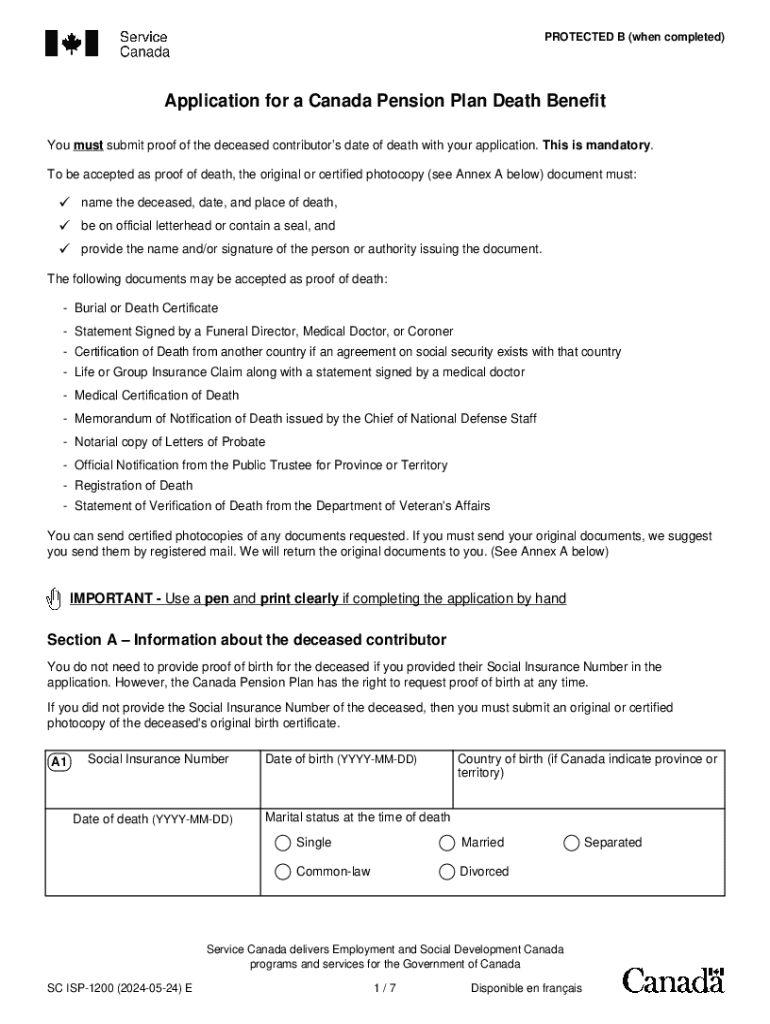
Canada Pension Plan Death Benefit Application ISP1200E 2024


What is the Canada Pension Plan Death Benefit Application ISP1200E
The Canada Pension Plan Death Benefit Application, commonly referred to as the ISP1200E, is a form used to apply for a one-time payment to the estate of a deceased contributor to the Canada Pension Plan (CPP). This benefit is designed to assist with funeral expenses and other costs following the death of a loved one. The application must be completed accurately to ensure timely processing and payment.
How to use the Canada Pension Plan Death Benefit Application ISP1200E
To effectively use the ISP1200E, applicants should first gather all necessary information, including the deceased’s CPP contribution details and personal identification. The form can be filled out online or printed for manual completion. It is important to follow the instructions carefully, ensuring all sections are completed and any required documentation is attached before submission.
Steps to complete the Canada Pension Plan Death Benefit Application ISP1200E
Completing the ISP1200E involves several key steps:
- Obtain the ISP1200E form, available online or through designated service points.
- Fill in the deceased’s personal information, including their name, date of birth, and Social Security number.
- Provide details about the applicant, including their relationship to the deceased and contact information.
- Attach any required documents, such as a death certificate and proof of identity.
- Review the completed form for accuracy before submission.
Required Documents
When submitting the ISP1200E, certain documents are required to support the application. These typically include:
- A certified copy of the death certificate.
- Proof of identity for the applicant, such as a driver’s license or passport.
- Any relevant documents that demonstrate the deceased’s contributions to the Canada Pension Plan.
Eligibility Criteria
To be eligible for the Canada Pension Plan death benefit, the deceased must have made sufficient contributions to the CPP during their working life. The applicant must also be a legal representative of the deceased's estate or a family member. Eligibility is determined based on the deceased's contribution history and the relationship of the applicant to the deceased.
Form Submission Methods
The ISP1200E can be submitted through various methods, catering to different preferences:
- Online submission via the official government portal.
- Mailing the completed form and documents to the designated address.
- In-person submission at local Service Canada offices.
Handy tips for filling out Canada Pension Plan Death Benefit Application ISP1200E online
Quick steps to complete and e-sign Canada Pension Plan Death Benefit Application ISP1200E online:
- Use Get Form or simply click on the template preview to open it in the editor.
- Start completing the fillable fields and carefully type in required information.
- Use the Cross or Check marks in the top toolbar to select your answers in the list boxes.
- Utilize the Circle icon for other Yes/No questions.
- Look through the document several times and make sure that all fields are completed with the correct information.
- Insert the current Date with the corresponding icon.
- Add a legally-binding e-signature. Go to Sign -> Add New Signature and select the option you prefer: type, draw, or upload an image of your handwritten signature and place it where you need it.
- Finish filling out the form with the Done button.
- Download your copy, save it to the cloud, print it, or share it right from the editor.
- Check the Help section and contact our Support team if you run into any troubles when using the editor.
We understand how straining completing forms can be. Obtain access to a GDPR and HIPAA compliant solution for maximum straightforwardness. Use signNow to e-sign and send out Canada Pension Plan Death Benefit Application ISP1200E for collecting e-signatures.
Create this form in 5 minutes or less
Find and fill out the correct canada pension plan death benefit application isp1200e
Create this form in 5 minutes!
How to create an eSignature for the canada pension plan death benefit application isp1200e
How to create an electronic signature for a PDF online
How to create an electronic signature for a PDF in Google Chrome
How to create an e-signature for signing PDFs in Gmail
How to create an e-signature right from your smartphone
How to create an e-signature for a PDF on iOS
How to create an e-signature for a PDF on Android
People also ask
-
What is the cpp death benefit application form?
The cpp death benefit application form is a document that allows beneficiaries to apply for the Canada Pension Plan death benefit. This form is essential for ensuring that the deceased's loved ones receive the financial support they are entitled to. Completing the cpp death benefit application form accurately is crucial for a smooth claims process.
-
How can I obtain the cpp death benefit application form?
You can obtain the cpp death benefit application form from the official Government of Canada website or through airSlate SignNow. Our platform allows you to easily access and fill out the form online, streamlining the application process. This ensures that you have the most up-to-date version of the form.
-
What features does airSlate SignNow offer for the cpp death benefit application form?
airSlate SignNow offers a range of features for the cpp death benefit application form, including eSignature capabilities, document templates, and secure cloud storage. These features make it easy to complete and submit your application efficiently. Additionally, our platform ensures that your documents are legally binding and secure.
-
Is there a cost associated with using airSlate SignNow for the cpp death benefit application form?
Yes, there is a cost associated with using airSlate SignNow, but we offer competitive pricing plans that cater to various needs. Our cost-effective solution provides excellent value for businesses and individuals looking to manage their documents, including the cpp death benefit application form. You can choose a plan that best fits your requirements.
-
How does airSlate SignNow ensure the security of my cpp death benefit application form?
airSlate SignNow prioritizes the security of your documents, including the cpp death benefit application form. We use advanced encryption and secure cloud storage to protect your sensitive information. Additionally, our platform complies with industry standards to ensure that your data remains confidential and secure.
-
Can I integrate airSlate SignNow with other applications for the cpp death benefit application form?
Yes, airSlate SignNow offers integrations with various applications to enhance your workflow when handling the cpp death benefit application form. You can connect with popular tools like Google Drive, Dropbox, and more. This integration capability allows for seamless document management and collaboration.
-
What are the benefits of using airSlate SignNow for the cpp death benefit application form?
Using airSlate SignNow for the cpp death benefit application form provides numerous benefits, including time savings, ease of use, and enhanced collaboration. Our platform simplifies the application process, allowing you to complete and submit your form quickly. Additionally, the eSignature feature ensures that your application is processed without unnecessary delays.
Get more for Canada Pension Plan Death Benefit Application ISP1200E
- Norman clarence tolpo v mary craver denny appeal from form
- Special warranty form
- Arizona quit claim deed us legal forms
- Two 2 individuals to husband and wife form
- Wests encyclopedia of american law 13 volume set form
- View house townhousevilla in ljuta form
- District of columbia deed forms us legal forms
- Two 2 individuals to two 2 individuals form
Find out other Canada Pension Plan Death Benefit Application ISP1200E
- eSign Utah Plumbing Notice To Quit Secure
- eSign Alabama Real Estate Quitclaim Deed Mobile
- eSign Alabama Real Estate Affidavit Of Heirship Simple
- eSign California Real Estate Business Plan Template Free
- How Can I eSign Arkansas Real Estate Promissory Note Template
- eSign Connecticut Real Estate LLC Operating Agreement Later
- eSign Connecticut Real Estate LLC Operating Agreement Free
- eSign Real Estate Document Florida Online
- eSign Delaware Real Estate Quitclaim Deed Easy
- eSign Hawaii Real Estate Agreement Online
- Help Me With eSign Hawaii Real Estate Letter Of Intent
- eSign Florida Real Estate Residential Lease Agreement Simple
- eSign Florida Real Estate Limited Power Of Attorney Online
- eSign Hawaii Sports RFP Safe
- eSign Hawaii Sports Warranty Deed Myself
- eSign Louisiana Real Estate Last Will And Testament Easy
- eSign Louisiana Real Estate Work Order Now
- eSign Maine Real Estate LLC Operating Agreement Simple
- eSign Maine Real Estate Memorandum Of Understanding Mobile
- How To eSign Michigan Real Estate Business Plan Template