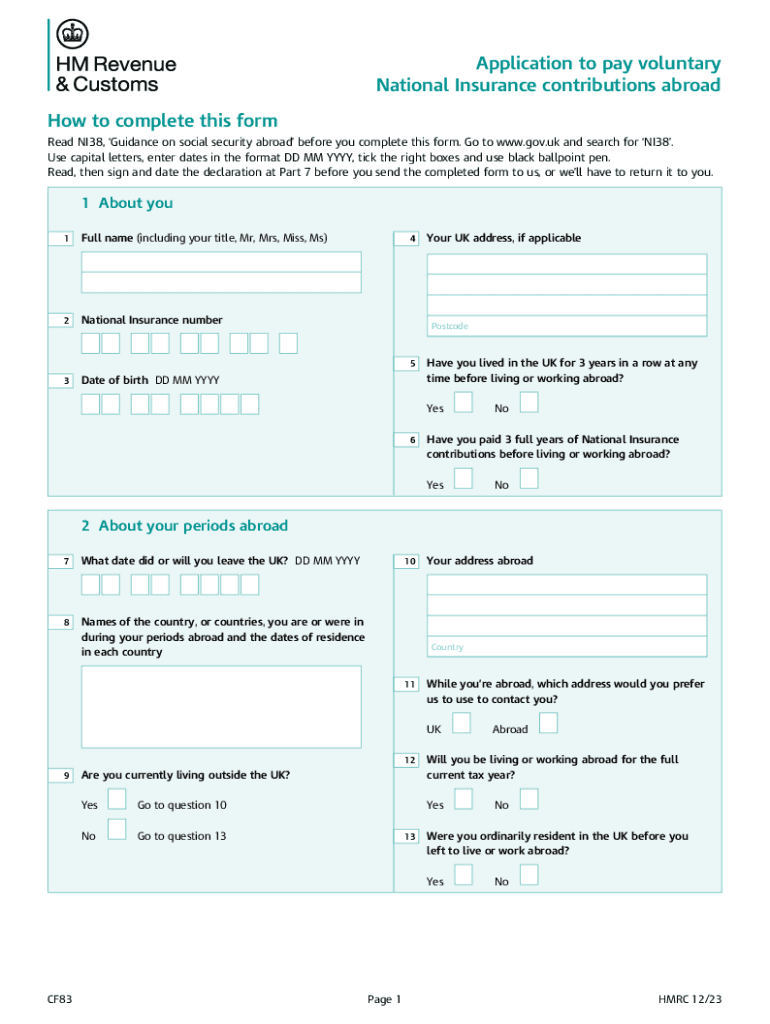
CF83 Application to Pay Voluntary National Insurance Contributions Abroad Use This Form to Apply to Pay Voluntary National Insur 2023-2026


Understanding the CF83 Application for Voluntary National Insurance Contributions
The CF83 form is specifically designed for individuals looking to pay voluntary National Insurance contributions while residing abroad. This application allows individuals to maintain their National Insurance record, which is essential for qualifying for certain benefits and the state pension. By submitting the CF83, applicants can ensure that their contributions are recognized, even if they are not physically present in the UK.
Steps to Complete the CF83 Application
Filling out the CF83 form involves several straightforward steps:
- Gather necessary personal information, including your National Insurance number.
- Provide details about your residency status and the country where you currently live.
- Indicate the period for which you wish to make voluntary contributions.
- Complete any additional sections that pertain to your specific circumstances.
- Review the application for accuracy before submission.
Eligibility Criteria for the CF83 Form
To be eligible to use the CF83 form, applicants must meet specific criteria:
- You must have a valid National Insurance number.
- You should be living outside the UK but wish to maintain your National Insurance contributions.
- It is necessary to have previously made National Insurance contributions in the UK.
Required Documents for Submission
When submitting the CF83 application, certain documents may be required to support your application:
- Proof of identity, such as a passport or national ID card.
- Documentation showing your current residency status.
- Any previous correspondence with HMRC regarding your National Insurance contributions.
Form Submission Methods
The CF83 form can be submitted through various methods, ensuring convenience for applicants:
- Online submission through the official HMRC portal.
- Mailing a printed copy of the completed form to the appropriate HMRC address.
- In-person submission at designated HMRC offices, if applicable.
Key Elements of the CF83 Form
Understanding the key components of the CF83 form can help streamline the application process. Important sections include:
- Personal information section, where you provide your details.
- Residency information, which outlines your living situation abroad.
- Contribution details, specifying the amount and period for which you wish to contribute.
Handy tips for filling out CF83 Application To Pay Voluntary National Insurance Contributions Abroad Use This Form To Apply To Pay Voluntary National Insur online
Quick steps to complete and e-sign CF83 Application To Pay Voluntary National Insurance Contributions Abroad Use This Form To Apply To Pay Voluntary National Insur online:
- Use Get Form or simply click on the template preview to open it in the editor.
- Start completing the fillable fields and carefully type in required information.
- Use the Cross or Check marks in the top toolbar to select your answers in the list boxes.
- Utilize the Circle icon for other Yes/No questions.
- Look through the document several times and make sure that all fields are completed with the correct information.
- Insert the current Date with the corresponding icon.
- Add a legally-binding e-signature. Go to Sign -> Add New Signature and select the option you prefer: type, draw, or upload an image of your handwritten signature and place it where you need it.
- Finish filling out the form with the Done button.
- Download your copy, save it to the cloud, print it, or share it right from the editor.
- Check the Help section and contact our Support team if you run into any troubles when using the editor.
We understand how straining completing forms can be. Obtain access to a GDPR and HIPAA compliant platform for maximum simpleness. Use signNow to e-sign and share CF83 Application To Pay Voluntary National Insurance Contributions Abroad Use This Form To Apply To Pay Voluntary National Insur for e-signing.
Create this form in 5 minutes or less
Find and fill out the correct cf83 application to pay voluntary national insurance contributions abroad use this form to apply to pay voluntary national
Create this form in 5 minutes!
How to create an eSignature for the cf83 application to pay voluntary national insurance contributions abroad use this form to apply to pay voluntary national
How to create an electronic signature for a PDF online
How to create an electronic signature for a PDF in Google Chrome
How to create an e-signature for signing PDFs in Gmail
How to create an e-signature right from your smartphone
How to create an e-signature for a PDF on iOS
How to create an e-signature for a PDF on Android
People also ask
-
What is cf83 and how does it relate to airSlate SignNow?
cf83 is a key feature of airSlate SignNow that enhances document management and eSigning capabilities. It allows users to streamline their workflows, ensuring that documents are signed quickly and securely. By utilizing cf83, businesses can improve efficiency and reduce turnaround times for important documents.
-
How much does airSlate SignNow cost with cf83 features?
The pricing for airSlate SignNow varies based on the plan selected, but it includes access to cf83 features that enhance document signing and management. Plans are designed to be cost-effective, catering to businesses of all sizes. You can choose a plan that best fits your needs and budget while leveraging the benefits of cf83.
-
What are the main benefits of using cf83 in airSlate SignNow?
Using cf83 in airSlate SignNow provides numerous benefits, including improved document security, faster signing processes, and enhanced collaboration among team members. It simplifies the eSigning experience, making it user-friendly for both senders and signers. Overall, cf83 helps businesses save time and reduce operational costs.
-
Can I integrate cf83 with other applications?
Yes, airSlate SignNow allows for seamless integration of cf83 with various applications and platforms. This means you can connect it with your existing tools, such as CRM systems and project management software, to create a more cohesive workflow. Integrating cf83 enhances productivity and ensures that all your documents are managed efficiently.
-
Is cf83 suitable for small businesses?
Absolutely! cf83 is designed to be user-friendly and cost-effective, making it an ideal solution for small businesses. With its intuitive interface and powerful features, small businesses can easily manage their document signing processes without the need for extensive training or resources. This empowers them to focus on growth and customer satisfaction.
-
What types of documents can I send using cf83?
With cf83 in airSlate SignNow, you can send a wide variety of documents for eSigning, including contracts, agreements, and forms. The platform supports multiple file formats, ensuring that you can handle all your document needs efficiently. This versatility makes cf83 a valuable tool for any business looking to streamline their document workflows.
-
How secure is the cf83 feature in airSlate SignNow?
The cf83 feature in airSlate SignNow is built with security in mind, employing advanced encryption and authentication measures to protect your documents. This ensures that sensitive information remains confidential and secure throughout the signing process. You can trust cf83 to provide a safe environment for your important documents.
Get more for CF83 Application To Pay Voluntary National Insurance Contributions Abroad Use This Form To Apply To Pay Voluntary National Insur
- Cbus letter of compliance form
- Form of certificate to be produced by other backward classes for claiming reservation
- Cba authority to release assets form
- Aquatic ecosystem visual vibes form
- Non employment certificate self declaration by the member claimant form
- Form 424a
- Blank discharge nhs form
- Post offer and annual physical examination for school bus drivers form
Find out other CF83 Application To Pay Voluntary National Insurance Contributions Abroad Use This Form To Apply To Pay Voluntary National Insur
- eSign Pennsylvania Plumbing RFP Easy
- Can I eSign Pennsylvania Plumbing RFP
- eSign Pennsylvania Plumbing Work Order Free
- Can I eSign Pennsylvania Plumbing Purchase Order Template
- Help Me With eSign South Carolina Plumbing Promissory Note Template
- How To eSign South Dakota Plumbing Quitclaim Deed
- How To eSign South Dakota Plumbing Affidavit Of Heirship
- eSign South Dakota Plumbing Emergency Contact Form Myself
- eSign Texas Plumbing Resignation Letter Free
- eSign West Virginia Orthodontists Living Will Secure
- Help Me With eSign Texas Plumbing Business Plan Template
- Can I eSign Texas Plumbing Cease And Desist Letter
- eSign Utah Plumbing Notice To Quit Secure
- eSign Alabama Real Estate Quitclaim Deed Mobile
- eSign Alabama Real Estate Affidavit Of Heirship Simple
- eSign California Real Estate Business Plan Template Free
- How Can I eSign Arkansas Real Estate Promissory Note Template
- eSign Connecticut Real Estate LLC Operating Agreement Later
- eSign Connecticut Real Estate LLC Operating Agreement Free
- eSign Real Estate Document Florida Online