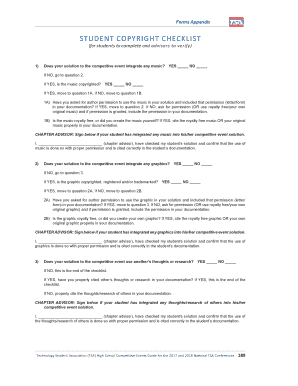
Tsa Student Copyright Checklist Form


Understanding the TSA Student Copyright Checklist
The TSA student copyright checklist is a vital resource designed to help students navigate the complexities of copyright law in relation to their projects and submissions. It outlines essential guidelines for ensuring that students respect copyright laws while creating and presenting their work. This checklist serves as a comprehensive tool for students involved in technology and engineering projects, particularly within the Technology Student Association (TSA). It covers various aspects of copyright, including the use of copyrighted materials, fair use provisions, and the importance of proper attribution.
How to Effectively Use the TSA Student Copyright Checklist
To use the TSA student copyright checklist effectively, students should first familiarize themselves with the key components of copyright law. The checklist provides a structured approach to assessing whether their work complies with copyright regulations. Students should review each item on the checklist, ensuring that they have obtained necessary permissions for any copyrighted materials used, and that they are aware of fair use guidelines. By following the checklist, students can minimize the risk of copyright infringement and enhance the integrity of their projects.
Key Elements of the TSA Student Copyright Checklist
The TSA student copyright checklist includes several key elements that students must consider. These elements typically encompass:
- Identification of all copyrighted materials used in the project.
- Assessment of whether the use of these materials falls under fair use.
- Proper attribution of sources and materials.
- Obtaining necessary permissions for any copyrighted works not covered under fair use.
- Understanding the implications of copyright infringement.
By addressing these elements, students can ensure their projects are both innovative and compliant with copyright laws.
Steps to Complete the TSA Student Copyright Checklist
Completing the TSA student copyright checklist involves several straightforward steps. Students should begin by listing all materials incorporated into their projects, including images, text, and multimedia. Next, they should evaluate each item to determine if it is copyrighted and whether their usage qualifies as fair use. If permission is needed, students should seek it from the copyright holder. Once all materials are accounted for and permissions secured, students can finalize their checklist, ensuring all aspects of copyright compliance are addressed.
Legal Considerations for Using the TSA Student Copyright Checklist
Understanding the legal implications of copyright is crucial for students utilizing the TSA student copyright checklist. Copyright law protects original works of authorship, granting creators exclusive rights to their use and distribution. Students should be aware that failure to comply with copyright regulations can lead to serious consequences, including legal action and penalties. Therefore, it is essential for students to use the checklist as a proactive measure to avoid infringement and to respect the rights of original creators.
Examples of Utilizing the TSA Student Copyright Checklist
Practical examples of using the TSA student copyright checklist can enhance understanding. For instance, a student creating a presentation may use images from the internet. The checklist would guide them to check if those images are copyrighted and whether they can be used under fair use. Another example could involve a student incorporating text from a published article; the checklist would remind them to seek permission or provide proper attribution. These scenarios illustrate how the checklist can be applied in real-world situations to promote ethical practices in project development.
Handy tips for filling out Tsa Student Copyright Checklist online
Quick steps to complete and e-sign Tsa Student Copyright Checklist online:
- Use Get Form or simply click on the template preview to open it in the editor.
- Start completing the fillable fields and carefully type in required information.
- Use the Cross or Check marks in the top toolbar to select your answers in the list boxes.
- Utilize the Circle icon for other Yes/No questions.
- Look through the document several times and make sure that all fields are completed with the correct information.
- Insert the current Date with the corresponding icon.
- Add a legally-binding e-signature. Go to Sign -> Add New Signature and select the option you prefer: type, draw, or upload an image of your handwritten signature and place it where you need it.
- Finish filling out the form with the Done button.
- Download your copy, save it to the cloud, print it, or share it right from the editor.
- Check the Help section and contact our Support team if you run into any troubles when using the editor.
We understand how straining completing forms can be. Obtain access to a HIPAA and GDPR compliant platform for maximum straightforwardness. Use signNow to electronically sign and send out Tsa Student Copyright Checklist for e-signing.
Create this form in 5 minutes or less
Create this form in 5 minutes!
How to create an eSignature for the tsa student copyright checklist
How to create an electronic signature for a PDF online
How to create an electronic signature for a PDF in Google Chrome
How to create an e-signature for signing PDFs in Gmail
How to create an e-signature right from your smartphone
How to create an e-signature for a PDF on iOS
How to create an e-signature for a PDF on Android
People also ask
-
What is the tsa student copyright checklist?
The tsa student copyright checklist is a comprehensive guide designed to help students understand their rights and responsibilities regarding copyright. It outlines essential steps to ensure compliance with copyright laws while using various materials in their projects. This checklist is particularly useful for students in creative fields.
-
How can airSlate SignNow assist with the tsa student copyright checklist?
airSlate SignNow provides an efficient platform for students to manage their documents related to the tsa student copyright checklist. With features like eSigning and document sharing, students can easily collaborate and ensure that all necessary permissions are obtained. This streamlines the process of adhering to copyright regulations.
-
Is there a cost associated with using airSlate SignNow for the tsa student copyright checklist?
Yes, airSlate SignNow offers various pricing plans that cater to different needs, including students. The cost-effective solutions ensure that students can access the tools necessary for managing their tsa student copyright checklist without breaking the bank. You can choose a plan that fits your budget and requirements.
-
What features does airSlate SignNow offer for managing the tsa student copyright checklist?
airSlate SignNow includes features such as customizable templates, eSignature capabilities, and document tracking, all of which are beneficial for managing the tsa student copyright checklist. These tools help students efficiently create, sign, and store documents while ensuring compliance with copyright laws. The user-friendly interface makes it easy to navigate.
-
Can I integrate airSlate SignNow with other tools for the tsa student copyright checklist?
Absolutely! airSlate SignNow offers integrations with various applications that can enhance your workflow while managing the tsa student copyright checklist. Whether you use Google Drive, Dropbox, or other platforms, you can seamlessly connect them to streamline your document management process.
-
What are the benefits of using airSlate SignNow for the tsa student copyright checklist?
Using airSlate SignNow for the tsa student copyright checklist provides numerous benefits, including increased efficiency, reduced paperwork, and enhanced collaboration. Students can quickly obtain signatures and share documents, ensuring that they meet all copyright requirements in a timely manner. This ultimately saves time and reduces stress.
-
How secure is airSlate SignNow when handling the tsa student copyright checklist?
Security is a top priority for airSlate SignNow. The platform employs advanced encryption and security protocols to protect your documents related to the tsa student copyright checklist. You can trust that your sensitive information is safe while using our services, allowing you to focus on your studies.
Get more for Tsa Student Copyright Checklist
Find out other Tsa Student Copyright Checklist
- How To eSignature Michigan Banking Job Description Template
- eSignature Missouri Banking IOU Simple
- eSignature Banking PDF New Hampshire Secure
- How Do I eSignature Alabama Car Dealer Quitclaim Deed
- eSignature Delaware Business Operations Forbearance Agreement Fast
- How To eSignature Ohio Banking Business Plan Template
- eSignature Georgia Business Operations Limited Power Of Attorney Online
- Help Me With eSignature South Carolina Banking Job Offer
- eSignature Tennessee Banking Affidavit Of Heirship Online
- eSignature Florida Car Dealer Business Plan Template Myself
- Can I eSignature Vermont Banking Rental Application
- eSignature West Virginia Banking Limited Power Of Attorney Fast
- eSignature West Virginia Banking Limited Power Of Attorney Easy
- Can I eSignature Wisconsin Banking Limited Power Of Attorney
- eSignature Kansas Business Operations Promissory Note Template Now
- eSignature Kansas Car Dealer Contract Now
- eSignature Iowa Car Dealer Limited Power Of Attorney Easy
- How Do I eSignature Iowa Car Dealer Limited Power Of Attorney
- eSignature Maine Business Operations Living Will Online
- eSignature Louisiana Car Dealer Profit And Loss Statement Easy