MSP Client Onboarding Form


What is the MSP Client Onboarding Form
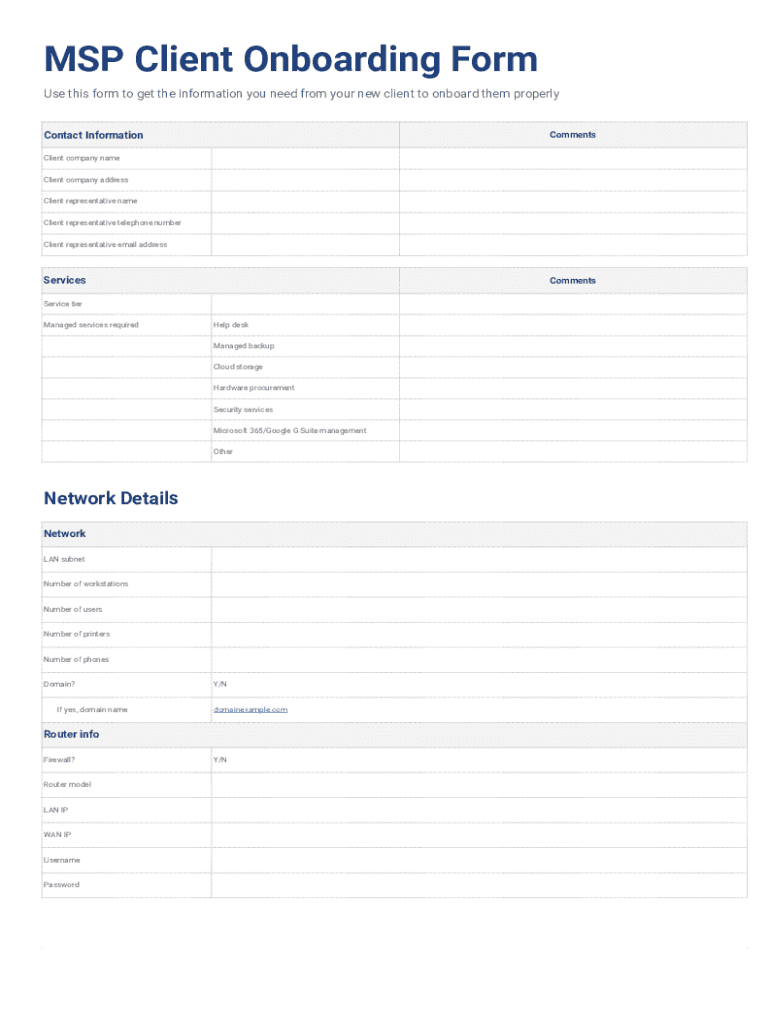
The MSP Client Onboarding Form is a crucial document used by Managed Service Providers (MSPs) to gather essential information from new clients. This form typically collects details such as the client's business name, contact information, and specific service requirements. By standardizing the onboarding process, the MSP ensures that all necessary data is captured efficiently, allowing for a smoother transition into the service relationship.
How to use the MSP Client Onboarding Form
Utilizing the MSP Client Onboarding Form involves several straightforward steps. First, the form should be distributed to the client, either electronically or in print. Clients fill out the form with accurate information regarding their business operations, technical needs, and any existing infrastructure. Once completed, the form can be submitted back to the MSP for review. This process helps the MSP tailor their services to meet the specific needs of the client effectively.
Key elements of the MSP Client Onboarding Form
Several key elements are essential in the MSP Client Onboarding Form. These include:
- Client Information: Basic details such as the client's name, address, and contact numbers.
- Service Requirements: A section where clients specify the services they are interested in, such as IT support, cloud services, or cybersecurity.
- Technical Environment: Information about the client's current technology setup, including hardware and software in use.
- Billing Information: Details regarding payment methods and billing preferences.
Steps to complete the MSP Client Onboarding Form
Completing the MSP Client Onboarding Form involves a few key steps:
- Access the Form: Obtain the form from the MSP, either through email or their website.
- Fill in Required Information: Provide accurate and comprehensive details in all sections of the form.
- Review the Information: Double-check the entries for accuracy to avoid any delays in service initiation.
- Submit the Form: Return the completed form to the MSP via the specified submission method.
Legal use of the MSP Client Onboarding Form
The MSP Client Onboarding Form serves not only as a tool for information gathering but also has legal implications. It establishes a formal agreement between the client and the MSP, outlining the services to be provided and the responsibilities of both parties. Proper completion and retention of this form can help protect both the client and the MSP in case of disputes or misunderstandings regarding service expectations.
Form Submission Methods
Clients can submit the MSP Client Onboarding Form through various methods, ensuring flexibility and convenience. Common submission methods include:
- Online Submission: Clients can fill out and submit the form digitally via the MSP's secure portal.
- Email Submission: Completed forms can be sent directly to the MSP's designated email address.
- In-Person Submission: Clients may also choose to deliver the form in person during a scheduled meeting.
Create this form in 5 minutes or less
Create this form in 5 minutes!
How to create an eSignature for the msp client onboarding form
How to create an electronic signature for a PDF online
How to create an electronic signature for a PDF in Google Chrome
How to create an e-signature for signing PDFs in Gmail
How to create an e-signature right from your smartphone
How to create an e-signature for a PDF on iOS
How to create an e-signature for a PDF on Android
People also ask
-
What is an MSP Client Onboarding Form?
An MSP Client Onboarding Form is a digital document designed to streamline the onboarding process for Managed Service Providers (MSPs). It allows businesses to collect essential client information efficiently, ensuring a smooth transition and setup. Utilizing airSlate SignNow, you can create and customize your MSP Client Onboarding Form to meet your specific needs.
-
How does airSlate SignNow enhance the MSP Client Onboarding Form process?
airSlate SignNow enhances the MSP Client Onboarding Form process by providing an intuitive platform for document creation, signing, and management. With features like templates, automated workflows, and real-time tracking, you can ensure that your onboarding process is both efficient and user-friendly. This ultimately leads to improved client satisfaction and faster onboarding times.
-
What are the pricing options for using airSlate SignNow for MSP Client Onboarding Forms?
airSlate SignNow offers flexible pricing plans tailored to different business needs, including options for small businesses and larger enterprises. Each plan provides access to features that can enhance your MSP Client Onboarding Form process. You can choose a plan that fits your budget while still benefiting from a powerful eSignature solution.
-
Can I integrate airSlate SignNow with other tools for my MSP Client Onboarding Form?
Yes, airSlate SignNow supports integrations with various third-party applications, allowing you to connect your MSP Client Onboarding Form with tools you already use. This includes CRM systems, project management software, and more. These integrations help streamline your workflow and improve overall efficiency.
-
What are the benefits of using an MSP Client Onboarding Form?
Using an MSP Client Onboarding Form offers numerous benefits, including reduced paperwork, faster processing times, and improved accuracy in client data collection. With airSlate SignNow, you can automate repetitive tasks and ensure that all necessary information is captured correctly. This leads to a more organized onboarding experience for both your team and your clients.
-
Is it easy to customize the MSP Client Onboarding Form in airSlate SignNow?
Absolutely! airSlate SignNow provides an easy-to-use interface that allows you to customize your MSP Client Onboarding Form according to your specific requirements. You can add fields, adjust layouts, and incorporate branding elements to create a form that reflects your business identity. Customization ensures that the form meets your unique onboarding needs.
-
How secure is the information collected through the MSP Client Onboarding Form?
Security is a top priority for airSlate SignNow. The platform employs advanced encryption and compliance measures to protect the information collected through your MSP Client Onboarding Form. This ensures that sensitive client data remains confidential and secure throughout the onboarding process.
Get more for MSP Client Onboarding Form
- Missouri regatta permits form
- Application for refund due to excess overpayment of stl amortization form
- Wholesale buyers order pdf form
- Eb exam past papers for management assistant grade 3 form
- Paul harris fellow certificate template form
- Application form 15889395
- Bank information document
- Gtr form 61 gujarat pdf download
Find out other MSP Client Onboarding Form
- How Can I Electronic signature Wyoming Real Estate Quitclaim Deed
- Electronic signature Virginia Police Quitclaim Deed Secure
- How Can I Electronic signature West Virginia Police Letter Of Intent
- How Do I Electronic signature Washington Police Promissory Note Template
- Electronic signature Wisconsin Police Permission Slip Free
- Electronic signature Minnesota Sports Limited Power Of Attorney Fast
- Electronic signature Alabama Courts Quitclaim Deed Safe
- How To Electronic signature Alabama Courts Stock Certificate
- Can I Electronic signature Arkansas Courts Operating Agreement
- How Do I Electronic signature Georgia Courts Agreement
- Electronic signature Georgia Courts Rental Application Fast
- How Can I Electronic signature Hawaii Courts Purchase Order Template
- How To Electronic signature Indiana Courts Cease And Desist Letter
- How Can I Electronic signature New Jersey Sports Purchase Order Template
- How Can I Electronic signature Louisiana Courts LLC Operating Agreement
- How To Electronic signature Massachusetts Courts Stock Certificate
- Electronic signature Mississippi Courts Promissory Note Template Online
- Electronic signature Montana Courts Promissory Note Template Now
- Electronic signature Montana Courts Limited Power Of Attorney Safe
- Electronic signature Oklahoma Sports Contract Safe