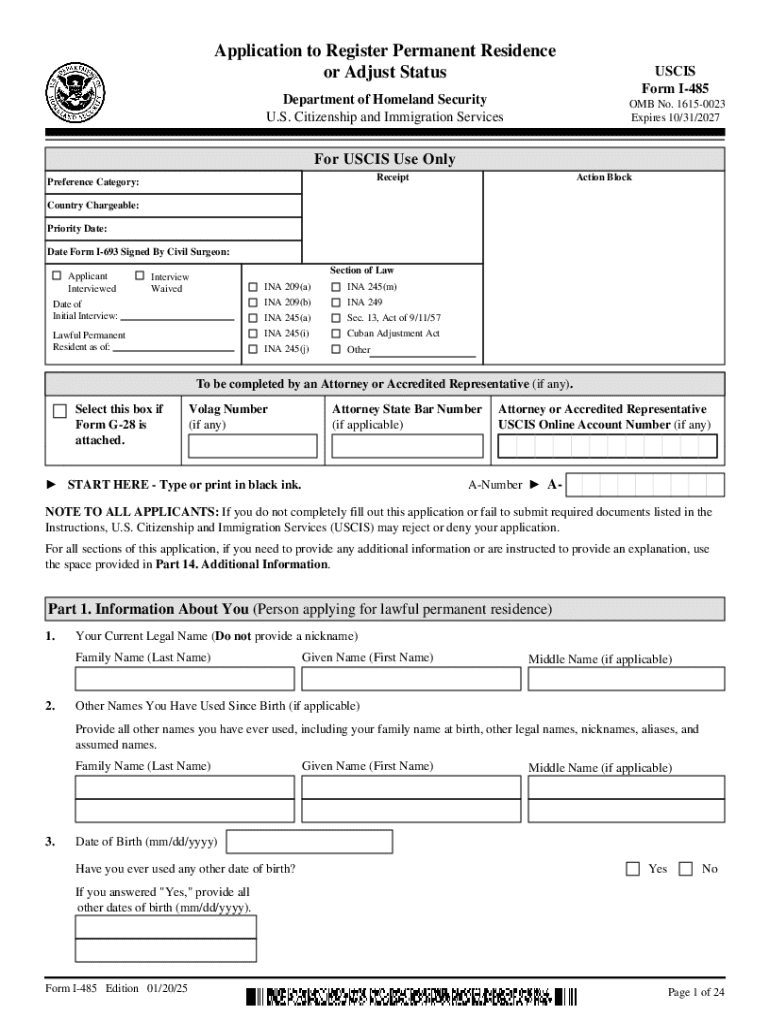
Form I 485, Application to Register Permanent Residence or Adjust Status


What is the Form I-485, Application To Register Permanent Residence Or Adjust Status
The Form I-485 is a crucial document used by individuals in the United States who wish to apply for permanent residency or adjust their immigration status. This application allows eligible applicants to transition from a temporary visa status to that of a lawful permanent resident. The form is primarily utilized by individuals who are already in the U.S. and wish to change their status based on family, employment, or other qualifying categories.
Steps to Complete the Form I-485, Application To Register Permanent Residence Or Adjust Status
Completing the Form I-485 involves several important steps to ensure accuracy and compliance with U.S. immigration regulations. Start by gathering all necessary documentation, including proof of eligibility, identity, and any supporting evidence relevant to your application. Carefully fill out each section of the form, ensuring that all information is accurate and complete. After completion, review the form for any errors before signing and dating it. Finally, submit the form along with the required fees and supporting documents to the appropriate USCIS address.
Required Documents
When submitting the Form I-485, applicants must include several essential documents to support their application. These typically include:
- A copy of the applicant's passport and any previous immigration documents.
- Two recent passport-sized photographs.
- Proof of eligibility for adjustment of status, such as an approved immigrant petition.
- Evidence of lawful entry into the U.S., like a copy of the I-94 arrival/departure record.
- Any applicable civil documents, such as birth certificates or marriage licenses.
Eligibility Criteria
Eligibility for filing the Form I-485 varies based on the applicant's specific circumstances. Generally, individuals must be in the U.S. legally and meet certain criteria, such as being an immediate relative of a U.S. citizen, having an approved employment-based petition, or qualifying under special categories like asylum or refugee status. It is essential to review the specific eligibility requirements outlined by USCIS to determine if you qualify for adjustment of status.
Form Submission Methods
The Form I-485 can be submitted through various methods, including online and by mail. For online submissions, applicants can use the USCIS website to complete and file the form electronically. Alternatively, those who prefer to submit by mail must print the completed form and send it to the designated USCIS address, ensuring that it is sent via a secure method with tracking capabilities. In-person submissions at a USCIS office may also be possible in certain cases, but this typically requires an appointment.
Application Process & Approval Time
The application process for the Form I-485 involves several stages, including initial submission, biometrics appointment, and an interview, if required. After submitting the form, applicants will receive a receipt notice from USCIS, confirming that their application is being processed. The approval time can vary widely based on the applicant's specific situation, the service center handling the case, and current processing times. Generally, applicants can expect a wait time ranging from several months to over a year.
Handy tips for filling out Form I 485, Application To Register Permanent Residence Or Adjust Status online
Quick steps to complete and e-sign Form I 485, Application To Register Permanent Residence Or Adjust Status online:
- Use Get Form or simply click on the template preview to open it in the editor.
- Start completing the fillable fields and carefully type in required information.
- Use the Cross or Check marks in the top toolbar to select your answers in the list boxes.
- Utilize the Circle icon for other Yes/No questions.
- Look through the document several times and make sure that all fields are completed with the correct information.
- Insert the current Date with the corresponding icon.
- Add a legally-binding e-signature. Go to Sign -> Add New Signature and select the option you prefer: type, draw, or upload an image of your handwritten signature and place it where you need it.
- Finish filling out the form with the Done button.
- Download your copy, save it to the cloud, print it, or share it right from the editor.
- Check the Help section and contact our Support team if you run into any troubles when using the editor.
We understand how straining completing documents can be. Gain access to a HIPAA and GDPR compliant platform for optimum simpleness. Use signNow to electronically sign and send Form I 485, Application To Register Permanent Residence Or Adjust Status for collecting e-signatures.
Create this form in 5 minutes or less
Create this form in 5 minutes!
How to create an eSignature for the form i 485 application to register permanent residence or adjust status
How to create an electronic signature for a PDF online
How to create an electronic signature for a PDF in Google Chrome
How to create an e-signature for signing PDFs in Gmail
How to create an e-signature right from your smartphone
How to create an e-signature for a PDF on iOS
How to create an e-signature for a PDF on Android
People also ask
-
What is the Form I 485, Application To Register Permanent Residence Or Adjust Status?
The Form I 485, Application To Register Permanent Residence Or Adjust Status, is a crucial document for individuals seeking to become lawful permanent residents in the United States. This form allows applicants to adjust their immigration status while remaining in the country. Completing this form accurately is essential for a successful application process.
-
How can airSlate SignNow assist with the Form I 485 application process?
airSlate SignNow provides a streamlined platform for completing and eSigning the Form I 485, Application To Register Permanent Residence Or Adjust Status. Our user-friendly interface simplifies document management, ensuring that all necessary fields are filled out correctly. This helps reduce errors and speeds up the submission process.
-
What are the pricing options for using airSlate SignNow for Form I 485?
airSlate SignNow offers flexible pricing plans tailored to meet the needs of individuals and businesses handling the Form I 485, Application To Register Permanent Residence Or Adjust Status. Our plans are cost-effective, allowing users to choose the best option based on their document management needs. Visit our pricing page for detailed information on available plans.
-
Are there any features specifically designed for the Form I 485 application?
Yes, airSlate SignNow includes features specifically designed to assist with the Form I 485, Application To Register Permanent Residence Or Adjust Status. These features include customizable templates, secure eSigning, and document tracking, ensuring that your application is completed efficiently and securely. This enhances the overall user experience during the application process.
-
What benefits does airSlate SignNow offer for managing the Form I 485?
Using airSlate SignNow for the Form I 485, Application To Register Permanent Residence Or Adjust Status, offers numerous benefits, including increased efficiency and reduced paperwork. Our platform allows for easy collaboration with legal advisors and family members, ensuring that all necessary information is gathered. Additionally, our secure storage options keep your documents safe and accessible.
-
Can I integrate airSlate SignNow with other applications for my Form I 485 process?
Absolutely! airSlate SignNow supports integrations with various applications that can enhance your experience while managing the Form I 485, Application To Register Permanent Residence Or Adjust Status. This includes CRM systems, cloud storage services, and other productivity tools, allowing for a seamless workflow and better document management.
-
Is airSlate SignNow compliant with legal standards for the Form I 485?
Yes, airSlate SignNow is fully compliant with legal standards for electronic signatures and document management, including those required for the Form I 485, Application To Register Permanent Residence Or Adjust Status. Our platform adheres to industry regulations, ensuring that your documents are legally binding and secure. This compliance gives users peace of mind during the application process.
Get more for Form I 485, Application To Register Permanent Residence Or Adjust Status
- Lists request form minnesota board of chiropractic examiners mn chiroboard mn
- Puerto rico form as 2745 a 2003
- Tax form 4810 rev 0110 2010
- Request for copy of the return estate or gift certificate form
- Puerto rico exemption form 2011
- Form as 2801
- Exhibit k departamento de hacienda gobierno de puerto rico hacienda gobierno form
- Puerto rico form 48040f
Find out other Form I 485, Application To Register Permanent Residence Or Adjust Status
- eSignature Oklahoma Insurance Warranty Deed Safe
- eSignature Pennsylvania High Tech Bill Of Lading Safe
- eSignature Washington Insurance Work Order Fast
- eSignature Utah High Tech Warranty Deed Free
- How Do I eSignature Utah High Tech Warranty Deed
- eSignature Arkansas Legal Affidavit Of Heirship Fast
- Help Me With eSignature Colorado Legal Cease And Desist Letter
- How To eSignature Connecticut Legal LLC Operating Agreement
- eSignature Connecticut Legal Residential Lease Agreement Mobile
- eSignature West Virginia High Tech Lease Agreement Template Myself
- How To eSignature Delaware Legal Residential Lease Agreement
- eSignature Florida Legal Letter Of Intent Easy
- Can I eSignature Wyoming High Tech Residential Lease Agreement
- eSignature Connecticut Lawers Promissory Note Template Safe
- eSignature Hawaii Legal Separation Agreement Now
- How To eSignature Indiana Legal Lease Agreement
- eSignature Kansas Legal Separation Agreement Online
- eSignature Georgia Lawers Cease And Desist Letter Now
- eSignature Maryland Legal Quitclaim Deed Free
- eSignature Maryland Legal Lease Agreement Template Simple