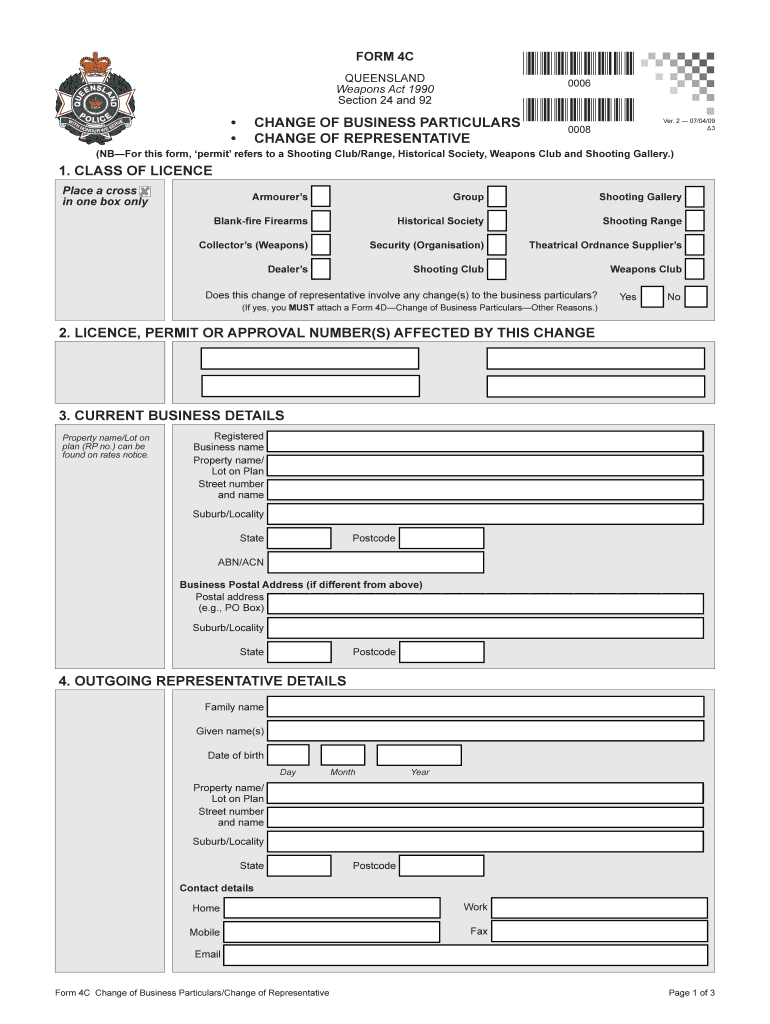
Form 4C4D Change of Business Particulars Queensland


What is the Form 4C4D Change Of Business Particulars Queensland
The Form 4C4D Change Of Business Particulars is a legal document used in Queensland, Australia, to notify the relevant authorities about changes in the particulars of a business. This form is essential for maintaining accurate business records and ensuring compliance with local regulations. It typically covers changes such as the business name, address, ownership structure, or contact details. Properly completing this form helps prevent legal complications and ensures that the business remains in good standing with regulatory bodies.
How to use the Form 4C4D Change Of Business Particulars Queensland
Using the Form 4C4D Change Of Business Particulars involves several straightforward steps. First, gather all necessary information regarding the changes you wish to report. This includes current and new business details. Next, fill out the form accurately, ensuring that all sections are completed. Once the form is filled, it must be submitted to the appropriate authority, either online or by mail. Keeping a copy of the submitted form for your records is advisable, as it serves as proof of the changes made.
Steps to complete the Form 4C4D Change Of Business Particulars Queensland
Completing the Form 4C4D requires careful attention to detail. Follow these steps:
- Obtain the latest version of the Form 4C4D from the official source.
- Read the instructions provided with the form to understand the requirements.
- Fill in your business details, including the current particulars and the changes being made.
- Double-check all information for accuracy and completeness.
- Sign and date the form where required.
- Submit the completed form via the designated method, either electronically or by mail.
Key elements of the Form 4C4D Change Of Business Particulars Queensland
The Form 4C4D includes several key elements that must be addressed for it to be valid. These elements typically include:
- Business name and registration number.
- Details of the changes being reported, such as new address or ownership.
- Contact information for the business owner or authorized representative.
- Signature of the person completing the form, confirming the accuracy of the information.
Required Documents
When submitting the Form 4C4D Change Of Business Particulars, certain documents may be required to support your application. These may include:
- Proof of identity for the business owner or authorized representative.
- Any legal documents that substantiate the changes being reported, such as partnership agreements or ownership transfer documents.
- Previous versions of the business registration if applicable.
Form Submission Methods
The Form 4C4D can be submitted through various methods, ensuring flexibility for business owners. Common submission methods include:
- Online submission through the official business registration portal.
- Mailing a printed copy of the form to the appropriate regulatory office.
- In-person submission at designated government offices.
Create this form in 5 minutes or less
Create this form in 5 minutes!
How to create an eSignature for the form 4c4d change of business particulars queensland
How to create an electronic signature for a PDF online
How to create an electronic signature for a PDF in Google Chrome
How to create an e-signature for signing PDFs in Gmail
How to create an e-signature right from your smartphone
How to create an e-signature for a PDF on iOS
How to create an e-signature for a PDF on Android
People also ask
-
What is the Form 4C4D Change Of Business Particulars Queensland?
The Form 4C4D Change Of Business Particulars Queensland is a legal document required for businesses in Queensland to update their registered details. This form ensures that the Queensland government has the most current information about your business, which is essential for compliance and communication.
-
How can airSlate SignNow help with the Form 4C4D Change Of Business Particulars Queensland?
airSlate SignNow simplifies the process of completing and submitting the Form 4C4D Change Of Business Particulars Queensland. With our user-friendly platform, you can easily fill out the form, eSign it, and send it directly to the relevant authorities, saving you time and effort.
-
What are the pricing options for using airSlate SignNow for the Form 4C4D Change Of Business Particulars Queensland?
airSlate SignNow offers flexible pricing plans that cater to different business needs. Whether you are a small business or a large enterprise, you can choose a plan that fits your budget while ensuring you have access to all the necessary features for managing the Form 4C4D Change Of Business Particulars Queensland.
-
Are there any features specifically designed for the Form 4C4D Change Of Business Particulars Queensland?
Yes, airSlate SignNow includes features tailored for the Form 4C4D Change Of Business Particulars Queensland, such as customizable templates and automated workflows. These features streamline the process, making it easier to manage your business particulars efficiently.
-
What benefits does airSlate SignNow provide for businesses filing the Form 4C4D Change Of Business Particulars Queensland?
Using airSlate SignNow for the Form 4C4D Change Of Business Particulars Queensland offers numerous benefits, including increased efficiency, reduced paperwork, and enhanced security. Our platform ensures that your documents are safely stored and easily accessible whenever you need them.
-
Can I integrate airSlate SignNow with other tools for managing the Form 4C4D Change Of Business Particulars Queensland?
Absolutely! airSlate SignNow integrates seamlessly with various business tools and applications, allowing you to manage the Form 4C4D Change Of Business Particulars Queensland alongside your existing workflows. This integration helps streamline your processes and enhances productivity.
-
Is it easy to eSign the Form 4C4D Change Of Business Particulars Queensland using airSlate SignNow?
Yes, eSigning the Form 4C4D Change Of Business Particulars Queensland with airSlate SignNow is incredibly easy. Our intuitive interface allows you to sign documents electronically in just a few clicks, ensuring a quick and hassle-free experience.
Get more for Form 4C4D Change Of Business Particulars Queensland
- 1 backflow preventer inspection and field test report form
- Www facebook comgeneva county solid wastegeneva county solid waste postsfacebook form
- Cep 1 form
- Journal ad template form
- Azalea trail maid homeschool application moffett road christian mobilemrcs form
- Iep process cvf form
- Pdf gadsden city high school transcript request form
- Dangerous dog registration form and
Find out other Form 4C4D Change Of Business Particulars Queensland
- eSignature Maine Sports Contract Safe
- eSignature New York Police NDA Now
- eSignature North Carolina Police Claim Secure
- eSignature New York Police Notice To Quit Free
- eSignature North Dakota Real Estate Quitclaim Deed Later
- eSignature Minnesota Sports Rental Lease Agreement Free
- eSignature Minnesota Sports Promissory Note Template Fast
- eSignature Minnesota Sports Forbearance Agreement Online
- eSignature Oklahoma Real Estate Business Plan Template Free
- eSignature South Dakota Police Limited Power Of Attorney Online
- How To eSignature West Virginia Police POA
- eSignature Rhode Island Real Estate Letter Of Intent Free
- eSignature Rhode Island Real Estate Business Letter Template Later
- eSignature South Dakota Real Estate Lease Termination Letter Simple
- eSignature Tennessee Real Estate Cease And Desist Letter Myself
- How To eSignature New Mexico Sports Executive Summary Template
- Can I eSignature Utah Real Estate Operating Agreement
- eSignature Vermont Real Estate Warranty Deed Online
- eSignature Vermont Real Estate Operating Agreement Online
- eSignature Utah Real Estate Emergency Contact Form Safe