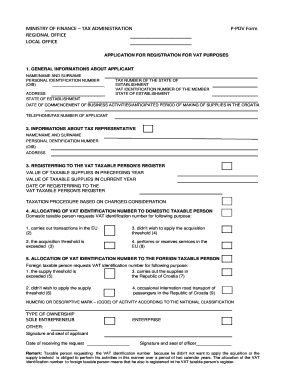
MINISTRY of FINANCE TAX ADMINISTRATION P PDV Form 2015


What is the MINISTRY OF FINANCE TAX ADMINISTRATION P PDV Form
The MINISTRY OF FINANCE TAX ADMINISTRATION P PDV Form is a crucial document used for tax administration purposes. It is specifically designed to facilitate the reporting of value-added tax (VAT) obligations by businesses and individuals. This form helps ensure compliance with tax regulations and provides the necessary information to the tax authorities. Understanding its purpose is essential for accurate tax reporting and avoiding potential penalties.
How to use the MINISTRY OF FINANCE TAX ADMINISTRATION P PDV Form
Using the MINISTRY OF FINANCE TAX ADMINISTRATION P PDV Form involves several steps. First, gather all relevant financial documents, including sales records and previous tax filings. Next, fill out the form accurately, ensuring that all sections are completed. It is important to double-check the figures for accuracy. Once the form is completed, it can be submitted according to the specified filing methods, which may include online submission, mailing, or in-person delivery to the tax office.
Steps to complete the MINISTRY OF FINANCE TAX ADMINISTRATION P PDV Form
Completing the MINISTRY OF FINANCE TAX ADMINISTRATION P PDV Form requires careful attention to detail. Follow these steps:
- Begin by entering your personal or business information, including name, address, and tax identification number.
- Report your total sales and any exempt sales, ensuring clarity in each category.
- Calculate the total VAT collected and any VAT that can be claimed back.
- Review all entries for accuracy before signing and dating the form.
Required Documents
To successfully complete the MINISTRY OF FINANCE TAX ADMINISTRATION P PDV Form, certain documents are required. These typically include:
- Sales invoices and receipts.
- Previous tax returns, if applicable.
- Any documentation supporting VAT exemptions or deductions.
- Proof of payment for any taxes owed.
Form Submission Methods
The MINISTRY OF FINANCE TAX ADMINISTRATION P PDV Form can be submitted through various methods, depending on the regulations set by the tax authority. Common submission methods include:
- Online submission through the official tax administration portal.
- Mailing the completed form to the designated tax office.
- In-person submission at local tax offices during business hours.
Penalties for Non-Compliance
Failure to comply with the requirements of the MINISTRY OF FINANCE TAX ADMINISTRATION P PDV Form can result in significant penalties. These may include:
- Fines for late submission or inaccurate reporting.
- Interest on unpaid taxes.
- Potential legal action for repeated non-compliance.
Create this form in 5 minutes or less
Find and fill out the correct ministry of finance tax administration p pdv form
Create this form in 5 minutes!
How to create an eSignature for the ministry of finance tax administration p pdv form
How to create an electronic signature for a PDF online
How to create an electronic signature for a PDF in Google Chrome
How to create an e-signature for signing PDFs in Gmail
How to create an e-signature right from your smartphone
How to create an e-signature for a PDF on iOS
How to create an e-signature for a PDF on Android
People also ask
-
What is the MINISTRY OF FINANCE TAX ADMINISTRATION P PDV Form?
The MINISTRY OF FINANCE TAX ADMINISTRATION P PDV Form is a document required for tax reporting in certain jurisdictions. It helps businesses comply with tax regulations by providing necessary financial information. Using airSlate SignNow, you can easily create, send, and eSign this form to ensure timely submission.
-
How can airSlate SignNow help with the MINISTRY OF FINANCE TAX ADMINISTRATION P PDV Form?
airSlate SignNow streamlines the process of completing the MINISTRY OF FINANCE TAX ADMINISTRATION P PDV Form by allowing users to fill out and eSign documents electronically. This reduces the time spent on paperwork and minimizes errors. Our platform ensures that your forms are securely stored and easily accessible.
-
Is there a cost associated with using airSlate SignNow for the MINISTRY OF FINANCE TAX ADMINISTRATION P PDV Form?
Yes, airSlate SignNow offers various pricing plans to accommodate different business needs. Each plan provides access to features that simplify the completion of the MINISTRY OF FINANCE TAX ADMINISTRATION P PDV Form. You can choose a plan that best fits your budget and requirements.
-
What features does airSlate SignNow offer for the MINISTRY OF FINANCE TAX ADMINISTRATION P PDV Form?
airSlate SignNow includes features such as customizable templates, electronic signatures, and document tracking. These tools make it easier to manage the MINISTRY OF FINANCE TAX ADMINISTRATION P PDV Form efficiently. Additionally, our platform supports collaboration, allowing multiple users to work on the form simultaneously.
-
Can I integrate airSlate SignNow with other software for the MINISTRY OF FINANCE TAX ADMINISTRATION P PDV Form?
Absolutely! airSlate SignNow offers integrations with various software applications, enhancing your workflow for the MINISTRY OF FINANCE TAX ADMINISTRATION P PDV Form. You can connect with tools like CRM systems, accounting software, and cloud storage services to streamline your document management process.
-
What are the benefits of using airSlate SignNow for the MINISTRY OF FINANCE TAX ADMINISTRATION P PDV Form?
Using airSlate SignNow for the MINISTRY OF FINANCE TAX ADMINISTRATION P PDV Form provides numerous benefits, including increased efficiency, reduced paperwork, and enhanced security. Our platform ensures that your documents are signed and stored securely, helping you maintain compliance with tax regulations. Additionally, the ease of use allows for quick onboarding of team members.
-
How secure is airSlate SignNow when handling the MINISTRY OF FINANCE TAX ADMINISTRATION P PDV Form?
airSlate SignNow prioritizes security and compliance, employing advanced encryption and authentication measures. When handling the MINISTRY OF FINANCE TAX ADMINISTRATION P PDV Form, your data is protected against unauthorized access. We adhere to industry standards to ensure that your sensitive information remains confidential.
Get more for MINISTRY OF FINANCE TAX ADMINISTRATION P PDV Form
- On death tod deed saclaworg form
- The cannabis party membership application form 5 10 20
- Cdl temporary permit practice test 1x great lakes truck driving form
- Criminal history verification form portland public schools pps k12 or
- Driver education supply request form dl 396a
- Food service employee evaluation form 428553616
- Renaltab ii form
- Police department 880 tennent ave pinole ca financing form
Find out other MINISTRY OF FINANCE TAX ADMINISTRATION P PDV Form
- How Do I eSignature Texas Real Estate Document
- How Can I eSignature Colorado Courts PDF
- Can I eSignature Louisiana Courts Document
- How To Electronic signature Arkansas Banking Document
- How Do I Electronic signature California Banking Form
- How Do I eSignature Michigan Courts Document
- Can I eSignature Missouri Courts Document
- How Can I Electronic signature Delaware Banking PDF
- Can I Electronic signature Hawaii Banking Document
- Can I eSignature North Carolina Courts Presentation
- Can I eSignature Oklahoma Courts Word
- How To Electronic signature Alabama Business Operations Form
- Help Me With Electronic signature Alabama Car Dealer Presentation
- How Can I Electronic signature California Car Dealer PDF
- How Can I Electronic signature California Car Dealer Document
- How Can I Electronic signature Colorado Car Dealer Form
- How To Electronic signature Florida Car Dealer Word
- How Do I Electronic signature Florida Car Dealer Document
- Help Me With Electronic signature Florida Car Dealer Presentation
- Can I Electronic signature Georgia Car Dealer PDF