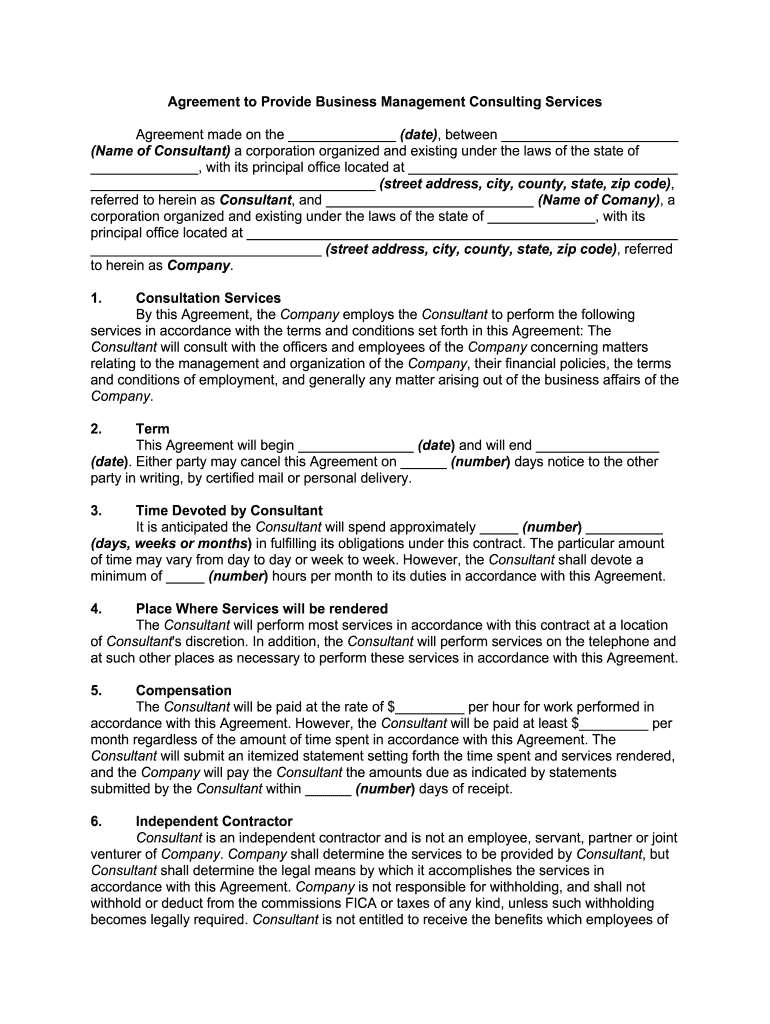
Business Management Consulting Services Form


What is the business consultant agreement?
A business consultant agreement is a legally binding document that outlines the terms and conditions between a consultant and a client. This agreement details the scope of work, payment terms, confidentiality clauses, and the duration of the engagement. It serves to protect both parties by clearly defining expectations and responsibilities. The agreement is essential for ensuring that both the consultant and the client have a mutual understanding of the project objectives and deliverables.
Key elements of the business consultant agreement
Several key elements should be included in a business consultant agreement to ensure clarity and legal protection. These elements include:
- Scope of Work: A detailed description of the services the consultant will provide.
- Compensation: Information on how and when the consultant will be paid, including any expenses that may be reimbursed.
- Duration: The timeframe for the engagement, including start and end dates.
- Confidentiality: Provisions to protect sensitive information shared during the consulting process.
- Termination Clause: Conditions under which either party can terminate the agreement.
- Dispute Resolution: Procedures for handling disagreements that may arise during the engagement.
Steps to complete the business consultant agreement
Completing a business consultant agreement involves several important steps to ensure that it is thorough and legally sound:
- Define the scope of work clearly, specifying the tasks and deliverables expected from the consultant.
- Discuss and agree upon compensation, including payment methods and timelines.
- Draft the agreement, incorporating all key elements and ensuring legal compliance.
- Review the document with legal counsel if necessary, to confirm its validity.
- Both parties should sign the agreement, either physically or electronically, to make it legally binding.
Legal use of the business consultant agreement
For a business consultant agreement to be legally enforceable, it must comply with relevant laws and regulations. In the United States, electronic signatures are recognized under the ESIGN Act and UETA, allowing agreements to be signed digitally. It is essential to ensure that both parties consent to the terms and that the agreement is executed in good faith. Additionally, retaining a copy of the signed agreement is vital for future reference and to provide evidence of the terms agreed upon.
Examples of using the business consultant agreement
Business consultant agreements can be utilized in various scenarios, including:
- A marketing consultant hired to develop a brand strategy for a new product launch.
- A financial consultant engaged to provide advice on investment strategies for a small business.
- A management consultant working with a company to improve operational efficiency.
In each case, the agreement serves to formalize the relationship and outline the expectations for both parties involved.
Who issues the business consultant agreement?
The business consultant agreement can be drafted by either the consultant or the client, depending on the circumstances. Typically, the consultant may provide a template based on their standard practices, which can then be customized to fit the specific engagement. It is advisable for both parties to review the agreement thoroughly and negotiate any terms before signing to ensure mutual understanding and agreement.
Quick guide on how to complete business management consulting services
Effortlessly prepare Business Management Consulting Services on any device
The management of online documents has gained signNow popularity among both organizations and individuals. It offers an excellent eco-friendly alternative to traditional printed and signed documents, allowing you to access the correct form and securely store it online. airSlate SignNow equips you with all the tools needed to create, edit, and electronically sign your documents swiftly and without delays. Handle Business Management Consulting Services on any device using the airSlate SignNow apps for Android or iOS and enhance any document-related process today.
Edit and electronically sign Business Management Consulting Services with ease
- Obtain Business Management Consulting Services and click on Get Form to begin.
- Utilize the tools we provide to complete your form.
- Emphasize pertinent sections of your documents or obscure sensitive information with tools specifically designed for that purpose by airSlate SignNow.
- Create your signature using the Sign tool, which takes mere seconds and carries the same legal validity as a conventional wet ink signature.
- Review the information and click on the Done button to save your modifications.
- Choose your preferred method to send your form, whether by email, SMS, or invitation link, or download it to your computer.
Eliminate concerns about lost or misplaced files, tedious form searches, or mistakes that necessitate printing new document copies. airSlate SignNow addresses your document management needs in just a few clicks from any device of your choice. Edit and electronically sign Business Management Consulting Services and ensure effective communication at every stage of your form preparation process with airSlate SignNow.
Create this form in 5 minutes or less
Create this form in 5 minutes!
How to create an eSignature for the business management consulting services
How to generate an electronic signature for the Business Management Consulting Services in the online mode
How to generate an electronic signature for your Business Management Consulting Services in Google Chrome
How to generate an eSignature for putting it on the Business Management Consulting Services in Gmail
How to make an eSignature for the Business Management Consulting Services from your smartphone
How to generate an electronic signature for the Business Management Consulting Services on iOS devices
How to generate an eSignature for the Business Management Consulting Services on Android OS
People also ask
-
What are Business Management Consulting Services?
Business Management Consulting Services are professional advisory services that help organizations improve their performance and efficiency. These services encompass a range of areas including strategy, operations, and organizational structure, enabling businesses to streamline processes and achieve their goals more effectively.
-
How can airSlate SignNow enhance Business Management Consulting Services?
airSlate SignNow enhances Business Management Consulting Services by providing a user-friendly platform for document management, electronic signatures, and workflow automation. This allows consulting firms to streamline their processes, reduce turnaround times, and focus more on delivering high-quality consulting solutions to their clients.
-
What features does airSlate SignNow offer for business consulting firms?
airSlate SignNow offers features such as secure eSignature capabilities, customizable document templates, and integration with various business tools. These features are designed to simplify document workflows and enhance collaboration, making it easier for consulting firms to manage client interactions and contracts efficiently.
-
What are the benefits of using airSlate SignNow for Business Management Consulting Services?
Using airSlate SignNow for Business Management Consulting Services provides numerous benefits, including improved efficiency, reduced operational costs, and enhanced client satisfaction. The platform’s intuitive design allows for quick document processing and signature collection, enabling consulting firms to deliver timely results to their clients.
-
How does pricing work for airSlate SignNow's services?
airSlate SignNow offers flexible pricing plans tailored to the needs of businesses, including those in Business Management Consulting Services. Pricing is based on the number of users and features required, ensuring that firms can find a plan that aligns with their budget and operational requirements.
-
Can airSlate SignNow integrate with other tools I use for Business Management Consulting?
Yes, airSlate SignNow seamlessly integrates with various tools commonly used in Business Management Consulting Services, such as CRM systems, project management software, and cloud storage solutions. This integration capability allows consulting firms to maintain a cohesive workflow and manage all aspects of their operations efficiently.
-
Is airSlate SignNow secure for handling sensitive consulting documents?
Absolutely, airSlate SignNow prioritizes security for all documents processed through its platform. With features like encryption, secure cloud storage, and compliance with industry standards, businesses can confidently use airSlate SignNow for their Business Management Consulting Services without worrying about data bsignNowes or unauthorized access.
Get more for Business Management Consulting Services
Find out other Business Management Consulting Services
- How To Integrate Sign in Banking
- How To Use Sign in Banking
- Help Me With Use Sign in Banking
- Can I Use Sign in Banking
- How Do I Install Sign in Banking
- How To Add Sign in Banking
- How Do I Add Sign in Banking
- How Can I Add Sign in Banking
- Can I Add Sign in Banking
- Help Me With Set Up Sign in Government
- How To Integrate eSign in Banking
- How To Use eSign in Banking
- How To Install eSign in Banking
- How To Add eSign in Banking
- How To Set Up eSign in Banking
- How To Save eSign in Banking
- How To Implement eSign in Banking
- How To Set Up eSign in Construction
- How To Integrate eSign in Doctors
- How To Use eSign in Doctors