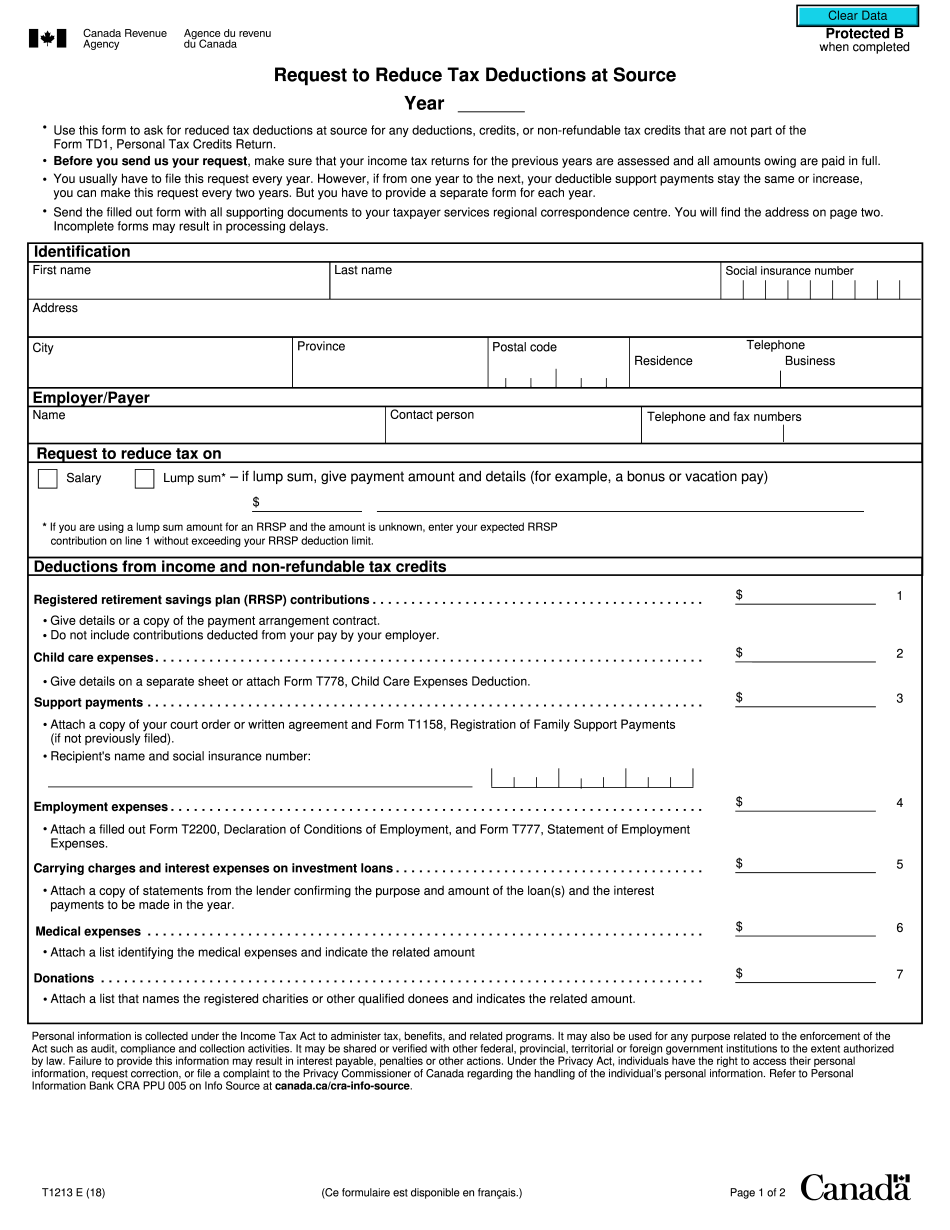
T1213 2018


What is the T1213
The T1213 form, officially known as the Request to Reduce Tax at Source, is a document issued by the Canada Revenue Agency (CRA). It is primarily used by individuals who wish to reduce the amount of tax withheld from their income, particularly in cases involving retiring allowances or contributions to a Registered Retirement Savings Plan (RRSP). By submitting this form, taxpayers can request that their employer or payer deduct a lower amount of tax from their payments, allowing them to retain more of their income throughout the year.
How to use the T1213
To effectively use the T1213 form, individuals must first complete the necessary sections accurately. This includes providing personal information, such as name, address, and social insurance number. Taxpayers should also indicate the specific reasons for requesting a reduction in tax withholding. Once the form is completed, it should be submitted to the CRA for approval. After receiving confirmation, the taxpayer can present the approved form to their employer or payer, who will then adjust the tax deductions accordingly.
Steps to complete the T1213
Completing the T1213 form involves several key steps:
- Gather Information: Collect all necessary personal and financial information, including your social insurance number and details about your income sources.
- Fill Out the Form: Accurately complete all sections of the T1213 form, ensuring that all information is correct and up to date.
- Submit to CRA: Send the completed form to the CRA for review. This can typically be done by mail or through an online submission portal.
- Receive Approval: Wait for the CRA to process your request and send back an approval notice.
- Provide to Employer: Once approved, give the T1213 form to your employer or payer to adjust your tax deductions accordingly.
Eligibility Criteria
To be eligible to submit the T1213 form, individuals must meet specific criteria set by the CRA. Generally, this includes being a resident of Canada and having income that qualifies for a reduction in tax withholding. Common scenarios include receiving a retiring allowance or making contributions to an RRSP. It is important for taxpayers to review the eligibility requirements carefully to ensure they qualify before submitting the form.
Required Documents
When submitting the T1213 form, taxpayers may need to provide additional documentation to support their request. This can include:
- Proof of income, such as pay stubs or tax returns.
- Documentation of RRSP contributions, if applicable.
- Any relevant correspondence from the CRA regarding previous tax deductions.
Having these documents ready can facilitate a smoother application process and help ensure that the request is processed efficiently.
Form Submission Methods
The T1213 form can be submitted to the CRA through various methods. Taxpayers can choose to send the completed form by mail or, in some cases, use online submission options available through the CRA's website. It is important to check the CRA's guidelines for the most current submission methods and to ensure that the form is sent to the correct address to avoid delays in processing.
Legal use of the T1213
The T1213 form is legally recognized as a valid request for reducing tax at source, provided it is completed and submitted according to CRA guidelines. It is essential for taxpayers to ensure that all information is accurate and truthful, as any discrepancies may lead to penalties or denial of the request. Understanding the legal implications of using the T1213 form can help individuals navigate the tax system more effectively and avoid potential issues with the CRA.
Quick guide on how to complete t1213
Complete T1213 effortlessly on any device
Digital document management has become increasingly favored by companies and individuals. It offers an ideal environmentally friendly alternative to traditional printed and signed paperwork, enabling you to locate the correct form and securely store it online. airSlate SignNow provides you with all the tools necessary to create, modify, and eSign your documents promptly without delays. Handle T1213 on any device using airSlate SignNow's Android or iOS applications and enhance any document-focused process today.
How to adjust and eSign T1213 with ease
- Locate T1213 and click on Get Form to begin.
- Use the tools we offer to fill out your document.
- Emphasize important sections of the documents or obscure sensitive information with tools that airSlate SignNow provides specifically for that purpose.
- Generate your eSignature using the Sign tool, which takes mere seconds and carries the same legal authority as a conventional wet ink signature.
- Review the information and click on the Done button to save your changes.
- Choose how you want to share your form, via email, SMS, or invite link, or download it to your computer.
Say goodbye to lost or mislaid documents, tedious form searching, or mistakes that require printing new document copies. airSlate SignNow fulfills all your document management needs in just a few clicks from any device you prefer. Adjust and eSign T1213 and ensure excellent communication at every stage of your form preparation process with airSlate SignNow.
Create this form in 5 minutes or less
Find and fill out the correct t1213
Create this form in 5 minutes!
How to create an eSignature for the t1213
How to create an eSignature for your T1213 in the online mode
How to make an electronic signature for your T1213 in Chrome
How to generate an electronic signature for signing the T1213 in Gmail
How to create an electronic signature for the T1213 straight from your mobile device
How to make an electronic signature for the T1213 on iOS
How to generate an eSignature for the T1213 on Android
People also ask
-
What is the T1213 form and how does airSlate SignNow support it?
The T1213 form is a tax-related document used in Canada for requesting a reduction in tax deductions at source. With airSlate SignNow, you can easily create, send, and eSign T1213 forms securely and efficiently. Our platform streamlines the entire process, ensuring you can focus on your business rather than paperwork.
-
How much does it cost to use airSlate SignNow for T1213 forms?
airSlate SignNow offers competitive pricing plans that cater to various business needs, starting from a free trial to affordable monthly subscriptions. You can use our platform to manage T1213 forms without breaking your budget. Check our pricing page for more details on plans that fit your requirements.
-
What features does airSlate SignNow offer for managing T1213 documents?
airSlate SignNow includes a range of features for managing T1213 documents, such as customizable templates, bulk sending, and real-time tracking. These tools enhance your document workflow, making it easier to handle T1213 forms efficiently. Our user-friendly interface ensures a smooth experience for all users.
-
Is airSlate SignNow secure for signing and storing T1213 forms?
Yes, airSlate SignNow prioritizes security and ensures that all T1213 forms are encrypted and stored safely. We comply with industry standards, including GDPR and HIPAA, so you can confidently eSign and manage your sensitive documents without worry. Your data's security is our top priority.
-
Can I integrate airSlate SignNow with other tools for T1213 processing?
Absolutely! airSlate SignNow integrates seamlessly with various applications like Google Drive, Salesforce, and more, making it easy to manage T1213 forms alongside your existing tools. This integration capability enhances your workflow efficiency, allowing you to automate processes related to T1213 documents.
-
What are the benefits of using airSlate SignNow for T1213 forms?
Using airSlate SignNow for your T1213 forms offers numerous benefits, including faster turnaround times, enhanced collaboration, and reduced paper waste. Our platform simplifies the eSigning process, ensuring you can focus on what matters most—your business. Experience the convenience of managing T1213 forms digitally.
-
Is there customer support available for using airSlate SignNow with T1213 forms?
Yes, airSlate SignNow provides robust customer support to assist you with any inquiries related to T1213 forms. Our support team is available via chat, email, and phone to ensure you receive the help you need quickly. We strive to make your experience seamless and productive.
Get more for T1213
- Suitability v security opm form
- Verification of a military retirees service in non wartime form
- Accessible formnet visualfill
- Npfc user reference guide united states coast guard form
- Standard form 1098 schedule of canceled or gsa
- Important disclosure verabank form
- Using ssnvs social security form
- Claim for unpaid compensation of deceased civilian opm form
Find out other T1213
- How Can I Electronic signature Texas Car Dealer Document
- How Do I Electronic signature West Virginia Banking Document
- How To Electronic signature Washington Car Dealer Document
- Can I Electronic signature West Virginia Car Dealer Document
- How Do I Electronic signature West Virginia Car Dealer Form
- How Can I Electronic signature Wisconsin Car Dealer PDF
- How Can I Electronic signature Wisconsin Car Dealer Form
- How Do I Electronic signature Montana Business Operations Presentation
- How To Electronic signature Alabama Charity Form
- How To Electronic signature Arkansas Construction Word
- How Do I Electronic signature Arkansas Construction Document
- Can I Electronic signature Delaware Construction PDF
- How Can I Electronic signature Ohio Business Operations Document
- How Do I Electronic signature Iowa Construction Document
- How Can I Electronic signature South Carolina Charity PDF
- How Can I Electronic signature Oklahoma Doctors Document
- How Can I Electronic signature Alabama Finance & Tax Accounting Document
- How To Electronic signature Delaware Government Document
- Help Me With Electronic signature Indiana Education PDF
- How To Electronic signature Connecticut Government Document