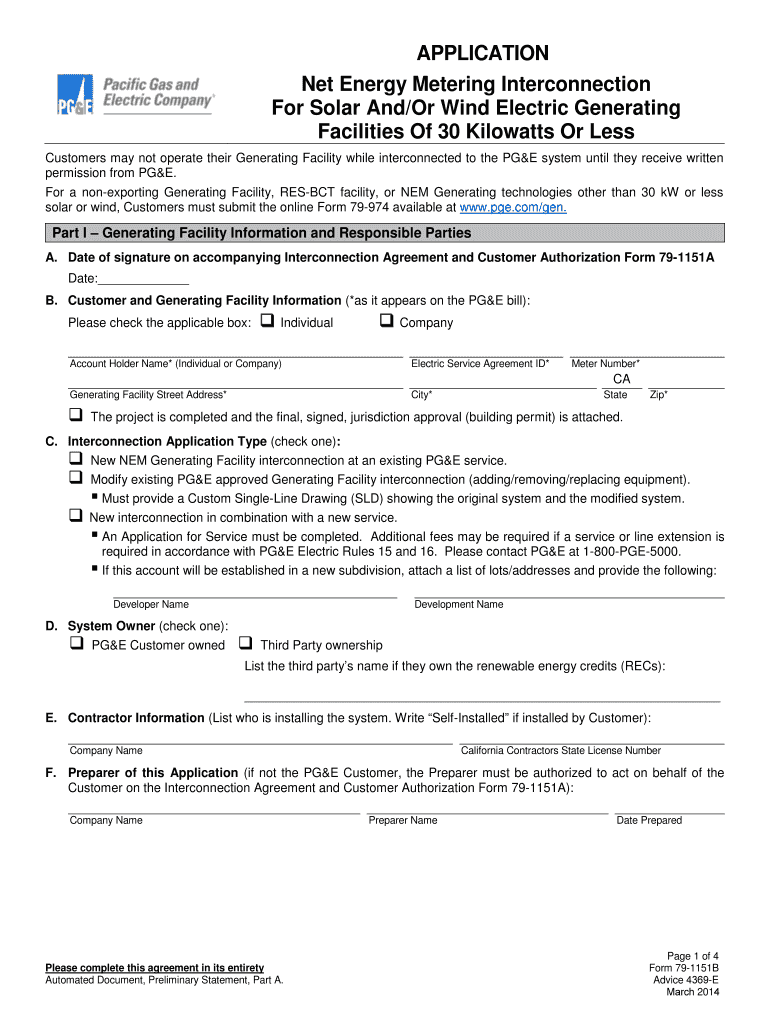
Application 79 1151B Pacific Gas and Electric Company 2014


What is the Application 79 1151B Pacific Gas And Electric Company
The Application 79 1151B is a specific form used by the Pacific Gas and Electric Company (PG&E) for various purposes related to utility services. This application may be required for new service requests, modifications to existing services, or specific programs offered by PG&E. Understanding the purpose of this application is essential for customers to ensure they provide the necessary information accurately and completely.
How to use the Application 79 1151B Pacific Gas And Electric Company
Using the Application 79 1151B involves several steps to ensure that all required information is accurately filled out. Customers should first review the instructions provided with the form, which outline the necessary details needed for completion. It is important to gather any supporting documents that may be required, such as identification or proof of residence, to accompany the application. Once completed, the application can be submitted according to the specified methods, which may include online submission or mailing it directly to PG&E.
Steps to complete the Application 79 1151B Pacific Gas And Electric Company
Completing the Application 79 1151B requires careful attention to detail. Here are the steps to follow:
- Download the form from the official PG&E website or obtain a physical copy.
- Read through the entire application to understand the requirements.
- Fill in personal information accurately, including name, address, and contact details.
- Provide any additional information requested, such as service type or account details.
- Attach any required documentation that supports your application.
- Review the completed application for accuracy before submission.
Legal use of the Application 79 1151B Pacific Gas And Electric Company
The Application 79 1151B is legally binding once it is completed and submitted according to PG&E's guidelines. It is important to ensure that all information provided is truthful and accurate, as any discrepancies may lead to delays or denial of service. The application serves as a formal request for utility services and must comply with relevant regulations governing utility providers in the United States.
Eligibility Criteria
Eligibility for submitting the Application 79 1151B typically depends on several factors, including the type of service requested and the applicant's residency status. Generally, applicants must be legal residents of the area served by PG&E and may need to provide identification or proof of ownership or tenancy for the property in question. Specific programs or services may have additional eligibility requirements that should be reviewed prior to application.
Application Process & Approval Time
The application process for the Application 79 1151B involves submission to PG&E, after which the utility company will review the application. The approval time can vary based on the complexity of the request and the volume of applications being processed. Typically, customers can expect a response within a few business days, but it may take longer for more complex requests or if additional information is needed. It is advisable to follow up with PG&E if there is no response within the expected timeframe.
Quick guide on how to complete application 79 1151b pacific gas and electric company
Prepare Application 79 1151B Pacific Gas And Electric Company effortlessly on any device
Online document management has gained traction among businesses and individuals. It offers an ideal sustainable substitute for conventional printed and signed documents, as you can locate the necessary form and securely save it online. airSlate SignNow provides you with all the tools you need to create, modify, and eSign your documents swiftly without any obstacles. Manage Application 79 1151B Pacific Gas And Electric Company on any device with airSlate SignNow's Android or iOS applications and enhance any document-driven task today.
The easiest way to edit and eSign Application 79 1151B Pacific Gas And Electric Company without effort
- Locate Application 79 1151B Pacific Gas And Electric Company and click on Get Form to begin.
- Use the tools we provide to complete your form.
- Emphasize important sections of the documents or redact sensitive information with tools that airSlate SignNow offers specifically for this purpose.
- Create your eSignature using the Sign tool, which takes mere seconds and holds the same legal validity as a traditional ink signature.
- Review all the details and then click the Done button to save your modifications.
- Select how you want to send your form, via email, SMS, or invitation link, or download it to your computer.
Eliminate concerns about lost or misplaced files, tedious form navigation, or mistakes that necessitate printing new document copies. airSlate SignNow meets your document management needs in just a few clicks from any device of your preference. Edit and eSign Application 79 1151B Pacific Gas And Electric Company and ensure excellent communication at every stage of your form preparation process with airSlate SignNow.
Create this form in 5 minutes or less
Find and fill out the correct application 79 1151b pacific gas and electric company
Create this form in 5 minutes!
How to create an eSignature for the application 79 1151b pacific gas and electric company
How to generate an electronic signature for a PDF file in the online mode
How to generate an electronic signature for a PDF file in Chrome
The way to create an electronic signature for putting it on PDFs in Gmail
The best way to generate an electronic signature right from your smartphone
How to make an eSignature for a PDF file on iOS devices
The best way to generate an electronic signature for a PDF on Android
People also ask
-
What is Application 79 1151B from Pacific Gas And Electric Company?
Application 79 1151B is a specific form required by Pacific Gas And Electric Company for certain utility-related applications. This application helps streamline the processes related to service requests, ensuring that customers meet PG&E's requirements efficiently.
-
How can airSlate SignNow assist with completing Application 79 1151B?
With airSlate SignNow, you can easily fill out and eSign Application 79 1151B electronically. This process simplifies document management and ensures that your submission to Pacific Gas And Electric Company is both secure and compliant.
-
Is there a cost associated with using airSlate SignNow for Application 79 1151B?
Yes, airSlate SignNow offers various pricing plans to cater to different business needs. The cost-effective solution ensures that you can manage Application 79 1151B and other documents without breaking your budget.
-
What features does airSlate SignNow provide for Application 79 1151B?
airSlate SignNow offers a range of features, including customizable templates, secure eSigning, and document tracking for Application 79 1151B. These tools help ensure that your application is processed quickly and efficiently.
-
Can I integrate airSlate SignNow with other tools for managing Application 79 1151B?
Absolutely! airSlate SignNow integrates seamlessly with various business applications, allowing you to manage Application 79 1151B alongside your existing tools. This integration enhances productivity and simplifies your workflow.
-
What are the benefits of using airSlate SignNow for Application 79 1151B?
Using airSlate SignNow for Application 79 1151B provides signNow benefits, such as faster processing times, enhanced security, and reduced paperwork. This helps businesses save time and resources while ensuring compliance with PG&E's requirements.
-
How secure is airSlate SignNow when handling Application 79 1151B?
airSlate SignNow prioritizes security, employing advanced encryption and compliance with industry standards to protect documents like Application 79 1151B. Your sensitive information is safeguarded throughout the eSigning process.
Get more for Application 79 1151B Pacific Gas And Electric Company
- Title iv authorization form 389384277
- Substitution request form prior to award of contract build laccd build laccd
- 19 04 23 rfp career and technical education form
- Employment history verification form
- Mary baldwin university form
- Epcc transcripts request form
- Uva financial assistance application form
- Stevens institute study plan form
Find out other Application 79 1151B Pacific Gas And Electric Company
- How To Sign Wyoming Orthodontists Document
- Help Me With Sign Alabama Courts Form
- Help Me With Sign Virginia Police PPT
- How To Sign Colorado Courts Document
- Can I eSign Alabama Banking PPT
- How Can I eSign California Banking PDF
- How To eSign Hawaii Banking PDF
- How Can I eSign Hawaii Banking Document
- How Do I eSign Hawaii Banking Document
- How Do I eSign Hawaii Banking Document
- Help Me With eSign Hawaii Banking Document
- How To eSign Hawaii Banking Document
- Can I eSign Hawaii Banking Presentation
- Can I Sign Iowa Courts Form
- Help Me With eSign Montana Banking Form
- Can I Sign Kentucky Courts Document
- How To eSign New York Banking Word
- Can I eSign South Dakota Banking PPT
- How Can I eSign South Dakota Banking PPT
- How Do I eSign Alaska Car Dealer Form