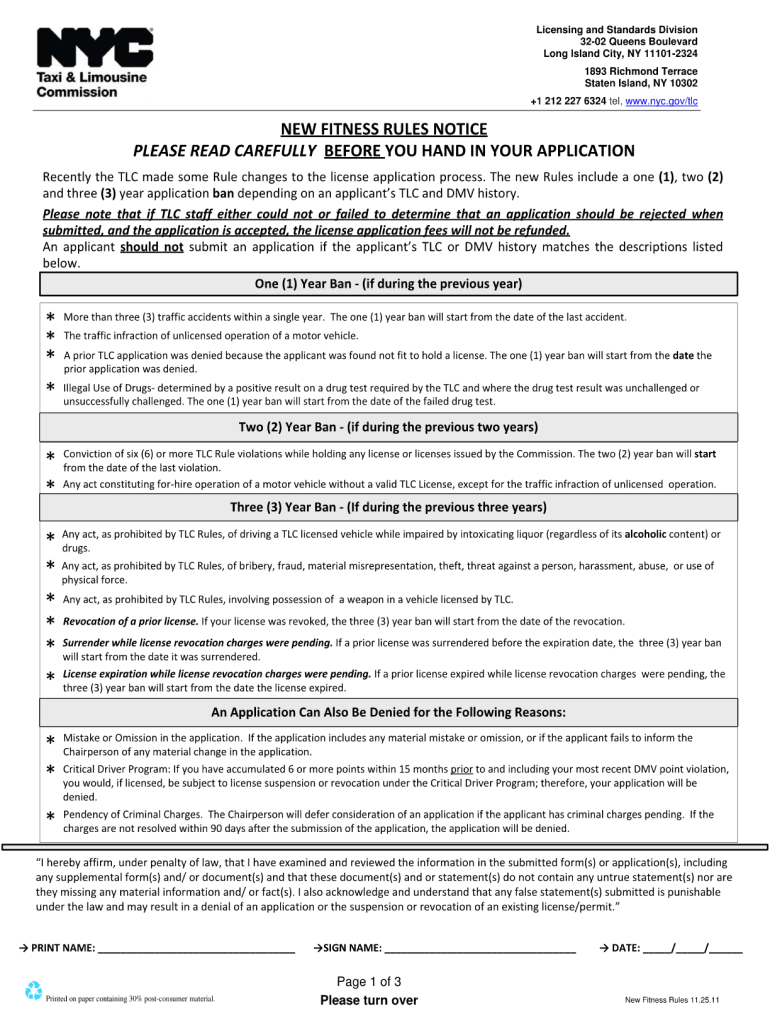
Tlc Application Form 2011-2026


What is the TLC Application Form
The TLC application form is a crucial document used for obtaining a license from the New York City Taxi and Limousine Commission (TLC). This form is essential for individuals seeking to operate as taxi drivers, livery drivers, or other for-hire vehicle operators within the city. The form collects necessary personal information, including identification details, driving history, and vehicle specifications, ensuring that applicants meet the regulatory requirements set forth by the TLC.
Steps to Complete the TLC Application Form
Completing the TLC application form involves several key steps to ensure accuracy and compliance. Begin by gathering all required documents, such as your driver’s license, proof of residency, and any relevant driving records. Next, fill out the form with precise information, ensuring that all fields are completed. After filling out the form, review it for any errors or omissions. Once verified, submit the application either online or in person at a designated TLC office. Be sure to keep a copy of your submitted application for your records.
Required Documents for the TLC Application Form
When applying for a TLC license, several documents are required to support your application. These typically include:
- Valid driver’s license
- Proof of residency (such as a utility bill or lease agreement)
- Driving history report
- Vehicle registration and insurance information (if applicable)
- Background check consent form
Having these documents ready will streamline the application process and help avoid delays.
Legal Use of the TLC Application Form
The TLC application form must be completed accurately to ensure its legal validity. It is essential that all information provided is truthful and verifiable, as any misrepresentation can lead to penalties or denial of the application. The form is governed by local regulations, which mandate compliance with safety and operational standards for all for-hire vehicle services in New York City. Understanding these legal requirements is crucial for successful application and operation.
Form Submission Methods
The TLC application form can be submitted through various methods, catering to the preferences of applicants. The primary submission options include:
- Online submission via the TLC’s official website
- In-person submission at designated TLC offices
- Mail submission, although this method may take longer for processing
Choosing the appropriate submission method can impact the speed of your application processing, so consider your circumstances when deciding how to submit.
Eligibility Criteria for the TLC Application Form
To qualify for a TLC license, applicants must meet specific eligibility criteria. These include:
- Being at least 19 years old
- Possessing a valid New York State driver’s license
- Having a clean driving record with no major violations
- Passing a background check
Meeting these criteria is essential for a successful application and to ensure compliance with TLC regulations.
Quick guide on how to complete application form in tlc
Handle Tlc Application Form from anywhere, at any time
Your daily organizational tasks may necessitate added focus when addressing state-specific business documents. Take back your work hours and reduce the costs associated with paper-based procedures using airSlate SignNow. airSlate SignNow provides you with a range of pre-made business documents, including Tlc Application Form, which you can utilize and share with your business associates. Administer your Tlc Application Form smoothly with powerful editing and electronic signature features and send it directly to your recipients.
Steps to obtain Tlc Application Form in just a few clicks:
- Choose a document pertinent to your state.
- Click Learn More to access the document and ensure its accuracy.
- Click Get Form to start using it.
- Tlc Application Form will immediately open in the editor. No further actions are necessary.
- Utilize airSlate SignNow’s advanced editing tools to complete or modify the document.
- Select the Sign feature to affix your signature and electronically sign your document.
- Once finished, click Done, save the changes, and access your document.
- Send the document via email or text message, or use a link-to-fill option with partners or allow them to download the files.
airSlate SignNow signNowly reduces the time spent managing Tlc Application Form and allows you to locate necessary documents all in one location. A comprehensive library of forms is organized and created to address crucial business operations necessary for your organization. The sophisticated editor minimizes the potential for mistakes, enabling you to easily correct errors and review your documents on any device before sending them out. Begin your free trial today to explore all the advantages of airSlate SignNow for your daily business processes.
Create this form in 5 minutes or less
FAQs
-
How many application forms does a person need to fill out in his/her lifetime?
As many as you want to !
-
How do I fill out an application form to open a bank account?
I want to believe that most banks nowadays have made the process of opening bank account, which used to be cumbersome, less cumbersome. All you need to do is to approach the bank, collect the form, and fill. However if you have any difficulty in filling it, you can always call on one of the banks rep to help you out.
-
How do I fill out the MHT-CET MBA exam application form in detail?
DTE Maharashtra has discharged MHT CET 2018 application form as on January 18 in online mode, can be filled by competitors by following the means said in how to fill MHT CET application frame 2018. Applicants who need to enlist themselves for the selection test should take after the means as given in how to fill MHT CET 2018 application form to maintain a strategic distance from oversights and entire method to go smooth and bother free. The means to fill the application type of MHT CET 2018 incorporates enlistment, filling of required subtle elements, transferring of filtered reports, instalment and affirmation page download. Hopefuls are required to fill the application type of MHT CET 2018 painstakingly to stay away from dismissal by the specialists. It is essential to take the application shape filling methodology of MHT CET genuinely on the grounds that exclusive those hopefuls who will present their structures effectively will get concede cards. Such applicants who will have legitimate MHT CET 2018 concede cards will be permitted to show up in the exam.Competitors must read the means offered underneath to fill and submit MHT CET 2018 application frame in a sorted-out way:Stage 1 – RegistrationApplicants should enrol themselves and give the required details. Candidate should concur whether he or she is an Indian resident or not.Proceeding onward, they will be required to fill the accompanying individual subtle elements:Full name (as showing up on the announcement of characteristics of SSC tenth or proportional exam), Father’s name, Mother’s first name, Last name, Gender, Contact Information, Address for correspondence, House No/Street, Area Name, Town/City , State, District, Pin code, Country, Mobile Number, Primary Email Id (Email will be sent to this email ID), Alternate Email Id (Parent’s Email ID, if accessible), Contact Telephone No. (with STD Code), Permanent Residence in Village/Town/City, Domicile of Maharashtra/Disputed Maharashtra Karnataka Border (MKB)/Outside Maharashtra, Reservation, Category of competitor (Caste perceived in Maharashtra state), Candidates having a place with SC, ST, VJ(A), NT(B), NT(C), NT(D), OBC and SBC classes must have their individual standing authentications, Candidates having a place with Non Creamy Layer (NCL) should create substantial testament upto March 31, 2019, Other DetailsRegardless of whether the candidate has a place with – PWD class or not (competitors qualified who are qualified under this classification ought to have under 40% incapacity), visually impaired, low vision. Orthopedically debilitated and competitors influenced with Cerebral Palsy and Dyslexia, who are not in a situation to compose, can benefit a copyist/author for the MHT-CET 2018 examRegardless of whether the applicant is a J&K vagrant or notReligionOther placement tests that applicant has enrolled for (JEE Main/NEET/None)Add up to Annual Family IncomeAadhaar NumberFinancial balance DetailsName of the record holder according to Bank recordName of the BankName of the Bank BranchKind of Account (Savings/Current)Financial balance NumberIFSC CodePoints of interest of HSC (twelfth/Equivalent Examination)Regardless of whether hopeful has passed/showed up for confirmation in Pharmacy (just for Biology applicants)Place from where hopeful has finished HSC (twelfth)/proportional exam showing up/Passed from school/Jr. School arranged (Maharashtra/Outside Maharashtra)Subtle elements required for MHT-CET 2018Subjects for CET examination (Physics, Chemistry, Mathematics, Biology)Dialect for the exam (English, Marathi, Urdu)Enter secret keyCompetitors should make a secret word (least 8 and most extreme 15 characters and should have one capitalized, one lower case and one numeric)In the wake of entering the secret key, competitors should affirm it. This secret word will be utilized for future logins.Statement by the hopefulApplicants should read the revelation composed and after that tap on “I Agree”Applicants need to enter the security key as gave and after that tap on “Next” catchStage 2 – Confirmation and SubmissionIn the wake of filling the previously mentioned subtle elements, hopefuls will have the capacity to check the data filled and alter certain things in the application frame.Applicants can backpedal and change or alter the accompanying particulars (as noticeable in green shading) before accommodation:Exam focusSubjects pickedDialect of the examIndividual with handicap choiceIn any case, there are particulars (as unmistakable in blue shading) that can’t be altered at this stage once submitted:Father’s nameLast nameDate of birthVersatile numberEmail IDSubsequent to rolling out the improvements, if required, hopefuls should present the shape.Stage 3 – Application number gotApplicants will get a message on the screen in regards to effective enlistment for MHT CET 2018 with their application number. A similar number will be sent to them gave email ID. Competitors can see and check their entered data in this progression.Stage 4 – Edit and Upload photo and markApplicants will have the capacity to alter the points of interest they have filled in the application frame. In any case, regardless they won’t have the capacity to alter their full name, father’s name, last name, date of birth, versatile number and email ID. In the event that candidates would prefer not to alter any points of interest, they can move to the subsequent stage of transferring their photo and mark in the arrangement recommended by the experts.Stage 5 – Uploading photo and markApplicants should transfer their current identification estimate shading photo and mark in the configuration given in the table underneath. On the off chance that, applicants are not ready to transfer the right photographs/marks, they should reload the right records and afterward transfer.Stage 6 – VerificationCompetitors will get a message on their screens with respect to fruitful transferring of photo and mark. They will likewise have the capacity to see a connection saying ” Click here to make payment “. Applicants should tap on the connection to enter the instalment entryway.Stage 7 – Payment gatewayHopefuls will have the capacity to see every one of the subtle elements filled by them alongside their transferred photo and mark on their screens. The application expense sum will likewise be noticeable in this progression, which they should pay in the wake of perusing the revelation. It is to noticed that competitors will have the capacity to change their subjects they are applying for.Applicants will have the capacity to influence application to charge payment through credit/check card, net saving money, plastic (ATM PIN), wallets and then some. They should influence instalment of the application to sum with comfort charge and expense.After instalment of utilisation charge, competitors will have the capacity to see a message on their screen with respect to accomplishment of exchange. Applicants must remove a print from this page.Stage 8 – Acknowledgment pageCompetitors must take a print from the affirmation page and keep it securely for some time later.Hope this Helps!!
-
How do I fill out the IIFT 2018 application form?
Hi!IIFT MBA (IB) Application Form 2018 – The last date to submit the Application Form of IIFT 2018 has been extended. As per the initial notice, the last date to submit the application form was September 08, 2017. However, now the candidates may submit it untill September 15, 2017. The exam date for IIFT 2018 has also been shifted to December 03, 2017. The candidates will only be issued the admit card, if they will submit IIFT application form and fee in the prescribed format. Before filling the IIFT application form, the candidates must check the eligibility criteria because ineligible candidates will not be granted admission. The application fee for candidates is Rs. 1550, however, the candidates belonging to SC/STPWD category only need to pay Rs. 775. Check procedure to submit IIFT Application Form 2018, fee details and more information from the article below.Latest – Last date to submit IIFT application form extended until September 15, 2017.IIFT 2018 Application FormThe application form of IIFT MBA 2018 has only be released online, on http://tedu.iift.ac.in. The candidates must submit it before the laps of the deadline, which can be checked from the table below.Application form released onJuly 25, 2017Last date to submit Application form(for national candidates)September 08, 2017 September 15, 2017Last date to submit the application form(by Foreign National and NRI)February 15, 2018IIFT MBA IB entrance exam will be held onNovember 26, 2017 December 03, 2017IIFT 2018 Application FeeThe candidates should take note of the application fee before submitting the application form. The fee amount is as given below and along with it, the medium to submit the fee are also mentioned.Fee amount for IIFT 2018 Application Form is as given below:General/OBC candidatesRs 1550SC/ST/PH candidatesRs 775Foreign National/NRI/Children of NRI candidatesUS$ 80 (INR Rs. 4500)The medium to submit the application fee of IIFT 2018 is as below:Credit CardsDebit Cards (VISA/Master)Demand Draft (DD)Candidates who will submit the application fee via Demand Draft will be required to submit a DD, in favour of Indian Institute of Foreign Trade, payable at New Delhi.Procedure to Submit IIFT MBA Application Form 2018Thank you & Have a nice day! :)
Create this form in 5 minutes!
How to create an eSignature for the application form in tlc
How to make an eSignature for the Application Form In Tlc in the online mode
How to make an eSignature for your Application Form In Tlc in Google Chrome
How to make an electronic signature for putting it on the Application Form In Tlc in Gmail
How to make an electronic signature for the Application Form In Tlc right from your smart phone
How to generate an electronic signature for the Application Form In Tlc on iOS
How to make an electronic signature for the Application Form In Tlc on Android
People also ask
-
What is the Tlc Application Form and why is it important?
The Tlc Application Form is a critical document required for individuals applying for a Taxi and Limousine Commission license. Completing this form accurately is essential to ensure compliance with local regulations and to facilitate the licensing process. Using airSlate SignNow simplifies the process of filling out and submitting your Tlc Application Form, making it quick and hassle-free.
-
How can airSlate SignNow help me with my Tlc Application Form?
airSlate SignNow offers an easy-to-use platform that allows you to fill out, sign, and send your Tlc Application Form digitally. Our eSignature solution ensures that your application is completed accurately and securely, saving you time and minimizing the potential for errors. Additionally, you can track the status of your application in real-time.
-
Is there a cost associated with using airSlate SignNow for the Tlc Application Form?
Yes, there is a subscription cost associated with using airSlate SignNow, but it is designed to be cost-effective for businesses and individuals alike. The pricing plans vary based on features and usage, allowing you to choose the best option for your needs. By using our platform for your Tlc Application Form, you can also save on printing and mailing expenses.
-
What features does airSlate SignNow offer for managing the Tlc Application Form?
airSlate SignNow provides a variety of features specifically designed to streamline the management of the Tlc Application Form. You can easily fill in fields, add signatures, and upload necessary documents. Our robust templates and customizable workflows further enhance your ability to organize and manage your application process efficiently.
-
Can I integrate airSlate SignNow with other applications while completing the Tlc Application Form?
Absolutely! airSlate SignNow integrates seamlessly with various applications, allowing you to connect your workflow easily. Whether you use CRM software, cloud storage, or project management tools, our integrations ensure that your Tlc Application Form process is smooth and connected to your existing systems.
-
What security measures does airSlate SignNow have in place for the Tlc Application Form?
Security is a top priority at airSlate SignNow. We utilize advanced encryption protocols to protect your Tlc Application Form and other sensitive documents. Additionally, our platform complies with international security standards to ensure that your data remains safe and confidential throughout the signing process.
-
How can I track the progress of my Tlc Application Form with airSlate SignNow?
With airSlate SignNow, you can easily track the progress of your Tlc Application Form in real-time. Our platform provides notifications and status updates, so you always know when your document is viewed, signed, or completed. This feature helps you stay organized and informed throughout the application process.
Get more for Tlc Application Form
- Articles of amendment effective on form
- Temporary assistance for needy families tanf helps families with children meet their basic needs with cash assistance form
- Dh 726 2010 2019 form
- Get and sign sfn 18609 2018 2019 form fill out and sign printable
- Building permit application bf03 form
- Colorado healthcare professional credentials application chcpca word version form
- On friday december 14 2018 governor scott walker signed 2017 wisconsin act 368 form
- Use a pen or pencil form
Find out other Tlc Application Form
- How Can I eSignature New Jersey Police Document
- How Can I eSignature New Jersey Real Estate Word
- Can I eSignature Tennessee Police Form
- How Can I eSignature Vermont Police Presentation
- How Do I eSignature Pennsylvania Real Estate Document
- How Do I eSignature Texas Real Estate Document
- How Can I eSignature Colorado Courts PDF
- Can I eSignature Louisiana Courts Document
- How To Electronic signature Arkansas Banking Document
- How Do I Electronic signature California Banking Form
- How Do I eSignature Michigan Courts Document
- Can I eSignature Missouri Courts Document
- How Can I Electronic signature Delaware Banking PDF
- Can I Electronic signature Hawaii Banking Document
- Can I eSignature North Carolina Courts Presentation
- Can I eSignature Oklahoma Courts Word
- How To Electronic signature Alabama Business Operations Form
- Help Me With Electronic signature Alabama Car Dealer Presentation
- How Can I Electronic signature California Car Dealer PDF
- How Can I Electronic signature California Car Dealer Document