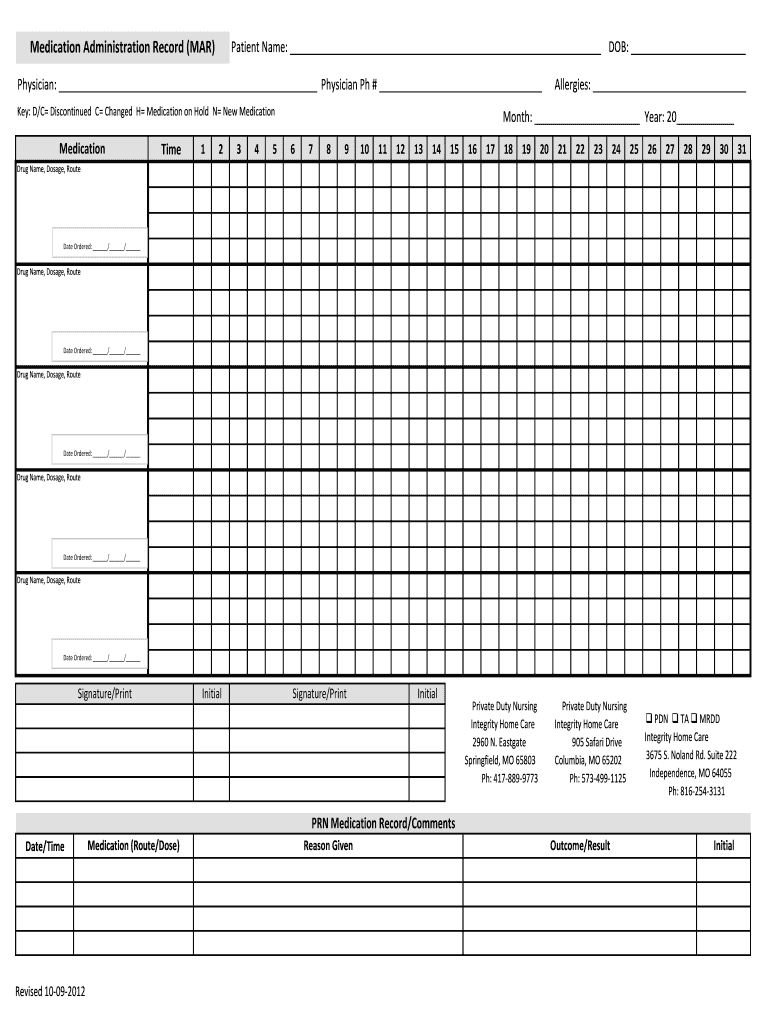
Medication Administration Record MAR Patient Name DOB Physician Physician Ph # Key DC Discontinued C Changed H Medication on Hol 2012-2026


Understanding the Medication Administration Record
The medication administration record (MAR) is a crucial document in healthcare settings. It tracks the administration of medications to patients, ensuring that they receive the correct dosage at the right time. Key components typically included in the MAR are the patient's name, date of birth, physician's details, and medication specifics. This record helps healthcare providers maintain accurate medication histories and supports patient safety by preventing medication errors.
Steps to Complete the Medication Administration Record
Completing the medication administration record involves several clear steps. First, ensure that all patient information, such as name and date of birth, is accurately filled out. Next, list the medications prescribed, including dosages and administration times. It's important to indicate any changes, such as medications that have been discontinued or placed on hold. Finally, document any allergies the patient may have to ensure safety during medication administration.
Legal Use of the Medication Administration Record
The medication administration record is legally binding when completed correctly. To ensure its validity, healthcare providers must adhere to specific regulations governing electronic signatures and documentation. Compliance with laws such as the Electronic Signatures in Global and National Commerce (ESIGN) Act and the Uniform Electronic Transactions Act (UETA) is essential. These laws establish that electronic records and signatures hold the same legal weight as their paper counterparts, provided they meet certain criteria.
Key Elements of the Medication Administration Record
Several key elements must be included in a medication administration record to ensure its effectiveness. These elements include:
- Patient Information: Full name and date of birth.
- Physician Details: Name and contact information of the prescribing physician.
- Medication Information: Names, dosages, and administration times of all medications.
- Allergies: A list of any known allergies to prevent adverse reactions.
- Documentation of Changes: Notes on any medications that have been discontinued or are on hold.
How to Use the Medication Administration Record
Using the medication administration record effectively involves several best practices. Healthcare providers should regularly update the MAR to reflect any changes in medication or patient status. It is also important to review the record before administering any medications to ensure accuracy. Training staff on the proper use of the MAR can enhance compliance and improve patient outcomes.
State-Specific Rules for the Medication Administration Record
Each state may have specific regulations regarding the use of medication administration records. It is essential for healthcare providers to familiarize themselves with their state's laws to ensure compliance. This includes understanding any requirements for documentation, electronic signatures, and patient privacy protections. Staying informed about state-specific rules helps maintain legal and ethical standards in patient care.
Quick guide on how to complete medication administration record mar patient name dob physician physician ph key dc discontinued c changed h medication on hold
Complete Medication Administration Record MAR Patient Name DOB Physician Physician Ph # Key DC Discontinued C Changed H Medication On Hol seamlessly on any device
Web-based document management has become increasingly favored by businesses and individuals alike. It acts as an ideal eco-conscious substitute for traditional printed and signed documents, allowing you to access the appropriate form and securely keep it online. airSlate SignNow equips you with all the resources required to generate, modify, and electronically sign your documents swiftly without delays. Manage Medication Administration Record MAR Patient Name DOB Physician Physician Ph # Key DC Discontinued C Changed H Medication On Hol on any platform with airSlate SignNow's Android or iOS applications and streamline any document-related task today.
How to modify and electronically sign Medication Administration Record MAR Patient Name DOB Physician Physician Ph # Key DC Discontinued C Changed H Medication On Hol effortlessly
- Acquire Medication Administration Record MAR Patient Name DOB Physician Physician Ph # Key DC Discontinued C Changed H Medication On Hol and click on Get Form to commence.
- Utilize the tools available to complete your document.
- Emphasize relevant sections of the documents or obscure sensitive information with tools provided by airSlate SignNow specifically for that purpose.
- Generate your signature using the Sign tool, which takes mere seconds and holds the same legal standing as a conventional wet ink signature.
- Review the details and click on the Done button to save your modifications.
- Choose your preferred method for delivering your form, via email, text message (SMS), or invitation link, or download it to your computer.
Eliminate worries over lost or misplaced documents, tedious form searches, or errors requiring the reproduction of new document copies. airSlate SignNow meets your document management needs in just a few clicks from any device you prefer. Modify and electronically sign Medication Administration Record MAR Patient Name DOB Physician Physician Ph # Key DC Discontinued C Changed H Medication On Hol and ensure excellent communication at any stage of your form preparation process with airSlate SignNow.
Create this form in 5 minutes or less
Create this form in 5 minutes!
How to create an eSignature for the medication administration record mar patient name dob physician physician ph key dc discontinued c changed h medication on hold
How to generate an eSignature for a PDF in the online mode
How to generate an eSignature for a PDF in Chrome
How to create an eSignature for putting it on PDFs in Gmail
The way to make an eSignature right from your smart phone
The best way to create an eSignature for a PDF on iOS devices
The way to make an eSignature for a PDF on Android OS
People also ask
-
What is a Medication Administration Record (MAR)?
A Medication Administration Record (MAR) is a vital document that helps healthcare providers track patient medications. It includes essential details such as the Patient Name, DOB, Physician, and their contact information (Physician Ph #). By maintaining an accurate MAR, medical professionals can ensure the safe administration of medications and monitor changes like DC (discontinued), C (changed), H (on hold), and N (new medications) effectively.
-
How does airSlate SignNow simplify the MAR process?
airSlate SignNow streamlines the Medication Administration Record (MAR) process by allowing healthcare providers to electronically sign and send documents securely. This means that key details like Patient Name, DOB, and medication times (1, 2, 3, 4, 5) can be easily updated and accessed. The platform also supports tracking of allergies and medication history, ensuring comprehensive patient care.
-
Can I integrate airSlate SignNow with other healthcare software?
Yes, airSlate SignNow offers seamless integrations with various healthcare software systems. This allows users to manage the Medication Administration Record (MAR) alongside other patient data, such as allergies and medication schedules. Integrating these systems enhances efficiency and ensures that critical information like Physician Ph # and medication statuses are always up to date.
-
What are the pricing options for airSlate SignNow?
airSlate SignNow provides flexible pricing options tailored to fit different organizational needs. Whether you are a small practice or a large healthcare facility, you can choose a plan that includes features for managing the Medication Administration Record (MAR), patient information, and document eSigning. Contact our sales team for detailed pricing information based on your specific requirements.
-
How secure is the patient information in airSlate SignNow?
Security is a top priority for airSlate SignNow. Our platform utilizes advanced encryption and compliance measures to protect sensitive data, including the Medication Administration Record (MAR) and patient details like names, DOB, and allergies. This ensures that patient information is kept confidential and secure from unauthorized access.
-
What features does airSlate SignNow offer for managing medication administration?
airSlate SignNow provides a range of features designed to manage medication administration effectively. Users can create and customize their Medication Administration Record (MAR) templates to include necessary fields like Patient Name, DOB, and medication times. The system also allows tracking of medication changes, allergies, and enables notifications for timely administration.
-
Can airSlate SignNow help with compliance in medication administration?
Absolutely! airSlate SignNow assists healthcare providers in maintaining compliance with medication administration regulations. By utilizing a digital Medication Administration Record (MAR), you can ensure that all necessary information, such as Physician Ph # and medication statuses (discontinued, changed, on hold, new), is accurately recorded and easily accessible for audits.
Get more for Medication Administration Record MAR Patient Name DOB Physician Physician Ph # Key DC Discontinued C Changed H Medication On Hol
- Agreement for delayed or partial rent payments alabama form
- Tenants maintenance repair request form alabama
- Guaranty attachment to lease for guarantor or cosigner alabama form
- Amendment to lease or rental agreement alabama form
- Warning notice due to complaint from neighbors alabama form
- Lease subordination agreement alabama form
- Apartment rules and regulations alabama form
- Alabama cancellation 497295855 form
Find out other Medication Administration Record MAR Patient Name DOB Physician Physician Ph # Key DC Discontinued C Changed H Medication On Hol
- eSignature Washington Insurance Work Order Fast
- eSignature Utah High Tech Warranty Deed Free
- How Do I eSignature Utah High Tech Warranty Deed
- eSignature Arkansas Legal Affidavit Of Heirship Fast
- Help Me With eSignature Colorado Legal Cease And Desist Letter
- How To eSignature Connecticut Legal LLC Operating Agreement
- eSignature Connecticut Legal Residential Lease Agreement Mobile
- eSignature West Virginia High Tech Lease Agreement Template Myself
- How To eSignature Delaware Legal Residential Lease Agreement
- eSignature Florida Legal Letter Of Intent Easy
- Can I eSignature Wyoming High Tech Residential Lease Agreement
- eSignature Connecticut Lawers Promissory Note Template Safe
- eSignature Hawaii Legal Separation Agreement Now
- How To eSignature Indiana Legal Lease Agreement
- eSignature Kansas Legal Separation Agreement Online
- eSignature Georgia Lawers Cease And Desist Letter Now
- eSignature Maryland Legal Quitclaim Deed Free
- eSignature Maryland Legal Lease Agreement Template Simple
- eSignature North Carolina Legal Cease And Desist Letter Safe
- How Can I eSignature Ohio Legal Stock Certificate