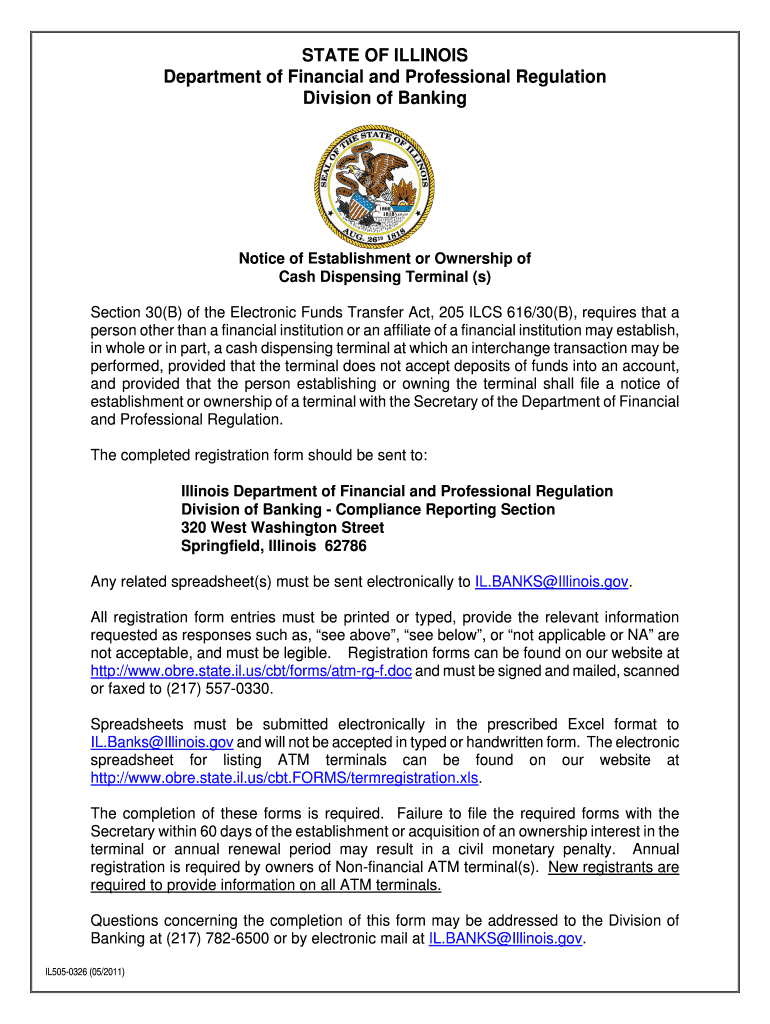
STATE of ILLINOIS Department of Financial and Professional Form


Understanding the Illinois Department of Financial and Professional Regulation
The Illinois Department of Financial and Professional Regulation (IDFPR) is the state agency responsible for regulating various professions and businesses in Illinois. This includes overseeing licensing for healthcare professionals, real estate agents, cosmetologists, and many others. The IDFPR ensures that practitioners meet the necessary qualifications and adhere to state laws, thereby protecting public health and safety. The department also handles complaints and disciplinary actions against licensed professionals, maintaining standards within the industry.
Steps to Use the Illinois Professional Licensing Lookup
Using the Illinois professional licensing lookup is a straightforward process. Follow these steps to access the information you need:
- Visit the IDFPR website.
- Locate the professional licensing lookup tool on the homepage.
- Enter the required information, such as the licensee's name or license number.
- Review the search results to find the relevant professional's licensing status.
- If necessary, click on the licensee's name for more detailed information.
Key Elements of the Illinois Professional Licensing Lookup
The Illinois professional licensing lookup provides essential information about licensed professionals in the state. Key elements include:
- License status (active, expired, or revoked).
- License type and specialty.
- Expiration dates and renewal requirements.
- Disciplinary history, if applicable.
- Contact information for the licensee.
Legal Use of the Illinois Professional Licensing Lookup
The Illinois professional licensing lookup is a legally recognized tool that allows individuals and organizations to verify the credentials of professionals. This verification is critical for ensuring compliance with state regulations and can be used in various contexts, such as hiring decisions or verifying qualifications for legal purposes. The lookup tool adheres to privacy laws, ensuring that personal information is handled appropriately.
Required Documents for Licensing Applications
When applying for a professional license in Illinois, applicants typically need to submit several documents. Commonly required documents include:
- Proof of education or training.
- Identification documents, such as a driver's license or Social Security card.
- Background check results.
- Application fee payment.
- Any additional documentation specific to the profession.
Eligibility Criteria for Illinois Professional Licenses
Eligibility criteria for obtaining a professional license in Illinois vary by profession but generally include:
- Minimum age requirement, typically at least 18 years old.
- Completion of required education or training programs.
- Passing relevant examinations.
- Submission of a complete application with all necessary documents.
- Good moral character, often assessed through background checks.
Quick guide on how to complete state of illinois department of financial and professional
Complete STATE OF ILLINOIS Department Of Financial And Professional effortlessly on any device
Web-based document management has gained popularity among businesses and individuals. It offers an excellent eco-friendly alternative to traditional printed and signed documents, allowing you to obtain the necessary form and securely store it online. airSlate SignNow equips you with all the tools required to create, modify, and eSign your documents swiftly without delays. Administer STATE OF ILLINOIS Department Of Financial And Professional on any device with airSlate SignNow's Android or iOS applications and simplify any document-related process today.
How to modify and eSign STATE OF ILLINOIS Department Of Financial And Professional with ease
- Find STATE OF ILLINOIS Department Of Financial And Professional and click on Get Form to begin.
- Utilize the tools we offer to complete your form.
- Emphasize pertinent sections of your documents or obscure sensitive information with tools that airSlate SignNow offers specifically for this purpose.
- Generate your eSignature using the Sign tool, which only takes seconds and carries the same legal validity as a conventional wet ink signature.
- Verify your information and click on the Done button to save your changes.
- Choose how you wish to send your form, whether by email, text message (SMS), or invite link, or download it to your computer.
Eliminate worries about lost or misplaced documents, tiring form searches, or errors that require reprinting new document copies. airSlate SignNow meets your document management needs in a few clicks from any device of your choice. Modify and eSign STATE OF ILLINOIS Department Of Financial And Professional and ensure excellent communication at any stage of the form preparation process with airSlate SignNow.
Create this form in 5 minutes or less
FAQs
-
What happens to all of the paper forms you fill out for immigration and customs?
Years ago I worked at document management company. There is cool software that can automate aspects of hand-written forms. We had an airport as a customer - they scanned plenty and (as I said before) this was several years ago...On your airport customs forms, the "boxes" that you 'need' to write on - are basically invisible to the scanner - but are used because then us humans will tend to write neater and clearer which make sit easier to recognize with a computer. Any characters with less than X% accuracy based on a recognition engine are flagged and shown as an image zoomed into the particular character so a human operator can then say "that is an "A". This way, you can rapidly go through most forms and output it to say - an SQL database, complete with link to original image of the form you filled in.If you see "black boxes" at three corners of the document - it is likely set up for scanning (they help to identify and orient the page digitally). If there is a unique barcode on the document somewhere I would theorize there is an even higher likelihood of it being scanned - the document is of enough value to be printed individually which costs more, which means it is likely going to be used on the capture side. (I've noticed in the past in Bahamas and some other Caribbean islands they use these sorts of capture mechanisms, but they have far fewer people entering than the US does everyday)The real answer is: it depends. Depending on each country and its policies and procedures. Generally I would be surprised if they scanned and held onto the paper. In the US, they proably file those for a set period of time then destroy them, perhaps mining them for some data about travellers. In the end, I suspect the "paper-to-data capture" likelihood of customs forms ranges somewhere on a spectrum like this:Third world Customs Guy has paper to show he did his job, paper gets thrown out at end of shift. ------> We keep all the papers! everything is scanned as you pass by customs and unique barcodes identify which flight/gate/area the form was handed out at, so we co-ordinate with cameras in the airport and have captured your image. We also know exactly how much vodka you brought into the country. :)
-
How to decide my bank name city and state if filling out a form, if the bank is a national bank?
Somewhere on that form should be a blank for routing number and account number. Those are available from your check and/or your bank statements. If you can't find them, call the bank and ask or go by their office for help with the form. As long as those numbers are entered correctly, any error you make in spelling, location or naming should not influence the eventual deposit into your proper account.
-
How likely is it that an attorney would write and file my health care complaint with the government agency called Illinois Department of Financial and Professional Regulation?
It’s pretty likely if you’re in Illinois, because that department regulates licensed physicians. There’s even a link on their website to submit a complaint about a licensed physician directly. They also regulate nurses, pharmacies, physical therapists, dentists, and veterinarians.
-
How can I fill out Google's intern host matching form to optimize my chances of receiving a match?
I was selected for a summer internship 2016.I tried to be very open while filling the preference form: I choose many products as my favorite products and I said I'm open about the team I want to join.I even was very open in the location and start date to get host matching interviews (I negotiated the start date in the interview until both me and my host were happy.) You could ask your recruiter to review your form (there are very cool and could help you a lot since they have a bigger experience).Do a search on the potential team.Before the interviews, try to find smart question that you are going to ask for the potential host (do a search on the team to find nice and deep questions to impress your host). Prepare well your resume.You are very likely not going to get algorithm/data structure questions like in the first round. It's going to be just some friendly chat if you are lucky. If your potential team is working on something like machine learning, expect that they are going to ask you questions about machine learning, courses related to machine learning you have and relevant experience (projects, internship). Of course you have to study that before the interview. Take as long time as you need if you feel rusty. It takes some time to get ready for the host matching (it's less than the technical interview) but it's worth it of course.
-
How would it play out if part of a state tried to secede to form another state of the Union?
Article 4, Section 3 of the Constitution states:New States may be admitted by the Congress into this Union; but no new State shall be formed or erected within the Jurisdiction of any other State; nor any State be formed by the Junction of two or more States, or Parts of States, without the Consent of the Legislatures of the States concerned as well as of the Congress.This is really not feasible without direct assent from the state being separated from. Both Maine and Kentucky split based on the assent of Massachusetts and Virginia under the Constitution.West Virginia was a wartime ploy, an act that held up due to the acceptance as fact that enough representatives of the state of Virginia showed up at the Wheeling Conventions to justify a state legislature. Lincoln and Congress accepted it, and in 1863, West Virginia was accepted as a state separate from Virginia. In peacetime, this arrangement would never have worked.To get the obstinate California legislature to go along with the notion of several of their prosperous counties just leave is just impossible.
-
How do I fill out the form of DU CIC? I couldn't find the link to fill out the form.
Just register on the admission portal and during registration you will get an option for the entrance based course. Just register there. There is no separate form for DU CIC.
Create this form in 5 minutes!
How to create an eSignature for the state of illinois department of financial and professional
How to make an eSignature for the State Of Illinois Department Of Financial And Professional in the online mode
How to generate an electronic signature for your State Of Illinois Department Of Financial And Professional in Chrome
How to make an eSignature for putting it on the State Of Illinois Department Of Financial And Professional in Gmail
How to make an electronic signature for the State Of Illinois Department Of Financial And Professional from your smart phone
How to make an eSignature for the State Of Illinois Department Of Financial And Professional on iOS devices
How to create an electronic signature for the State Of Illinois Department Of Financial And Professional on Android OS
People also ask
-
What is airSlate SignNow and how does it relate to the STATE OF ILLINOIS Department Of Financial And Professional?
airSlate SignNow is an electronic signature solution that enables businesses to send and eSign documents efficiently. For organizations working with the STATE OF ILLINOIS Department Of Financial And Professional, airSlate SignNow provides a secure platform that meets regulatory compliance, streamlining document workflows and ensuring timely approvals.
-
How much does airSlate SignNow cost for users in Illinois?
Pricing for airSlate SignNow varies based on the plan chosen, which can cater to different needs, including those of the STATE OF ILLINOIS Department Of Financial And Professional. We offer flexible pricing options that provide excellent value for businesses looking to improve their document management processes while remaining compliant with Illinois regulations.
-
What features does airSlate SignNow offer for the STATE OF ILLINOIS Department Of Financial And Professional?
airSlate SignNow includes a range of features designed to enhance document management for the STATE OF ILLINOIS Department Of Financial And Professional. Key features include customizable templates, advanced security measures, and seamless integrations with popular applications, making it easier for professionals to handle legal and financial documents efficiently.
-
Is airSlate SignNow compliant with Illinois regulations?
Yes, airSlate SignNow is compliant with all relevant regulations, including those set forth by the STATE OF ILLINOIS Department Of Financial And Professional. Our platform adheres to the Electronic Signatures in Global and National Commerce (ESIGN) Act and the Uniform Electronic Transactions Act (UETA), ensuring that all eSignatures are legally binding.
-
Can airSlate SignNow integrate with other tools used by the STATE OF ILLINOIS Department Of Financial And Professional?
Absolutely! airSlate SignNow offers integrations with various tools and software commonly used by the STATE OF ILLINOIS Department Of Financial And Professional, such as CRM systems, cloud storage services, and productivity applications. This allows for a seamless workflow and enhances overall efficiency.
-
What are the benefits of using airSlate SignNow for document signing in Illinois?
Using airSlate SignNow for document signing in Illinois offers numerous benefits, especially for the STATE OF ILLINOIS Department Of Financial And Professional. It increases efficiency by reducing the time spent on manual processes, enhances security with robust encryption, and facilitates easier document tracking and management.
-
How secure is airSlate SignNow for sensitive documents in Illinois?
Security is a top priority for airSlate SignNow, especially when handling sensitive documents for the STATE OF ILLINOIS Department Of Financial And Professional. Our platform employs advanced encryption protocols, multi-factor authentication, and complies with industry standards to ensure your documents are safe and secure at all times.
Get more for STATE OF ILLINOIS Department Of Financial And Professional
Find out other STATE OF ILLINOIS Department Of Financial And Professional
- How Do I Sign Idaho Disclosure Notice
- Sign Illinois Drug Testing Consent Agreement Online
- Sign Louisiana Applicant Appraisal Form Evaluation Free
- Sign Maine Applicant Appraisal Form Questions Secure
- Sign Wisconsin Applicant Appraisal Form Questions Easy
- Sign Alabama Deed of Indemnity Template Later
- Sign Alabama Articles of Incorporation Template Secure
- Can I Sign Nevada Articles of Incorporation Template
- Sign New Mexico Articles of Incorporation Template Safe
- Sign Ohio Articles of Incorporation Template Simple
- Can I Sign New Jersey Retainer Agreement Template
- Sign West Virginia Retainer Agreement Template Myself
- Sign Montana Car Lease Agreement Template Fast
- Can I Sign Illinois Attorney Approval
- Sign Mississippi Limited Power of Attorney Later
- How Can I Sign Kansas Attorney Approval
- How Do I Sign New Mexico Limited Power of Attorney
- Sign Pennsylvania Car Lease Agreement Template Simple
- Sign Rhode Island Car Lease Agreement Template Fast
- Sign Indiana Unlimited Power of Attorney Online