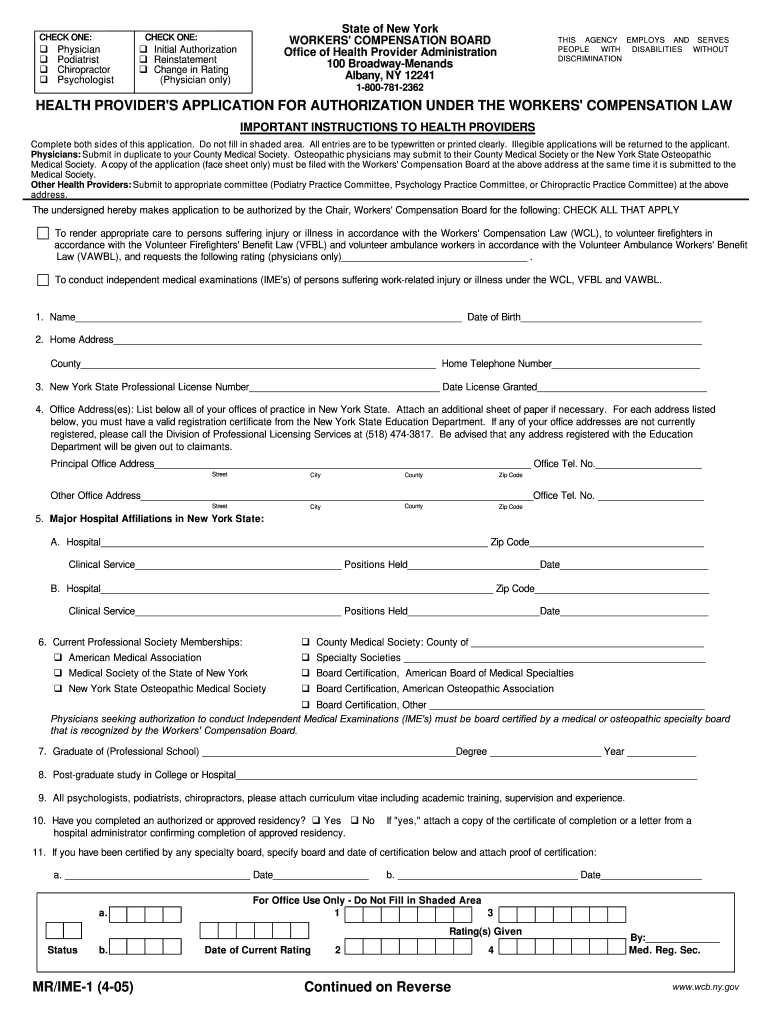
Ime 1 2005


What is the IME 1 Form?
The IME 1 form, officially known as the Workers' Compensation Application MR IME 1 Form, is a document used in the United States for filing workers' compensation claims. This form is essential for employees seeking benefits due to work-related injuries or illnesses. It serves as a formal request for medical evaluation and treatment, ensuring that the injured worker receives the necessary support and compensation. Understanding the purpose and requirements of the IME 1 form is crucial for both employees and employers involved in the workers' compensation process.
Steps to Complete the IME 1 Form
Completing the IME 1 form accurately is vital for a successful workers' compensation claim. Here are the key steps to follow:
- Gather necessary information, including personal details, employment information, and specifics about the injury.
- Ensure you have all required documentation, such as medical records and incident reports.
- Fill out the form carefully, making sure to provide accurate and complete information in each section.
- Review the form for any errors or missing information before submission.
- Sign and date the form to validate your application.
Legal Use of the IME 1 Form
The IME 1 form must be used in compliance with state laws and regulations governing workers' compensation. It is important to understand the legal implications of submitting this form, as it serves as a formal request for benefits. Any inaccuracies or omissions can lead to delays or denials of claims. Additionally, the form must be submitted within specific timeframes to ensure eligibility for benefits. Familiarizing yourself with these legal requirements can help protect your rights and ensure a smoother claims process.
Key Elements of the IME 1 Form
The IME 1 form contains several key elements that are critical for processing a workers' compensation claim. These elements include:
- Personal Information: Details such as the claimant's name, address, and contact information.
- Employer Information: Name and address of the employer, along with the nature of the business.
- Incident Details: A description of the injury or illness, including the date and circumstances surrounding the event.
- Medical Treatment: Information about any medical treatment received, including healthcare provider details.
- Signature: The claimant's signature, which is necessary for the form to be considered valid.
Eligibility Criteria for the IME 1 Form
To be eligible to file the IME 1 form, certain criteria must be met. These typically include:
- The individual must be an employee covered under their employer's workers' compensation insurance.
- The injury or illness must have occurred during the course of employment.
- The claim must be filed within the state-specific deadlines to qualify for benefits.
Understanding these eligibility criteria is essential for ensuring that your application is processed efficiently and effectively.
Form Submission Methods
Submitting the IME 1 form can be done through various methods, depending on state regulations and employer policies. Common submission methods include:
- Online Submission: Many states allow for electronic filing of the IME 1 form through designated workers' compensation websites.
- Mail: The form can be printed and mailed to the appropriate workers' compensation board or insurance company.
- In-Person: Some claimants may choose to submit the form in person at their local workers' compensation office.
Choosing the right submission method can help ensure that your application is received and processed in a timely manner.
Quick guide on how to complete printing taaosharefinlformmr ime 1frp wcb ny
Simplify Your HR Processes with Ime 1 Template
Every HR professional understands the importance of keeping employee information organized and tidy. With airSlate SignNow, you have access to an extensive collection of state-specific employment forms that greatly simplify the area, management, and storage of all work-related documents in one location. airSlate SignNow enables you to handle Ime 1 management from beginning to end, with comprehensive editing and eSignature tools available whenever you need them. Improve your accuracy, document security, and eliminate minor manual mistakes in just a few clicks.
How to Edit and eSign Ime 1:
- Choose the relevant state and search for the form you require.
- Open the form page and click Get Form to start working on it.
- Wait for Ime 1 to load in the editor and follow the prompts that indicate mandatory fields.
- Enter your information or add additional fillable fields to the document.
- Utilize our tools and features to adjust your form as needed: annotate, redact confidential information, and create an eSignature.
- Review your document for inaccuracies before proceeding with its submission.
- Click Done to save changes and download your form.
- Alternatively, send your documents directly to your recipients and collect signatures and information.
- Safely store completed documents in your airSlate SignNow account and access them whenever you wish.
Using a versatile eSignature solution is crucial when managing Ime 1. Make even the most intricate workflows as seamless as possible with airSlate SignNow. Begin your free trial today to explore what you can achieve with your department.
Create this form in 5 minutes or less
Find and fill out the correct printing taaosharefinlformmr ime 1frp wcb ny
Create this form in 5 minutes!
How to create an eSignature for the printing taaosharefinlformmr ime 1frp wcb ny
How to generate an eSignature for your Printing Taaosharefinlformmr Ime 1frp Wcb Ny online
How to create an eSignature for the Printing Taaosharefinlformmr Ime 1frp Wcb Ny in Chrome
How to generate an eSignature for putting it on the Printing Taaosharefinlformmr Ime 1frp Wcb Ny in Gmail
How to make an electronic signature for the Printing Taaosharefinlformmr Ime 1frp Wcb Ny from your mobile device
How to make an eSignature for the Printing Taaosharefinlformmr Ime 1frp Wcb Ny on iOS
How to create an eSignature for the Printing Taaosharefinlformmr Ime 1frp Wcb Ny on Android
People also ask
-
What is Ime 1 and how does it work with airSlate SignNow?
Ime 1 refers to our innovative electronic signature solution within airSlate SignNow. It streamlines the process of sending and signing documents electronically, allowing users to complete transactions efficiently and securely. With Ime 1, businesses can enhance their workflow by eliminating paper documents and reducing turnaround times.
-
How does Ime 1 improve document management for businesses?
Ime 1 enhances document management by providing a centralized platform for sending, signing, and storing documents. This means businesses can track the status of their documents in real-time, ensuring that nothing gets lost in the shuffle. By using Ime 1, organizations can also maintain compliance and audit trails, which is crucial for regulatory purposes.
-
Is there a free trial available for Ime 1?
Yes, airSlate SignNow offers a free trial for Ime 1, allowing prospective users to explore its features without any commitment. This trial period helps businesses assess how Ime 1 can integrate into their existing workflows. Users can sign up easily on our website and start experiencing the benefits of Ime 1 right away.
-
What are the pricing options for Ime 1?
Ime 1 offers flexible pricing plans to meet the needs of businesses of all sizes. Whether you’re a small startup or a large enterprise, there’s a plan tailored for you. Detailed pricing information is available on our website, ensuring transparency and clarity for all potential users.
-
What features does Ime 1 offer to enhance user experience?
Ime 1 includes a variety of features designed to enhance user experience, such as templates for frequently used documents, real-time notifications, and mobile accessibility. These features ensure that users can send and sign documents quickly and efficiently, no matter where they are. With Ime 1, ease of use is a priority.
-
Can I integrate Ime 1 with other software tools?
Absolutely! Ime 1 supports integration with a wide range of third-party applications, including CRM systems, cloud storage, and project management tools. This seamless integration allows businesses to leverage their existing software while enhancing their document signing processes with airSlate SignNow.
-
How secure is the Ime 1 electronic signing process?
Ime 1 ensures the highest level of security for electronic signatures, employing advanced encryption methods and authentication protocols. This means that both the documents and the signatures are protected against unauthorized access. Businesses can have peace of mind knowing that Ime 1 meets industry standards for security and compliance.
Get more for Ime 1
- Application for benefits georgia department of human form
- Application for a certified copy michigan certificate of form
- Metroplus health plan hiring medicare part cd operations form
- Navpers form 13363 download fillable pdf or fill online
- Installation clearance record for use of this form see ar
- 1915 sp form
- A hctc form
- District of columbia long term carewaiver medicaid dhcf dc form
Find out other Ime 1
- eSign Michigan Sports Cease And Desist Letter Free
- How To eSign Wisconsin Real Estate Contract
- How To eSign West Virginia Real Estate Quitclaim Deed
- eSign Hawaii Police Permission Slip Online
- eSign New Hampshire Sports IOU Safe
- eSign Delaware Courts Operating Agreement Easy
- eSign Georgia Courts Bill Of Lading Online
- eSign Hawaii Courts Contract Mobile
- eSign Hawaii Courts RFP Online
- How To eSign Hawaii Courts RFP
- eSign Hawaii Courts Letter Of Intent Later
- eSign Hawaii Courts IOU Myself
- eSign Hawaii Courts IOU Safe
- Help Me With eSign Hawaii Courts Cease And Desist Letter
- How To eSign Massachusetts Police Letter Of Intent
- eSign Police Document Michigan Secure
- eSign Iowa Courts Emergency Contact Form Online
- eSign Kentucky Courts Quitclaim Deed Easy
- How To eSign Maryland Courts Medical History
- eSign Michigan Courts Lease Agreement Template Online