Electronic signature for nonprofits: Cut paperwork and save 90% on document costs

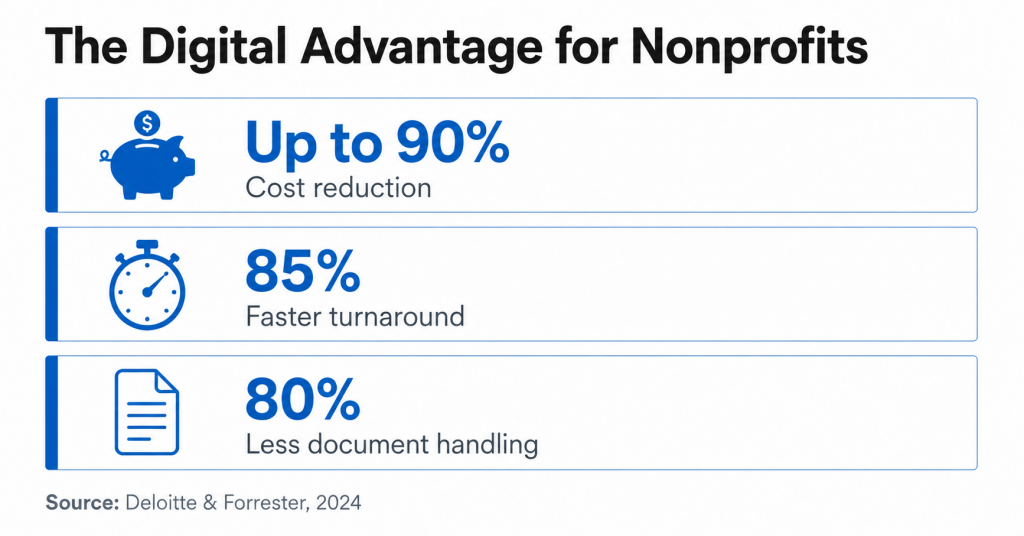
Nonprofit organizations that rely on paper-based workflows for donation forms, volunteer agreements, and grant applications spend significant staff time on tasks that generate zero mission impact — chasing signatures, filing physical documents, and correcting errors introduced by manual data entry. Adopting an electronic signature nonprofit workflow changes that equation directly. According to Deloitte, organizations that leverage digital public infrastructure and advanced workflow automation can achieve significant efficiency gains, including reducing operational costs by up to 10x and shortening cycle times by as much as 90%.
This guide covers the five best practices for implementing eSignature for nonprofits. We’ll show you how SignNow helps you achieve these benefits, avoid common mistakes, and measure your results.
- Start with one high-impact, low-complexity workflow before expanding across the organization.
- Select a platform that provides legally valid signatures under the ESIGN Act and UETA, with a full audit trail.
- Choose a solution with transparent, per-user pricing and no annual document caps.
- Confirm the platform integrates natively with your CRM, cloud storage, and financial software.
- Verify that the signing experience works on mobile devices, including offline mode for field teams.
- Track cost reduction, turnaround time, error rate, and ROI to report results to your board.
1. Start with one high-impact workflow before scaling across the organization
To get started with eSignature, focus on a single process that’s causing clear delays or costs. Don’t try to roll it out across every department at once. By starting with one high-impact workflow, you can prove the tool works and build confidence before scaling it to other parts of your organization.
Why it matters
Volunteer onboarding, annual pledge forms, and board resolutions are all strong starting points. Each one involves repetitive paperwork, multiple signers, and delays that your staff can feel. A successful pilot in one of these areas builds internal support for wider adoption.
How to do it
- Audit your current document workflows and identify the one that causes the most delays or consumes the most staff time — for most nonprofits, this is volunteer intake or recurring donor pledge forms.
- Create a reusable template for the document so staff don’t have to build the same form from scratch each time.
- Set up a signing link for the form and embed it on your website or include it in onboarding emails. This removes the need to manually send individual invites for every new volunteer or donor.
- Run the pilot for 30 days and collect feedback from staff and signers before expanding to additional workflows.
- Document the time saved and errors avoided during the pilot. This data builds the business case for expanding to other workflows.
Scenario: A regional food bank runs an annual fundraising gala. Previously, pledge forms were printed at the event, collected by volunteers, and manually entered into a spreadsheet; this process took two staff members three days to complete. After creating a single pledge form template with a shareable signing link, the bank let donors complete the form on their phones at the event or via an email follow-up. Staff processed the same volume in under two hours, with no manual data entry.
2. Prioritize data security and legal compliance to protect donors and the organization
To protect your organization and its stakeholders, select an eSignature platform that provides legally recognized electronic signatures under the ESIGN Act and UETA, and offers a detailed, court-admissible audit trail for every document.
For nonprofits, donor trust is not a marketing consideration — it is an operational requirement. A signed donation form or grant agreement that cannot be verified in the event of a dispute poses legal and reputational risks.
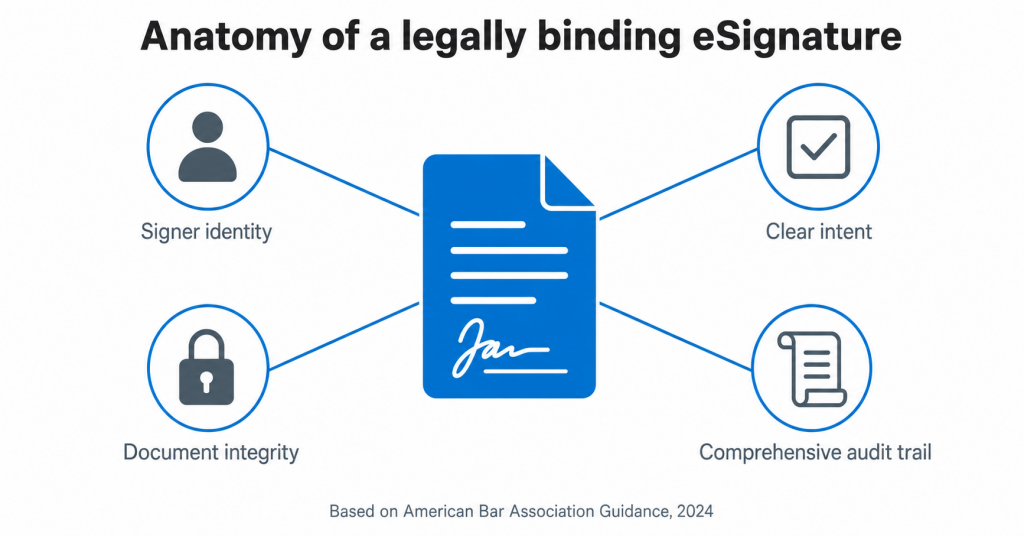
The American Bar Association’s 2024 guidance on electronic records reinforces this: a defensible eSignature record must include timestamps, IP addresses, signer identity verification, and a complete log of the signing process — not just the signature itself.
Why it matters
Federal laws like the ESIGN Act and state laws like UETA give electronic signatures the same legal weight as handwritten ones, but only if the platform records sufficient evidence to establish the signer’s intent and identity.
Nonprofits may also need to consider other regulations, for example:
- HIPAA: For organizations that handle patient or health information.
- GDPR: For organizations with donors in the European Union.
How to do it
- Confirm that the platform is ESIGN- and UETA-compliant before signing a contract. This is non-negotiable for U.S.-based nonprofits.
- Review what the audit trail captures: it must include full signer names, email addresses, IP addresses, and timestamps for every action taken on the document.
- If your nonprofit handles health information, ask whether the vendor offers a Business Associate Agreement (BAA) to ensure HIPAA compliance. This is typically an add-on, not a feature of standard plans.
- If your organization has EU donors or operates internationally, confirm the platform participates in the EU-U.S. Data Privacy Framework and encrypts data at rest and in transit.
- Ask for the vendor’s SOC 2 Type II report. This certification means an independent auditor has verified their data protection controls.
SignNow is compliant with ESIGN, UETA, and GDPR across all paid plans, and holds SOC 2 Type II certification. It encrypts documents at rest with AES-256 and in transit with TLS 1.2/1.3. The platform’s SignNow security and compliance page details each certification and what it covers. HIPAA compliance is available via a BAA for organizations that require it.
Nonprofits need an eSignature provider with transparent, predictable pricing that scales with their needs. Avoid solutions that charge per document or impose annual sending limits, as these can lead to surprise costs when document volumes increase.
Budget is a major obstacle for nonprofits. In a 2024 NTEN study, more than half of nonprofits reported that a lack of budget was a significant barrier to adopting new technology. When evaluating platforms, pricing clarity is just as important as the features offered.
Why it matters
Some eSignature platforms limit the number of documents users can send annually. For an active nonprofit running seasonal fundraisers, volunteer onboarding, and grant agreements, hitting that cap mid-year can disrupt operations and lead to costly upgrades.
How to evaluate an eSignature platform’s pricing
| Factor | What to look for |
| Pricing model | Per-user, not per-document or per-envelope |
| Document limits | No annual cap on signature invites |
| Nonprofit discounts | Available on enterprise or API plans |
| Free trial | No credit card required |
| Plan scalability | Can add users without switching plans |
SignNow’s Business plans start at $10 per user per month (billed annually) with no cap on the number of documents sent. All paid plans allow you to add unlimited users. A 7-day free trial is available without a credit card, which is useful for running a pilot before committing. For nonprofits with high document volumes or API needs, the Enterprise+ API plan offers volume and nonprofit discounts through direct sales.
Alternative approach: If your nonprofit sends fewer than a few dozen documents per month, a usage-based pricing model may be more cost-effective than a monthly subscription. Compare both options against your sending volume to see which makes more sense. Check our article about the top free & paid eSignature apps for 2026 to learn more about what major eSignature platforms offer and make a considered decision.
4. Integrate eSignature with your existing donor management and cloud systems
To create a truly paperless workflow, your eSignature tool needs to connect with the systems your nonprofit already uses. Integrating with donor management CRMs, cloud storage, and financial software ensures that signed documents flow automatically, without manual data entry.
According to AIIM, poor integration is the most cited challenge in creating end-to-end digital workflows. When an eSignature tool isn’t connected to other systems, staff waste time downloading signed documents, uploading them to other platforms, and manually updating donor records. This defeats the purpose of using an eSignature tool in the first place.
Gartner’s 2025 Magic Quadrant for Contract Lifecycle Management identified CRM integration capabilities — particularly with Salesforce for Nonprofits — as a key differentiator among eSignature vendors.

Why it matters
When a donor signs a pledge form, the record should automatically update in your CRM and save the signed document to the correct cloud folder — without manual work from your staff. This is the difference between digitizing a task and eliminating it completely.
Scenario: A community foundation uses Salesforce Nonprofit Success Pack (NPSP) to manage donor relationships. After configuring SignNow’s Salesforce integration, signed grant agreements automatically create a completed document record in the relevant Salesforce opportunity and save a copy to a designated Google Drive folder. Staff no longer log into two systems to reconcile records after each signing cycle.
How to do it
- List the systems your team uses daily, like your CRM, cloud storage, email platform, and any financial or grant management software.
- Confirm that your eSignature platform has native integrations for your highest-priority systems, not just an API access.
- For Salesforce users, verify the integration supports bidirectional data sync, not just outbound document delivery.
- Set up cloud storage auto-export so signed documents route to the correct folder structure without manual intervention. SignNow supports automatic export to cloud storage services (Box, Google Drive, OneDrive, Dropbox, and Egnyte).
- Test the integration end-to-end with a real document before going live. Confirm the signed record appears correctly in the destination system.
SignNow offers native integrations with Salesforce, NetSuite, SharePoint, Microsoft Dynamics 365, Microsoft 365, and major cloud storage platforms. For custom nonprofit software, API access is available on higher-tier plans.
5. Adopt a mobile-first signing experience for volunteers, donors, and field staff
Volunteers, donors, and staff often work outside the office. Your eSignature solution needs to offer a simple, intuitive signing experience on any device, especially smartphones and tablets.
IDC identified mobile-first signing demand as a primary growth driver in eSignature adoption, specifically citing volunteer and field staff use cases as key drivers.
Why it matters
A poor mobile signing experience leads to abandoned forms. If a volunteer struggles to complete a waiver on their phone, they’ll either skip it or require follow-up from your staff—both outcomes cost you time. The same is true for donors trying to complete pledge forms on their personal devices.
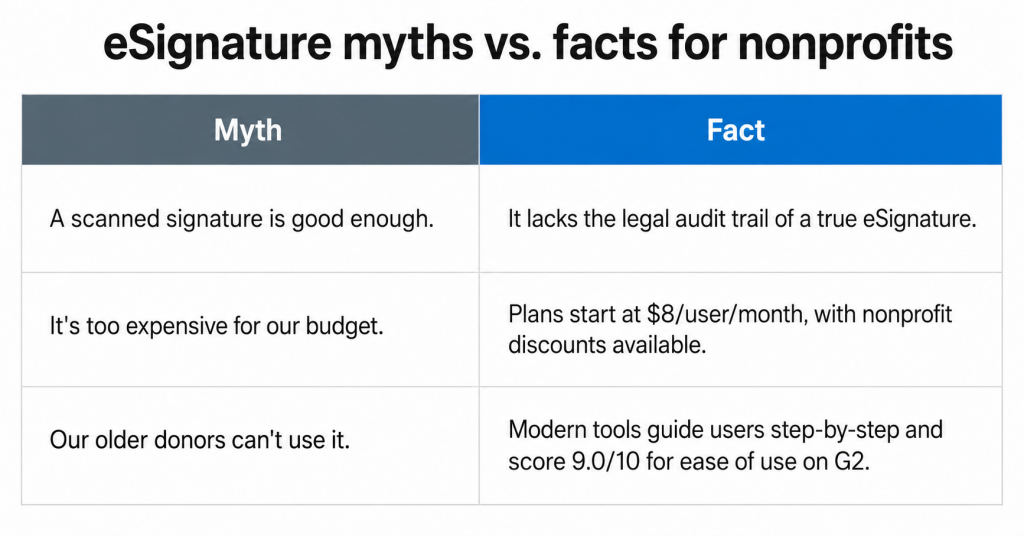
A common concern is that older donors or less tech-savvy volunteers won’t be able to navigate eSignature tools. Modern platforms address this directly: SignNow scores 9.0 out of 10 for ease of use on G2, and one reviewer noted, “I have a lot of clients that are over 60, and the fact that SignNow guides them through every step is fantastic.” The platform walks signers through each field sequentially — they don’t need to know where to click.
How to do it
- Before you send out a form, test the signing experience on a smartphone. Open the signing link on both an iPhone and an Android device and complete the form as if you were signing for the first time.
- Make sure the platform has highly-rated native apps for iOS and Android. SignNow’s mobile apps are rated 4.7 on the App Store and 4.6 on Google Play.
- Let your staff or volunteers complete documents even when they’re offline. SignNow’s mobile app has an offline mode that automatically syncs all changes once a user reconnects.
- Use signing links for high-volume forms, such as event waivers or volunteer agreements. You can post a link on a webpage, turn it into a QR code, or include it in an email campaign without sending individual invites.
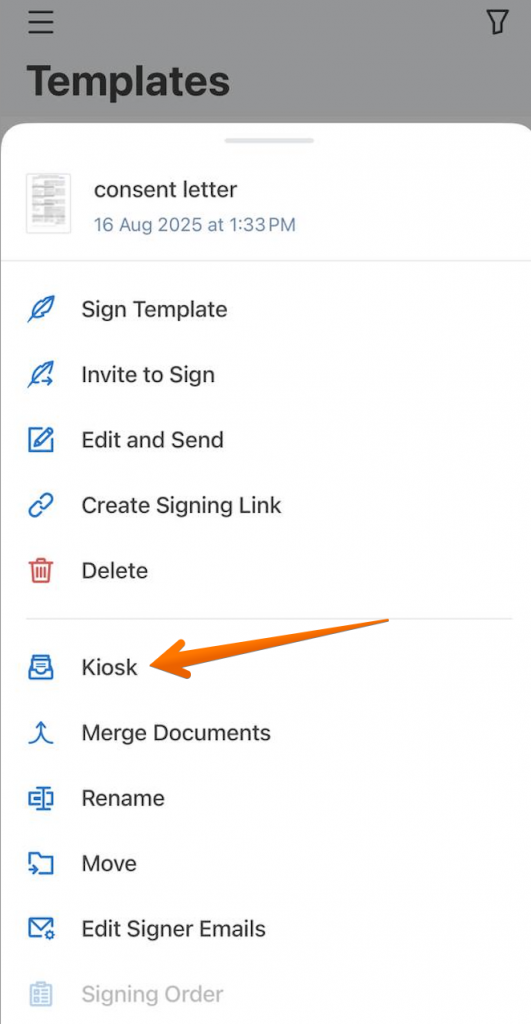
- For in-person events like fundraising galas or volunteer orientations, configure kiosk mode on a tablet so participants can sign on-site without staff involvement.
Who benefits from mobile signing:
- Volunteers signing waivers at a Saturday community event
- Donors completing pledge forms from a mobile email on a Sunday evening
- Field staff in rural areas completing grant-required documentation without reliable internet
All of these scenarios require a mobile-first design and offline capabilities. A platform that only works well on desktops won’t meet the needs of a nonprofit’s signers.
Common mistakes to avoid when going paperless
Transitioning to a nonprofit digital workflow can significantly reduce costs and administrative burden, but several common errors slow adoption and reduce the return on investment.
- Mistaking a scanned signature for an eSignature. A scanned image of a signature doesn’t have the security of a true electronic signature. It lacks a timestamped audit trail, IP address capture, and signer verification, offering minimal legal protection in a dispute.
- Assuming the cost is too high. Entry-level eSignature plans start at around $8- $ 10 per user per month, and many platforms offer nonprofit discounts. This is often less than the cost of printing, mailing, and storing physical documents.
- Not reviewing the audit trail. Before committing to a platform, ask for a sample audit trail. Ensure it captures full names, email addresses, IP addresses, and timestamps for every action, not just the final signature.
- Rolling it out to everyone at once. A full-organization rollout can create resistance and make troubleshooting harder. Start with one team or document type, resolve any issues, and then expand.
- Ignoring the signer’s experience. Internal staff can be trained, but donors and volunteers can’t. If the signing process isn’t simple, users will abandon the form. Test the signer experience, not just the admin side.
- Choosing a platform with document volume limits. Some platforms cap the number of documents you can send per year. A nonprofit running multiple campaigns could hit this limit and face unexpected costs. Confirm there are no annual caps before signing up.
How to measure the success of your eSignature implementation
To demonstrate the value of your investment to your board and funders, track metrics that directly reflect cost savings, efficiency gains, and operational speed — not just adoption rates.
- Cost per document: Compare the total cost of processing a paper document (printing, postage, staff time, storage) against the cost of doing it electronically. Deloitte reports that digitizing paper-heavy workflows can cut costs by up to 90%.
- Document turnaround time: Measure the average time it takes to get a document signed and returned. According to Deloitte, this can be up to 85% faster. For nonprofits, this speeds up critical processes like grant agreements and board approvals.
- Error rate: Track how often documents are returned with missing information or signatures. Automated workflows can reduce human error by up to 55%, according to Forrester, by using required fields to prevent incomplete submissions.
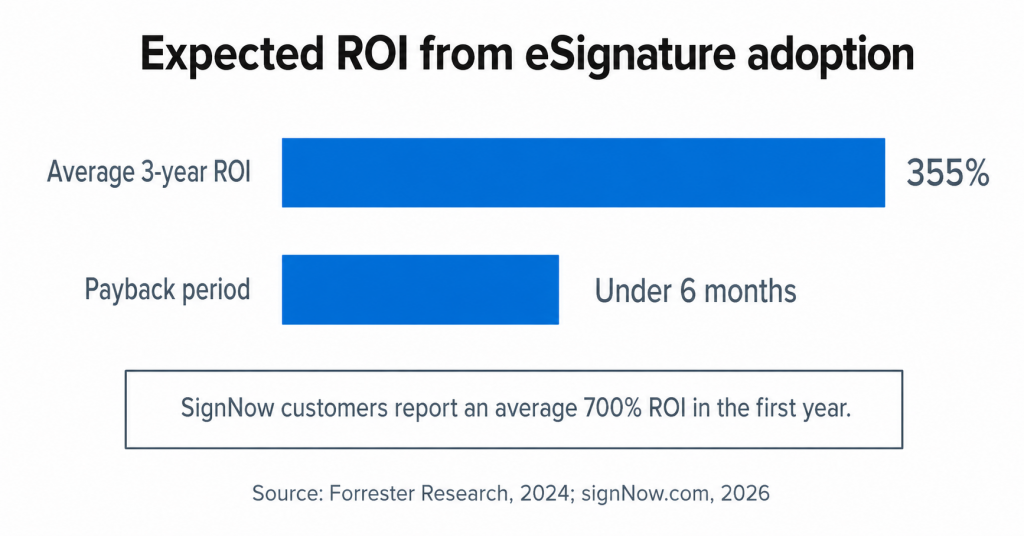
- Return on investment (ROI): A 2024 Forrester study found that eSignature adoption delivers an average 355% ROI over three years, with a payback period of under six months. SignNow customers report an average 700% ROI in their first year alone.
- Staff hours recaptured per week: Track the hours employees save on document handling after implementation. SignNow users save up to 6 hours per week per employee — time that nonprofit staff can redirect to program delivery, donor relationships, or grant writing.
Empower your mission with digital workflows
The core argument for electronic signature nonprofit adoption comes down to one trade-off: time and money spent on paper administration is time and money not spent on mission delivery. Digitizing even a single high-volume workflow, such as volunteer onboarding, pledge forms, or board resolutions, can produce measurable returns in weeks, not quarters.
To see an immediate impact, focus on these three things: pilot a single workflow, verify legal compliance and audit trail quality before committing to a platform, and make sure the signing experience works for non-technical users on mobile devices.
Nicholas Tovar, SHRM-CP at LEARN, put the outcome plainly after switching to SignNow: “SignNow has changed our workflows to be more streamlined and efficient. We saved more than 1,500 pieces of paper converting to an electronic format.”
Start a 7-day SignNow free trial (no credit card required) and see how going paperless can streamline document signing processes for your non-profit organization.
Glossary of key terms
- Audit trail. A detailed, time-stamped record of all activity related to a document, including who viewed it, when it was signed, and the IP address of each signer. A court-admissible audit trail is a legal requirement for a defensible eSignature record.
- ESIGN Act. The U.S. federal Electronic Signatures in Global and National Commerce Act, passed in 2000, which gives electronic signatures the same legal weight as handwritten signatures in interstate and international commerce.
- UETA. The Uniform Electronic Transactions Act, a state-level law adopted by 49 states that establishes a legal framework for electronic signatures and records in commercial transactions, complements the federal ESIGN Act.
- Workflow automation. The use of technology to automatically route, notify, and process documents through a defined series of steps — for example, automatically sending a signed grant agreement to the finance department folder and updating the donor record in a CRM without staff intervention.
FAQ
1. Are electronic signatures legally binding for donation forms and grant agreements?
Yes. Under the ESIGN Act and UETA, electronic signatures carry the same legal weight as handwritten signatures in the United States, provided that the platform captures evidence of the signer’s intent, identity, and document integrity. Donation forms, volunteer agreements, grant contracts, and board resolutions are all appropriate use cases. For nonprofits with EU-based donors, GDPR-compliant platforms provide equivalent protection under European law.
2. What is the best eSignature software for a small 501(c)(3)?
The right platform for a small nonprofit balances affordability, ease of use for non-technical signers, and core features like reusable templates, audit trails, and mobile signing. Look for per-user pricing with no document caps, a free trial period, and native integrations with the tools you already use. Plans starting at $8-$10/user/month with no annual document limits are a practical starting point for organizations processing fewer than a few hundred documents per month.
3. Can nonprofits use electronic signatures for board meeting minutes and resolutions?
Yes, and this is one of the most efficient use cases for eSignature adoption in nonprofits. Board members are often geographically dispersed, making in-person signature collection slow and logistically challenging. A signed board resolution can be sent to all board members simultaneously with a defined signing order, and the completed document with full audit trail is available immediately after the final signature — no scanning, no mailing, no manual filing.
4. What is the difference between an electronic signature and a digital signature?
An electronic signature is a legal concept: any electronic indication of intent to agree to a document, which may include a typed name, drawn signature, or clicked acceptance. A digital signature is a specific technology that uses public key infrastructure (PKI) encryption to mathematically bind a signature to a document and verify that it has not been altered. Most nonprofit use cases — donation forms, volunteer agreements, grant contracts — are fully and legally served by electronic signatures. Digital signatures are typically required only in highly regulated industries or specific government contexts.
Sources
- Deloitte Insights: Investments in customers yield great experience dividends, 2024
- NTEN 2024 Nonprofit Digital Investments Report
- Forrester Research Total Economic Impact of eSignature Solutions, 2024
- AIIM State of Intelligent Information Management, 2025
- Gartner Magic Quadrant for Contract Lifecycle Management, 2025
- IDC Enterprise Mobility: Workspace and Deployment Strategies
- FTC ESIGN Act Overview
- Uniform Laws Commission UETA
- National Credit Union Administration: Electronic Signatures in Global and National Commerce Act (E-Sign Act)
- 1. Start with one high-impact workflow before scaling across the organization
- 2. Prioritize data security and legal compliance to protect donors and the organization
- 3. Select a cost-effective solution with no hidden document limits
- 4. Integrate eSignature with your existing donor management and cloud systems
- 5. Adopt a mobile-first signing experience for volunteers, donors, and field staff
- Common mistakes to avoid when going paperless
- How to measure the success of your eSignature implementation
- Empower your mission with digital workflows
- Glossary of key terms
- FAQ
- Sources
