

Electronic signatures are no longer a novelty; they’re a necessity for modern HR departments. By replacing traditional wet-ink signatures, this technology streamlines workflows, enhances security, and significantly increases efficiency.
- Replace paper offer letters and onboarding packets with digital templates to cut turnaround time by up to 80%
- Use custom branding and document groups to create a cohesive, professional new hire signing experience
- Eliminate hidden document handling costs by switching to a predictable SaaS pricing model
- Configure audit trails and legal compliance settings before sending any HR document for signature
- Enable required fields and field validation to prevent incomplete or incorrectly completed forms
- Set up mobile-accessible signing workflows so remote and field employees can complete HR paperwork from any device
- Connect your eSignature platform to your HRIS or cloud storage to build a centralized, searchable document archive
Paper-based HR processes slow the hiring process, create compliance gaps, and consume administrative time that HR professionals could spend on people — not paperwork. Implementing an electronic signature HR workflow addresses all three problems simultaneously.
As one analyst put it: “The conversation has shifted from ‘Are eSignatures legal?’ to ‘How can we leverage eSignatures to completely re-engineer our talent acquisition and employee lifecycle workflows?’ It’s no longer a tool for convenience; it’s a cornerstone of digital HR transformation.” — Dr. Elina Petrova, Gartner.
In this guide, we cover 7 measurable benefits of eSignature for HR teams, with practical steps for realizing each one.
1. Accelerate hiring and onboarding cycles — Cut turnaround time by 80%
The single most impactful benefit of electronic signatures for HR is the dramatic reduction in document turnaround time, allowing teams to secure top talent faster and complete electronic signature onboarding in hours instead of days.
Think of a paper offer letter like a physical relay race baton — it can only move as fast as the slowest person in the chain, and if anyone drops it, the whole process restarts. A digital signing link removes the baton entirely: the candidate clicks, signs, and the document is back in HR’s hands before the end of the day.
Forrester Research (2024) found that HR departments report an average reduction in document turnaround time of 80% after implementing eSignature workflows, with offer letters being signed in hours instead of days. When a candidate is weighing multiple offers, that speed difference is often decisive.
How to achieve this:
- Audit your current hiring document set — offer letters, NDAs, background check authorizations — and identify which are sent most frequently.
- Create reusable templates for each document type so HR doesn’t rebuild from scratch for every hire.
- Set a custom signing order if multiple parties (hiring manager, HR director, candidate) need to sign in sequence.
- Send the complete onboarding packet as a single document group so the new hire completes everything in one session.
- Enable automatic reminders so documents that haven’t been signed within 24 hours trigger a follow-up without manual intervention.
Scenario: A logistics company with seven regional terminals was managing all hiring paperwork on paper across three states. After switching to SignNow, their HR coordinator reported: “We’ve centralized our process and our documents are fully complete before an employee ever starts their first day. The savings in time, effort and dollars is incredible.” — Laura H., G2 Review.
The SignNow Business Premium plan ($15/user/month, billed annually) includes bulk send, which is particularly useful for onboarding cohorts of new hires simultaneously.

2. Enhance the new hire experience with digital-first HR document signing
A digital-first onboarding process sets a professional tone for a new employee’s entire tenure, replacing cumbersome paperwork with a modern experience that reflects a forward-thinking company culture.
SHRM (2025) found that 91% of HR managers believe that digitizing HR processes, including document signing, significantly improves the new hire onboarding experience. Research published in the Journal of Organizational Behavior (2024) found a direct correlation between digital tool adoption and higher employee satisfaction scores during onboarding. The first week shapes long-term retention — and a stack of PDFs to print, sign, and scan is not a strong first impression.
How to do it:
- Enable custom branding on all signing requests so the experience looks and feels like it comes directly from your company, not a third-party tool.
- Bundle all onboarding forms — W-4, I-9, policy acknowledgments, benefits enrollment — into a document group so new hires complete everything in one organized flow.
- Pre-fill fields such as the employee’s name, start date, and department before sending, reducing the cognitive load on day one.
- Set the signing session language to match the employee’s preferred language, where applicable.
- Send a completion notification automatically once all documents are signed, so both the employee and HR have immediate confirmation.
“We were previously using an all-paper hiring and onboarding method. We switched all those documents over to Sign Now, and our whole process is so much easier and smoother… We’ve removed so much of the burden from our terminal managers so they can do what they do: manage the business.” — Laura H., G2 Review
3. Significantly reduce operational costs — Up to 85% savings per document
Electronic signatures deliver substantial cost savings by eliminating expenses related to paper, printing, ink, postage, and physical document storage, with companies reducing document handling costs by up to 85% (AIIM, 2025).
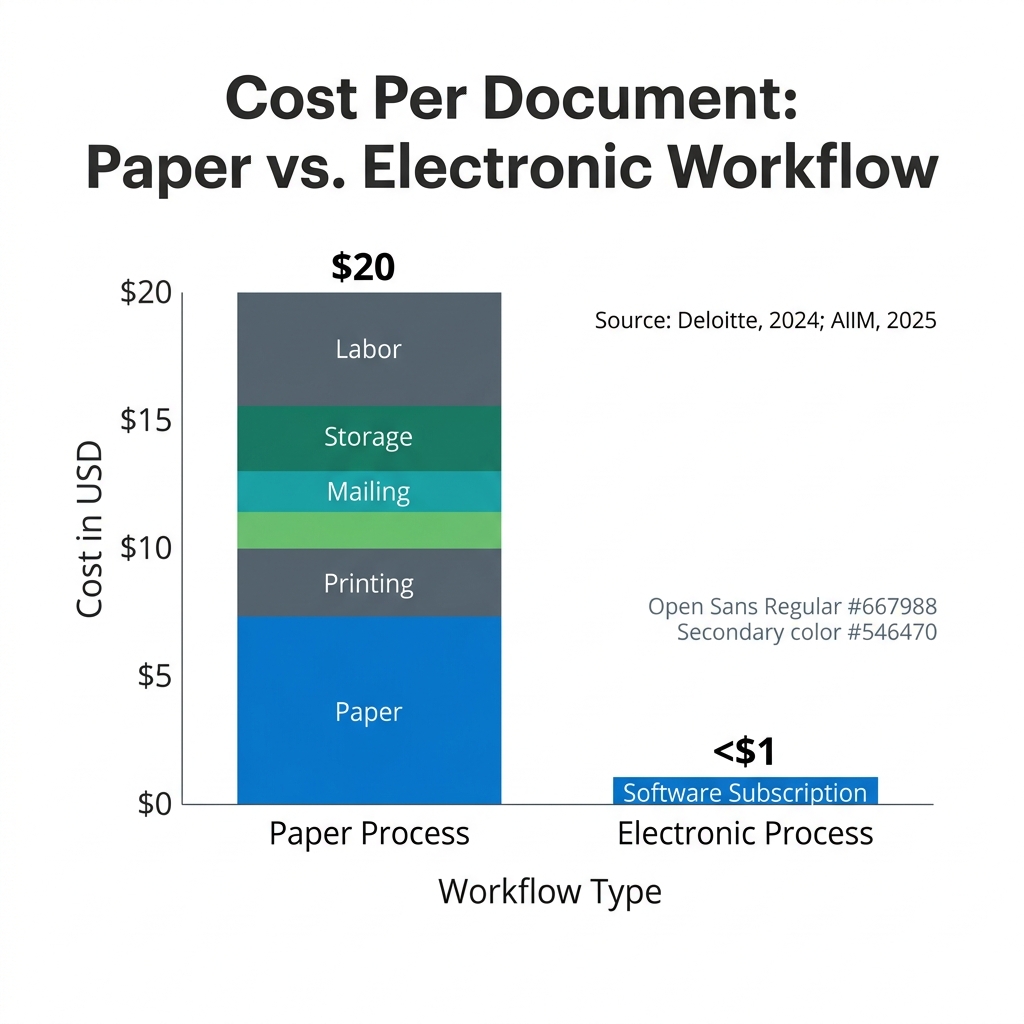
Deloitte (2024) calculated an average savings of $20 per document when factoring in paper, printing, mailing, and storage costs. HR departments that process hundreds of documents per month — offer letters, policy acknowledgments, performance reviews, separation agreements — accumulate those costs quickly.
The hidden costs are often the ones that don’t appear on a single invoice: the time spent chasing wet signatures, re-printing documents with errors, filing physical copies, and retrieving them during audits.
| Cost Category | Paper Process | Electronic Process |
| Paper and printing | $2–4 per document | $0 |
| Mailing / courier | $5–8 per document | $0 |
| Physical storage | $3–5 per document/year | $0 |
| Labor (filing, retrieval) | $6–10 per document | Minimal |
| Total estimate | ~$20 per document | <$1 (software cost) |
SignNow’s Business plan starts at $8/user/month (billed annually) and includes unlimited documents, unlimited templates, and unlimited storage. There are no per-document caps, which matters for HR teams with high document volumes. Transparent pricing means the cost is predictable from month one.
4. Strengthen compliance and audit readiness in electronic signature HR operations
A dedicated electronic signature platform creates a comprehensive, court-admissible audit trail for every document, reducing audit preparation time by as much as 75% (Forrester Research, 2024).
“For HR, the audit trail is the unsung hero of electronic signatures. In any dispute or compliance audit, having an immutable, court-admissible record of who signed what, when, and where is invaluable.” — David Jones, AIIM International
HR teams face record-keeping obligations under a range of regulations — from I-9 tax form retention requirements to state-specific employment law. When a document dispute arises, the question is never just “was it signed?” but “who signed it, from which IP address, at what time, and did they have the opportunity to review it?”
What a robust audit trail captures:
- Full legal name and email address of each signer
- IP address and device information at the time of signing
- Timestamp for every action: viewed, signed, declined, forwarded
- A unique document ID tied to the final signed PDF
How to configure compliance-ready HR document signing:
- Confirm your platform complies with the legally-binding electronic signatures standards set by the U.S. ESIGN Act and UETA before sending any employment document.
- Enable two-factor authentication for sensitive documents such as separation agreements or benefit elections.
- Set document expiration dates so unsigned documents don’t remain accessible indefinitely.
- Download and archive the Certificate of Completion for every signed document — this is your primary evidence in any compliance review.
- For organizations handling employee health data, activate HIPAA compliance through a Business Associate Agreement (BAA) with your provider.
SignNow is certified under SOC 2 Type II and complies with GDPR, the ESIGN Act, UETA, and eIDAS. HIPAA compliance is available as an add-on via BAA. SignNow security and compliance documentation is available for review before deployment.
5. Minimize costly human errors with guided HR document signing
Guided signing workflows in eSignature platforms can reduce human error in document processing by an average of 90%, preventing issues like missing signatures, incomplete fields, and incorrect data entry (IDC, 2024).
Manual HR paperwork produces a predictable set of errors: a new hire skips the initials on page 4, writes the date in the wrong format, or leaves the emergency contact section blank. Each error requires the document to be reprinted, re-sent, or corrected — adding days to a process that should take hours.
Before eSignatures: An HR coordinator at a mid-size manufacturer sends a 12-page onboarding packet by email as a PDF. The new hire prints it, signs where they think they should, misses two required fields, and emails back a scan. HR spots the errors two days later and requests a correction. The employee starts work before the paperwork is complete.
After eSignatures: The same packet is sent as a guided signing session. The platform walks the employee through each required field in order — think of it like a GPS for the document, telling you exactly where to go next so you can’t get lost or skip a step. Required fields are enforced: the document cannot be submitted until every field is complete. Field validation ensures dates are entered correctly, and text fields contain the right type of information. The completed, error-free document arrives in HR’s inbox within the hour.
How to configure this:
- Add fillable fields to a PDF and mark all required fields as mandatory in the editor.
- Apply field validation rules to date fields, numeric fields, and any field requiring a specific format.
- Use conditional fields (available on the Enterprise plan) to show or hide form sections based on an employee’s role or employment type, reducing confusion.
- Test the signing experience from the recipient’s perspective before deploying any template to new hires.
6. Enable secure and efficient remote workflows for distributed HR teams
For distributed, remote, and hybrid teams, cloud-based electronic signatures are an essential tool, providing a secure and standardized way to handle HR paperwork from any location, on any device.
IDC (2025) identified mobile-first signing experiences as the emerging standard, as a significant portion of the workforce — particularly remote and field employees — now complete HR paperwork on mobile devices. An HR team managing employees across multiple sites cannot rely on a process that requires physical presence or a desktop computer.
“When COVID-19 occurred we converted to 100% teletherapy within a week. Now I am doing that intake contract work via SignNow and it has simplified the workflow.” — Mark Dombeck, Ph.D (signnow.com/solutions)
Who benefits most: HR managers at companies with field staff, warehouse workers, healthcare professionals, or employees in multiple time zones — anyone who cannot reliably access a printer or scanner during business hours.
What they need: A signing experience that works on a smartphone, requires no app download for the recipient, and delivers a legally binding result.
Where it happens: From any location — a job site, a hospital break room, a home office — via a secure signing link sent by SMS or email.
When it matters most: During high-volume hiring periods when speed and consistency across locations are critical.
Why it works: SignNow’s iOS and Android apps support offline signing, meaning a field employee in a low-connectivity area can complete documents and sync when they reconnect. Completed documents export automatically to Google Drive, OneDrive, or Dropbox for team access.
How to set it up: Send signing invitations via SMS (available on all paid plans), enable mobile-optimized document layouts, and configure automatic export to your organization’s preferred cloud storage.
7. Create a centralized, searchable HR paperless workflow — Save 8 hours per week
By digitizing the signing process, HR teams can move away from physical filing cabinets and build a secure, centralized, and instantly searchable digital archive of all employee-related documents, saving up to 8 hours of administrative time per week (Forrester Research, 2024).
Retrieving a paper document from a filing cabinet — locating the right cabinet, the right folder, the right page — takes minutes per document. Across hundreds of employee records, that time accumulates into a significant portion of an HR coordinator’s week. Digital search changes the equation entirely: a document is found in seconds by name, date, or document type.
An HR paperless workflow also addresses a risk that physical archives cannot: disaster recovery. Paper files can be destroyed. A cloud-based document archive with AES-256 encryption and a tested disaster recovery plan cannot.
Looking ahead, AI capabilities integrated with eSignature platforms are beginning to automate contract analysis, flag missing information in HR forms, and identify non-standard clauses for review — reducing the manual review burden further (Gartner, 2025).
How to build this system:
- Organize signed documents into named folders by department, employee type, or document category from day one.
- Use full-text search to locate any document by keyword, signer name, or date range.
- Connect SignNow to your existing HRIS or document management system via native integrations with Salesforce, Microsoft 365, or NetSuite so signed documents are filed automatically in the correct system of record.
- Set document retention and expiration policies within the platform to stay compliant with applicable record-keeping regulations.
Common mistakes to avoid when implementing e-Signatures for HR
To fully realize the benefits of electronic signatures, HR teams should avoid several common pitfalls — from choosing non-compliant tools to neglecting the end-user experience.
Assuming any digital signature method is legally valid. A typed name in an email or a scanned wet signature does not carry the same legal protections as a signature created through a platform that complies with the ESIGN Act and UETA. Using non-compliant methods exposes the organization to document disputes with no verifiable audit trail to fall back on.
Treating eSignatures as less secure than paper. Paper documents can be forged, lost, or destroyed with no record. A compliant eSignature platform captures signer identity, IP address, and timestamp for every action, and encrypts the document at rest and in transit. The security profile of a properly configured digital workflow is stronger than most paper-based alternatives.
Skipping integration with core HR systems. Deploying eSignatures as a standalone tool — disconnected from your HRIS, payroll system, or document management platform — means HR staff still manually transfer data between systems. The full ROI of an HR paperless workflow comes from connecting the signing step to the rest of the employee data lifecycle.
Ignoring the mobile experience. If the signing process only works well on a desktop, a significant portion of your workforce — particularly field, warehouse, or healthcare employees — will struggle to complete documents. Test every template on a mobile device before deploying it.
Failing to configure required fields and validation. Sending a document without enforcing required fields defeats the purpose of guided signing. Teams that skip this step often find themselves back in the same cycle of incomplete documents and manual follow-up they were trying to escape.
Best practices checklist
- Audit all HR documents sent for signature and identify the top 10 by volume
- Build reusable templates for offer letters, NDAs, I-9s, W-4s, and policy acknowledgments
- Enable custom branding on all signing requests so they reflect your company identity
- Bundle onboarding documents into a single document group for a one-session new hire experience
- Mark all required fields as mandatory and apply field validation rules before deploying any template
- Configure a custom signing order for documents requiring approval from multiple parties
- Enable two-factor authentication for sensitive HR documents (separation agreements, benefit elections)
- Set automatic reminders for unsigned documents at 24 and 48 hours
- Connect your eSignature platform to your HR software or cloud storage for automatic document filing
- Download and archive the Certificate of Completion for every signed document
- Test all templates on a mobile device before deploying to employees
- Review your platform’s compliance certifications (SOC 2, ESIGN/UETA, GDPR) before going live
How to measure the success of your eSignature implementation
Tracking the right key performance indicators is essential to demonstrate the ROI of your electronic signature solution and identify areas for further workflow optimization.
| KPI | What It Measures | Target Benchmark |
| Document turnaround time | Average hours from send to completed signature | 80% reduction vs. paper baseline (Forrester Research, 2024) |
| Cost per document | Total cost including labor, storage, and platform fees | ~$20 savings per document vs. paper (Deloitte, 2024) |
| Document error rate | Percentage of documents returned with missing or incorrect fields | 90% reduction with guided signing workflows (IDC, 2024) |
| HR administrative time on document management | Weekly hours spent on document handling, filing, and retrieval | 8 hours saved per week (Forrester Research, 2024) |
| Onboarding completion rate | Percentage of new hires who complete all documents before day one | Target: 100% pre-start completion |
Establish a baseline for each metric before go-live, then measure again at 30, 60, and 90 days. Most teams see meaningful improvement within the first month.
Disclaimer: The information contained in this blog post is provided for general informational purposes only and does not constitute formal legal advice.
Transform your HR workflows with SignNow
Electronic signature HR workflows reduce the time HR teams spend on administrative tasks and redirect that capacity toward hiring, development, and retention. The data is consistent: document turnaround time drops by 80%, error rates fall by 90%, and document handling costs decrease by up to 85%. These are not marginal gains — they change what HR can accomplish in a week.
SignNow is trusted by over 28 million users, including 352 Fortune 500 companies, to manage document workflows across every stage of the employee lifecycle. Every paid plan includes unlimited documents, unlimited templates, court-admissible audit trails, and SOC 2 Type II certified security.
Ready to eliminate paper-based bottlenecks from your hiring and onboarding process? Start your free 7-day trial of SignNow today — no credit card required.
Glossary
- Audit trail: A time-stamped, immutable log of every action taken on a document — including who viewed it, who signed it, from which IP address, and when. Audit trails are the primary evidence in compliance reviews and document disputes.
- Document group: A feature that bundles multiple separate documents into a single signing session, allowing a new hire to complete an entire onboarding packet — W-4, I-9, policy acknowledgments — in one sitting without receiving multiple separate requests.
- ESIGN Act: The Electronic Signatures in Global and National Commerce Act, a U.S. federal law enacted in 2000 that gives electronic signatures the same legal validity as handwritten signatures for most commercial and employment transactions.
- Field validation: A configuration setting in an eSignature editor that enforces formatting rules on fillable fields — for example, requiring a date field to follow MM/DD/YYYY format or a phone number field to contain only digits. Prevents incorrectly formatted data from being submitted.
- UETA: The Uniform Electronic Transactions Act, a state-level law adopted by 49 U.S. states that establishes the legal equivalence of electronic records and signatures in transactions governed by state law. Works in parallel with the federal ESIGN Act.
FAQ
- Are electronic signatures legally binding for employment contracts?
Yes, provided the platform complies with the applicable legal framework. In the United States, the ESIGN Act and UETA give e-signatures the same legal standing as handwritten signatures for the vast majority of employment documents, including offer letters, NDAs, and policy acknowledgments. SignNow complies with both acts, as well as eIDAS for EU-based employees. For country-specific legality, SignNow maintains dedicated legality pages covering 30+ jurisdictions.
- Is it secure to sign sensitive HR documents electronically?
Yes, when using a platform with appropriate security controls. SignNow encrypts documents in transit using TLS 1.2/1.3 and at rest using AES-256 bit encryption. The platform holds SOC 2 Type II certification and maintains a detailed audit trail capturing signer names, email addresses, IP addresses, and timestamps for every action. For human resources handling employee health information, HIPAA compliance is available through a Business Associate Agreement.
- What is the difference between an electronic signature and a digital signature?
An electronic signature is a legal concept — it represents a person’s intent to agree to a document’s contents. A digital signature is a specific technology that uses encryption (PKI) to mathematically bind the signature to the document, making any post-signing alteration detectable. SignNow provides legally binding electronic signatures secured with digital signature technology, giving HR teams both the legal validity and the technical integrity they need.
- What’s the most important best practice to start with?
Build reusable templates before anything else. Templates are the foundation of every other efficiency gain — faster sending, consistent formatting, enforced required fields, and accurate audit trails all depend on having well-configured documents. Start with your highest-volume document (typically the offer letter) and build from there.
- 1. Accelerate hiring and onboarding cycles — Cut turnaround time by 80%
- 2. Enhance the new hire experience with digital-first HR document signing
- 3. Significantly reduce operational costs — Up to 85% savings per document
- 4. Strengthen compliance and audit readiness in electronic signature HR operations
- 5. Minimize costly human errors with guided HR document signing
- 6. Enable secure and efficient remote workflows for distributed HR teams
- 7. Create a centralized, searchable HR paperless workflow — Save 8 hours per week
- Common mistakes to avoid when implementing e-Signatures for HR
- Best practices checklist
- How to measure the success of your eSignature implementation
- Transform your HR workflows with SignNow
