How to sign contracts online and cut document turnaround time by 80%

Printing, scanning, and chasing down physical signatures cost teams hours every week and introduce errors that delay deals. The global digital signature market is projected to reach USD 61.91 billion by 2030, growing at a CAGR of 30.2% from 2024 to 2031, reflecting the widespread adoption of legally binding online alternatives to paper-based workflows. Think of the process like routing a document through a secure, trackable courier: every handoff is logged, every signature is verified, and the final package arrives with a complete chain of custody — no paper required.
Quick summary: How to sign a contract online
- Upload your contract (PDF or DOCX) to SignNow from your computer or a connected cloud storage service.
- Add signature, initials, date, and text fields to the document using a drag-and-drop editor.
- Invite signers by email, assign each person to their fields, and set a signing order if the contract requires sequential approval.
- Send the document to all contract parties; SignNow emails each signer a secure link and sends automatic reminders to anyone who has not yet signed.
- Download the final, tamper-proof PDF along with a Certificate of Completion that includes a full audit trail — names, email addresses, IP addresses, and timestamps for every action.
Organizations using electronic signature solutions report an average 85% improvement in productivity

Whether you’re a business owner streamlining your operations or an individual looking for an easy way to manage personal contracts, this article is for you.
Before you begin
Before you can send a contract for online signature, ensure all preparations are complete and that you have everything ready. You’ll need the final version of your contract document, the full names and email addresses of all signers, and an account with a legally compliant eSignature service.
Security and compliance are the main reasons to use a formal eSignature solution instead of just pasting a signature image into a PDF. If the platform doesn’t comply with the law, the signatures it produces may be unenforceable, defeating the contract’s purpose.
Confirm you have the following before starting:
- A SignNow account. If you don’t have an account, you can sign up for a free 7-day trial to test all our features—no credit card required. The platform offers flexible pricing, with paid plans starting from $8 per user per month (billed annually).
- Your contract document in a supported format: PDF or Word (DOCX).
- Full names and email addresses of every party who needs to sign or receive a copy.
- A compliant solution. SignNow is a secure and compliant platform that meets the requirements of the ESIGN Act, UETA, GDPR, SOC 2 Type II, and ISO 27001. If your organization operates in a regulated industry, such as healthcare or finance, check your plan’s compliance tier before sending sensitive documents.
Now, let’s walk through every step you should take to sign your contract online using SignNow.
Step 1: Upload your contract
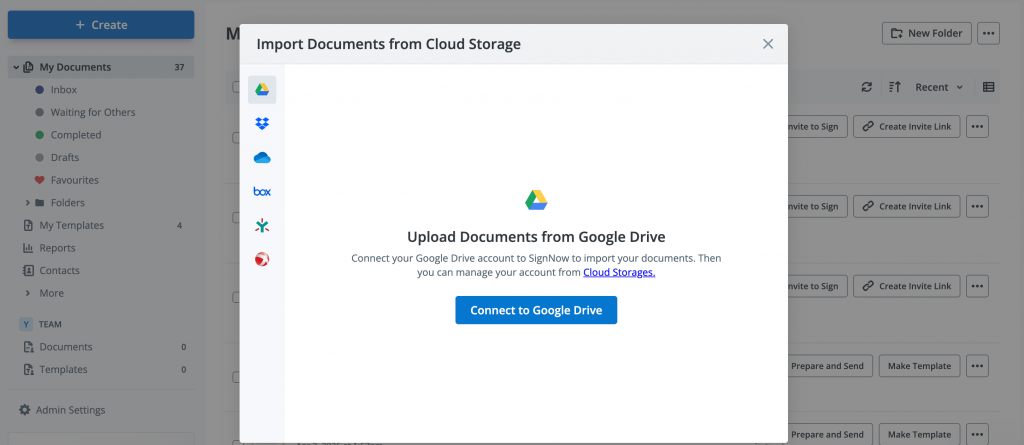
Uploading your document is the first step to signing a contract online. This places a protected copy of your file inside the platform’s editor, where you can add fields and assign signers without altering your original file.
- Open SignNow’s main page and log in to your account.
- On the dashboard, click +Create > Document.
- Choose your file from your computer or a cloud storage service. SignNow supports direct import from Box, Google Drive, OneDrive, Dropbox, and Egnyte. You can also import your document via a secure URL.
- Select a PDF or Word (DOCX) file. The platform supports both formats and will preserve the original layout and formatting.
- Once uploaded, your document will automatically open in the editor.
When you upload a file, SignNow creates a secure working copy, leaving your original file untouched. Any changes you make—like adding fields or assigning roles—only affect this copy. The document is encrypted at rest with AES-256 and in transit with TLS 1.2/1.3.
Step 2: Add fields and recipients to your contract
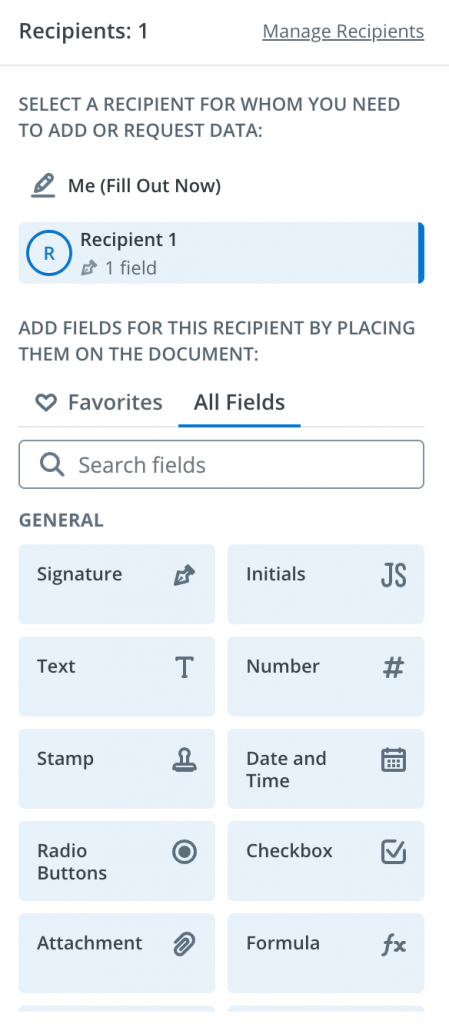
Once your document is uploaded, you must add fillable fields to indicate where exactly each person needs to enter their information and sign. You just drag and drop fields, so no technical configuration is needed.
- In the editor, locate the Fields toolbox on the left panel. SignNow provides various field types for different types of data.
- Drag a Signature field onto the contract’s signature line to capture a legally binding electronic signature.
- Add an Initials field to any page that requires initials rather than a full signature.
- Place a Date and Time field on the signing date line. This field automatically populates with the signing timestamp, preventing signers from entering an incorrect date.
- Add Text fields anywhere the signer needs to enter information — printed name, address, title, or other data.
If you are one of the contract signers, simply click Me (Fill Out Now) and drop My Signature, My Initials, Today’s Date, and Text fields where you need to fill in your information.
Advanced options
SignNow also supports advanced field types, available on the Enterprise plan at $30/user/month.:
- calculated fields (formula-based auto-computation)
- conditional fields (fields that appear or hide based on other inputs)
- attachment fields (requesting a file upload from the signer).
Step 3: Add and manage recipients
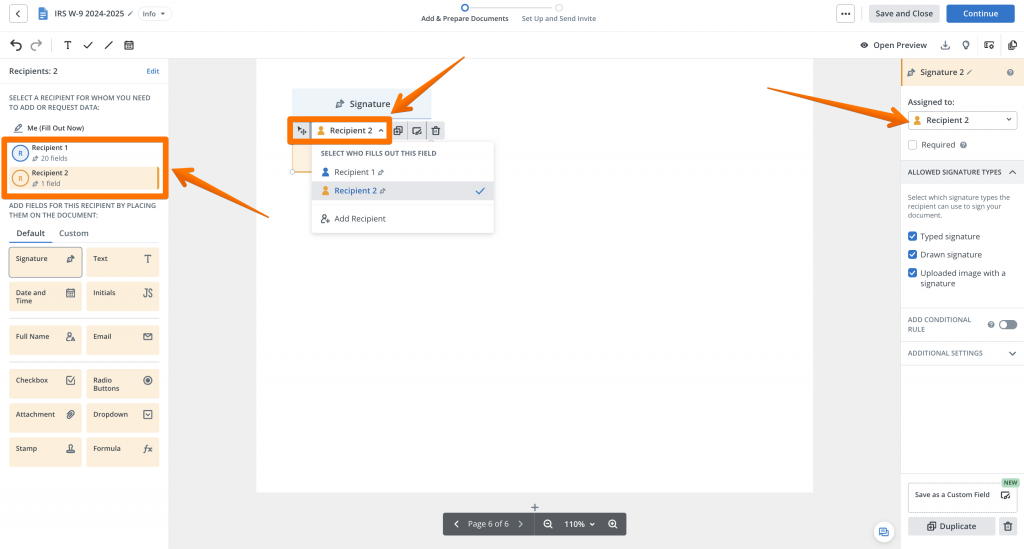
If your agreement requires eSignatures from multiple parties, you must ensure each person only completes their assigned fields. SignNow lets you add multiple recipients and assign specific fields to each one, preventing them from accidentally filling out fields meant for someone else.
- Click Manage Recipients at the top of the Fields panel.
- Click +Add Recipient and select the recipient type: Signer or Approver.
- Enter the recipient’s email address right away or do it later, on the Invite Page.
- Once finished, click Save and Continue to go back to the editor and set up your fields.
- Assign fields to each of your recipients. Click a field you added to the document and change the assigned Recipient in the field toolbar or the field settings panel on the right.
- When you finish, each recipient’s fields will be color-coded.
Step 4: Invite signers and set the signing order
After placing and assigning all fields, you invite the required parties to sign the contract by entering their email addresses and assigning them to their respective fields. This step defines who signs, what their role is, when they receive the document, and where their signature appears — covering all the critical dimensions of a multi-party agreement.
- While you’re still in the editor, click Continue.
- If you want to send a previously prepared contract for signing, click Invite to Sign in the dashboard next to your file.
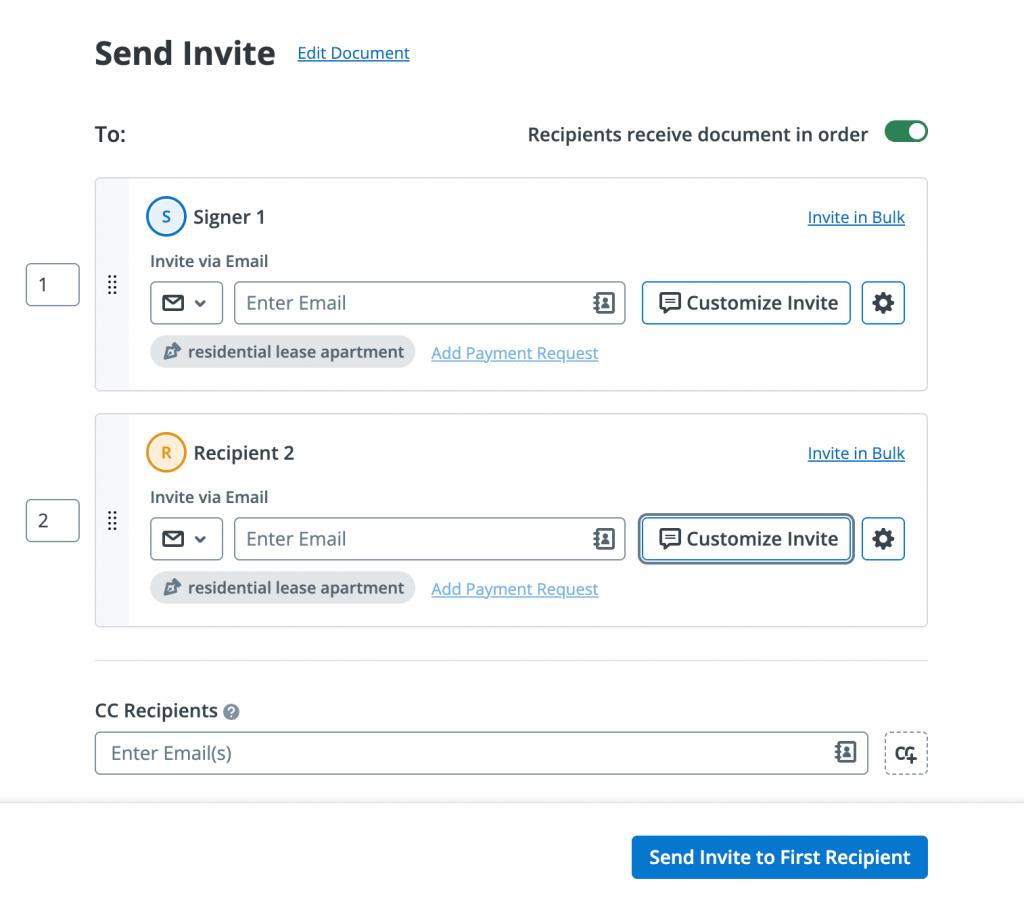
- Enter the email addresses of your signers in the corresponding Recipient field.
- Customize a message for each recipient, then click the Settings icon to add user authentication, set an expiration date, and enable reminders for your online contract signature invite.
- To add a non-signing recipient — such as a manager or legal counsel who needs a copy — add their email in the CC Recipients field. They will receive the final signed document automatically, without taking any action.
- If the contract must be executed in a specific sequence (for example, a vendor must sign before a client countersigns), enable signing order: toggle the Recipients receive document in order option and drag the recipients into the required sequence. Signer 1 receives the document first; Signer 2 only receives the invitation after Signer 1 completes their action.
Setting a signing order is particularly important for contracts with approval chains — employment agreements where HR signs before the candidate, or vendor contracts where legal reviews before the executive countersigns. Teams that skip this step on sequential agreements often find signers completing the document out of order, creating legal ambiguity.
Step 5: Send and track your contract signing
Once all fields are filled in and signers have been invited, send the document. SignNow emails a secure, unique signing link to the first person in the signing order. From that point, you can monitor every action on the document in real time from your dashboard.
- Review the recipient list and signing order one final time, then click Send Invites.
- SignNow sends a signing invitation to the first recipient’s email. It contains a direct link to the document, and the recipient doesn’t need a signNow account to sign.
- Open the My Documents tab on your dashboard to monitor status. Each document shows one of the following states: Awaiting, Viewed, Signed, or Completed.
- If a recipient has not signed within your deadline, SignNow sends automatic reminders on a schedule you configure. You can also trigger a manual resend from the dashboard at any time.
- Receive an email notification each time a signer completes their action.
eSignature solutions produce a 70-80% reduction in document turnaround times (especially when integrated with Intelligent Document Processing tools) compared to paper-based processes. For contracts that once required printing and mailing, the difference between waiting days versus minutes directly impacts deal velocity and revenue.
Step 6: Access the final signed document and audit trail
Once all parties have signed, SignNow notifies you by email and makes the final, tamper-proof PDF available for download immediately. This document is accompanied by a Certificate of Completion — a detailed audit trail that constitutes legally admissible evidence of the signing event.
The Certificate of Completion records:
- Full name and email address of each signer
- IP address from which each signing action was performed
- Timestamps for every action: document viewed, fields completed, signature applied
- Unique Document ID for independent verification
- The signing platform’s identity and the document’s cryptographic hash
The legal validity of an online signature is not determined by how the signature looks — it is determined by the process behind it.
SignNow’s audit trail satisfies the evidentiary requirements of the ESIGN Act and UETA in the United States, and meets eIDAS SES standards for EU-based transactions. Our SOC 2 Type II certification confirms that an independent auditor has verified that SignNow’s data management practices meet the security and privacy standards required to protect your signed contracts.
How to retrieve the final document
- Open the Documents tab and locate the completed contract.
- Click Download With to save the signed PDF with a detailed audit trail to your computer.
- Store the file in your document management system or export it automatically to Box, Google Drive, OneDrive, Dropbox, or Egnyte using SignNow’s cloud storage integration.
Troubleshooting common scenarios
Even with the efficiency and convenience of signing contracts online with SignNow, occasional challenges may arise. To ensure a smooth experience, we’ve compiled a list of common scenarios you might encounter and practical solutions to resolve them quickly. Refer to the table below to troubleshoot any issues and keep your document workflow on track.
| Issue | Cause | Solution |
| A signer says they cannot open the document or find the email. | The invitation email may have been filtered into spam, or the recipient’s email address was entered incorrectly. | From the Documents dashboard, verify the recipient’s email address. If correct, use the Resend Invite option. If incorrect, use the Reassign Recipient function to update it. |
| A signer is not comfortable signing online and questions its legal validity. | Many people incorrectly assume that only a handwritten signature on paper has legal standing. | Share the eSignature legality page to address jurisdiction-specific questions. SignNow is fully compliant with the U.S. ESIGN Act and UETA, giving eSignatures the same legal effect as handwritten ones. |
A signer needs to formally reject the contract rather than sign it. | A party may need to decline an agreement and provide a documented reason, for instance, if the terms are not final or legal review is needed. | Use the Decline to Sign feature. The recipient selects this option, enters a reason, and the declination is captured in the audit trail. The document status updates to Declined. |
| The document contains fields assigned to the wrong signer. | This often happens when a template for a two-party contract is reused for a three-party agreement without updating role assignments. | Before sending, click each misassigned field in the editor and reassign it to the correct signer. If already sent, void the document using the Cancel Invites button, then resend the corrected version. |
| The contract needs to be signed on a mobile device, but the signer doesn’t have a computer. | Some signers, like field staff or clients in transit, may only have access to a smartphone. | SignNow users can sign documents online via the iOS or Android mobile app. If the signer doesn’t have a SignNow account, they can simply tap the link in the email, open the contract in a mobile browser, and complete online document signing without needing a desktop or a SignNow account. |
If you have any issues using SignNow, our support team is here to help. Contact us for assistance or find answers to your questions in our Help Center.
Stop printing and sign contracts electronically in minutes
You now have a complete, repeatable process for digital contract signing — with a legally admissible audit trail, automatic reminders, and real-time tracking built in at every step. Businesses that implement eSignature solutions save an average of $20 per document
Sign up for a free trial with SignNow and experience the speed and security of eSignatures.
Glossary
- Audit Trail: A time-stamped log of every action taken on a document, such as when it was opened, signed, and from which IP address. A complete audit trail is treated by courts as evidence of a valid signing event.
- Certificate of Completion: A PDF generated after everyone has signed, which summarizes the audit trail and serves as the primary evidence for the transaction.
- ESIGN Act (Electronic Signatures in Global and National Commerce Act): A U.S. federal law enacted in 2000 that gives eSignatures the same legal status as handwritten signatures for commercial transactions, provided conditions like intent and consent are met.
- eIDAS (electronic IDentification, Authentication and trust Services): The EU regulation for electronic identification and trust services.
- UETA (Uniform Electronic Transactions Act): A legal framework adopted by most U.S. states that gives electronic signatures and records the same legal weight as paper ones, working in tandem with the federal ESIGN Act.
FAQ
1. What makes an electronic signature legally binding and valid?
A valid electronic signature requires three elements: demonstrated intent to sign, consent to conduct the transaction electronically, and a secure record that associates the signature with the signed document. SignNow captures all three — the signer actively clicks through a signing session (intent), the invitation email constitutes consent, and the audit trail with timestamps and IP addresses creates the required secure record. This satisfies the requirements of the ESIGN Act and UETA in the United States.
2. What is the difference between an electronic signature and a digital signature?
An electronic signature is a legal concept — any electronic symbol or process attached to a document with the intent to sign. A digital signature is the underlying cryptographic technology (Public Key Infrastructure, or PKI) that secures and verifies the signature mathematically. SignNow uses PKI-based digital signature technology for all digital contract signing, creating electronic signatures that are both legally valid and cryptographically verifiable, meaning the signed document cannot be altered after execution without invalidating the signature.
3. How can I prove that an electronic signature is authentic?
Proof is established through the Certificate of Completion generated at the end of the signing process. This document records the full name, email address, and IP address of each signer, along with timestamps for every action — including when the document was viewed, when each field was completed, and when the final signature was applied. The signed PDF also contains a unique Document ID. In a legal dispute, this combination of records provides the chain of custody a court requires to verify the signature’s authenticity.
4. Can I sign a contract on my phone?
Yes. SignNow provides mobile apps for iOS and Android, and the signing session also works in a mobile browser without requiring an app download. The signer taps the link in the invitation email, reviews the document, and applies their signature by drawing, typing, or uploading an image of their signature. All field types — signature, initials, date, and text — are fully accessible on mobile devices.
Sources
- Digital Signature Market Size, Share & Forecast — Allied Market Research, 2021
- Electronic Signature (E-Signature) Market Size & Share Analysis – Trends, Drivers, Competitive Landscape, and Forecasts (2024-2030) — Precient & Strategic Intelligence
- Ombud Open Research: eSignature Solutions — Amazon Web Services
- 2024 State of the Intelligent Information Management Industry — AIIM
- ESIGN Act: Electronic Signatures in Global and National Commerce Act — Federal Trade Commission
- UETA — Uniform Law Commission
- eIDAS — eIDAS Dashboard — European Commission
- SignNow Security and Compliance Overview — SignNow Security & Compliance
- Before you begin
- Step 1: Upload your contract
- Step 2: Add fields and recipients to your contract
- Step 3: Add and manage recipients
- Step 4: Invite signers and set the signing order
- Step 5: Send and track your contract signing
- Step 6: Access the final signed document and audit trail
- Troubleshooting common scenarios
- Stop printing and sign contracts electronically in minutes
- Glossary
- FAQ
- Sources
