

- Under eIDAS, there are three main types of electronic signatures: simple electronic signatures (SES), advanced electronic signatures (AES), and qualified electronic signatures (QES). QES offers the highest level of assurance.
- QES bears the same legal weight as a handwritten signature in the EU, because it uses a qualified digital certificate issued by a qualified trust service provider (QTSP) and a qualified signature creation device (QSCD).
- SignNow supports SES, AES, and QES via vetted QTSPs following PAdES and eIDAS standards.
- Legal foundations: eIDAS sets EU rules for eSignatures; the ESIGN Act establishes validity for electronic signatures in U.S. commerce.
- How to choose:
- SES: internal documents, low-risk approvals
- AES: higher risk, needs signer identity verification + tamper detection
- QES: highest stakes (e.g., employment, government, finance), requires formal identity verification and a QTSP-issued qualified certificate.
- SES: internal documents, low-risk approvals
Understanding the differences between a simple electronic signature, an advanced signature, and a qualified electronic signature (QES) is crucial for ensuring compliance, security, and legal validity—especially for high-risk transactions or business in regulated industries.
This guide explains the three main types of electronic signatures, with a special focus on the highest-assurance standard: the Qualified Electronic Signature (QES).
What is an electronic signature?
An electronic signature is data in an electronic form used by a signer to approve or agree to the terms of a document. This simple concept enjoys widespread global acceptance.
Major international laws have established the legal validity of electronic signatures, ensuring their legal effect cannot be denied just because they are in electronic form.
Key regulations include:
- The United States: The Electronic Signatures in Global and National Commerce (ESIGN) Act and the Uniform Electronic Transactions Act (UETA) provide legal recognition for electronic signatures. You can learn more about ESIGN Act standards.
- The European Union: The eIDAS Regulation (Electronic Identification, Authentication and Trust Services) is the legal framework for electronic signatures across all EU member states. It clearly defines the three levels: electronic signature, Advanced Electronic Signature, and Qualified Electronic Signature. Read more about the eIDAS regulation.
- Canada: The Personal Information Protection and Electronic Documents Act (PIPEDA) recognizes the legal standing of electronic signatures that meet specific requirements.
While the terminology varies, most legal frameworks differentiate between basic electronic signatures and more secure “digital signatures,” which include AES and QES.
What is the difference between QES, AES, and SES?
The main differences are the level of security, the identity verification process, and the resulting legal power. As protection levels rise, the requirements for creating signatures become more strict.
Here is a brief comparison of the three types as defined by the eIDAS Regulation:
| Simple Electronic Signature (SES) | Advanced Electronic Signature (AES) | Qualified Electronic Signature (QES) | |
| What it is | Any electronic data (like a typed name or image) showing intent to sign. | A secure “digital signature” using encryption and identity verification. | An electronic signature created with a qualified certificate issued by a qualified trust service provider (QTSP) and generated using a qualified signature creation device (QSCD). |
| Security level | Basic. Expresses intent. | High. Uniquely linked to the signer, capable of identifying them, and tamper-evident. | Maximum. Meets all AES requirements plus is certified by a QTSP. |
| Legal standing | Legally binding and admissible in court. | High legal standing and strong evidence. | The legal equivalent of a handwritten signature across the EU. |
| Common use cases | Internal documents, HR forms, purchase orders, low-risk contracts. | Regulated industries (finance, secure healthcare document workflows), high-value agreements. | Court filings, cross-border EU contracts, government documents, high-stakes transactions. |
| Implementation in SignNow | Default signature type for all standard workflows. | Integrated PKI solution partnered with GlobalSign for verified digital certificates. | Fully managed workflow collaborating with multiple accredited QTSPs. |
What is an advanced electronic signature (AES)?
An Advanced Electronic Signature works using a technology called Public Key Infrastructure (PKI). PKI is what makes an AES a “digital signature”—it provides a high level of security by encrypting the signature and binding the signer’s identity to the document.
The process involves two main components:
- A key pair: Each signer has a unique “key pair”—a private key and a public key.
- Private key: This key is kept secret and is under the signer’s sole control. It is used to create an electronic signature.
- Public key: This key is publicly available and is used to verify a signature.
- A Certificate Authority (CA): This is a trusted third party that verifies the signer’s identity.
When you sign a document with an AES:
- A CA first verifies your identity.
- Once verified, the CA issues a unique digital certificate that binds your identity to your public key.
- You use your private key to apply a signature, which creates an encrypted digital “hash” (a unique fingerprint) of the document.
- Any recipient can now use your public key embedded in the signed document’s certificate to confirm that the signature was made using your private key and that the document has not been altered.
SignNow supports AES through its partnership with eID Easy, a service that integrates eID authentication and eSealing solutions from a network of global trust service providers.
What is a qualified electronic signature (QES)?
A Qualified Electronic Signature, or QES, is the gold standard for digital document security and legal validity. It is a specific type of digital signature, defined by the EU’s eIDAS Regulation, that is legally recognized as the full equivalent of a traditional handwritten signature.
What truly sets a QES apart is its legal presumption of validity. In the event of a legal dispute, a QES is considered valid by default. The burden of proof falls on the party challenging the signature’s validity, not the party that used it. This provides an unmatched level of non-repudiation and legal certainty for all parties involved.
Is a QES legally equivalent to a handwritten signature?
Yes. Under the eIDAS Regulation, a Qualified Electronic Signature is the only electronic signature type that has the same legal effect as a handwritten signature across all European Union member states.
This makes it an indispensable tool for cross-border contracts, official government filings, and any high-stakes document where absolute legal certainty is a must. While other eSignatures (like SES and AES) are fully admissible in court and legally binding, only the QES carries the same automatic legal weight as a wet-ink signature.
How does a qualified electronic signature work?
Creating a QES involves a precise, high-assurance process that combines advanced technology with verified human identity.
The process relies on two key components that go beyond an Advanced Electronic Signature:
- A Qualified Certificate: This is not just any digital certificate. It is a special certificate issued only by a Qualified Trust Service Provider (QTSP). A QTSP is an organization that has undergone a strict audit and is officially accredited by an EU national authority to provide these high-trust services.
- A Qualified Signature Creation Device (QSCD): The signature itself must be generated using a QSCD. This is a secure, certified piece of hardware (like a USB token or smart card) or a secure remote (cloud-based) service that generates the signature data. This device ensures that the signer’s private key, used to create the signature, is secure and under their sole control.
When a signer uses a QES, the QTSP first performs an identity verification. Once verified, the QTSP issues the qualified certificate and uses the QSCD to apply a unique, encrypted signature to the document. This signature permanently links the signer’s verified identity to the document and seals it, making any future tampering immediately detectable.
How do I obtain or get a QES?
The process is managed by QTSPs and facilitated by platforms like SignNow.
- Identity verification: First, the signer must prove their identity to the QTSP. This high-assurance process can involve a live video call, using a pre-verified government e-ID, or even an in-person check.
- Certificate generation: Once the signer’s identity is confirmed, the QTSP generates a qualified signature certificate. In most modern workflows, this certificate is generated on the spot during the signing process.
- Signing: The QTSP then uses this certificate and its secure QSCD to create the signature on the document.
SignNow simplifies this for both the sender and the signer. The sender can require a QES, and when the recipient opens the document, they are guided through the verification process with their choice of QTSP, all within a seamless workflow.
How do I create a qualified electronic signature in SignNow?
SignNow’s platform makes sending and signing with QES simple by handling all the technical compliance requirements behind the scenes.
Requesting a QES (recipient):
- Enable QES
First, an account administrator contacts the SignNow sales team to activate QES. The activation process takes no more than 1-2 days. Once active, the admin can enable QES mode in the account settings.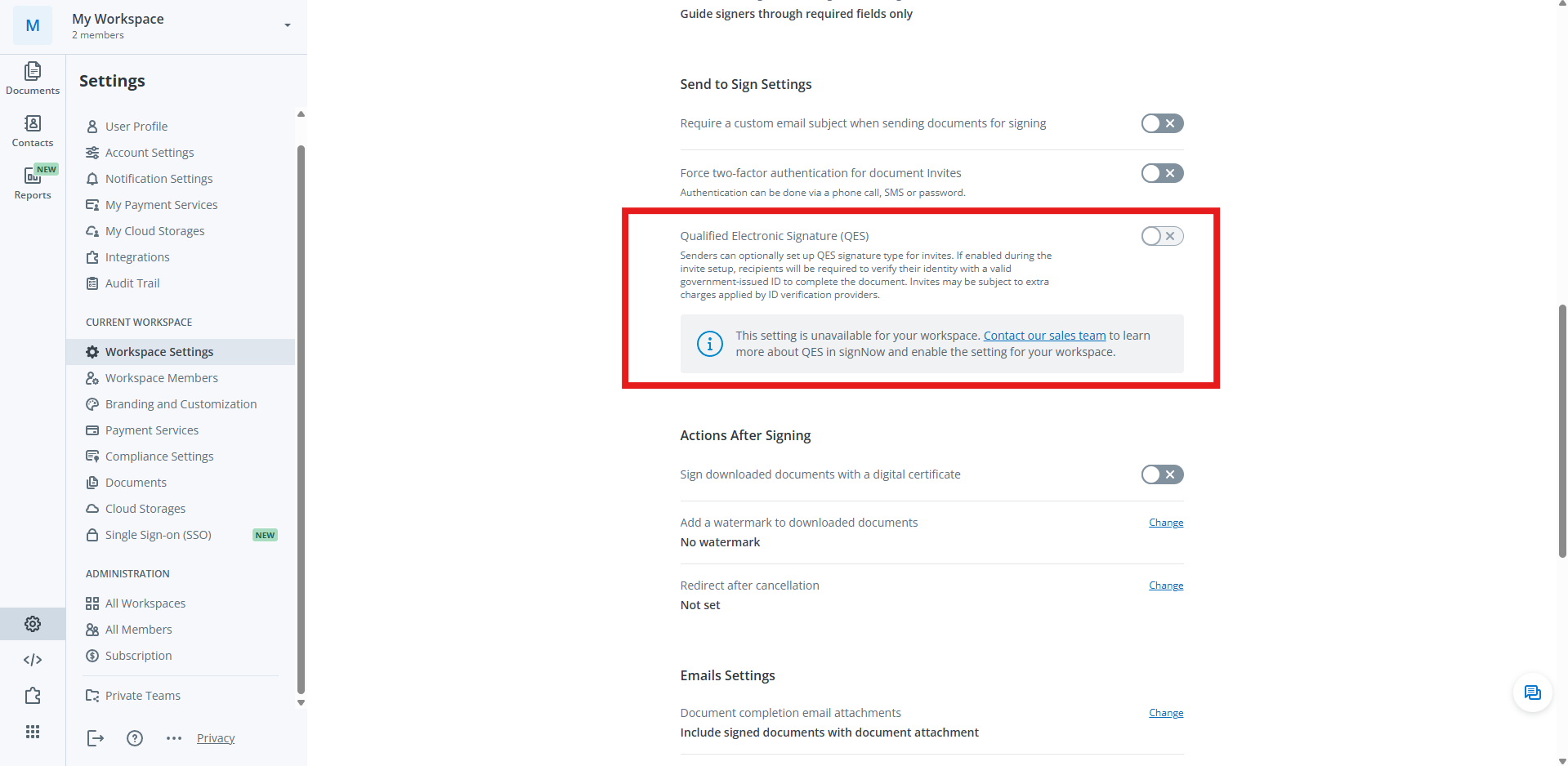
- Prepare a document
Set up your document invite as you normally would, adding the signer and any required fields. A key requirement for QES is that you can only have one signer per signing step. - Select QES signature type
When configuring the recipient’s settings, click to open Authentication and Settings. Change the signature type to Qualified Electronic Signature (QES).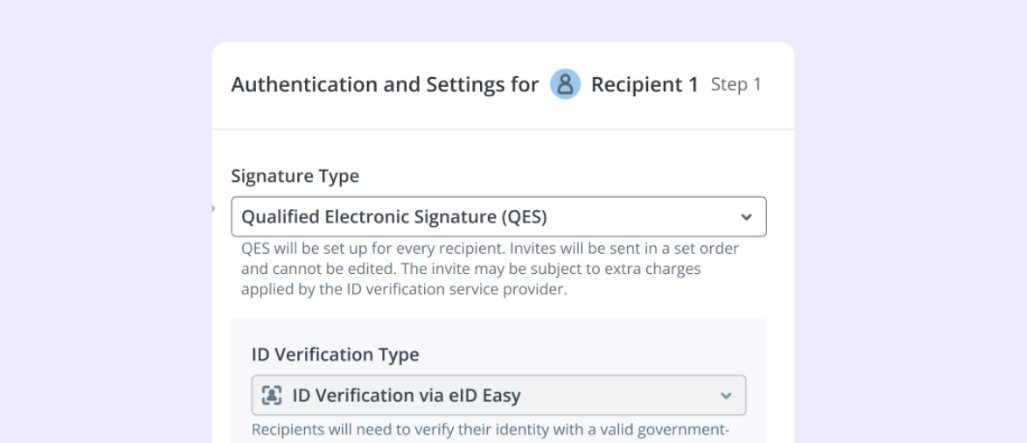
- Confirm settings: You will see a notification that QES settings will apply to all signers. The “ID Verification Type” will be automatically set to ID Verification via eID Easy, which manages the connection to the various QTSPs.
- Send Invite: Click Apply and send your document. The recipient will now have to complete the QES process to sign.
Pro tip: Merge multiple documents before sending. If you don’t need sequential signing, you’ll only pay for one document certificate this way.
Signing with QES (recipient):
- Open an eSignature invite
You will receive an email invitation to sign. Open the document and fill out all the required fields. - Start verification
After completing the document, a pop-up appears prompting you to verify your identity to sign. Click Get Started.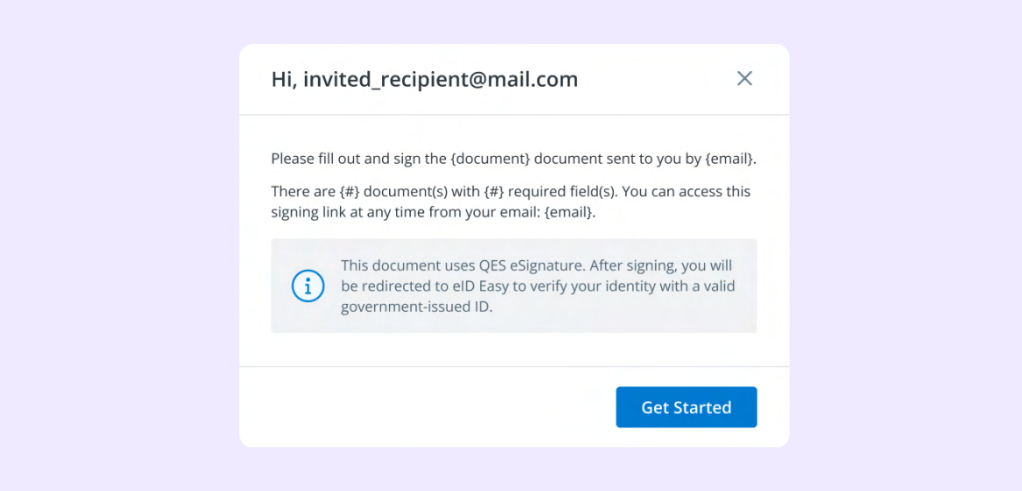
- Choose your provider
Select your country. Based on your selection, a list of available QTSPs (like BankID, Evrotrust, sign-me, etc.) will appear. Select the provider you use or wish to use. SignNow works with over 50 QTSPs.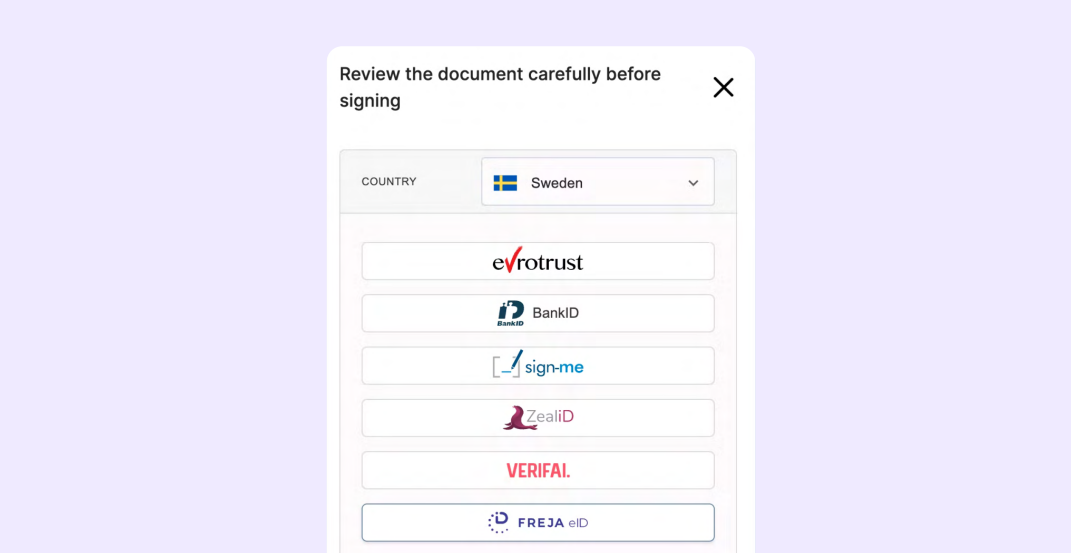
- Complete verification
Follow the on-screen instructions for your chosen provider. This process is different for each QTSP but may require you to use a mobile app, enter a personal identity code, or use a government-issued ID. - Finish signing
Once the QTSP has successfully verified your identity, your Qualified Electronic Signature applies to the document. The document is now signed, and you will see a confirmation page where you can download the certified document.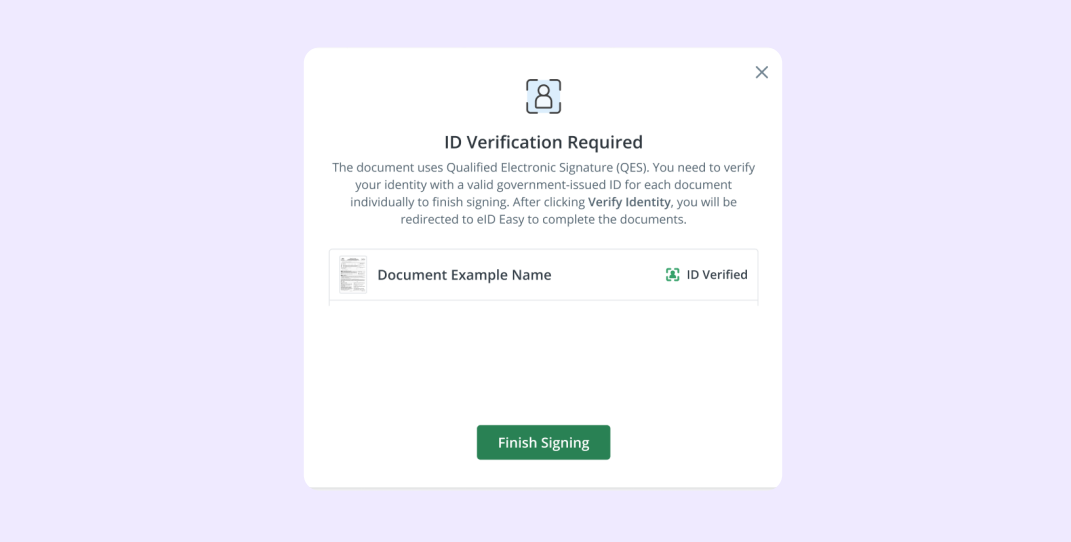
How can I validate or verify a QES?
You can easily verify a QES-signed document using any standard PDF viewer, such as Adobe Reader. The qualified certificate and signature are embedded directly into the PDF file.
Follow these steps to validate the signature:
- Open the PDF: Open the signed document in Adobe Reader.
- Open the signature panel: Look for a signature panel or a blue bar at the top indicating the document is signed. Click on it.
- View signature properties: Click on the signature in the panel to open the “Signature Validation Status” dialog. Click “Signature Properties”.
- Check validity: The “Signature Properties” dialog will clearly state if the signature is valid.
- Check certificate details: You can also check the certificate information to confirm it is a QES. Look for details stating it is a “Qualified Electronic Signature” and that it was issued by a trusted QTSP.
- Verify the certificate chain: In the same dialog, you can inspect the certificate chain (hierarchy). This shows that the signer’s certificate is linked to and validated by a root certificate authority recognized by the European Commission.
If the signature is valid, it confirms two critical things:
- Authenticity: The document was signed by the person whose identity is on the certificate.
- Integrity: The document has not been altered or tampered with since it was signed.
What about other regional standards like NOM-151?
While eIDAS is the standard for the EU, many countries have their own specific regulations for electronic documents. One example is NOM-151, a technical standard in Mexico.
NOM-151 is a standard for preserving data messages. Its main purpose is to guarantee the long-term integrity of an electronic document by proving that it has not been altered since it was created or signed.
SignNow facilitates compliance with specific national standards like NOM-151. Through our platform and integrations with accredited trust service providers, users can not only create and sign documents but also apply legally required preservation seals to ensure full compliance and legal validity in Mexico. Learn more about NOM-151 compliance and how SignNow achieves it.
Final thoughts: Choose the right signature level for your use case
Choosing the right type of electronic signature depends on your business needs, risk assessment, and legal requirements.
- For everyday operations like sales contracts, internal approvals, and HR documents, a Simple Electronic Signature (SES) provides the perfect balance of speed, convenience, and legal standing.
- For high-value transactions or in regulated industries, an Advanced Electronic Signature (AES) offers a vital extra layer of identity verification and document security.
- For the most critical legal documents or when operating in the EU, a Qualified Electronic Signature (QES) is the only choice that provides the same legal weight as a handwritten signature.
With SignNow, you don’t have to choose just one. Our platform supports every type of electronic signature under the eIDAS Regulation.
By integrating with trusted partners like GlobalSign for AES and a network of Qualified Trust Service Providers for QES, SignNow ensures the authenticity and integrity of your signed documents.
Ready to boost security with AES and QES? Start your free trial of SignNow today.
FAQs
1. What is a qualified trust service provider (QTSP)?
A QTSP is an organization or company officially accredited by a national authority in the EU to provide “qualified trust services.” These services include issuing the qualified certificates required to create a Qualified Electronic Signature.
2. What is the eIDAS Regulation?
eIDAS (Electronic Identification, Authentication and Trust Services) is a legal framework in the European Union. It establishes a single market for electronic identification and trust services, ensuring that electronic transactions (including e-signatures) are secure, reliable, and legally consistent across all EU member states.
3. Is a “digital signature” the same as an “electronic signature”?
No, not exactly. “Electronic signature” is a broad legal term for any electronic data used to show intent to sign. A “digital signature” is a specific type of electronic signature that uses a cryptographic technology called Public Key Infrastructure (PKI) to provide high levels of security, signer authentication, and document integrity. Advanced (AES) and Qualified (QES) electronic signatures are both types of digital signatures.
4. What is PKI (Public Key Infrastructure)?
PKI is a cryptographic technology that uses a pair of keys—a private key and a public key—to encrypt and decrypt data. In electronic signatures, the signer uses their private key (which only they control) to sign a document. The recipient uses the signer’s public key to verify that the signature is authentic and that the document was not altered. It is a foundational technology for AES and QES.
5. Can I use QES for documents in the United States?
While QES is a specific legal standard from the EU’s eIDAS Regulation, US laws like ESIGN and UETA are “technology-neutral”. This means they don’t prefer one technology over another, as long as the signature process proves intent. A QES provides an exceptionally high level of security, identity verification, and data integrity, which would constitute very strong evidence of a signature’s validity in a US court.
Glossary
- Audit trail: A complete, time-stamped log of all actions taken on an electronic document, including when it was opened, viewed, and signed. This serves as evidence to confirm the validity of the signature.
- eIDAS: The EU Regulation (2014/910) that governs electronic identification and trust services for electronic transactions, creating a standardized legal framework for electronic signatures across the EU.
- Public Key Infrastructure (PKI): A system of digital certificates, certificate authorities, and other registration authorities that create and manage cryptographic keys (public and private) to secure electronic transactions.
- Qualified Signature Creation Device (QSCD): A secure and certified piece of hardware (like a smart card or USB token) or a remote cloud-based service that is used to generate a Qualified Electronic Signature, ensuring the signer has sole control.
- Trust Service Provider (TSP): A business that provides digital trust services, such as issuing digital certificates or validating signatures. A Qualified Trust Service Provider (QTSP) is a TSP that has been audited and accredited by an EU national authority to provide qualified services, such as issuing certificates for QES.
- What is an electronic signature?
- What is the difference between QES, AES, and SES?
- What is an advanced electronic signature (AES)?
- What is a qualified electronic signature (QES)?
- Is a QES legally equivalent to a handwritten signature?
- How does a qualified electronic signature work?
- How do I obtain or get a QES?
- How do I create a qualified electronic signature in SignNow?
- How can I validate or verify a QES?
- What about other regional standards like NOM-151?
- Final thoughts: Choose the right signature level for your use case
- FAQs
- Glossary
