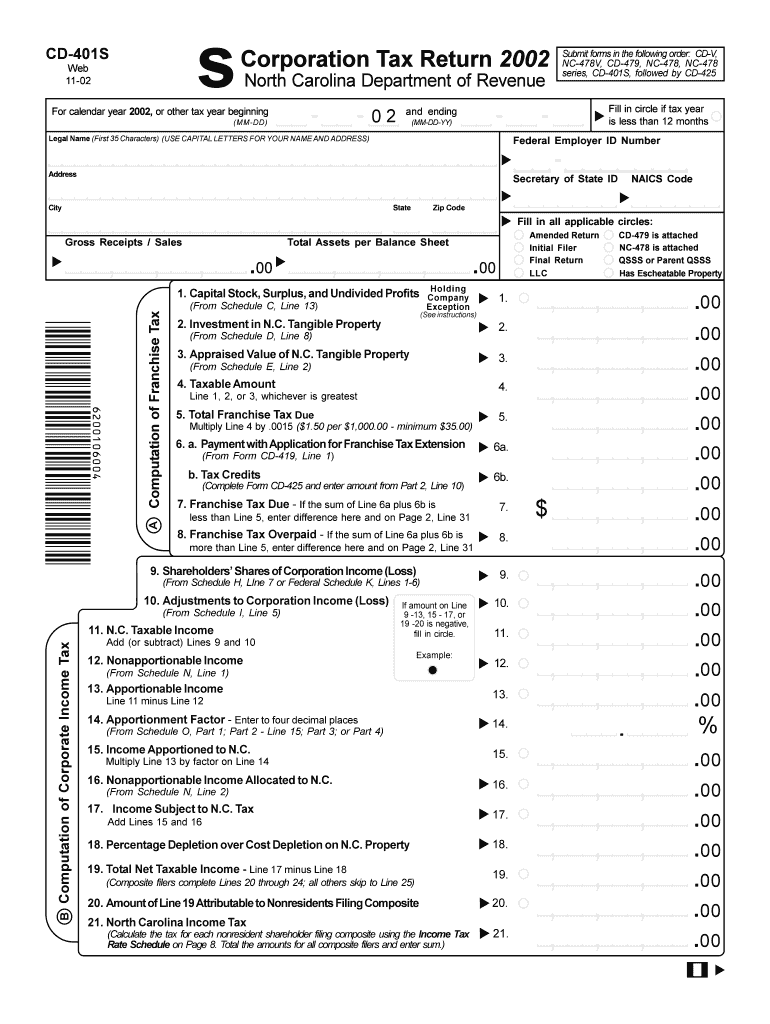
S CD 401S Web 11 02 Corporation Tax Return North Carolina Department of Revenue for Calendar Year , or Other Tax Year Beginning 2018


What is the S CD 401S Web 11 02 Corporation Tax Return?
The S CD 401S Web 11 02 Corporation Tax Return is a specific form required by the North Carolina Department of Revenue for corporations operating within the state. This form is utilized for reporting income, deductions, and credits for the calendar year or other designated tax year. It is essential for ensuring compliance with state tax laws and for accurately calculating the corporation's tax liability. The form must be submitted in a specific order, which includes the CD V, NC 478V, CD 479, NC 478, NC 478 Series, and finally the CD 401S to ensure proper processing by the tax authorities.
Steps to Complete the S CD 401S Web 11 02 Corporation Tax Return
Completing the S CD 401S Web 11 02 Corporation Tax Return involves several key steps:
- Gather all necessary financial documents, including income statements, balance sheets, and prior year tax returns.
- Complete the required forms in the specified order: start with CD V, followed by NC 478V, CD 479, NC 478, NC 478 Series, and finally the CD 401S.
- Ensure that all information is accurate and reflects the corporation's financial status for the tax year.
- Review the completed forms for any errors or omissions before submission.
- Submit the forms electronically or by mail, following the guidelines provided by the North Carolina Department of Revenue.
Legal Use of the S CD 401S Web 11 02 Corporation Tax Return
The S CD 401S Web 11 02 Corporation Tax Return is legally binding when filled out and submitted in accordance with North Carolina tax laws. To ensure its legal validity, the form must be signed by an authorized representative of the corporation. The use of electronic signatures is permissible, provided that the eSignature complies with the relevant legal frameworks, such as the ESIGN Act and UETA. This ensures that the form is recognized as an official document by both the state and federal authorities.
Filing Deadlines and Important Dates
Corporations must adhere to specific filing deadlines for the S CD 401S Web 11 02 Corporation Tax Return. Typically, the due date aligns with the federal tax return deadline, which is the fifteenth day of the fourth month following the end of the tax year. For corporations operating on a calendar year basis, this means the return is due on April 15. It is crucial to stay informed about any changes in deadlines or extensions that may be announced by the North Carolina Department of Revenue.
Required Documents for the S CD 401S Web 11 02 Corporation Tax Return
To successfully complete the S CD 401S Web 11 02 Corporation Tax Return, corporations need to prepare several documents:
- Income statements for the tax year.
- Balance sheets reflecting the corporation's financial position.
- Prior year tax returns for reference.
- Documentation of any deductions or credits being claimed.
- Records of any estimated tax payments made during the year.
State-Specific Rules for the S CD 401S Web 11 02 Corporation Tax Return
North Carolina has specific rules and regulations governing the completion and submission of the S CD 401S Web 11 02 Corporation Tax Return. Corporations must be aware of state-specific tax credits, deductions, and compliance requirements that differ from federal regulations. It is important to consult the North Carolina Department of Revenue’s guidelines to ensure that all state-specific rules are followed accurately to avoid penalties or issues with tax processing.
Quick guide on how to complete s cd 401s web 11 02 corporation tax return 2002 north carolina department of revenue for calendar year 2002 or other tax year
Effortlessly Prepare S CD 401S Web 11 02 Corporation Tax Return North Carolina Department Of Revenue For Calendar Year , Or Other Tax Year Beginning on Any Device
The management of online documents has become increasingly popular among organizations and individuals. It offers a perfect environmentally friendly substitute for conventional printed and signed documentation, as you can easily locate the necessary form and securely store it online. airSlate SignNow provides all the tools required to create, modify, and electronically sign your documents quickly without delays. Handle S CD 401S Web 11 02 Corporation Tax Return North Carolina Department Of Revenue For Calendar Year , Or Other Tax Year Beginning on any platform with the airSlate SignNow apps for Android or iOS and enhance any document-related workflow today.
The Easiest Way to Alter and Electronically Sign S CD 401S Web 11 02 Corporation Tax Return North Carolina Department Of Revenue For Calendar Year , Or Other Tax Year Beginning
- Obtain S CD 401S Web 11 02 Corporation Tax Return North Carolina Department Of Revenue For Calendar Year , Or Other Tax Year Beginning and click Get Form to begin.
- Utilize the tools we offer to complete your form.
- Highlight important sections of your documents or obscure sensitive information with tools that airSlate SignNow provides specifically for that purpose.
- Create your electronic signature using the Sign tool, a process that takes mere seconds and carries the same legal validity as a traditional ink signature.
- Review all the details and click on the Done button to save your changes.
- Select your preferred method to send your form, whether by email, SMS, invitation link, or download it to your computer.
No more concerns about lost or misplaced documents, tedious form searches, or errors that necessitate printing new copies. airSlate SignNow meets your document management needs in just a few clicks from your chosen device. Modify and electronically sign S CD 401S Web 11 02 Corporation Tax Return North Carolina Department Of Revenue For Calendar Year , Or Other Tax Year Beginning to ensure excellent communication at every stage of your form preparation process with airSlate SignNow.
Create this form in 5 minutes or less
Find and fill out the correct s cd 401s web 11 02 corporation tax return 2002 north carolina department of revenue for calendar year 2002 or other tax year
Create this form in 5 minutes!
How to create an eSignature for the s cd 401s web 11 02 corporation tax return 2002 north carolina department of revenue for calendar year 2002 or other tax year
The way to make an electronic signature for your PDF file in the online mode
The way to make an electronic signature for your PDF file in Chrome
The best way to make an eSignature for putting it on PDFs in Gmail
The best way to make an eSignature from your smartphone
The way to generate an electronic signature for a PDF file on iOS devices
The best way to make an eSignature for a PDF file on Android
People also ask
-
What is the S CD 401S Web 11 02 Corporation Tax Return?
The S CD 401S Web 11 02 Corporation Tax Return is a specific tax form used for reporting corporate income to the North Carolina Department of Revenue. This form is essential for those filing for a calendar year or other tax year beginning on 02 MM DD. Properly completing and submitting the S CD 401S ensures compliance with state tax regulations.
-
How do I submit the S CD 401S along with other forms?
When submitting the S CD 401S Web 11 02 Corporation Tax Return, it is crucial to submit forms in the following order: CD V, NC 478V, CD 479, NC 478, NC 478 Series, and finally, the CD 401S. Following this order ensures that the North Carolina Department of Revenue processes your submission efficiently.
-
What features does airSlate SignNow offer for completing the S CD 401S?
airSlate SignNow enables users to easily fill out the S CD 401S Web 11 02 Corporation Tax Return with its intuitive interface and document management features. The platform allows for eSigning and sharing documents securely, making it easier to manage tax forms and submissions for the North Carolina Department of Revenue.
-
Are there any pricing plans available for using airSlate SignNow?
Yes, airSlate SignNow offers various pricing plans that cater to different business needs. These plans provide access to key features, including the ability to manage forms like the S CD 401S Web 11 02 Corporation Tax Return efficiently. Check their website for specific details on pricing and features that align with your requirements.
-
How can airSlate SignNow benefit my business when filing taxes?
Using airSlate SignNow can streamline your tax filing process, particularly for the S CD 401S Web 11 02 Corporation Tax Return. The platform reduces the time spent on manual paperwork and ensures that all forms are completed accurately and submitted in the correct order, enhancing overall efficiency and compliance.
-
Does airSlate SignNow integrate with other financial software?
Yes, airSlate SignNow supports integration with various financial and accounting software solutions. This allows businesses to seamlessly manage their forms, including the S CD 401S Web 11 02 Corporation Tax Return, and ensures that all necessary data is easily accessible from one platform.
-
Can I track the status of my tax forms submitted via airSlate SignNow?
Absolutely! airSlate SignNow offers tracking features that allow you to monitor the status of your submitted tax forms, including the S CD 401S Web 11 02 Corporation Tax Return. This ensures you stay updated on the progress of your submission to the North Carolina Department of Revenue.
Get more for S CD 401S Web 11 02 Corporation Tax Return North Carolina Department Of Revenue For Calendar Year , Or Other Tax Year Beginning
- Pub 102 alaska court records state of alaska form
- Mc 505 motion for dismissal of petition 12 87 doc form
- P 305 alaska court records state of alaska form
- Alaska 805 motion form
- Dr 356 alaska court records state of alaska form
- Pg 600 minor guardianship petition packet non indian child coversheet form
- Form cr 742 alaska court system
- P 316 statement starting informal probate and appointing a personal representative when there is a will 12 14
Find out other S CD 401S Web 11 02 Corporation Tax Return North Carolina Department Of Revenue For Calendar Year , Or Other Tax Year Beginning
- eSignature California Plumbing Profit And Loss Statement Easy
- How To eSignature California Plumbing Business Letter Template
- eSignature Kansas Plumbing Lease Agreement Template Myself
- eSignature Louisiana Plumbing Rental Application Secure
- eSignature Maine Plumbing Business Plan Template Simple
- Can I eSignature Massachusetts Plumbing Business Plan Template
- eSignature Mississippi Plumbing Emergency Contact Form Later
- eSignature Plumbing Form Nebraska Free
- How Do I eSignature Alaska Real Estate Last Will And Testament
- Can I eSignature Alaska Real Estate Rental Lease Agreement
- eSignature New Jersey Plumbing Business Plan Template Fast
- Can I eSignature California Real Estate Contract
- eSignature Oklahoma Plumbing Rental Application Secure
- How Can I eSignature Connecticut Real Estate Quitclaim Deed
- eSignature Pennsylvania Plumbing Business Plan Template Safe
- eSignature Florida Real Estate Quitclaim Deed Online
- eSignature Arizona Sports Moving Checklist Now
- eSignature South Dakota Plumbing Emergency Contact Form Mobile
- eSignature South Dakota Plumbing Emergency Contact Form Safe
- Can I eSignature South Dakota Plumbing Emergency Contact Form