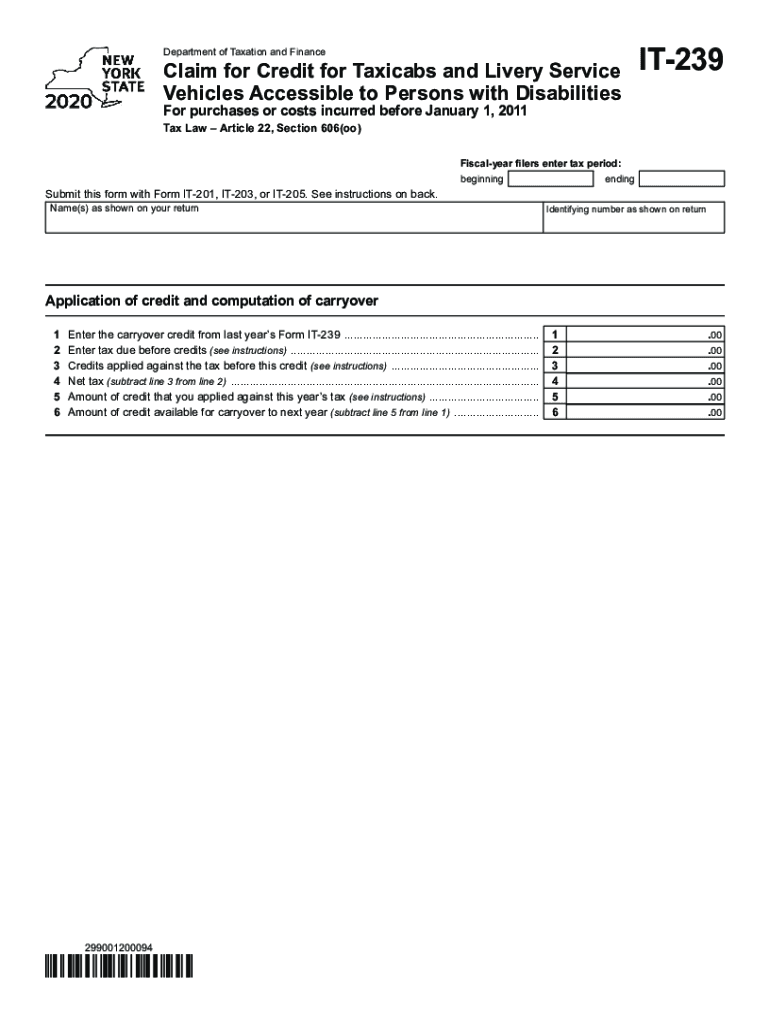
Printable New York Form it 239 Claim for Credit for Taxicabs and Livery Service Vehicles Accessible to Persons with Disabilities 2020


What is the NY 239 Form?
The NY 239 form, officially known as the Printable New York Form IT 239 Claim For Credit For Taxicabs And Livery Service Vehicles Accessible To Persons With Disabilities, is designed to provide tax credits for costs incurred in making vehicles accessible to individuals with disabilities. This form is particularly relevant for businesses that operate taxicabs and livery services in New York. It allows eligible entities to claim credits for expenses related to modifications that enhance accessibility, thus promoting inclusivity within the transportation sector.
Steps to Complete the NY 239 Form
Completing the NY 239 form involves several key steps to ensure accuracy and compliance. First, gather all necessary documentation, including receipts and proof of expenses related to vehicle modifications. Next, fill out the form with precise details, including your business information and the specific costs incurred. It is crucial to follow the instructions provided on the form carefully to avoid errors. Once completed, review the form for accuracy before submission.
Eligibility Criteria for the NY 239 Form
To qualify for the NY 239 form, businesses must meet specific eligibility criteria. Primarily, the business must operate taxicabs or livery service vehicles in New York and have incurred costs for making these vehicles accessible to individuals with disabilities. Additionally, the modifications must comply with state regulations regarding accessibility. It is essential to ensure that all criteria are met to successfully claim the tax credit.
Required Documents for the NY 239 Form
When filing the NY 239 form, several documents are required to substantiate your claim. These include:
- Receipts for all expenses related to vehicle modifications.
- Proof of business operation in New York.
- Documentation demonstrating the accessibility features added to the vehicles.
Having these documents ready will facilitate a smoother filing process and help ensure that your claim is processed without delays.
Filing Deadlines for the NY 239 Form
It is important to be aware of the filing deadlines associated with the NY 239 form. Typically, the form must be submitted along with your annual tax return. For most taxpayers, this means filing by April fifteenth of the following year. However, if you are granted an extension for your tax return, the same extension applies to the NY 239 form. Staying informed about these deadlines is crucial to avoid penalties and ensure timely processing of your claim.
Form Submission Methods
The NY 239 form can be submitted through various methods to accommodate different preferences. Businesses can choose to file the form online through the New York State Department of Taxation and Finance website. Alternatively, the form can be mailed to the appropriate tax office or submitted in person at designated locations. Each method has its advantages, and choosing the right one can help streamline the submission process.
Quick guide on how to complete printable 2020 new york form it 239 claim for credit for taxicabs and livery service vehicles accessible to persons with
Effortlessly prepare Printable New York Form IT 239 Claim For Credit For Taxicabs And Livery Service Vehicles Accessible To Persons With Disabilities on any device
Digital document management has gained signNow traction among businesses and individuals alike. It serves as an ideal environmentally-friendly substitute for traditional printed and signed paperwork, as you can easily locate the needed form and securely store it online. airSlate SignNow provides all the resources necessary to create, modify, and electronically sign your documents promptly, without any holdups. Manage Printable New York Form IT 239 Claim For Credit For Taxicabs And Livery Service Vehicles Accessible To Persons With Disabilities on any device using airSlate SignNow applications for Android or iOS and simplify your document-related tasks today.
The easiest way to modify and eSign Printable New York Form IT 239 Claim For Credit For Taxicabs And Livery Service Vehicles Accessible To Persons With Disabilities seamlessly
- Obtain Printable New York Form IT 239 Claim For Credit For Taxicabs And Livery Service Vehicles Accessible To Persons With Disabilities and click Get Form to begin.
- Utilize the tools we offer to complete your document.
- Emphasize important sections of your documents or redact sensitive data using resources that airSlate SignNow specifically provides for this purpose.
- Generate your eSignature with the Sign tool, which takes mere seconds and carries the same legal validity as a conventional wet ink signature.
- Verify all details and click the Done button to save your changes.
- Choose your delivery method for the form: via email, text message (SMS), invitation link, or download it to your computer.
Put an end to lost or misplaced documents, tedious form searches, or mistakes that necessitate printing new copies. airSlate SignNow fulfills all your document management needs in just a few clicks from any device you prefer. Edit and eSign Printable New York Form IT 239 Claim For Credit For Taxicabs And Livery Service Vehicles Accessible To Persons With Disabilities while ensuring excellent communication throughout the entire form preparation process with airSlate SignNow.
Create this form in 5 minutes or less
Find and fill out the correct printable 2020 new york form it 239 claim for credit for taxicabs and livery service vehicles accessible to persons with
Create this form in 5 minutes!
How to create an eSignature for the printable 2020 new york form it 239 claim for credit for taxicabs and livery service vehicles accessible to persons with
The best way to generate an eSignature for your PDF file in the online mode
The best way to generate an eSignature for your PDF file in Chrome
How to make an eSignature for putting it on PDFs in Gmail
The way to create an electronic signature right from your smartphone
How to create an electronic signature for a PDF file on iOS devices
The way to create an electronic signature for a PDF on Android
People also ask
-
What is the ny 239 form, and how can airSlate SignNow help me with it?
The ny 239 form is a crucial document often required for business filings in New York. airSlate SignNow streamlines the process of completing and eSigning the ny 239 form, ensuring you can efficiently manage your paperwork without delays or hassles.
-
Is airSlate SignNow cost-effective for processing the ny 239 form?
Yes, airSlate SignNow offers a cost-effective solution for managing documents like the ny 239 form. With various pricing plans, you can choose one that suits your needs, allowing seamless processing without breaking your budget.
-
What features does airSlate SignNow offer for the ny 239 form?
airSlate SignNow provides several features to enhance your experience with the ny 239 form, including template creation, real-time tracking, and secure storage. These tools ensure that your documents are managed efficiently and securely at every step.
-
Can I integrate airSlate SignNow with other apps while working on the ny 239 form?
Absolutely! airSlate SignNow integrates seamlessly with various applications, allowing you to work on the ny 239 form alongside your favorite tools. This integration enhances your workflow and maximizes efficiency.
-
How secure is airSlate SignNow when handling the ny 239 form?
Security is a top priority at airSlate SignNow. When you’re working with sensitive documents like the ny 239 form, you can trust that our platform employs advanced encryption and compliance measures to keep your information safe and secure.
-
Can multiple users collaborate on the ny 239 form using airSlate SignNow?
Yes, airSlate SignNow allows multiple users to collaborate on the ny 239 form. This feature facilitates teamwork, enabling users to share, review, and sign documents in real time, making the process faster and more efficient.
-
What benefits does airSlate SignNow offer for completing the ny 239 form?
Using airSlate SignNow for the ny 239 form offers numerous benefits, including time savings, improved accuracy, and reduced paperwork. You can conveniently eSign and store your forms online, which enhances organization and accessibility.
Get more for Printable New York Form IT 239 Claim For Credit For Taxicabs And Livery Service Vehicles Accessible To Persons With Disabilities
- Vertical well homogeneous reservoir form
- Form four revision papers
- Bia form 6407 2011
- Usfws form 3 177 declaration for importation or exportation of fish or wildlife
- 3809 management bond form
- Form no 10 344 rev 3 73 national park service nps
- Osage nation lien release form
- Addendum to form 8370 1 blm the bureau of land management blm
Find out other Printable New York Form IT 239 Claim For Credit For Taxicabs And Livery Service Vehicles Accessible To Persons With Disabilities
- eSignature Tennessee Banking Affidavit Of Heirship Online
- eSignature Florida Car Dealer Business Plan Template Myself
- Can I eSignature Vermont Banking Rental Application
- eSignature West Virginia Banking Limited Power Of Attorney Fast
- eSignature West Virginia Banking Limited Power Of Attorney Easy
- Can I eSignature Wisconsin Banking Limited Power Of Attorney
- eSignature Kansas Business Operations Promissory Note Template Now
- eSignature Kansas Car Dealer Contract Now
- eSignature Iowa Car Dealer Limited Power Of Attorney Easy
- How Do I eSignature Iowa Car Dealer Limited Power Of Attorney
- eSignature Maine Business Operations Living Will Online
- eSignature Louisiana Car Dealer Profit And Loss Statement Easy
- How To eSignature Maryland Business Operations Business Letter Template
- How Do I eSignature Arizona Charity Rental Application
- How To eSignature Minnesota Car Dealer Bill Of Lading
- eSignature Delaware Charity Quitclaim Deed Computer
- eSignature Colorado Charity LLC Operating Agreement Now
- eSignature Missouri Car Dealer Purchase Order Template Easy
- eSignature Indiana Charity Residential Lease Agreement Simple
- How Can I eSignature Maine Charity Quitclaim Deed