Blank Course Record Addendum 2004-2026


What is the Blank Course Record Addendum
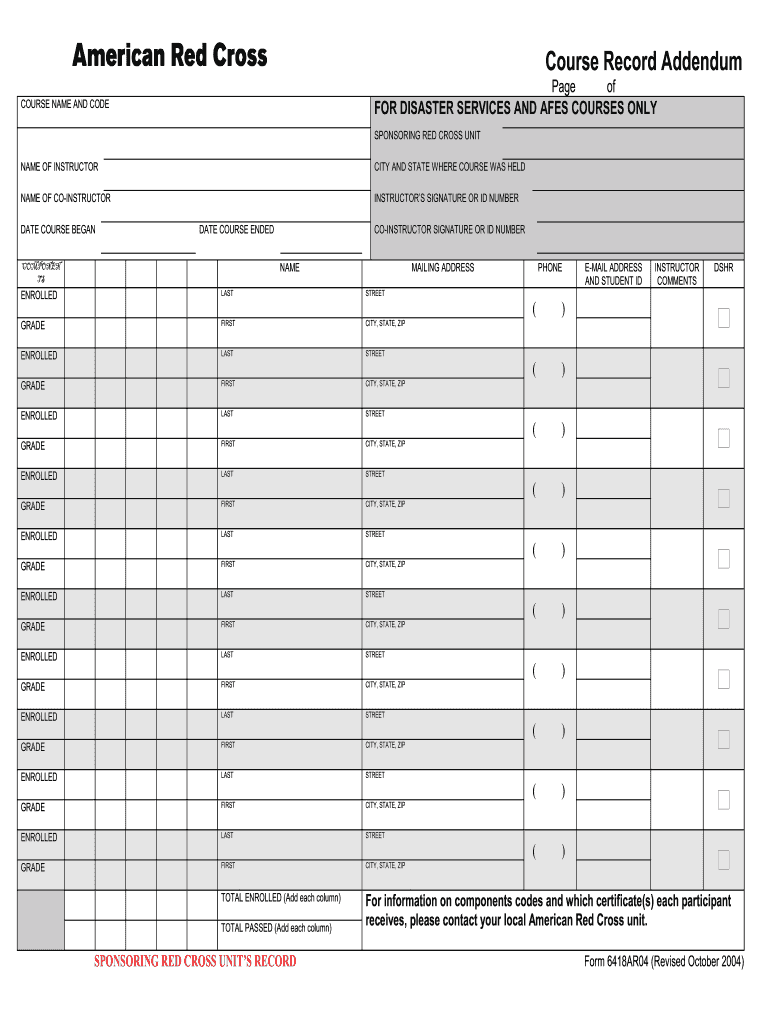
The Blank Course Record Addendum serves as a supplementary document used in conjunction with CPR training programs, particularly those offered by the American Red Cross. This addendum is essential for recording participant information, course details, and completion statuses. It ensures that all necessary data is captured accurately, providing a reliable record of training sessions. This document is particularly useful for instructors and training organizations to maintain compliance and track participant progress effectively.
How to Use the Blank Course Record Addendum
Utilizing the Blank Course Record Addendum involves several straightforward steps. First, gather all necessary information regarding the participants, including names, contact details, and completion dates. Next, fill out the addendum by entering this information in the designated fields. Ensure that all entries are clear and legible to avoid any confusion. Once completed, the addendum should be stored securely, either digitally or in a physical format, to maintain an accurate training record.
Steps to Complete the Blank Course Record Addendum
Completing the Blank Course Record Addendum requires attention to detail. Follow these steps for accurate documentation:
- Collect participant information, including full names and contact details.
- Document the course title, date, and duration of the training session.
- Record any certifications or qualifications achieved during the course.
- Ensure all entries are signed by the instructor to validate the record.
- Store the completed addendum securely for future reference.
Legal Use of the Blank Course Record Addendum
The Blank Course Record Addendum is legally binding when filled out correctly and signed by authorized personnel. It adheres to various eSignature laws, such as the ESIGN Act and UETA, ensuring that digital signatures are valid and enforceable. This legal backing is crucial for organizations that need to demonstrate compliance with training requirements and for participants who may need proof of their training for employment or certification purposes.
Key Elements of the Blank Course Record Addendum
Several key elements must be included in the Blank Course Record Addendum to ensure its effectiveness:
- Participant Information: Full names and contact details of all trainees.
- Course Details: Title, date, and duration of the CPR training.
- Completion Status: Indicate whether the participant successfully completed the course.
- Instructor Signature: Required to authenticate the document.
Examples of Using the Blank Course Record Addendum
The Blank Course Record Addendum can be utilized in various scenarios. For instance, a CPR instructor may use it to track attendance and completion for a group training session. Additionally, training organizations may compile these addendums to provide proof of training to employers or regulatory bodies. This documentation can also assist in evaluating the effectiveness of the training program by analyzing participant feedback and completion rates.
Quick guide on how to complete blank course record sheet red cross form
Learn how to effortlessly navigate the Blank Course Record Addendum process with this straightforward guidance
Electronic filing and completion of documents are becoming increasingly favored and the preferred choice for numerous clients. It offers various benefits over outdated printed forms, such as convenience, time savings, enhanced precision, and security.
With platforms like airSlate SignNow, you can locate, edit, sign, optimize, and send your Blank Course Record Addendum without being encumbered by endless printing and scanning. Follow this brief guide to initiate and finalize your document.
Follow these instructions to obtain and complete Blank Course Record Addendum
- Begin by clicking the Get Form button to access your document in our editor.
- Adhere to the green indicator on the left that highlights essential fields to ensure you don’t miss them.
- Utilize our advanced features to annotate, edit, sign, secure, and enhance your document.
- Protect your file or convert it into a fillable form using the tools available in the right panel.
- Review the document and verify it for mistakes or inconsistencies.
- Select DONE to complete the editing process.
- Rename your document or leave it as is.
- Select the storage option you wish to use to save your document, send it via USPS, or click the Download Now button to retrieve your document.
If Blank Course Record Addendum isn’t what you were looking for, feel free to explore our comprehensive library of pre-existing templates that you can fill out with minimal effort. Try our platform today!
Create this form in 5 minutes or less
FAQs
-
What is the procedure to fill out the DU admission form? How many colleges and courses can I fill in?
It's as simple as filling any school admission form but you need to be quite careful while filling for courses ,don't mind you are from which stream in class 12 choose all the courses you feel like choosing,there is no limitations in choosing course and yes you must fill all the courses related to your stream ,additionally there is no choice for filling of college names in the application form .
-
Will the NEET 2018 give admission in paramedical courses and Ayush courses too? If yes, how do you fill out the form to claim a seat if scored well?
wait for notifications.
-
I have a class lesson assessment form that I need to have filled out for 75 lessons. The form will be exactly the same except for the course number. How would you do this?
Another way would be to use the option of getting pre-filled answers with the course numbers entered. A custom URL is created and the form would collect the answers for all of the courses in the same spreadsheet. Not sure if that creates another problem for you, but you could sort OR filter the sheet once all the forms had been submitted. This is what the URL would look like for a Text Box https://docs.google.com/forms/d/1Ia6-paRijdUOn8U2L2H0bF1yujktcqgDsdBJQy2yO30/viewform?entry.14965048=COURSE+NUMBER+75 The nice thing about this is you can just change the part of the URL that Contains "COURSE+NUMBER+75" to a different number...SO for course number 1 it would be https://docs.google.com/forms/d/1Ia6-paRijdUOn8U2L2H0bF1yujktcqgDsdBJQy2yO30/viewform?entry.14965048=COURSE+NUMBER+1This is what the URL would look like for a Text Box radio button, same concept. https://docs.google.com/forms/d/1Ia6-paRijdUOn8U2L2H0bF1yujktcqgDsdBJQy2yO30/viewform?entry.14965048&entry.1934317001=Option+1 OR https://docs.google.com/forms/d/1Ia6-paRijdUOn8U2L2H0bF1yujktcqgDsdBJQy2yO30/viewform?entry.14965048&entry.1934317001=Option+6The Google Doc would look like this Quora pre-filled form I'm not sure if this helps at all or makes too complicated and prone to mistakes.
-
Why should it be so complicated just figuring out how much tax to pay? (record keeping, software, filling out forms . . . many times cost much more than the amount of taxes due) The cost of compliance makes the U.S. uncompetitive and costs jobs and lowers our standard of living.
Taxes can be viewed as having 4 uses (or purposes) in our (and most) governments:Revenue generation (to pay for public services).Fiscal policy control (e.g., If the government wishes to reduce the money supply in order to reduce the risk of inflation, they can raise interest rates, sell fewer bonds, burn money, or raise taxes. In the last case, this represents excess tax revenue over the actual spending needs of the government).Wealth re-distribution. One argument for this is that the earnings of a country can be perceived as belonging to all of its citizens since the we all have a stake in the resources of the country (natural resources, and intangibles such as culture, good citizenship, civic duties). Without some tax policy complexity, the free market alone does not re-distribute wealth according to this "shared" resources concept. However, this steps into the boundary of Purpose # 4...A way to implement Social Policy (and similar government mandated policies, such as environmental policy, health policy, savings and debt policy, etc.). As Government spending can be use to implement policies (e.g., spending money on public health care, environmental cleanup, education, etc.), it is equivalent to provide tax breaks (income deductions or tax credits) for the private sector to act in certain ways -- e.g., spend money on R&D, pay for their own education or health care, avoid spending money on polluting cars by having a higher sales tax on these cars or offering a credit for trade-ins [ref: Cash for Clunkers]).Uses # 1 & 2 are rather straight-forward, and do not require a complex tax code to implement. Flat income and/or consumption (sales) taxes can easily be manipulated up or down overall for these top 2 uses. Furthermore, there is clarity when these uses are invoked. For spending, we publish a budget. For fiscal policy manipulation, the official economic agency (The Fed) publishes their outlook and agenda.Use # 3 is controversial because there is no Constitutional definition for the appropriate level of wealth re-distribution, and the very concept of wealth re-distribution is considered by some to be inappropriate and unconstitutional. Thus, the goal of wealth re-distribution is pretty much hidden in with the actions and policies of Use #4 (social policy manipulation).Use # 4, however, is where the complexity enters the Taxation system. Policy implementation through taxation (or through spending) occurs via legislation. Legislation (law making) is inherently complex and subject to gross manipulation by special interests during formation and amendments. Legislation is subject to interpretation, is prone to errors (leading to loopholes) and both unintentional or intentional (criminal / fraudulent) avoidance.The record keeping and forms referred to in the question are partially due to the basic formula for calculating taxes (i.e., percentage of income, cost of property, amount of purchase for a sales tax, ...). However, it is the complexity (and associated opportunities for exploitation) of taxation legislation for Use # 4 (Social Policy implementation) that naturally leads to complexity in the reporting requirements for the tax system.
Create this form in 5 minutes!
How to create an eSignature for the blank course record sheet red cross form
How to create an eSignature for the Blank Course Record Sheet Red Cross Form online
How to generate an electronic signature for the Blank Course Record Sheet Red Cross Form in Google Chrome
How to make an eSignature for signing the Blank Course Record Sheet Red Cross Form in Gmail
How to create an eSignature for the Blank Course Record Sheet Red Cross Form straight from your smart phone
How to create an electronic signature for the Blank Course Record Sheet Red Cross Form on iOS devices
How to generate an eSignature for the Blank Course Record Sheet Red Cross Form on Android
People also ask
-
What is a Blank Course Record Addendum?
A Blank Course Record Addendum is a customizable document that allows educators and institutions to provide additional information about a student's academic record. With airSlate SignNow, you can easily create and manage Blank Course Record Addendums to ensure all necessary details are accurately documented and quickly accessible.
-
How can airSlate SignNow help me with Blank Course Record Addendums?
airSlate SignNow streamlines the creation and signing process for Blank Course Record Addendums. Our platform offers templates and easy-to-use tools that enable you to fill out, eSign, and send these documents seamlessly, saving you time and improving efficiency.
-
Is there a cost associated with using Blank Course Record Addendums on airSlate SignNow?
Yes, airSlate SignNow offers competitive pricing plans that include the ability to create and manage Blank Course Record Addendums. We provide flexible options to fit various budgets, ensuring you have access to essential features without breaking the bank.
-
What features does airSlate SignNow offer for managing Blank Course Record Addendums?
airSlate SignNow includes features such as document templates, eSignature capabilities, and secure cloud storage for Blank Course Record Addendums. You can easily track document statuses and collaborate with others, enhancing the overall management of academic records.
-
Can I integrate airSlate SignNow with other tools for Blank Course Record Addendums?
Absolutely! airSlate SignNow integrates with various applications, making it easy to incorporate Blank Course Record Addendums into your existing workflow. Whether you're using CRM systems, document management software, or educational platforms, our solution ensures seamless connectivity.
-
What are the benefits of using airSlate SignNow for Blank Course Record Addendums?
Using airSlate SignNow for Blank Course Record Addendums offers numerous benefits, including increased efficiency, reduced paper usage, and improved document accuracy. Our platform simplifies the signing process while providing a secure environment for sensitive academic information.
-
How secure is the information on my Blank Course Record Addendums with airSlate SignNow?
Security is our top priority at airSlate SignNow. All information related to your Blank Course Record Addendums is protected with advanced encryption and compliance with regulatory standards, ensuring that your documents remain confidential and secure.
Get more for Blank Course Record Addendum
Find out other Blank Course Record Addendum
- Sign South Dakota Non-Profit Business Plan Template Myself
- Sign Rhode Island Non-Profit Residential Lease Agreement Computer
- Sign South Carolina Non-Profit Promissory Note Template Mobile
- Sign South Carolina Non-Profit Lease Agreement Template Online
- Sign Oregon Life Sciences LLC Operating Agreement Online
- Sign Texas Non-Profit LLC Operating Agreement Online
- Can I Sign Colorado Orthodontists Month To Month Lease
- How Do I Sign Utah Non-Profit Warranty Deed
- Help Me With Sign Colorado Orthodontists Purchase Order Template
- Sign Virginia Non-Profit Living Will Fast
- How To Sign Virginia Non-Profit Lease Agreement Template
- How To Sign Wyoming Non-Profit Business Plan Template
- How To Sign Wyoming Non-Profit Credit Memo
- Sign Wisconsin Non-Profit Rental Lease Agreement Simple
- Sign Wisconsin Non-Profit Lease Agreement Template Safe
- Sign South Dakota Life Sciences Limited Power Of Attorney Mobile
- Sign Alaska Plumbing Moving Checklist Later
- Sign Arkansas Plumbing Business Plan Template Secure
- Sign Arizona Plumbing RFP Mobile
- Sign Arizona Plumbing Rental Application Secure