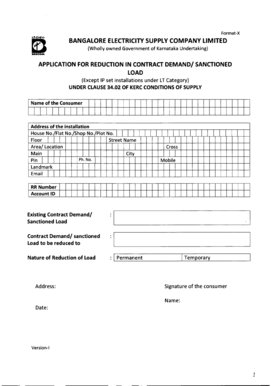
How to Increase Sanctioned Load in Bescom Form


What is the process for increasing sanctioned load in BESCOM?
The process for increasing sanctioned load in BESCOM involves submitting an application to the Bangalore Electricity Supply Company Limited (BESCOM) for approval. This application allows consumers to request an increase in their electricity load capacity, which is essential for accommodating higher energy demands. The sanctioned load refers to the maximum amount of electricity that a consumer is permitted to use, based on their connection type and requirements.
Steps to complete the increase sanctioned load application in BESCOM
To successfully complete the application for increasing sanctioned load in BESCOM, follow these steps:
- Gather necessary documents, including proof of identity, address, and existing electricity bill.
- Access the BESCOM online portal to locate the load enhancement application form.
- Fill out the application form with accurate details, including the current and requested load.
- Submit the application along with the required documents through the online system.
- Pay any applicable fees associated with the load enhancement request.
- Track the status of your application through the BESCOM portal or by contacting customer service.
Required documents for increasing sanctioned load in BESCOM
When applying to increase your sanctioned load in BESCOM, you will need to provide specific documents to support your request. These typically include:
- A copy of the consumer's identity proof, such as a driver's license or passport.
- A recent electricity bill to verify the current load and consumption.
- Proof of address, which can be a utility bill or lease agreement.
- Any additional documents requested by BESCOM, depending on the nature of the application.
Legal considerations for increasing sanctioned load in BESCOM
When increasing the sanctioned load in BESCOM, it is important to consider the legal implications. The application must comply with local regulations governing electricity usage and safety standards. Additionally, the submitted documents must be accurate and truthful to avoid penalties or delays in processing. Ensuring compliance with these legal requirements helps protect consumers' rights and ensures a smooth process.
Key elements to include in your BESCOM load enhancement application
To enhance the chances of approval for your sanctioned load increase, include the following key elements in your application:
- Clear identification of the current sanctioned load and the requested increase.
- Justification for the increase, such as new appliances or business expansion.
- Accurate personal and contact information to facilitate communication.
- Any relevant technical specifications if applicable, especially for commercial applications.
Understanding BESCOM load enhancement charges
When applying for an increase in sanctioned load, consumers may incur additional charges. These charges are typically based on the difference between the existing and requested load, along with any administrative fees. It is advisable to review BESCOM's fee structure to understand the potential costs involved in the load enhancement process. Being aware of these charges can help in budgeting for the increase in electricity capacity.
Quick guide on how to complete how to increase sanctioned load in bescom
Manage How To Increase Sanctioned Load In Bescom effortlessly on any device
Digital document management has become increasingly popular among businesses and individuals alike. It offers an excellent sustainable alternative to traditional printed and signed documents, as you can access the necessary form and securely keep it online. airSlate SignNow provides all the tools you require to create, modify, and electronically sign your documents promptly without delays. Manage How To Increase Sanctioned Load In Bescom on any device with airSlate SignNow's Android or iOS applications and simplify any document-related process today.
The simplest way to alter and electronically sign How To Increase Sanctioned Load In Bescom with ease
- Locate How To Increase Sanctioned Load In Bescom and click on Get Form to begin.
- Make use of the tools we offer to complete your form.
- Select important sections of the documents or obscure sensitive data with tools that airSlate SignNow specifically provides for this purpose.
- Create your eSignature using the Sign feature, which only takes seconds and has the same legal validity as a conventional wet ink signature.
- Review the details and click on the Done button to preserve your changes.
- Choose your preferred method for sending your form, whether by email, SMS, or an invite link, or download it to your computer.
Eliminate the hassle of lost or misplaced documents, tedious form searches, or mistakes that necessitate reprinting new copies. airSlate SignNow fulfills your document management requirements in a few clicks from any device you choose. Modify and electronically sign How To Increase Sanctioned Load In Bescom and ensure outstanding communication at every stage of your form preparation process with airSlate SignNow.
Create this form in 5 minutes or less
Create this form in 5 minutes!
How to create an eSignature for the how to increase sanctioned load in bescom
How to create an electronic signature for a PDF online
How to create an electronic signature for a PDF in Google Chrome
How to create an e-signature for signing PDFs in Gmail
How to create an e-signature right from your smartphone
How to create an e-signature for a PDF on iOS
How to create an e-signature for a PDF on Android
People also ask
-
What is the process to learn how to increase sanctioned load in bescom online?
To increase sanctioned load in bescom online, you typically need to visit the official BESCOM website, log in to your account, and follow the instructions provided for load enhancement. Ensure you have your consumer details ready and adhere to all guidelines to successfully complete the process.
-
Are there any fees associated with increasing sanctioned load in bescom online?
Yes, there may be charges associated with how to increase sanctioned load in bescom online. These fees can vary based on the load increase requested and local regulations. It's recommended to check BESCOM's official site for the most accurate fee structure.
-
What documents do I need to submit when learning how to increase sanctioned load in bescom online?
When learning how to increase sanctioned load in bescom online, you'll typically need to submit proof of identity, address, and any existing electrical load details. Additional documents may be required depending on the specific load increase you are requesting.
-
Can I track the status of my request to increase sanctioned load in bescom online?
Yes, you can track the status of your request to increase sanctioned load in bescom online through your user account on the BESCOM portal. Make sure you're logged in to check the updates and any further steps you might need to take.
-
How long does it take to process the request for increasing sanctioned load in bescom online?
The processing time for how to increase sanctioned load in bescom online can vary, typically ranging from several days to a few weeks. Factors like your local BESCOM branch's workload and the completeness of your submitted documents can affect the timeframe.
-
What are the benefits of increasing my sanctioned load in bescom online?
Increasing your sanctioned load in bescom online allows you to support greater electrical needs, enhancing your business or home's overall energy capacity. This can facilitate increased productivity and prevent power interruptions during peak demand periods.
-
Is it necessary to consult an electrician before I increase my sanctioned load in bescom online?
While it's not mandatory, consulting an electrician before increasing your sanctioned load in bescom online is highly recommended. An electrician can provide valuable insights on your existing electrical system's capabilities and whether it can handle the proposed load increase.
Get more for How To Increase Sanctioned Load In Bescom
- Schedule j form 1040 income averaging for farmers and fishermen
- Tax brief form 990 schedule i grants and other assistance
- Form 3520 702386909
- Application form for registration the government of
- Sale agent contract template form
- Sale business contract template form
- Sale by owner contract template form
- Sale associate contract template form
Find out other How To Increase Sanctioned Load In Bescom
- Electronic signature Doctors PDF Louisiana Now
- How To Electronic signature Massachusetts Doctors Quitclaim Deed
- Electronic signature Minnesota Doctors Last Will And Testament Later
- How To Electronic signature Michigan Doctors LLC Operating Agreement
- How Do I Electronic signature Oregon Construction Business Plan Template
- How Do I Electronic signature Oregon Construction Living Will
- How Can I Electronic signature Oregon Construction LLC Operating Agreement
- How To Electronic signature Oregon Construction Limited Power Of Attorney
- Electronic signature Montana Doctors Last Will And Testament Safe
- Electronic signature New York Doctors Permission Slip Free
- Electronic signature South Dakota Construction Quitclaim Deed Easy
- Electronic signature Texas Construction Claim Safe
- Electronic signature Texas Construction Promissory Note Template Online
- How To Electronic signature Oregon Doctors Stock Certificate
- How To Electronic signature Pennsylvania Doctors Quitclaim Deed
- Electronic signature Utah Construction LLC Operating Agreement Computer
- Electronic signature Doctors Word South Dakota Safe
- Electronic signature South Dakota Doctors Confidentiality Agreement Myself
- How Do I Electronic signature Vermont Doctors NDA
- Electronic signature Utah Doctors Promissory Note Template Secure