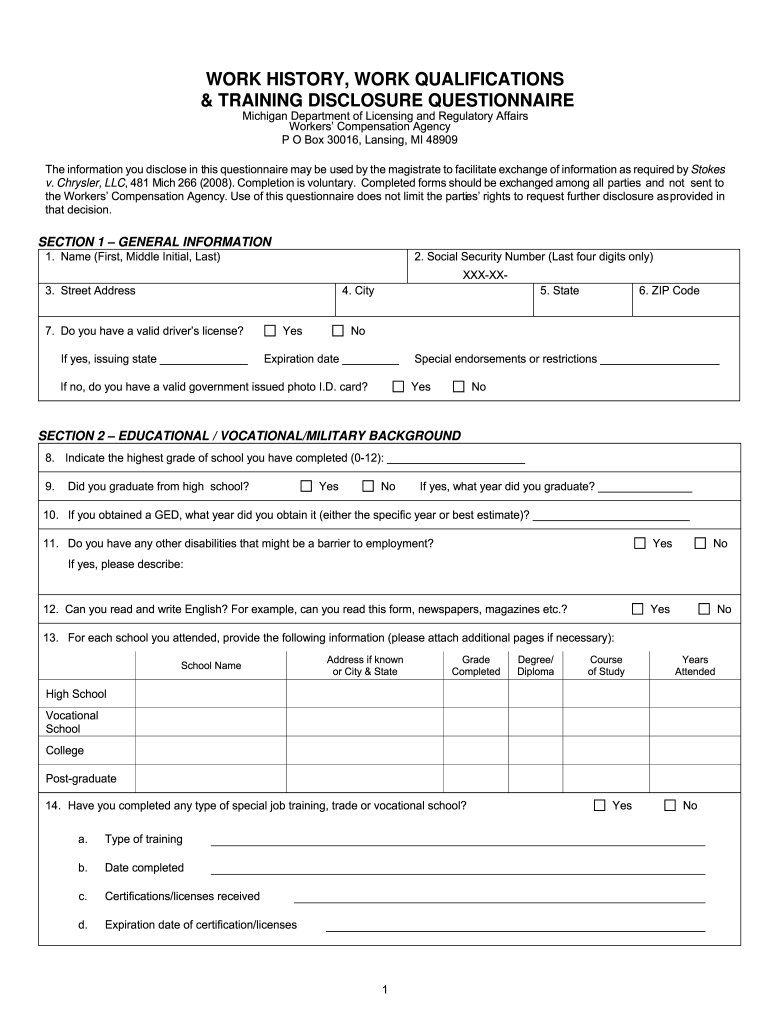
105a Form Workmans Compensation 2012


What is the 105a Form Workmans Compensation
The 105a form, also known as the Workmans Compensation form, is an essential document used in the United States for reporting workplace injuries and illnesses. This form serves as a formal notification to employers and insurance providers regarding an employee's claim for benefits due to work-related incidents. It outlines the details of the injury, including the date, nature of the injury, and the circumstances surrounding the event. Proper completion of the 105a form is crucial for ensuring that employees receive the necessary support and compensation for their injuries.
How to use the 105a Form Workmans Compensation
Using the 105a form involves several steps to ensure that all required information is accurately provided. First, gather all relevant details about the incident, including witness statements and medical reports. Next, fill out the form with precise information regarding the injured party, the nature of the injury, and the date it occurred. Once completed, submit the form to the appropriate employer or insurance representative. It is important to keep a copy of the submitted form for personal records and to track the progress of the claim.
Steps to complete the 105a Form Workmans Compensation
Completing the 105a form requires careful attention to detail. Follow these steps for accurate submission:
- Collect all necessary documentation related to the injury, including medical records and witness accounts.
- Fill in the employee's personal information, including name, address, and contact details.
- Provide a detailed description of the injury, including the date, time, and location of the incident.
- Include any relevant medical treatment information, such as hospital visits or ongoing care.
- Review the form for accuracy and completeness before submission.
- Submit the form to the designated employer or insurance company, and retain a copy for your records.
Legal use of the 105a Form Workmans Compensation
The 105a form is legally recognized as a valid document for filing workers' compensation claims. It must be completed in compliance with state-specific regulations to ensure its acceptance. Proper use of this form protects both the employee's rights to compensation and the employer's obligations under workers' compensation laws. Inaccuracies or omissions can lead to delays or denials of claims, making it essential to adhere to legal guidelines when completing and submitting the form.
Key elements of the 105a Form Workmans Compensation
Several key elements must be included in the 105a form to ensure its validity:
- Employee Information: Full name, address, and contact details of the injured employee.
- Incident Details: Date, time, and location of the injury, along with a detailed description.
- Medical Information: Details of any medical treatment received, including provider information.
- Witness Information: Names and contact details of any witnesses to the incident.
- Employer Information: Name and contact information of the employer or insurance representative receiving the claim.
Form Submission Methods
The 105a form can be submitted through various methods, depending on the employer's or insurance company's preferences. Common submission methods include:
- Online Submission: Many employers and insurance companies offer online portals for submitting the form electronically, which can expedite the claims process.
- Mail: The form can be printed and mailed to the appropriate address provided by the employer or insurance company.
- In-Person Submission: Employees may also choose to deliver the form directly to their employer's human resources department or the insurance provider's office.
Quick guide on how to complete what is the wc 105 form used for in michigan
Optimize your HR functions with 105a Form Workmans Compensation Template
Every HR professional understands the importance of maintaining employees’ information organized and tidy. With airSlate SignNow, you gain access to a comprehensive collection of state-specific labor documents that signNowly ease the organization, management, and storage of all employment-related paperwork in one location. airSlate SignNow assists you in overseeing 105a Form Workmans Compensation management from start to finish, with robust editing and eSignature features available whenever you require them. Improve your precision, document safety, and eliminate minor manual mistakes in just a few clicks.
The most effective way to modify and eSign 105a Form Workmans Compensation:
- Select the relevant state and look for the document you need.
- Open the document page and click Get Form to commence working on it.
- Allow 105a Form Workmans Compensation to load in our editor and follow the prompts that highlight required fields.
- Enter your details or add additional fillable areas to the document.
- Utilize our tools and features to adjust your document as necessary: annotate, conceal sensitive information, and create an eSignature.
- Review your document for any mistakes before proceeding with its submission.
- Click on Done to save changes and download your document.
- Alternatively, dispatch your documents directly to your recipients and gather signatures and information.
- Safely store completed documents in your airSlate SignNow account and access them whenever you wish.
Employing a versatile eSignature solution is crucial when handling 105a Form Workmans Compensation. Make even the most intricate workflow as seamless as possible with airSlate SignNow. Start your free trial today to discover what you can accomplish within your department.
Create this form in 5 minutes or less
Find and fill out the correct what is the wc 105 form used for in michigan
FAQs
-
What is the procedure to fill out the DU admission form? How many colleges and courses can I fill in?
It's as simple as filling any school admission form but you need to be quite careful while filling for courses ,don't mind you are from which stream in class 12 choose all the courses you feel like choosing,there is no limitations in choosing course and yes you must fill all the courses related to your stream ,additionally there is no choice for filling of college names in the application form .
-
What is the procedure to fill out the form for re-viva in CSJM University?
It is not difficult. Every year CSJM university organises left over viva examination in university campus. For this contact Registrar University. Fill a form. Submit the fees. Usually such viva takes.place in summer months. You can get contact information from csjm website
-
What are the good ways to fill out 1120 form if my business is inactive?
While you might not have been “active” throughout the year, by filing a “no activity” return you may be throwing away potential deductions! Most businesses (even unprofitable ones) will have some form of expenses – think tax prep fees, taxes, filing fees, home office, phone, etc. Don’t miss out on your chance to preserve these valuable deductions. You can carry these forward to more profitable years by using the Net Operating Loss Carry-forward rules. But you must report them to take advantage of this break. If you honestly did not have any expenses or income during the tax year, simply file form 1120 by the due date (no later than 2 and one half months after the close of the business tax year – March 15 for calendar year businesses). Complete sections A-E on the front page of the return and make sure you sign the bottom – that’s it!
-
What is the new procedure in filling out the AIIMS 2019 form? What is the last date to fill out its form?
AIIMS has introduced the PAAR facility (Prospective Applicant Advanced Registration) for filling up the application form. Through PAAR facility, the process application form is divided into two steps- basic registration and final registration.Basic Registration:On this part you have to fill up your basic details like Full name, parent’s name, date of birth, gender, category, state of domicile, ID proof/number and others. No paAIIMS Final RegistrationA Code will be issued to the candidates who complete the Basic Registration. You have to use the same code to login again and fill the form.At this stage, candidates are required to fill out the entire details of their personal, professional and academic background. Also, they have to submit the application fee as per their category.Here I have explained the two steps for AIIMS 2019 form.For more details visit aim4aiims’s website:About AIIMS Exam 2019
-
What happens to all of the paper forms you fill out for immigration and customs?
Years ago I worked at document management company. There is cool software that can automate aspects of hand-written forms. We had an airport as a customer - they scanned plenty and (as I said before) this was several years ago...On your airport customs forms, the "boxes" that you 'need' to write on - are basically invisible to the scanner - but are used because then us humans will tend to write neater and clearer which make sit easier to recognize with a computer. Any characters with less than X% accuracy based on a recognition engine are flagged and shown as an image zoomed into the particular character so a human operator can then say "that is an "A". This way, you can rapidly go through most forms and output it to say - an SQL database, complete with link to original image of the form you filled in.If you see "black boxes" at three corners of the document - it is likely set up for scanning (they help to identify and orient the page digitally). If there is a unique barcode on the document somewhere I would theorize there is an even higher likelihood of it being scanned - the document is of enough value to be printed individually which costs more, which means it is likely going to be used on the capture side. (I've noticed in the past in Bahamas and some other Caribbean islands they use these sorts of capture mechanisms, but they have far fewer people entering than the US does everyday)The real answer is: it depends. Depending on each country and its policies and procedures. Generally I would be surprised if they scanned and held onto the paper. In the US, they proably file those for a set period of time then destroy them, perhaps mining them for some data about travellers. In the end, I suspect the "paper-to-data capture" likelihood of customs forms ranges somewhere on a spectrum like this:Third world Customs Guy has paper to show he did his job, paper gets thrown out at end of shift. ------> We keep all the papers! everything is scanned as you pass by customs and unique barcodes identify which flight/gate/area the form was handed out at, so we co-ordinate with cameras in the airport and have captured your image. We also know exactly how much vodka you brought into the country. :)
Create this form in 5 minutes!
How to create an eSignature for the what is the wc 105 form used for in michigan
How to generate an eSignature for your What Is The Wc 105 Form Used For In Michigan in the online mode
How to create an eSignature for the What Is The Wc 105 Form Used For In Michigan in Chrome
How to create an electronic signature for putting it on the What Is The Wc 105 Form Used For In Michigan in Gmail
How to generate an electronic signature for the What Is The Wc 105 Form Used For In Michigan from your mobile device
How to generate an electronic signature for the What Is The Wc 105 Form Used For In Michigan on iOS
How to create an electronic signature for the What Is The Wc 105 Form Used For In Michigan on Android
People also ask
-
What is the 105a Form Workmans Compensation?
The 105a Form Workmans Compensation is a document used to report workplace injuries and claims related to worker's compensation. It serves as a critical tool for employers and employees to ensure compliance with state regulations and facilitate the claims process efficiently.
-
How does airSlate SignNow simplify the 105a Form Workmans Compensation process?
airSlate SignNow streamlines the process of completing and submitting the 105a Form Workmans Compensation by allowing users to fill out, sign, and send documents electronically. This feature reduces paperwork and accelerates the claims process, making it easier for businesses to manage worker's compensation claims.
-
What are the pricing options for using airSlate SignNow with the 105a Form Workmans Compensation?
airSlate SignNow offers a variety of pricing plans to suit different business needs, starting with a free trial that allows you to explore features related to the 105a Form Workmans Compensation. Paid plans provide enhanced capabilities, such as unlimited document signing and integrations, at competitive rates.
-
Can I integrate airSlate SignNow with other software to manage the 105a Form Workmans Compensation?
Yes, airSlate SignNow provides seamless integrations with popular business applications, enabling you to manage the 105a Form Workmans Compensation within your existing workflows. This integration capability enhances efficiency and ensures that all documentation is easily accessible.
-
What benefits does electronic signing offer for the 105a Form Workmans Compensation?
Using airSlate SignNow for the 105a Form Workmans Compensation allows for quick, secure, and legally binding electronic signatures. This not only speeds up the approval process but also improves record-keeping and provides a more efficient method of handling claims.
-
Is airSlate SignNow secure for handling the 105a Form Workmans Compensation?
Absolutely! airSlate SignNow employs advanced security measures to protect sensitive information related to the 105a Form Workmans Compensation. With features like SSL encryption and secure cloud storage, you can trust that your documents are safe.
-
How can airSlate SignNow improve compliance with the 105a Form Workmans Compensation?
By using airSlate SignNow to manage the 105a Form Workmans Compensation, businesses can ensure they meet all regulatory requirements. The platform provides templates and reminders, helping companies stay compliant and reducing the risk of errors in the claims process.
Get more for 105a Form Workmans Compensation
Find out other 105a Form Workmans Compensation
- eSignature New Jersey Healthcare / Medical Credit Memo Myself
- eSignature North Dakota Healthcare / Medical Medical History Simple
- Help Me With eSignature Arkansas High Tech Arbitration Agreement
- eSignature Ohio Healthcare / Medical Operating Agreement Simple
- eSignature Oregon Healthcare / Medical Limited Power Of Attorney Computer
- eSignature Pennsylvania Healthcare / Medical Warranty Deed Computer
- eSignature Texas Healthcare / Medical Bill Of Lading Simple
- eSignature Virginia Healthcare / Medical Living Will Computer
- eSignature West Virginia Healthcare / Medical Claim Free
- How To eSignature Kansas High Tech Business Plan Template
- eSignature Kansas High Tech Lease Agreement Template Online
- eSignature Alabama Insurance Forbearance Agreement Safe
- How Can I eSignature Arkansas Insurance LLC Operating Agreement
- Help Me With eSignature Michigan High Tech Emergency Contact Form
- eSignature Louisiana Insurance Rental Application Later
- eSignature Maryland Insurance Contract Safe
- eSignature Massachusetts Insurance Lease Termination Letter Free
- eSignature Nebraska High Tech Rental Application Now
- How Do I eSignature Mississippi Insurance Separation Agreement
- Help Me With eSignature Missouri Insurance Profit And Loss Statement