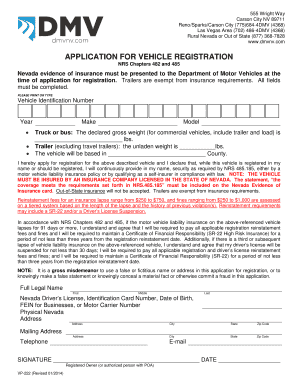
Vp222 Form


What is the VP222?
The VP222 form is a crucial document used in Nevada for vehicle registration and title applications. It serves as an official request to register a vehicle with the Nevada Department of Motor Vehicles (DMV). This form is essential for individuals who are purchasing a vehicle or transferring ownership, ensuring that all necessary information is documented for legal and administrative purposes.
How to Obtain the VP222
Obtaining the VP222 form is straightforward. You can acquire it directly from the Nevada DMV website or visit a local DMV office. The form is available in both digital and printable formats, allowing users to choose their preferred method of access. It's important to ensure that you have the most recent version of the VP222 to comply with current regulations.
Steps to Complete the VP222
Completing the VP222 form requires careful attention to detail. Here are the steps to follow:
- Gather necessary information, including vehicle details, owner information, and any previous registration documents.
- Fill out the form accurately, ensuring that all fields are completed as required.
- Review the form for any errors or omissions before submission.
- Submit the form either online, by mail, or in person at a DMV office, depending on your preference.
Legal Use of the VP222
The VP222 form is legally binding when completed correctly and submitted in accordance with Nevada state laws. It must be signed by the vehicle owner or an authorized representative. The form's legal validity is reinforced by compliance with eSignature regulations when completed electronically, ensuring that all signatures are recognized and enforceable.
Required Documents
To successfully complete the VP222, certain documents are required. These typically include:
- Proof of identity, such as a driver's license or state ID.
- Previous vehicle registration documents, if applicable.
- Proof of residency in Nevada.
- Any relevant lien release documents if the vehicle was financed.
Form Submission Methods
The VP222 can be submitted through various methods, providing flexibility for users. Options include:
- Online submission through the Nevada DMV website, which is often the quickest method.
- Mailing the completed form to the appropriate DMV address.
- In-person submission at a local DMV office, allowing for immediate assistance with any questions.
Quick guide on how to complete vp222 159387
Complete Vp222 effortlessly on any device
Web-based document management has gained traction among companies and individuals. It offers an excellent eco-conscious option to conventional printed and signed documents, allowing you to obtain the correct form and securely store it online. airSlate SignNow provides all the resources needed to create, alter, and eSign your documents swiftly without interruptions. Handle Vp222 on any device using airSlate SignNow Android or iOS applications and simplify any document-related task today.
The easiest way to modify and eSign Vp222 without hassle
- Find Vp222 and click on Get Form to begin.
- Utilize the features we offer to finish your form.
- Highlight important sections of your documents or obscure sensitive information with tools that airSlate SignNow specifically offers for this purpose.
- Generate your eSignature using the Sign tool, which takes moments and holds the same legal validity as a conventional wet ink signature.
- Review all the details and click on the Done button to save your modifications.
- Select how you want to send your form, via email, SMS, or an invitation link, or download it to your computer.
Eliminate concerns about missing or lost documents, tedious form searches, or errors that necessitate printing new document copies. airSlate SignNow addresses all your document management needs within a few clicks from any device of your preference. Modify and eSign Vp222 and ensure exceptional communication at any stage of your form preparation process with airSlate SignNow.
Create this form in 5 minutes or less
Create this form in 5 minutes!
How to create an eSignature for the vp222 159387
How to create an electronic signature for a PDF online
How to create an electronic signature for a PDF in Google Chrome
How to create an e-signature for signing PDFs in Gmail
How to create an e-signature right from your smartphone
How to create an e-signature for a PDF on iOS
How to create an e-signature for a PDF on Android
People also ask
-
What is vp222 and how does it relate to airSlate SignNow?
The vp222 is a unique identifier for our scalable eSignature solution, airSlate SignNow. It represents our commitment to offering tools that enable seamless document management and signing processes for businesses of all sizes.
-
What features does the vp222 package offer?
The vp222 package includes a range of features like customizable templates, multi-party signing, and real-time tracking. These elements make airSlate SignNow a powerful tool for businesses to efficiently handle eSignatures and document workflows.
-
How much does the vp222 solution cost?
The pricing for the vp222 package is designed to be cost-effective, catering to businesses with varying needs. You can explore different pricing tiers on our website, ensuring you find a solution that fits your budget without compromising on quality.
-
What are the benefits of using airSlate SignNow with the vp222 package?
Using airSlate SignNow with the vp222 package provides signNow benefits, such as quick turnaround times for document signing and enhanced security features. It streamlines your workflows, allowing your team to focus on core tasks and improve overall productivity.
-
Can the vp222 package integrate with other tools?
Yes, the vp222 package is built to integrate seamlessly with a variety of third-party applications. Whether you use CRMs, cloud storage solutions, or other document management systems, airSlate SignNow aims to enhance your existing processes.
-
Is training available for new users of the vp222 package?
Absolutely! airSlate SignNow offers comprehensive onboarding and training resources for users of the vp222 package. Accessing our support materials ensures you and your team can maximize the potential of the platform right from the start.
-
What types of businesses can benefit from the vp222 solution?
The vp222 solution is designed for businesses of all sizes across various industries. Whether you are a small startup or a large enterprise, airSlate SignNow is scalable and versatile enough to meet your document signing needs.
Get more for Vp222
- Petro canada credit card application form
- New jersey registration application form
- Credit card authorization form authorization forms
- Initial application for driving school owner approval dpsmv2400 form
- 2020 prince edward island form
- Healthy habits questionnaire for students form
- Solid waste questionnaire form
- Cs4243 form
Find out other Vp222
- How To Integrate Sign in Banking
- How To Use Sign in Banking
- Help Me With Use Sign in Banking
- Can I Use Sign in Banking
- How Do I Install Sign in Banking
- How To Add Sign in Banking
- How Do I Add Sign in Banking
- How Can I Add Sign in Banking
- Can I Add Sign in Banking
- Help Me With Set Up Sign in Government
- How To Integrate eSign in Banking
- How To Use eSign in Banking
- How To Install eSign in Banking
- How To Add eSign in Banking
- How To Set Up eSign in Banking
- How To Save eSign in Banking
- How To Implement eSign in Banking
- How To Set Up eSign in Construction
- How To Integrate eSign in Doctors
- How To Use eSign in Doctors