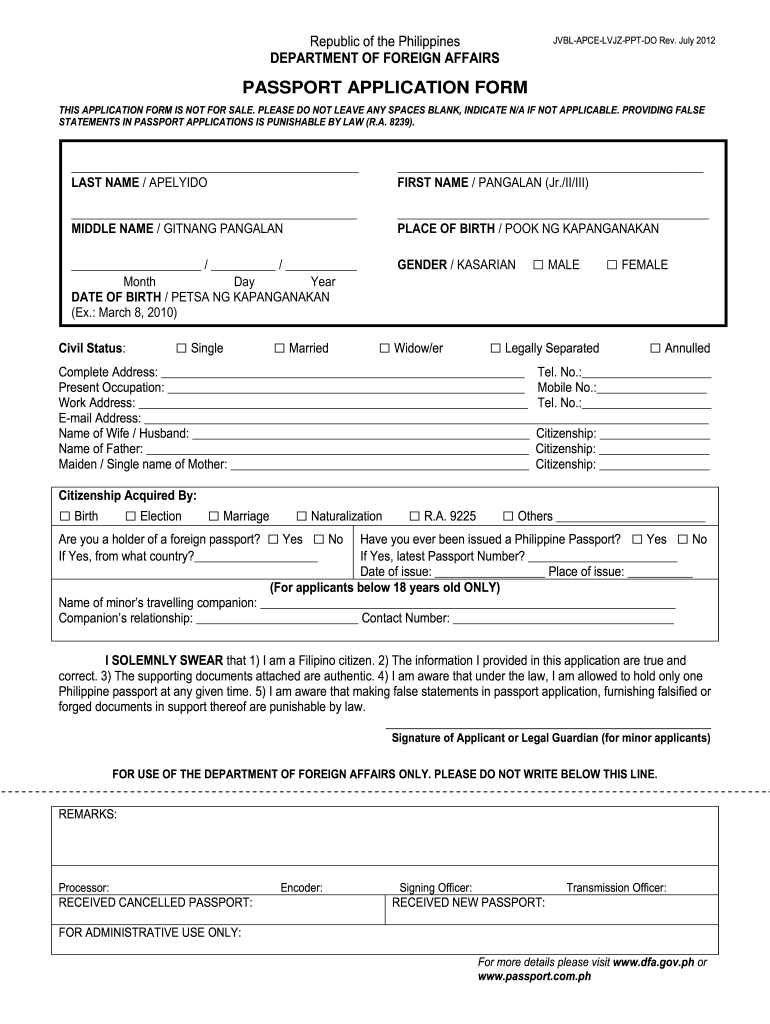
Passport Application 2012-2026


What is the Passport Application
The passport application is a formal request submitted to the government to obtain a passport, a crucial document for international travel. In the United States, the application process typically involves filling out a specific form, providing personal information, and submitting required documents. The most common forms used are the DS-11 for first-time applicants and the DS-82 for renewals. Each form has distinct requirements and processes, making it essential to select the correct one based on individual circumstances.
Steps to Complete the Passport Application
Completing the passport application involves several key steps to ensure accuracy and compliance with government regulations. Begin by selecting the appropriate form based on your situation, either DS-11 or DS-82. Next, gather necessary documents, including proof of citizenship, identification, and passport photos. Fill out the application form carefully, ensuring all information is accurate and complete. After completing the form, submit it either online, by mail, or in person at a designated acceptance facility. Finally, pay the required fee to process your application.
Required Documents
When applying for a passport, specific documents must be submitted to verify your identity and citizenship. Essential documents include:
- Proof of U.S. citizenship: This can be a birth certificate, naturalization certificate, or previous passport.
- Government-issued photo ID: Acceptable forms include a driver's license or military ID.
- Passport photo: A recent, color photograph that meets the official requirements.
Ensure that all documents are original or certified copies, as photocopies are typically not accepted.
Application Process & Approval Time
The application process for obtaining a passport can vary in duration based on several factors. After submission, applications are generally processed within ten to twelve weeks, although expedited services are available for urgent needs. To expedite processing, applicants can request faster service for an additional fee. It is advisable to apply well in advance of any planned travel to avoid delays.
Legal Use of the Passport Application
The passport application is a legally binding document that must be filled out truthfully and accurately. Providing false information can lead to severe penalties, including denial of the application or legal action. It is essential to ensure that all details are correct and that all required documents are submitted to avoid complications in the application process.
Eligibility Criteria
To be eligible for a U.S. passport, applicants must meet specific criteria. These include being a U.S. citizen or a non-citizen national. First-time applicants must also be at least 16 years old and provide proof of citizenship and identity. Additionally, individuals who have previously held a passport but are applying for a renewal must ensure their previous passport is undamaged and can be submitted with the application.
Quick guide on how to complete philippines form
A brief manual on how to create your Passport Application
Locating the appropriate template can be difficult when you're tasked with providing official foreign documentation. Even with the necessary form at hand, it might be taxing to swiftly prepare it in accordance with all regulations if you utilize printed copies rather than handling everything digitally. airSlate SignNow serves as the online electronic signature platform that assists you in navigating these challenges. It enables you to select your Passport Application and efficiently complete and sign it on-site without having to reprint documents whenever you make an error.
The following steps outline what you need to do to set up your Passport Application with airSlate SignNow:
- Press the Get Form button to swiftly upload your document to our editor.
- Begin with the first blank section, enter the necessary information, and proceed using the Next tool.
- Fill in the empty fields using the Cross and Check tools from the top toolbar.
- Select the Highlight or Line features to emphasize the key details.
- Click on Image to upload one if your Passport Application requires it.
- Utilize the right-side panel to add additional fields for you or others to complete if necessary.
- Review your entries and verify the document by selecting Date, Initials, and Sign.
- Sketch, type, upload your eSignature, or take a picture of it using a camera or QR code.
- Conclude your modifications by pressing the Done button and choosing your file-sharing preferences.
Once your Passport Application is ready, you can distribute it as you wish - send it to your recipients via email, SMS, fax, or even print it directly from the editor. You can also securely keep all your completed documents in your account, organized in folders as per your desires. Don’t spend time on manual document preparation; give airSlate SignNow a try!
Create this form in 5 minutes or less
FAQs
-
How do I fill out an Indian passport form online?
You need to be careful while filling up the Passport form online. If is better if you download the Passport form and fill it up offline. You can upload the form again after you completely fill it up. You can check the complete procedure to know : How to Apply for Indian Passport Online ?
-
How do I fill out the Annexure B form for a passport?
Specimen Annexure-B can be seen at the following link -http://passportindia.gov.in/AppO...It can be seen that following data has to be filled in the form -Date of Birth ………………………………..Place of Birth ………………………………..Educational Qualification ………………………………..Profession (Govt./Private Service/Others) ………………………………..Permanent Address .………………………………..Present Address …………………………………Thus filling the form is not a problem as the applicants must know the above mentioned particulars.The real issue lies in getting it signed by the authorities who are authorized to issue the same as listed in the format.
-
What happens if I fill out the online application form 2 times for a passport?
Hi,Your question is vague.Please note your application is not processed further unless you submit your form and make the payment for the same. I am not aware of the legal implications, but why would you want to pay double for your passport process.With one login Id you can only undergo filling one application for a normal / Tatkal for fresh or renewed passport.Incase you had earlier made a login and forgot the password as well login. 1. you can try to revive this said account 2. Or else make a new login to proceed with the application.And incase you did file two applications and also made the respective payments. If both the forms carry the same information, the PSK database should be able to find this out and if you even skip this phase. You will surely be held accountable during the police verification.Just do not complicate your passport application process and follow one login- one application.Let me know if this was helpful.
-
Can I fill out a passport form from a different state than my state?
I answered a similar query earlier in these columns. Please go through it for more clarity. It's not a different state or district, but from the address where you stay and reside at the time of applying for PP is what matters. Briefly, you have to apply for your PP from the address wherever you stay presently. If your stay there is less than a year, you have to attach the proof of your previous address where you've stayed continuously for a year.
Create this form in 5 minutes!
How to create an eSignature for the philippines form
How to generate an electronic signature for the Philippines Passport Form online
How to generate an electronic signature for the Philippines Passport Form in Chrome
How to generate an electronic signature for putting it on the Philippines Passport Form in Gmail
How to create an electronic signature for the Philippines Passport Form straight from your smartphone
How to create an electronic signature for the Philippines Passport Form on iOS devices
How to create an eSignature for the Philippines Passport Form on Android
People also ask
-
What is airSlate SignNow's role in the Passport Application process?
airSlate SignNow streamlines the Passport Application process by allowing users to easily create, send, and eSign necessary documents online. This digital solution eliminates the need for physical paperwork, making it faster and more efficient to complete your Passport Application.
-
How much does it cost to use airSlate SignNow for Passport Applications?
airSlate SignNow offers competitive pricing plans tailored for businesses and individuals looking to manage their Passport Application needs. You can choose from various subscription options, ensuring that you find a plan that fits your budget and frequency of use.
-
Can I use airSlate SignNow to collaborate with others on my Passport Application?
Absolutely! airSlate SignNow provides robust collaboration features that allow multiple users to work together on a Passport Application. You can invite team members to review, edit, and eSign documents, ensuring a smooth and efficient application process.
-
What features does airSlate SignNow offer for managing Passport Applications?
airSlate SignNow includes essential features like customizable templates, secure eSigning, and document tracking, all of which simplify the Passport Application process. These tools help you manage your documents efficiently and ensure compliance with legal requirements.
-
Is airSlate SignNow secure for handling sensitive Passport Application documents?
Yes, airSlate SignNow prioritizes security, employing advanced encryption protocols to protect your Passport Application documents. Our platform ensures that your sensitive information remains confidential and secure throughout the signing process.
-
Does airSlate SignNow integrate with other applications for Passport Application management?
airSlate SignNow seamlessly integrates with various applications such as Google Drive, Dropbox, and CRM systems, enhancing your Passport Application management process. These integrations allow for easy document sharing and workflow automation.
-
How can airSlate SignNow help speed up my Passport Application?
By using airSlate SignNow, you can complete your Passport Application quickly and efficiently, thanks to our user-friendly interface and automated workflows. The ability to eSign documents instantly eliminates delays associated with traditional mailing methods.
Get more for Passport Application
- Patient assistance program enrollment form
- Aaa staffing timesheet form
- Vehicle spec sheet form
- Mock 1040 form
- Ssp1 form 22334544
- Pa printable marriage license application form
- Alberta disposition of capital property at1 schedule 18 alberta corporate income tax return schedule 18 alberta dispositions of form
- Revenue division directory form
Find out other Passport Application
- eSignature West Virginia Sale of Shares Agreement Later
- Electronic signature Kentucky Affidavit of Service Mobile
- How To Electronic signature Connecticut Affidavit of Identity
- Can I Electronic signature Florida Affidavit of Title
- How Can I Electronic signature Ohio Affidavit of Service
- Can I Electronic signature New Jersey Affidavit of Identity
- How Can I Electronic signature Rhode Island Affidavit of Service
- Electronic signature Tennessee Affidavit of Service Myself
- Electronic signature Indiana Cease and Desist Letter Free
- Electronic signature Arkansas Hold Harmless (Indemnity) Agreement Fast
- Electronic signature Kentucky Hold Harmless (Indemnity) Agreement Online
- How To Electronic signature Arkansas End User License Agreement (EULA)
- Help Me With Electronic signature Connecticut End User License Agreement (EULA)
- Electronic signature Massachusetts Hold Harmless (Indemnity) Agreement Myself
- Electronic signature Oklahoma Hold Harmless (Indemnity) Agreement Free
- Electronic signature Rhode Island Hold Harmless (Indemnity) Agreement Myself
- Electronic signature California Toll Manufacturing Agreement Now
- How Do I Electronic signature Kansas Toll Manufacturing Agreement
- Can I Electronic signature Arizona Warranty Deed
- How Can I Electronic signature Connecticut Warranty Deed