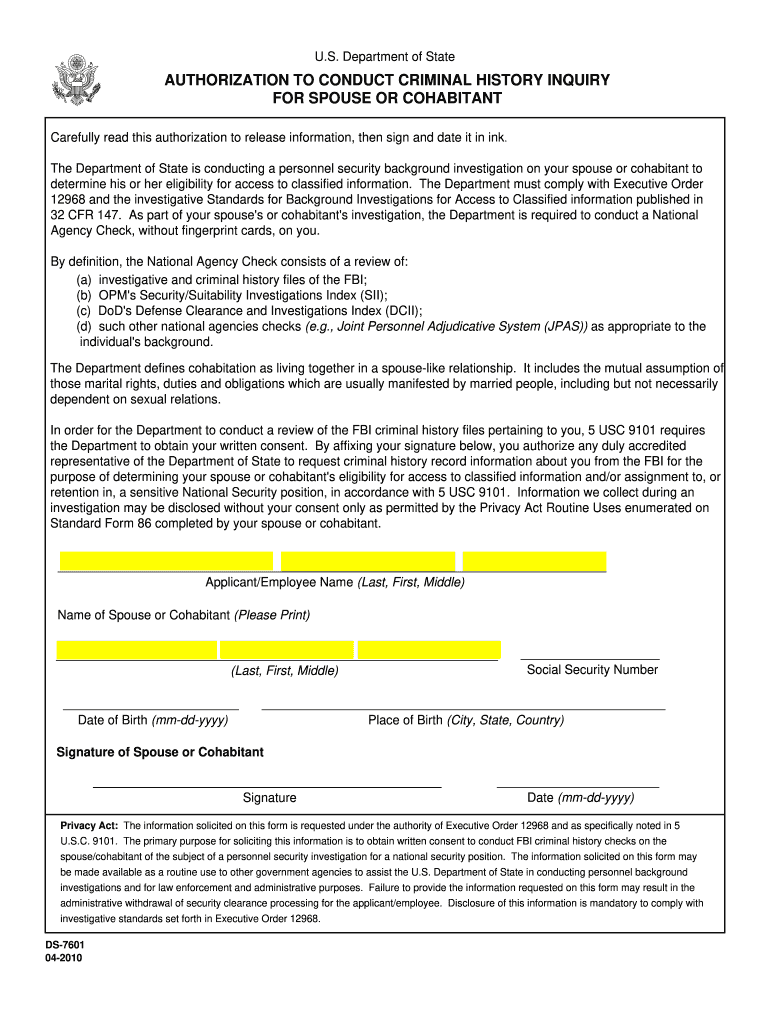
Ds 7601 2010-2026


What is the DS-7601?
The DS-7601 is a form used for authorization conduct in various legal and administrative contexts within the United States. This document facilitates the authorization process for individuals seeking to grant permission for specific actions or inquiries related to their personal or legal matters. It serves as a crucial tool for ensuring that the necessary permissions are documented and legally recognized.
How to Use the DS-7601
Using the DS-7601 involves several steps to ensure that the form is completed accurately and submitted correctly. First, gather all required information, including personal details and any relevant identifiers. Next, fill out the form carefully, ensuring that all fields are completed as necessary. After completing the form, review it for accuracy before submission. Depending on the requirements of the institution or agency, you may need to submit the form electronically or via mail.
Steps to Complete the DS-7601
Completing the DS-7601 involves a systematic approach:
- Begin by downloading the latest version of the DS-7601 from an official source.
- Fill in your personal information, including your name, address, and any identification numbers required.
- Clearly state the purpose of the authorization, detailing what actions you are permitting.
- Ensure that you sign and date the form, as this is essential for its validity.
- Review the completed form to confirm that all information is accurate and complete.
Legal Use of the DS-7601
The DS-7601 must be used in accordance with legal guidelines to ensure its validity. This includes using the form for its intended purpose and ensuring that all information provided is truthful and accurate. Misuse of the form can lead to legal consequences, including penalties for non-compliance. Always check the specific legal requirements related to the authorization conduct relevant to your situation.
Key Elements of the DS-7601
Several key elements must be included in the DS-7601 to ensure it serves its purpose effectively:
- Personal Information: Full name, contact information, and any relevant identification numbers.
- Authorization Details: A clear description of what is being authorized and for what purpose.
- Signatures: The signature of the individual granting authorization, along with the date.
Form Submission Methods
The DS-7601 can typically be submitted through various methods, depending on the requirements of the receiving agency. Common submission methods include:
- Online Submission: Many agencies allow electronic submission through secure online portals.
- Mail: You can send the completed form via postal mail to the designated address.
- In-Person: Some situations may require you to deliver the form in person to the relevant office.
Quick guide on how to complete ds 7601 form
Discover the easiest method to complete and endorse your Ds 7601
Are you still spending time drafting your formal documents on paper instead of online? airSlate SignNow presents a superior approach to complete and endorse your Ds 7601 and associated forms for public services. Our intelligent electronic signature solution equips you with all the necessary tools to rapidly process documents while adhering to official standards - powerful PDF editing, managing, securing, signing, and sharing capabilities are all available in an intuitive interface.
Only a few steps are needed to finalize filling out and signing your Ds 7601:
- Insert the editable template into the editor by clicking the Get Form button.
- Review the information you need to supply in your Ds 7601.
- Navigate through the fields using the Next button to ensure nothing is overlooked.
- Utilize Text, Check, and Cross tools to complete the fields with your information.
- Revise the content with Text boxes or Images from the upper toolbar.
- Highlight essential details or Blackout sections that are no longer relevant.
- Press Sign to produce a legally recognized electronic signature using your preferred option.
- Add the Date adjacent to your signature and conclude your task with the Done button.
Store your finalized Ds 7601 in the Documents folder within your account, download it, or transfer it to your preferred cloud storage. Our solution also offers versatile form sharing. There's no need to print your templates when sending them to the appropriate public office - do it via email, fax, or by requesting a USPS “snail mail” delivery from your account. Try it out today!
Create this form in 5 minutes or less
FAQs
-
Is it okay to pay visa fees before filling out the DS-160 form?
No you can’t make visa fee before submitting the DS-160, because once you submit the DS-160 form, it send a email to you with submission confirmation number which is important to synch the payments under your application. Bother how will they ever know who paid for which application.
-
During a B1/B2 visa interview, I was asked to fill out the DS-5535 form introduced recently and was told to send it back by email. The interviewer gave me back my passport (needed to fill the form). What experience have people had with this form?
It is a little bit on the privacy invasive side but nobody is forcing anyone to fill it out. If your visit to the US is important and you have nothing to hide, you just have to fill it out. If not, you chose not to travel to the USA.
Create this form in 5 minutes!
How to create an eSignature for the ds 7601 form
How to generate an eSignature for your Ds 7601 Form in the online mode
How to make an electronic signature for the Ds 7601 Form in Google Chrome
How to create an electronic signature for putting it on the Ds 7601 Form in Gmail
How to create an eSignature for the Ds 7601 Form right from your mobile device
How to generate an electronic signature for the Ds 7601 Form on iOS
How to make an eSignature for the Ds 7601 Form on Android
People also ask
-
What is the Ds 7601 document in relation to airSlate SignNow?
The Ds 7601 is a specific document often used for electronic signatures in various business transactions. With airSlate SignNow, users can easily create, send, and eSign the Ds 7601, ensuring compliance and efficiency in document management.
-
How does airSlate SignNow simplify the signing process for the Ds 7601?
airSlate SignNow streamlines the signing process for the Ds 7601 by allowing users to send documents electronically, track their status in real-time, and collect signatures securely. This signNowly reduces the time spent on paperwork and enhances overall productivity.
-
What are the pricing options for using airSlate SignNow for the Ds 7601?
airSlate SignNow offers flexible pricing plans to accommodate various business needs, starting with a free trial. For those specifically dealing with the Ds 7601 and other documents, the paid plans provide additional features like advanced integrations and custom workflows.
-
Can I integrate airSlate SignNow with other software while handling the Ds 7601?
Yes, airSlate SignNow provides seamless integrations with popular software such as CRM systems, cloud storage, and document management platforms. This allows users to manage the Ds 7601 alongside their existing workflows, enhancing efficiency and collaboration.
-
What security measures does airSlate SignNow offer for the Ds 7601?
airSlate SignNow prioritizes security by employing robust encryption protocols and ensuring compliance with industry standards. When handling the Ds 7601, users can trust that their sensitive information is protected throughout the signing process.
-
Is it easy to customize the Ds 7601 template with airSlate SignNow?
Absolutely! airSlate SignNow allows users to customize the Ds 7601 template according to their specific requirements. This enables businesses to streamline their documentation processes and ensure that all necessary fields and clauses are included for effective signing.
-
What are the key features of airSlate SignNow for managing documents like the Ds 7601?
Key features of airSlate SignNow include template creation, automated workflows, real-time tracking, and mobile access. These features are particularly beneficial for managing documents like the Ds 7601, making the signing and document management process efficient and user-friendly.
Get more for Ds 7601
Find out other Ds 7601
- How To Integrate Sign in Banking
- How To Use Sign in Banking
- Help Me With Use Sign in Banking
- Can I Use Sign in Banking
- How Do I Install Sign in Banking
- How To Add Sign in Banking
- How Do I Add Sign in Banking
- How Can I Add Sign in Banking
- Can I Add Sign in Banking
- Help Me With Set Up Sign in Government
- How To Integrate eSign in Banking
- How To Use eSign in Banking
- How To Install eSign in Banking
- How To Add eSign in Banking
- How To Set Up eSign in Banking
- How To Save eSign in Banking
- How To Implement eSign in Banking
- How To Set Up eSign in Construction
- How To Integrate eSign in Doctors
- How To Use eSign in Doctors