Ics 202 Form


What is the ICS 202?
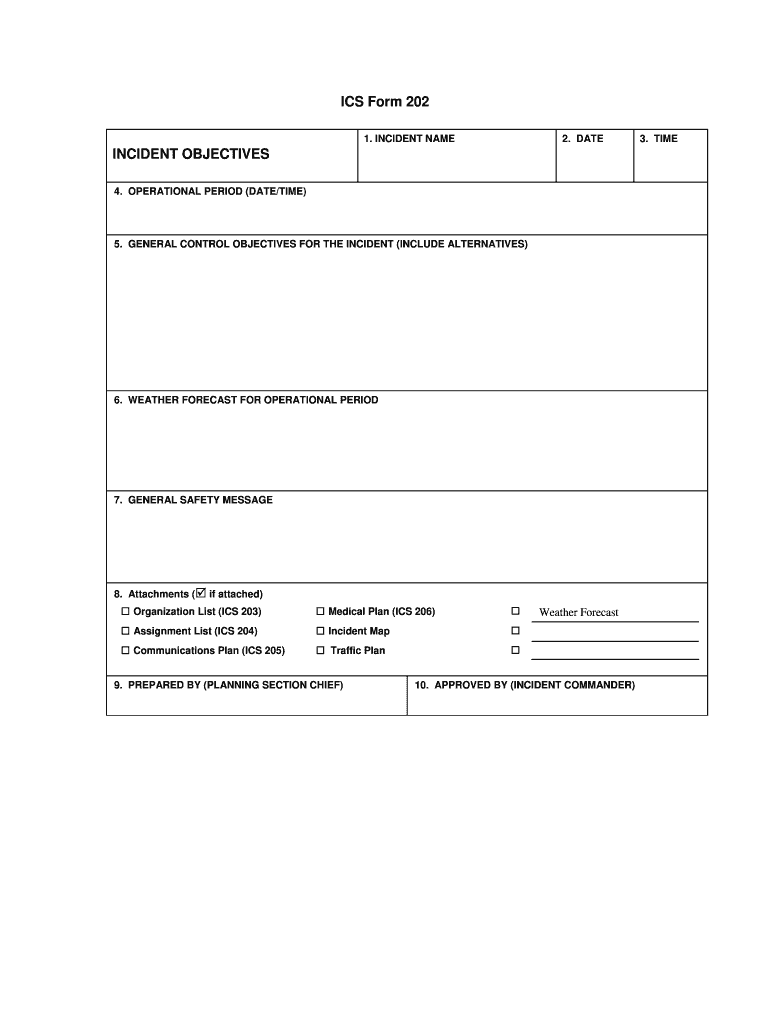
The ICS Form 202, also known as the Incident Objectives form, is a critical component of the Incident Command System (ICS) used in emergency management. This form serves to outline the objectives for an incident response, providing a clear direction for the operational period. It helps incident commanders and response teams to focus their efforts and resources effectively. The ICS 202 is essential for documenting the goals and strategies that will guide the incident response, ensuring that all team members are aligned and informed.
How to Use the ICS 202
Using the ICS Form 202 involves several key steps. First, it is important to gather all relevant information regarding the incident, including the current situation and resource availability. Next, the incident commander should define specific, measurable objectives that are achievable within the operational period. These objectives should be clearly stated on the form. Once completed, the ICS 202 should be distributed to all team members involved in the incident response to ensure everyone is on the same page regarding priorities and actions.
Steps to Complete the ICS 202
Completing the ICS Form 202 requires careful attention to detail. Begin by entering the incident name and number at the top of the form. Next, specify the operational period for which the objectives apply. Then, list the incident objectives, ensuring they are clear and concise. Following this, include any additional information such as the current situation, resource needs, and safety considerations. Finally, review the completed form for accuracy before sharing it with the incident management team.
Key Elements of the ICS 202
The ICS Form 202 contains several key elements that are vital for effective incident management. These include:
- Incident Name and Number: Identifies the specific incident.
- Operational Period: Defines the time frame for which the objectives are set.
- Incident Objectives: Clearly stated goals that guide the response efforts.
- Current Situation: A brief overview of the incident status and any challenges faced.
- Resource Needs: An outline of personnel and equipment required to achieve the objectives.
- Safety Considerations: Important information regarding risks and safety protocols.
Legal Use of the ICS 202
The ICS Form 202 is used legally within the framework of emergency management and incident response in the United States. It complies with various federal and state regulations governing incident management practices. Proper use of the form ensures that all objectives are documented and communicated effectively, which can be crucial in legal contexts, especially when evaluating the response to an incident. Adhering to established guidelines helps protect organizations from liability and ensures accountability during emergency situations.
Examples of Using the ICS 202
Examples of using the ICS Form 202 can be seen in various emergency scenarios. For instance, during a wildfire, the incident commander may set objectives such as containing the fire within specific boundaries, protecting structures, and ensuring the safety of personnel. Another example could involve a natural disaster response, where objectives might include assessing damage, providing shelter for displaced individuals, and restoring essential services. Each of these examples illustrates how the ICS 202 can guide teams in achieving their goals effectively.
Quick guide on how to complete ics resource center fema training
Uncover how to effortlessly navigate the Ics 202 completion with this simple guide
Submitting and finalizing documents online is gaining traction and is the preferred choice for many users. It offers numerous advantages over traditional printed documents, including convenience, time savings, enhanced precision, and security.
With tools like airSlate SignNow, you can locate, modify, sign, and enhance your Ics 202 without the hassle of ongoing printing and scanning. Follow this concise guide to initiate and complete your document.
Adhere to these instructions to obtain and complete Ics 202
- Begin by clicking on the Get Form button to launch your form in our editor.
- Follow the green marker on the left indicating required fields to ensure none are overlooked.
- Utilize our advanced features to annotate, modify, sign, secure, and enhance your form.
- Secure your document or change it into a fillable form using the functionalities on the right panel.
- Review the form and verify it for any mistakes or inconsistencies.
- Click on DONE to complete the editing process.
- Rename your document or retain its current title.
- Choose the storage solution where you wish to keep your form, send it via USPS, or click the Download Now button to save your file.
If Ics 202 isn’t what you were searching for, you may explore our extensive collection of pre-uploaded forms that you can complete with minimal input. Visit our platform today!
Create this form in 5 minutes or less
FAQs
-
When do I have to file for an exam center in NISM certification?
I assume your question is “When should I ideally make online enrollment for an NISM Certification Examination?”As per NISM website, more than 200 NISM Test Centres are available across India. Each exam centre has specific dates for exam depending on the demand at that particular Test Centre.For example, NISM Test Centre in Delhi (CP) has 150 seats every Saturday and Sunday, whereas NSEiT - Agra Centre has limited exam seats 3 to 4 times in a month.Generally, you will find that sufficient seats are available if you are planning to take NISM Exam after 15–20 days. It may be possible that seats may get filled up as you approach closer to the exam date. This is similar to a seat booking for Indian Railways except the fact that there is no waiting list :)Therefore, once you have prepared yourself for the exam, you can make online enrollment 15–20 days in advance and utilize the time for revision and taking mock tests.You can take NISM Mock Tests and Download NISM Study Material freely online.
-
How can I fill out Google's intern host matching form to optimize my chances of receiving a match?
I was selected for a summer internship 2016.I tried to be very open while filling the preference form: I choose many products as my favorite products and I said I'm open about the team I want to join.I even was very open in the location and start date to get host matching interviews (I negotiated the start date in the interview until both me and my host were happy.) You could ask your recruiter to review your form (there are very cool and could help you a lot since they have a bigger experience).Do a search on the potential team.Before the interviews, try to find smart question that you are going to ask for the potential host (do a search on the team to find nice and deep questions to impress your host). Prepare well your resume.You are very likely not going to get algorithm/data structure questions like in the first round. It's going to be just some friendly chat if you are lucky. If your potential team is working on something like machine learning, expect that they are going to ask you questions about machine learning, courses related to machine learning you have and relevant experience (projects, internship). Of course you have to study that before the interview. Take as long time as you need if you feel rusty. It takes some time to get ready for the host matching (it's less than the technical interview) but it's worth it of course.
-
How do I fill out the form of DU CIC? I couldn't find the link to fill out the form.
Just register on the admission portal and during registration you will get an option for the entrance based course. Just register there. There is no separate form for DU CIC.
-
How do you know if you need to fill out a 1099 form?
Assuming that you are talking about 1099-MISC. Note that there are other 1099s.check this post - Form 1099 MISC Rules & RegulationsQuick answer - A Form 1099 MISC must be filed for each person to whom payment is made of:$600 or more for services performed for a trade or business by people not treated as employees;Rent or prizes and awards that are not for service ($600 or more) and royalties ($10 or more);any fishing boat proceeds,gross proceeds of $600, or more paid to an attorney during the year, orWithheld any federal income tax under the backup withholding rules regardless of the amount of the payment, etc.
-
How can I make it easier for users to fill out a form on mobile apps?
I’ll tell you a secret - you can thank me later for this.If you want to make the form-filling experience easy for a user - make sure that you have a great UI to offer.Everything boils down to UI at the end.Axonator is one of the best mobile apps to collect data since it offers powerful features bundled with a simple UI.The problem with most of the mobile form apps is that they are overloaded with features that aren’t really necessary.The same doesn’t hold true for Axonator. It has useful features but it is very unlikely that the user will feel overwhelmed in using them.So, if you are inclined towards having greater form completion rates for your survey or any data collection projects, then Axonator is the way to go.Apart from that, there are other features that make the data collection process faster like offline data collection, rich data capture - audio, video, images, QR code & barcode data capture, live location & time capture, and more!Check all the features here!You will be able to complete more surveys - because productivity will certainly shoot up.Since you aren’t using paper forms, errors will drop signNowly.The cost of the paper & print will be saved - your office expenses will drop dramatically.No repeat work. No data entry. Time & money saved yet again.Analytics will empower you to make strategic decisions and explore new revenue opportunities.The app is dirt-cheap & you don’t any training to use the app. They come in with a smooth UI. Forget using, even creating forms for your apps is easy on the platform. Just drag & drop - and it’s ready for use. Anyone can build an app under hours.
Create this form in 5 minutes!
How to create an eSignature for the ics resource center fema training
How to create an electronic signature for the Ics Resource Center Fema Training online
How to make an eSignature for the Ics Resource Center Fema Training in Chrome
How to make an electronic signature for signing the Ics Resource Center Fema Training in Gmail
How to generate an eSignature for the Ics Resource Center Fema Training right from your smart phone
How to generate an eSignature for the Ics Resource Center Fema Training on iOS devices
How to create an electronic signature for the Ics Resource Center Fema Training on Android OS
People also ask
-
What is Ics 202 and how does it relate to airSlate SignNow?
Ics 202 is a critical component in the document management process, which includes the ability to electronically sign documents through platforms like airSlate SignNow. With airSlate SignNow, businesses can seamlessly incorporate Ics 202 into their workflows, ensuring compliance and efficiency in document handling.
-
How does pricing for Ics 202 work with airSlate SignNow?
Pricing for Ics 202 features in airSlate SignNow is competitive and tailored to fit different business needs. We offer various plans that allow you to choose the level of service and features you require, ensuring you only pay for what you use.
-
What are the key features of airSlate SignNow related to Ics 202?
Key features of airSlate SignNow related to Ics 202 include secure electronic signatures, customizable templates, and robust document tracking. These features help streamline the signing process, making it easier for businesses to manage their documents efficiently.
-
How can Ics 202 benefit my business using airSlate SignNow?
Utilizing Ics 202 with airSlate SignNow can signNowly enhance your business operations by reducing the time spent on document signing. It also minimizes errors and ensures compliance, ultimately leading to increased productivity and cost savings.
-
Is airSlate SignNow compatible with other software for Ics 202 integration?
Yes, airSlate SignNow offers seamless integration with various software applications, enhancing your Ics 202 workflow. Whether you use CRM systems, project management tools, or document storage solutions, airSlate SignNow can connect with them to optimize your document processes.
-
What security measures does airSlate SignNow implement for Ics 202 documents?
airSlate SignNow prioritizes the security of your Ics 202 documents by employing robust encryption, secure storage, and compliance with industry standards. This ensures that your sensitive information remains protected throughout the signing process.
-
Can I customize documents for Ics 202 with airSlate SignNow?
Absolutely! airSlate SignNow allows you to create and customize documents specifically for Ics 202 requirements. You can tailor your templates, add fields for signatures, and adjust the layout to meet your business's unique needs.
Get more for Ics 202
Find out other Ics 202
- Can I eSignature Alaska Orthodontists PDF
- How Do I eSignature New York Non-Profit Form
- How To eSignature Iowa Orthodontists Presentation
- Can I eSignature South Dakota Lawers Document
- Can I eSignature Oklahoma Orthodontists Document
- Can I eSignature Oklahoma Orthodontists Word
- How Can I eSignature Wisconsin Orthodontists Word
- How Do I eSignature Arizona Real Estate PDF
- How To eSignature Arkansas Real Estate Document
- How Do I eSignature Oregon Plumbing PPT
- How Do I eSignature Connecticut Real Estate Presentation
- Can I eSignature Arizona Sports PPT
- How Can I eSignature Wisconsin Plumbing Document
- Can I eSignature Massachusetts Real Estate PDF
- How Can I eSignature New Jersey Police Document
- How Can I eSignature New Jersey Real Estate Word
- Can I eSignature Tennessee Police Form
- How Can I eSignature Vermont Police Presentation
- How Do I eSignature Pennsylvania Real Estate Document
- How Do I eSignature Texas Real Estate Document