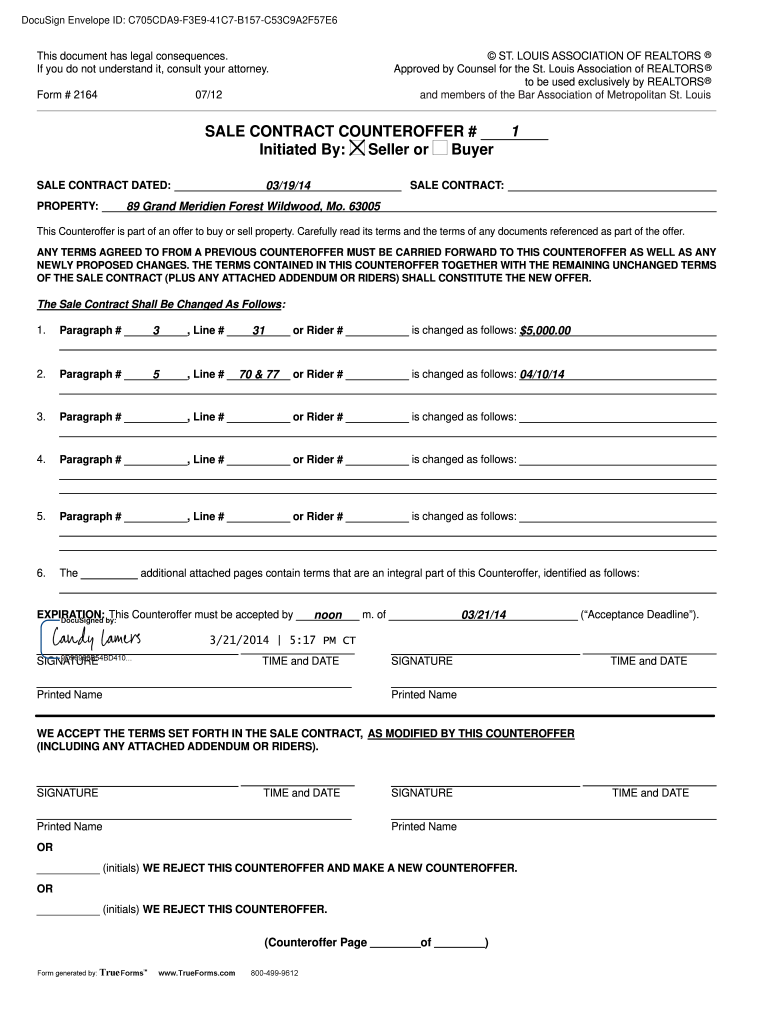
SALE CONTRACT COUNTEROFFER 1 Initiated by Seller or Buyer Form


Understanding the counter offer letter
A counter offer letter is a formal response to an initial offer, often used in real estate transactions or job negotiations. This document allows the recipient to propose different terms than those originally presented. It is important to clearly outline the changes being proposed, such as price adjustments or specific conditions, to facilitate effective communication between parties. Understanding the purpose and structure of a counter offer letter is essential for achieving a mutually agreeable outcome.
Key elements of a counter offer letter
When drafting a counter offer letter, several key elements should be included to ensure clarity and professionalism:
- Contact Information: Include your name, address, and contact details at the top of the letter.
- Date: Clearly state the date the letter is written.
- Recipient's Information: Include the name and address of the person or entity receiving the counter offer.
- Subject Line: A brief subject line indicating the purpose of the letter, such as "Counter Offer for [Property Address or Job Title]."
- Details of the Offer: Clearly outline the original terms and the proposed changes, including any new prices or conditions.
- Closing Statement: A polite closing statement encouraging the recipient to respond or discuss further.
- Signature: Include a space for your signature, followed by your printed name.
Steps to complete a counter offer letter
Completing a counter offer letter involves several straightforward steps:
- Begin by reviewing the original offer to identify areas for negotiation.
- Draft your counter offer letter, incorporating the key elements mentioned earlier.
- Be specific about the changes you are proposing to avoid any misunderstandings.
- Proofread the letter for clarity and professionalism before sending.
- Send the letter via a method that provides confirmation of receipt, such as email or certified mail.
Examples of counter offer letters
Utilizing examples can provide valuable insight into how to structure your own counter offer letter. Here are two common scenarios:
- Real Estate Counter Offer Example: A seller may receive an offer below their asking price. The counter offer letter could propose a new price along with terms such as closing costs or contingencies.
- Job Counter Offer Example: An employee may receive a job offer with a salary that is lower than expected. The counter offer letter can outline a request for a higher salary along with justifications based on market research or experience.
Legal use of a counter offer letter
A counter offer letter can serve as a legally binding document if it meets certain criteria. It must clearly indicate acceptance of the original offer's terms while proposing new terms. To ensure legal validity, both parties should sign the final agreement. It is advisable to consult with a legal professional to ensure compliance with applicable laws and regulations, particularly in real estate transactions or employment agreements.
How to word a counter offer
When wording a counter offer, clarity and professionalism are key. Start with a polite acknowledgment of the original offer, followed by a clear statement of the proposed changes. Use straightforward language to ensure that the recipient understands your intentions. For example, instead of saying, "I think the price should be higher," you could state, "I propose a purchase price of $X." This direct approach helps facilitate effective negotiation and communication.
Quick guide on how to complete sale contract counteroffer 1 initiated by seller or buyer
Complete SALE CONTRACT COUNTEROFFER 1 Initiated By Seller Or Buyer effortlessly on any device
Online document management has become increasingly popular among businesses and individuals. It offers an ideal eco-friendly substitute for traditional printed and signed documents, as you can access the necessary form and securely save it online. airSlate SignNow equips you with all the resources you need to create, modify, and eSign your documents quickly and without delays. Manage SALE CONTRACT COUNTEROFFER 1 Initiated By Seller Or Buyer on any device with airSlate SignNow's Android or iOS applications and enhance any document-related process today.
The easiest way to revise and eSign SALE CONTRACT COUNTEROFFER 1 Initiated By Seller Or Buyer seamlessly
- Obtain SALE CONTRACT COUNTEROFFER 1 Initiated By Seller Or Buyer and click on Get Form to begin.
- Utilize the tools we provide to complete your document.
- Highlight important sections of the documents or mask confidential information with tools specifically offered by airSlate SignNow for that purpose.
- Create your eSignature using the Sign feature, which takes mere seconds and holds the same legal validity as a traditional handwritten signature.
- Verify the details and click on the Done button to save your changes.
- Select your preferred method for sharing your form, whether by email, SMS, or invite link, or download it to your computer.
No more worries about lost or misplaced documents, tedious form searches, or errors that require new document copies. airSlate SignNow addresses all your document management needs in just a few clicks from your chosen device. Modify and eSign SALE CONTRACT COUNTEROFFER 1 Initiated By Seller Or Buyer and ensure outstanding communication at every stage of your form preparation process with airSlate SignNow.
Create this form in 5 minutes or less
FAQs
-
Is there a way to find out for how much a restaurant has been sold by the seller or for how much it was bought by the buyer?
Absolutely, there are two ways to do this.You respectfully go to the buyer and you approach in a sincere benign manner, and ask them: “I’m trying to learn about restaurants and business, would you mind sharing with me what that was like?”Same as option 1- but replace “buyer” with seller.One thing that I’ve learned about successful business individuals, is they recognize sincerity far better than anyone in else. You really have to by default because once you begin to experience any kind of success (or even perceived success) people come out of the woodwork.The interesting thing is- just having an interest on that level from your end is an anomaly in itself. So I would try that approach, because if I was the one buying or selling the restaurant and you approached me…I would first want to help you learn more. But that would immediately be followed by seeing where you were in your professional life because every relationship is a two-way street. EVEN for those super really “important” people!
-
For the new 2016 W8-BEN-E form to be filled out by companies doing business as a seller on the Amazon USA website, do I fill out a U.S. TIN, a GIIN, or a foreign TIN?
You will need to obtain an EIN for the BC corporation; however, I would imagine a W8-BEN is not appropriate for you, if you are selling through Amazon FBA. The FBA program generally makes Amazon your agent in the US, which means any of your US source income, ie anything sold to a US customer is taxable in the US. W8-BEN is asserting that you either have no US sourced income or that income is exempt under the US/Canadian tax treaty. Based on the limited knowledge I have of your situation, but if you are selling through the FBA program, I would say you don’t qualify to file a W8-BEN, but rather should be completing a W8-ECI and your BC corporation should be filing an 1120F to report your US effectively connected income.
Create this form in 5 minutes!
How to create an eSignature for the sale contract counteroffer 1 initiated by seller or buyer
How to make an electronic signature for the Sale Contract Counteroffer 1 Initiated By Seller Or Buyer in the online mode
How to generate an electronic signature for your Sale Contract Counteroffer 1 Initiated By Seller Or Buyer in Google Chrome
How to generate an eSignature for putting it on the Sale Contract Counteroffer 1 Initiated By Seller Or Buyer in Gmail
How to create an eSignature for the Sale Contract Counteroffer 1 Initiated By Seller Or Buyer from your smartphone
How to generate an electronic signature for the Sale Contract Counteroffer 1 Initiated By Seller Or Buyer on iOS devices
How to make an electronic signature for the Sale Contract Counteroffer 1 Initiated By Seller Or Buyer on Android OS
People also ask
-
What is a SALE CONTRACT COUNTEROFFER 1 Initiated By Seller Or Buyer?
The SALE CONTRACT COUNTEROFFER 1 Initiated By Seller Or Buyer is a legal document used in real estate transactions that allows either party to propose changes to an existing sale contract. This counteroffer is essential for negotiating terms that meet both parties' needs and can signNowly influence the outcome of the sale.
-
How does airSlate SignNow simplify the SALE CONTRACT COUNTEROFFER 1 Initiated By Seller Or Buyer process?
airSlate SignNow simplifies the SALE CONTRACT COUNTEROFFER 1 Initiated By Seller Or Buyer process by providing an intuitive platform for drafting, sending, and signing documents electronically. With its user-friendly interface, you can quickly create counteroffers and receive signatures from all parties, streamlining negotiation and reducing turnaround time.
-
What are the key features of airSlate SignNow for managing SALE CONTRACT COUNTEROFFER 1 Initiated By Seller Or Buyer?
Key features of airSlate SignNow for managing the SALE CONTRACT COUNTEROFFER 1 Initiated By Seller Or Buyer include customizable templates, real-time collaboration, and secure cloud storage. These features ensure that you can efficiently create and manage counteroffers while maintaining the integrity and security of your documents.
-
Is airSlate SignNow cost-effective for handling SALE CONTRACT COUNTEROFFER 1 Initiated By Seller Or Buyer?
Yes, airSlate SignNow is a cost-effective solution for handling the SALE CONTRACT COUNTEROFFER 1 Initiated By Seller Or Buyer. With flexible pricing plans, it offers businesses an affordable way to manage eSignatures and document workflows without compromising on quality or functionality.
-
Can I integrate airSlate SignNow with other tools for SALE CONTRACT COUNTEROFFER 1 Initiated By Seller Or Buyer?
Absolutely! airSlate SignNow can be integrated with various CRM and document management tools, enhancing your workflow for the SALE CONTRACT COUNTEROFFER 1 Initiated By Seller Or Buyer. This integration allows you to sync data seamlessly and improve collaboration across your team.
-
How secure is airSlate SignNow for processing SALE CONTRACT COUNTEROFFER 1 Initiated By Seller Or Buyer?
airSlate SignNow prioritizes security by employing advanced encryption and compliance with industry standards for processing SALE CONTRACT COUNTEROFFER 1 Initiated By Seller Or Buyer. Your documents are protected at all stages, ensuring that sensitive information remains confidential and secure.
-
What benefits does airSlate SignNow offer for managing SALE CONTRACT COUNTEROFFER 1 Initiated By Seller Or Buyer?
Using airSlate SignNow for your SALE CONTRACT COUNTEROFFER 1 Initiated By Seller Or Buyer provides numerous benefits, including faster document turnaround times, improved organization, and enhanced collaboration. These advantages help you close deals more efficiently and effectively.
Get more for SALE CONTRACT COUNTEROFFER 1 Initiated By Seller Or Buyer
Find out other SALE CONTRACT COUNTEROFFER 1 Initiated By Seller Or Buyer
- How Do I Sign Hawaii Sports Presentation
- How Do I Sign Kentucky Sports Presentation
- Can I Sign North Carolina Orthodontists Presentation
- How Do I Sign Rhode Island Real Estate Form
- Can I Sign Vermont Real Estate Document
- How To Sign Wyoming Orthodontists Document
- Help Me With Sign Alabama Courts Form
- Help Me With Sign Virginia Police PPT
- How To Sign Colorado Courts Document
- Can I eSign Alabama Banking PPT
- How Can I eSign California Banking PDF
- How To eSign Hawaii Banking PDF
- How Can I eSign Hawaii Banking Document
- How Do I eSign Hawaii Banking Document
- How Do I eSign Hawaii Banking Document
- Help Me With eSign Hawaii Banking Document
- How To eSign Hawaii Banking Document
- Can I eSign Hawaii Banking Presentation
- Can I Sign Iowa Courts Form
- Help Me With eSign Montana Banking Form