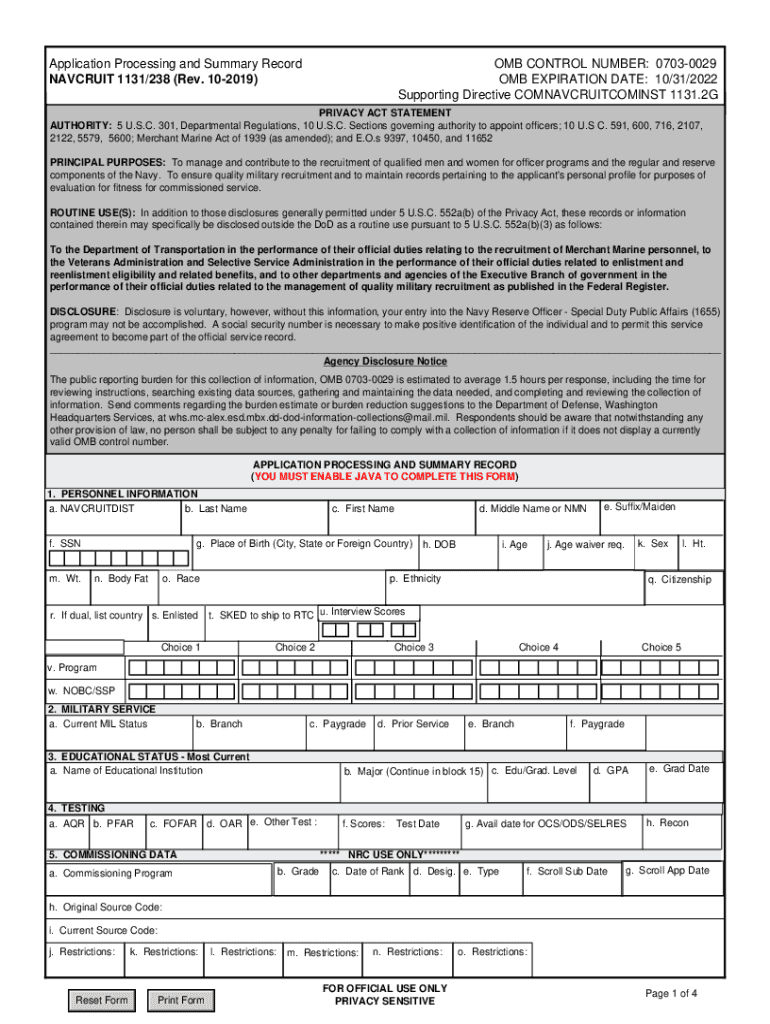
Application Processing and Summary Record RECRUIT 2019-2026


Understanding the Application Processing and Summary Record RECRUIT
The Application Processing and Summary Record RECRUIT, often referred to as navcruit 1131 238, is a crucial document used by the Navy to streamline the recruitment process. This form serves as a comprehensive summary of an applicant's qualifications, experiences, and motivations for joining the Navy. It is designed to facilitate the evaluation of candidates and ensure that all necessary information is collected efficiently.
This record includes sections that detail personal information, educational background, work history, and a motivational statement. The motivational statement is particularly important as it allows candidates to express their reasons for wanting to join the Navy, showcasing their commitment and aspirations.
Steps to Complete the Application Processing and Summary Record RECRUIT
Completing the navcruit 1131 238 requires careful attention to detail. Here are the essential steps to ensure accurate submission:
- Gather Required Information: Collect all necessary personal and educational details, including transcripts, work history, and any relevant certifications.
- Fill Out the Form: Carefully enter your information in the designated sections. Ensure that all entries are accurate and up-to-date.
- Write Your Motivational Statement: Take time to articulate your reasons for joining the Navy. Highlight your goals, values, and what you hope to achieve through your service.
- Review Your Submission: Double-check all entries for accuracy and completeness. Consider having someone else review your form for clarity.
- Submit the Form: Follow the specified submission methods, ensuring that you meet any deadlines set by the recruitment office.
Legal Use of the Application Processing and Summary Record RECRUIT
The navcruit 1131 238 is a legally recognized document within the recruitment process of the Navy. It is essential that all information provided is truthful and accurate, as any discrepancies can lead to disqualification or legal repercussions. The form is used to assess a candidate's eligibility for enlistment and is subject to scrutiny by recruitment officials.
Additionally, the motivational statement included in the form must reflect genuine intentions and aspirations. Misrepresentation in this section can have serious consequences, including potential legal action or denial of enlistment.
Key Elements of the Application Processing and Summary Record RECRUIT
The navcruit 1131 238 consists of several key components that are vital for a successful application:
- Personal Information: This section collects basic details such as name, contact information, and date of birth.
- Educational Background: Applicants must provide information regarding their education, including schools attended and degrees obtained.
- Work History: A detailed account of previous employment, including job titles, responsibilities, and duration of employment.
- Motivational Statement: A personal narrative that explains the applicant's desire to join the Navy and their future aspirations.
How to Obtain the Application Processing and Summary Record RECRUIT
To obtain the navcruit 1131 238, prospective candidates can visit the official Navy recruitment website or contact a local recruitment office. The form is typically available in both digital and paper formats, allowing applicants to choose the method that best suits their needs. It is important to ensure that you are using the most current version of the form to avoid any issues during the application process.
Once you have access to the form, follow the instructions provided to fill it out correctly and submit it according to the guidelines established by the Navy.
Quick guide on how to complete application processing and summary record recruit
Accomplish Application Processing And Summary Record RECRUIT seamlessly on any gadget
Digital document management has become increasingly favored by enterprises and individuals alike. It offers an excellent environmentally friendly substitute for traditional printed and signed documents, allowing you to find the appropriate form and securely archive it online. airSlate SignNow equips you with all the necessary features to create, modify, and eSign your documents promptly without any holdups. Manage Application Processing And Summary Record RECRUIT on any gadget using airSlate SignNow's Android or iOS applications and enhance any document-based workflow today.
The simplest method to modify and eSign Application Processing And Summary Record RECRUIT effortlessly
- Find Application Processing And Summary Record RECRUIT and click on Get Form to begin.
- Utilize the tools we offer to finalize your document.
- Emphasize important sections of your documents or obscure sensitive information using tools specifically designed by airSlate SignNow for that purpose.
- Generate your eSignature with the Sign feature, which takes mere seconds and has the same legal validity as a conventional wet ink signature.
- Review all the details and click the Done button to save your changes.
- Choose your preferred method to send your form, whether by email, SMS, or invitation link, or download it to your computer.
Eliminate concerns about lost or misplaced documents, tedious form searches, or mistakes that necessitate printing new document copies. airSlate SignNow addresses all your document management needs in a few clicks from any device of your choice. Modify and eSign Application Processing And Summary Record RECRUIT and guarantee outstanding communication at any stage of the form preparation process with airSlate SignNow.
Create this form in 5 minutes or less
Find and fill out the correct application processing and summary record recruit
Create this form in 5 minutes!
How to create an eSignature for the application processing and summary record recruit
How to create an electronic signature for a PDF online
How to create an electronic signature for a PDF in Google Chrome
How to create an e-signature for signing PDFs in Gmail
How to create an e-signature right from your smartphone
How to create an e-signature for a PDF on iOS
How to create an e-signature for a PDF on Android
People also ask
-
What is navcruit 1131 238?
Navcruit 1131 238 is a powerful tool designed to streamline the signing and management of documents within your business. It integrates seamlessly with airSlate SignNow, offering users a simple yet effective way to handle electronic signatures and document workflows.
-
How does navcruit 1131 238 enhance the signing experience?
Navcruit 1131 238 enhances the signing experience by providing a user-friendly interface and advanced features that simplify document management. With this solution, users can sign, send, and store documents quickly, ensuring efficiency and a smooth workflow.
-
What are the pricing options for navcruit 1131 238?
The pricing options for navcruit 1131 238 are competitive and tailored to fit various business needs. Depending on your requirements, you can choose from different subscription plans that provide access to essential features and scalability as your business grows.
-
What integrations are available with navcruit 1131 238?
Navcruit 1131 238 offers a range of integrations with popular business applications such as CRM systems, project management tools, and cloud storage services. These integrations help enhance workflow efficiency and ensure seamless document handling within your existing processes.
-
What are the key features of navcruit 1131 238?
Key features of navcruit 1131 238 include customizable templates, multi-party signing, real-time tracking, and secure storage options. These functionalities empower users to streamline their document processes while ensuring compliance and security.
-
How can navcruit 1131 238 benefit my business?
Navcruit 1131 238 can signNowly benefit your business by reducing the time spent on manual document handling and improving efficiency. By automating the signing process, your team can focus on core tasks while enjoying increased productivity and faster turnaround times.
-
Is there a mobile app for navcruit 1131 238?
Yes, navcruit 1131 238 is available as a mobile app, enabling users to access document signing functionalities on the go. This flexibility ensures that you can manage important documents anytime, anywhere, enhancing your business operations.
Get more for Application Processing And Summary Record RECRUIT
Find out other Application Processing And Summary Record RECRUIT
- How To eSign West Virginia Courts Confidentiality Agreement
- eSign Wyoming Courts Quitclaim Deed Simple
- eSign Vermont Sports Stock Certificate Secure
- eSign Tennessee Police Cease And Desist Letter Now
- Help Me With eSign Texas Police Promissory Note Template
- eSign Utah Police LLC Operating Agreement Online
- eSign West Virginia Police Lease Agreement Online
- eSign Wyoming Sports Residential Lease Agreement Online
- How Do I eSign West Virginia Police Quitclaim Deed
- eSignature Arizona Banking Moving Checklist Secure
- eSignature California Banking Warranty Deed Later
- eSignature Alabama Business Operations Cease And Desist Letter Now
- How To eSignature Iowa Banking Quitclaim Deed
- How To eSignature Michigan Banking Job Description Template
- eSignature Missouri Banking IOU Simple
- eSignature Banking PDF New Hampshire Secure
- How Do I eSignature Alabama Car Dealer Quitclaim Deed
- eSignature Delaware Business Operations Forbearance Agreement Fast
- How To eSignature Ohio Banking Business Plan Template
- eSignature Georgia Business Operations Limited Power Of Attorney Online