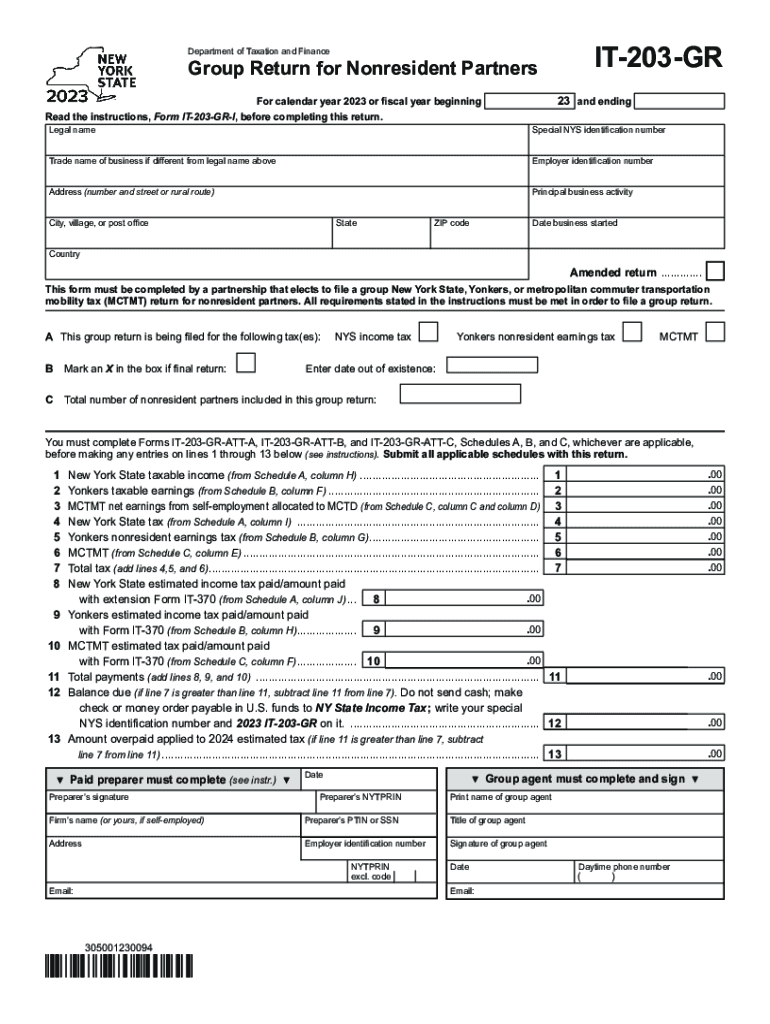
Form it 203 GR Group Return for Nonresident Partners Tax Year 2023


What is the Form IT 203 GR Group Return For Nonresident Partners Tax Year
The IT 203 GR is a tax form used in the United States for filing a group return for nonresident partners. This form allows partnerships with nonresident partners to report income, gains, losses, and other tax-related information collectively. It is specifically designed for partnerships that wish to simplify the tax reporting process for their nonresident partners, ensuring compliance with state tax regulations while minimizing the administrative burden on individual partners.
How to Use the Form IT 203 GR Group Return For Nonresident Partners Tax Year
To utilize the IT 203 GR, partnerships must first determine their eligibility based on the income generated in the state. The form requires detailed information about the partnership, including the names and addresses of all partners, as well as their respective shares of income. Completing the form accurately is crucial, as it consolidates the tax liability of nonresident partners into a single submission, streamlining the filing process and ensuring that all partners meet their tax obligations.
Steps to Complete the Form IT 203 GR Group Return For Nonresident Partners Tax Year
Completing the IT 203 GR involves several key steps:
- Gather necessary information about the partnership and all nonresident partners.
- Calculate the total income, gains, and losses to be reported on behalf of the nonresident partners.
- Fill out the form with accurate details, ensuring that each partner's share is correctly represented.
- Review the completed form for accuracy and compliance with state tax laws.
- Submit the form by the designated filing deadline to avoid penalties.
Key Elements of the Form IT 203 GR Group Return For Nonresident Partners Tax Year
The IT 203 GR includes several essential components:
- Partnership Information: Name, address, and federal employer identification number (FEIN).
- Partner Details: Names, addresses, and identification numbers of all nonresident partners.
- Income Reporting: Detailed reporting of income, gains, and losses attributable to nonresident partners.
- Signature: Required signatures from authorized representatives of the partnership.
Filing Deadlines / Important Dates
It is crucial for partnerships to be aware of the filing deadlines associated with the IT 203 GR. Typically, the form must be submitted by the due date of the partnership's tax return, which is usually March fifteenth for calendar year filers. Extensions may be available, but it is essential to file on time to avoid penalties and interest on unpaid taxes.
Eligibility Criteria
To be eligible to file the IT 203 GR, a partnership must have nonresident partners who are subject to state income tax. The partnership must also ensure that it meets all requirements set forth by the state tax authority, including proper registration and compliance with local tax laws. Understanding these criteria is vital for partnerships aiming to utilize this form effectively.
Quick guide on how to complete form it 203 gr group return for nonresident partners tax year
Manage Form IT 203 GR Group Return For Nonresident Partners Tax Year seamlessly on any device
Digital document management has become increasingly favored by businesses and individuals alike. It serves as an ideal eco-friendly alternative to conventional printed and signed documents, allowing you to access the necessary form and securely store it online. airSlate SignNow equips you with all the tools required to create, modify, and electronically sign your documents swiftly without any delays. Handle Form IT 203 GR Group Return For Nonresident Partners Tax Year across any platform using airSlate SignNow's Android or iOS applications and enhance any document-driven process today.
How to modify and electronically sign Form IT 203 GR Group Return For Nonresident Partners Tax Year effortlessly
- Find Form IT 203 GR Group Return For Nonresident Partners Tax Year and click Obtain Form to initiate the process.
- Utilize the tools we provide to complete your document.
- Mark relevant sections of the documents or mask sensitive information with tools specifically designed for that purpose by airSlate SignNow.
- Create your signature using the Sign feature, which only takes seconds and carries the same legal validity as a traditional handwritten signature.
- Verify all the details and click on the Complete button to save your changes.
- Choose your preferred method of delivering your form—via email, text message (SMS), invite link, or download it onto your computer.
Say goodbye to lost or misplaced documents, tedious form searching, or mistakes that necessitate printing new document copies. airSlate SignNow caters to all your document management needs within just a few clicks from any device you prefer. Modify and electronically sign Form IT 203 GR Group Return For Nonresident Partners Tax Year while ensuring superb communication throughout the document preparation process with airSlate SignNow.
Create this form in 5 minutes or less
Find and fill out the correct form it 203 gr group return for nonresident partners tax year
Create this form in 5 minutes!
How to create an eSignature for the form it 203 gr group return for nonresident partners tax year
How to create an electronic signature for a PDF online
How to create an electronic signature for a PDF in Google Chrome
How to create an e-signature for signing PDFs in Gmail
How to create an e-signature right from your smartphone
How to create an e-signature for a PDF on iOS
How to create an e-signature for a PDF on Android
People also ask
-
What is the IT 203 gr. feature in airSlate SignNow?
The IT 203 gr. feature in airSlate SignNow is designed for seamless electronic signature solutions. It enables users to send, sign, and manage documents efficiently, enhancing workflow productivity. This feature integrates high-level security standards to protect sensitive information.
-
How much does airSlate SignNow with IT 203 gr. cost?
The pricing for airSlate SignNow with IT 203 gr. varies based on the chosen plan. Typically, it offers flexible subscription options that are cost-effective for businesses of all sizes. You can find detailed pricing information on our website to choose the best plan for your needs.
-
What are the key benefits of using airSlate SignNow's IT 203 gr.?
Using airSlate SignNow's IT 203 gr. provides numerous benefits such as reducing paperwork, shortening turnaround times, and improving document management efficiency. It also ensures compliance with legal standards for electronic signatures, which can help streamline your business processes.
-
Can airSlate SignNow with IT 203 gr. integrate with other applications?
Yes, airSlate SignNow with IT 203 gr. supports integration with various applications and platforms like Google Workspace, Microsoft Office, and CRM systems. This makes it easy to embed e-signatures and document workflows into your existing software architecture.
-
What types of documents can be signed using IT 203 gr. in airSlate SignNow?
You can sign a wide range of documents using IT 203 gr. in airSlate SignNow, including contracts, agreements, forms, and consent documents. The flexibility allows businesses to handle both simple and complex signing needs effectively.
-
Is the IT 203 gr. feature easy to use for beginners?
Absolutely! The IT 203 gr. feature in airSlate SignNow is designed with user-friendliness in mind, making it accessible even for beginners. The intuitive interface and step-by-step guidance ensure that anyone can quickly start sending and signing documents.
-
How secure is the airSlate SignNow IT 203 gr. for sensitive documents?
The IT 203 gr. feature in airSlate SignNow prioritizes security, employing advanced encryption and authentication measures. Your sensitive documents are safeguarded, ensuring compliance with industry standards for data protection.
Get more for Form IT 203 GR Group Return For Nonresident Partners Tax Year
- Cardiac thoracic vascular and perfusion form
- Release of thesis form
- Enrolment form first aid ampamp short courses
- Blackburn bursary application girl guides victoria guidesvic org form
- Utas safety practice form
- Sponsorship and exhibit opportunities air ampamp waste form
- Rspca form claim
- Victoria clearance form
Find out other Form IT 203 GR Group Return For Nonresident Partners Tax Year
- How Do I Electronic signature Arkansas Real Estate Word
- How Do I Electronic signature Colorado Real Estate Document
- Help Me With Electronic signature Wisconsin Legal Presentation
- Can I Electronic signature Hawaii Real Estate PPT
- How Can I Electronic signature Illinois Real Estate Document
- How Do I Electronic signature Indiana Real Estate Presentation
- How Can I Electronic signature Ohio Plumbing PPT
- Can I Electronic signature Texas Plumbing Document
- How To Electronic signature Michigan Real Estate Form
- How To Electronic signature Arizona Police PDF
- Help Me With Electronic signature New Hampshire Real Estate PDF
- Can I Electronic signature New Hampshire Real Estate Form
- Can I Electronic signature New Mexico Real Estate Form
- How Can I Electronic signature Ohio Real Estate Document
- How To Electronic signature Hawaii Sports Presentation
- How To Electronic signature Massachusetts Police Form
- Can I Electronic signature South Carolina Real Estate Document
- Help Me With Electronic signature Montana Police Word
- How To Electronic signature Tennessee Real Estate Document
- How Do I Electronic signature Utah Real Estate Form