Clia on Site Survey Disclosure of Ownership 2012-2026


What is the CLIA On-Site Survey Disclosure of Ownership
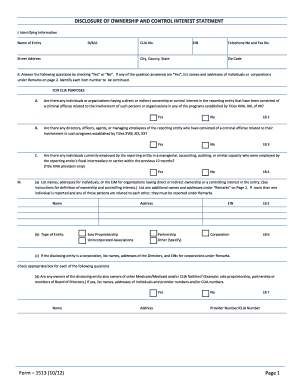
The CLIA On-Site Survey Disclosure of Ownership is a critical document required by the Clinical Laboratory Improvement Amendments (CLIA). This form provides essential information about the ownership and control of a laboratory. It ensures transparency and compliance with federal regulations by detailing the individuals or entities that hold ownership interests in the laboratory. This disclosure is vital for maintaining the integrity of laboratory operations and for ensuring that all stakeholders are properly vetted and approved by the Centers for Medicare & Medicaid Services (CMS).
Steps to Complete the CLIA On-Site Survey Disclosure of Ownership
Completing the CLIA On-Site Survey Disclosure of Ownership involves several key steps:
- Gather necessary information, including the names and addresses of all owners and partners.
- Ensure you have the correct CLIA number for your laboratory.
- Fill out the form accurately, providing detailed information about ownership interests.
- Review the completed form for accuracy and completeness.
- Submit the form according to the specified submission methods, ensuring it reaches the appropriate regulatory body.
Legal Use of the CLIA On-Site Survey Disclosure of Ownership
The legal use of the CLIA On-Site Survey Disclosure of Ownership is governed by federal regulations that require laboratories to maintain transparency regarding ownership. This form is legally binding and must be completed truthfully. Misrepresentation or failure to disclose ownership information can lead to significant penalties, including loss of CLIA certification. It is essential to understand that this form not only serves regulatory purposes but also protects the integrity of laboratory operations.
Required Documents for the CLIA On-Site Survey Disclosure of Ownership
When preparing to submit the CLIA On-Site Survey Disclosure of Ownership, several documents may be required:
- Proof of ownership, such as articles of incorporation or partnership agreements.
- Identification documents for all listed owners, including Social Security numbers and addresses.
- Any previous CLIA documentation that may be relevant to ownership.
Penalties for Non-Compliance with the CLIA On-Site Survey Disclosure of Ownership
Failure to comply with the requirements of the CLIA On-Site Survey Disclosure of Ownership can result in severe penalties. These may include:
- Fines imposed by regulatory agencies.
- Revocation of CLIA certification, which would halt laboratory operations.
- Legal action against the laboratory and its owners for misrepresentation or fraud.
Disclosure Requirements for the CLIA On-Site Survey Disclosure of Ownership
The disclosure requirements for the CLIA On-Site Survey Disclosure of Ownership are stringent. Laboratories must provide comprehensive details about:
- All individuals or entities that have a financial interest in the laboratory.
- Any changes in ownership that occur after the initial submission.
- Relationships between owners and the laboratory, including any potential conflicts of interest.
Quick guide on how to complete omb no 0938 0086 2012 2019 form
The optimal method to locate and authorize Clia On Site Survey Disclosure Of Ownership
On a business-wide scale, ineffective procedures related to paper approval can consume a signNow amount of working hours. Signing documents like Clia On Site Survey Disclosure Of Ownership is an integral part of operations across all sectors, which is why the effectiveness of each agreement’s lifecycle signNowly impacts the overall efficiency of the company. With airSlate SignNow, endorsing your Clia On Site Survey Disclosure Of Ownership can be as straightforward and prompt as possible. You will discover on this platform the most recent version of nearly any form. Even better, you can sign it instantly without the need to install third-party software on your device or printing out physical copies.
Steps to obtain and authorize your Clia On Site Survey Disclosure Of Ownership
- Explore our library by category or employ the search bar to find the document you require.
- Examine the form preview by clicking on Learn more to confirm it’s the correct document.
- Click Get form to start editing immediately.
- Fill out your form and insert any necessary information using the toolbar.
- Once finished, click the Sign tool to endorse your Clia On Site Survey Disclosure Of Ownership.
- Select the signature method that suits you best: Draw, Generate initials, or upload an image of your handwritten signature.
- Click Done to complete editing and move on to document-sharing options if needed.
With airSlate SignNow, you possess everything necessary to manage your paperwork efficiently. You can find, fill out, edit, and even send your Clia On Site Survey Disclosure Of Ownership all in one window without any difficulty. Enhance your workflows by leveraging a unified, intelligent eSignature solution.
Create this form in 5 minutes or less
Find and fill out the correct omb no 0938 0086 2012 2019 form
FAQs
-
How many forms are filled out in the JEE Main 2019 to date?
You should wait till last date to get these type of statistics .NTA will release how much application is received by them.
-
How do I create a authentication code system with WordPress (no coding)? Clients can enter the code and then be shown a form to fill out. Also have a client side setup to create access codes.
Yes, what I understand is that you need a plugin order to create an authentication code system various free plugins are available on WordPress plugin directory list but here are some of best authentication code plugin that I would recommend:Authentication Code By MitchTwo Factor AuthenticationGoogle Authenticator By Henrik SchackRublon Two-Factor AuthenticationTry It and Tell me how these plugins work for you… All The Best
-
How do I get Google to remove an ad for a "restricted" product? I flag it in Google Chrome, fill out the form for a Google violation and no response.
You can fill out this form Feedback on AdWords AdsAs you can see Fireworks isn't an option on the list of violations. My best guess is this just isn't a top priority for Google since there are much more important issues they need to weed out like illegal drugs. Though it is clearly listed as disallowed in the Fireworks - Advertising Policies Help section enforcement varies between different policies.Often it's a waste of time and energy to try and get your competitor's ads blocked so I wouldn't bother.
-
How much time does it take to get a yes/no answer for Canada Express Entry after filling out all the form & signing up? How many points are needed for a positive answer, i.e. how many points do the people that are getting accepted have on average?
The minimum that I know people got accepted is from 450 to 470 points.Usually when you fill up the information it tells you straight up if you are in the pool or not.By experience Canada’a express entry system is THE WORST THING EVER happened to the Canada’s immigration. It is literally a nightmare! The portal crashes, and sometimes only open between midnight and 3am. You literally need to be the luckiest person to have it work normally. What is worst about it: Is that the Canadian government keeps on saying they will fix issues, and in the same time calling it the best system ever, where it is the worst system I have ever seen. NO technical support whatsoever.Good luck in your application.My advice also, Canada is not as it advertises. It s quite hard out there, and people are racist (not to your face, but we a smile and in their mind, which is to the worst).I do not recommend Canada as a land for immigration, but I recommend Canada for studying. Schools there are pretty multicultural, and you do not feel the racism only when you go in the labour market or create your company.
-
Startup I am no longer working with is requesting that I fill out a 2014 w9 form. Is this standard, could someone please provide any insight as to why a startup may be doing this and how would I go about handling it?
It appears that the company may be trying to reclassify you as an independent contractor rather than an employee.Based on the information provided, it appears that such reclassification (a) would be a violation of applicable law by the employer and (b) potentially could be disadvantageous for you (e.g., depriving you of unemployment compensation if you are fired without cause).The most prudent approach would be to retain a lawyer who represents employees in employment matters.In any event, it appears that you would be justified in refusing to complete and sign the W-9, telling the company that there is no business or legal reason for you to do so.Edit: After the foregoing answer was written, the OP added Q details concerning restricted stock repurchase being the reason for the W-9 request. As a result, the foregoing answer appears to be irrelevant. However, I will leave it, for now, in case Q details are changed yet again in a way that reestablishes the answer's relevance.
Create this form in 5 minutes!
How to create an eSignature for the omb no 0938 0086 2012 2019 form
How to make an eSignature for your Omb No 0938 0086 2012 2019 Form online
How to create an electronic signature for your Omb No 0938 0086 2012 2019 Form in Chrome
How to make an electronic signature for putting it on the Omb No 0938 0086 2012 2019 Form in Gmail
How to create an eSignature for the Omb No 0938 0086 2012 2019 Form straight from your smartphone
How to generate an eSignature for the Omb No 0938 0086 2012 2019 Form on iOS
How to generate an electronic signature for the Omb No 0938 0086 2012 2019 Form on Android devices
People also ask
-
What is the CLIA On Site Survey Disclosure of Ownership requirement?
The CLIA On Site Survey Disclosure of Ownership is a crucial regulatory requirement for laboratories to disclose ownership details during an on-site survey. This ensures transparency and compliance with federal standards. By providing this information, labs can facilitate smoother inspections and maintain their certification status.
-
How can airSlate SignNow help with CLIA On Site Survey Disclosure of Ownership?
airSlate SignNow streamlines the process of collecting and managing the necessary documentation for the CLIA On Site Survey Disclosure of Ownership. With our eSignature solution, you can easily prepare, send, and sign ownership disclosures securely, ensuring compliance and efficiency.
-
Is there a cost associated with using airSlate SignNow for CLIA On Site Survey Disclosure of Ownership?
Yes, airSlate SignNow offers flexible pricing plans tailored to meet the needs of businesses of all sizes. Our cost-effective solutions make it easy for labs to manage the CLIA On Site Survey Disclosure of Ownership process without breaking the bank.
-
What features of airSlate SignNow support the CLIA On Site Survey Disclosure of Ownership process?
Key features of airSlate SignNow that aid in the CLIA On Site Survey Disclosure of Ownership process include customizable templates, real-time tracking of document status, and secure cloud storage. These features enhance efficiency and ensure that all ownership disclosures are handled correctly.
-
Can airSlate SignNow integrate with other systems for handling CLIA On Site Survey Disclosure of Ownership?
Absolutely! airSlate SignNow offers seamless integrations with various systems, including CRM and document management tools. This allows you to automate workflows related to the CLIA On Site Survey Disclosure of Ownership, enhancing productivity and reducing manual errors.
-
What are the benefits of using airSlate SignNow for CLIA On Site Survey Disclosure of Ownership?
Using airSlate SignNow for the CLIA On Site Survey Disclosure of Ownership provides numerous benefits, including increased efficiency, reduced processing time, and improved compliance. Our easy-to-use platform empowers teams to manage ownership disclosures with confidence and precision.
-
How secure is airSlate SignNow for handling CLIA On Site Survey Disclosure of Ownership?
airSlate SignNow prioritizes security, offering advanced encryption and secure storage for all documents, including CLIA On Site Survey Disclosure of Ownership. Our compliance with industry standards ensures that your sensitive information is always protected.
Get more for Clia On Site Survey Disclosure Of Ownership
- Vertical zone trampoline barrie form
- Mdot forms michigan
- Trauma registry patient abstraction form healthy arkansas
- Cadd legacy ptc infusjonspumpe modell 6300 vestreviken form
- Form 461 ground lease analysis freddie mac
- Cheney application for employment cheney brothers form
- Yard sale permit application lynn form
- Application form pub 1319
Find out other Clia On Site Survey Disclosure Of Ownership
- eSign Iowa Construction Quitclaim Deed Now
- How Do I eSign Iowa Construction Quitclaim Deed
- eSign Louisiana Doctors Letter Of Intent Fast
- eSign Maine Doctors Promissory Note Template Easy
- eSign Kentucky Construction Claim Online
- How Can I eSign Maine Construction Quitclaim Deed
- eSign Colorado Education Promissory Note Template Easy
- eSign North Dakota Doctors Affidavit Of Heirship Now
- eSign Oklahoma Doctors Arbitration Agreement Online
- eSign Oklahoma Doctors Forbearance Agreement Online
- eSign Oregon Doctors LLC Operating Agreement Mobile
- eSign Hawaii Education Claim Myself
- eSign Hawaii Education Claim Simple
- eSign Hawaii Education Contract Simple
- eSign Hawaii Education NDA Later
- How To eSign Hawaii Education NDA
- How Do I eSign Hawaii Education NDA
- eSign Hawaii Education Arbitration Agreement Fast
- eSign Minnesota Construction Purchase Order Template Safe
- Can I eSign South Dakota Doctors Contract