Alberta Government At1 Fillable 2016-2026


What is the Alberta AT1 Fillable Form?
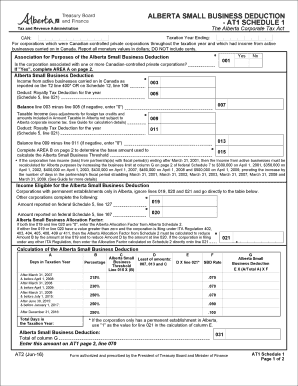
The Alberta AT1 fillable form is a crucial document used for filing the Alberta corporate income tax return. This form is specifically designed for corporations operating in Alberta, allowing them to report their income, deductions, and tax credits accurately. The AT1 form is essential for ensuring compliance with Alberta's tax regulations and is a key component of the Alberta corporate tax process.
Steps to Complete the Alberta AT1 Fillable Form
Completing the Alberta AT1 fillable form involves several important steps:
- Gather Required Information: Collect all necessary financial documents, including income statements, expense records, and previous tax returns.
- Access the Form: Download the AT1 fillable form from an authorized source, ensuring it is the latest version.
- Fill Out the Form: Input accurate financial data into the designated fields. Pay attention to details to avoid errors.
- Review the Information: Double-check all entries for accuracy, ensuring that all required sections are completed.
- Submit the Form: Choose your preferred submission method, whether online, by mail, or in person, and ensure it is sent before the deadline.
Legal Use of the Alberta AT1 Fillable Form
The Alberta AT1 fillable form must be used in accordance with Alberta's tax laws to ensure its legal validity. Submitting this form accurately and on time is essential for avoiding penalties. Corporations are required to provide truthful and complete information, as any discrepancies can lead to audits or legal repercussions. Understanding the legal implications of this form is vital for compliance.
Key Elements of the Alberta AT1 Fillable Form
Several key elements must be included in the Alberta AT1 fillable form to ensure it is complete:
- Corporate Information: This includes the corporation's name, address, and business number.
- Income Details: Report all sources of income accurately, including revenue from sales and services.
- Deductions: Clearly outline any allowable deductions, such as operating expenses and capital costs.
- Tax Credits: Include any applicable tax credits that may reduce the overall tax liability.
Form Submission Methods
Corporations can submit the Alberta AT1 fillable form through various methods:
- Online Submission: Utilize the Alberta tax portal for electronic filing, which is often the fastest and most efficient method.
- Mail: Print the completed form and send it to the designated tax office address.
- In-Person: Submit the form directly at a local tax office if preferred.
Filing Deadlines / Important Dates
It is essential for corporations to be aware of the filing deadlines associated with the Alberta AT1 fillable form. Typically, the deadline for submitting the AT1 form is six months after the end of the corporation's fiscal year. Missing this deadline can result in penalties and interest charges, making timely submission critical for compliance.
Quick guide on how to complete alberta small business deduction
A brief manual on how to create your Alberta Government At1 Fillable
Locating the appropriate template can be a task when you have to present official international documentation. Even if you possess the necessary form, it may be tedious to swiftly fill it out according to all the specifications if you rely on hard copies instead of handling everything digitally. airSlate SignNow is the web-based electronic signature platform that assists you in overcoming these obstacles. It allows you to select your Alberta Government At1 Fillable and promptly fill and sign it on-site without having to reprint documents whenever you make an error.
Here are the procedures you need to follow to prepare your Alberta Government At1 Fillable with airSlate SignNow:
- Click the Get Form button to immediately upload your document to our editor.
- Begin with the first empty field, input your information, and proceed with the Next tool.
- Complete the empty boxes using the Cross and Check tools from the menu above.
- Select the Highlight or Line features to emphasize the most important details.
- Click on Image and add one if your Alberta Government At1 Fillable requires it.
- Utilize the right-side menu to add extra fields for yourself or others to fill out if needed.
- Review your responses and approve the form by clicking Date, Initials, and Sign.
- Draw, type, upload your eSignature, or capture it with a camera or QR code.
- Complete the editing process by clicking the Done button and choosing your file-sharing preferences.
Once your Alberta Government At1 Fillable is ready, you can distribute it as you wish - send it to your recipients via email, SMS, fax, or even print it directly from the editor. You can also safely store all your completed documentation in your account, organized in folders according to your preferences. Don’t spend time on manual form completion; give airSlate SignNow a try!
Create this form in 5 minutes or less
Find and fill out the correct alberta small business deduction
FAQs
-
Which form is to be filled out to avoid an income tax deduction from a bank?
Banks have to deduct TDS when interest income is more than Rs.10,000 in a year. The bank includes deposits held in all its branches to calculate this limit. But if your total income is below the taxable limit, you can submit Forms 15G and 15H to the bank requesting them not to deduct any TDS on your interest.Please remember that Form 15H is for senior citizens, those who are 60 years or older; while Form 15G is for everybody else.Form 15G and Form 15H are valid for one financial year. So you have to submit these forms every year if you are eligible. Submitting them as soon as the financial year starts will ensure the bank does not deduct any TDS on your interest income.Conditions you must fulfill to submit Form 15G:Youare an individual or HUFYou must be a Resident IndianYou should be less than 60 years oldTax calculated on your Total Income is nilThe total interest income for the year is less than the minimum exemption limit of that year, which is Rs 2,50,000 for financial year 2016-17Thanks for being here
-
What are the good ways to fill out 1120 form if my business is inactive?
While you might not have been “active” throughout the year, by filing a “no activity” return you may be throwing away potential deductions! Most businesses (even unprofitable ones) will have some form of expenses – think tax prep fees, taxes, filing fees, home office, phone, etc. Don’t miss out on your chance to preserve these valuable deductions. You can carry these forward to more profitable years by using the Net Operating Loss Carry-forward rules. But you must report them to take advantage of this break. If you honestly did not have any expenses or income during the tax year, simply file form 1120 by the due date (no later than 2 and one half months after the close of the business tax year – March 15 for calendar year businesses). Complete sections A-E on the front page of the return and make sure you sign the bottom – that’s it!
-
Which US tax form do you fill out if you work full-time and have a 30+ hour a week small business?
If you are self employed from the small business, most likely you will fill schedule C:https://www.irs.gov/pub/irs-pdf/...You will claim profit from the small business as well as your W2 income from the 40 hr a week job.You may be able to use an online service such as turbotax:Online Tax Software for Self Employment and Personal TaxesHowever, you may benefit from sitting down with an accountant.
-
What forms should I fill out to start a business?
From a legal business entity standpoint, one does not normally have to file any forms with the state the business is located in to be considered a sole proprietor (SP). However, this highly unadvisable since a SP provides no liability protection.The most popular, and most advisable business entities are a Limited Liability Company (LLC) and a Corporation. These entities are state created entities meaning that you must file the necessary paperwork in the state where you will have the business headquarters. The state’s secretary of state’s office will have all the necessary documents, forms, and rules needed to create the entity of your choice. You will also have to pay a filing fee.It is important that you further discuss the issue with experienced counsel as they will be able to help you decide which entity is best for you, and help you with the filing.
-
How can I deduct on my Federal income taxes massage therapy for my chronic migraines? Is there some form to fill out to the IRS for permission?
As long as your doctor prescribed this, it is tax deductible under the category for medical expenses. There is no IRS form for permission.
Create this form in 5 minutes!
How to create an eSignature for the alberta small business deduction
How to generate an electronic signature for your Alberta Small Business Deduction online
How to generate an eSignature for the Alberta Small Business Deduction in Chrome
How to generate an electronic signature for putting it on the Alberta Small Business Deduction in Gmail
How to create an electronic signature for the Alberta Small Business Deduction straight from your smartphone
How to make an eSignature for the Alberta Small Business Deduction on iOS devices
How to generate an eSignature for the Alberta Small Business Deduction on Android devices
People also ask
-
What is the Alberta Government At1 Fillable form?
The Alberta Government At1 Fillable form is an official document used for various administrative purposes within the province of Alberta. With airSlate SignNow, you can easily fill out, eSign, and submit this form digitally, streamlining your processes and ensuring compliance.
-
How can airSlate SignNow help with the Alberta Government At1 Fillable?
airSlate SignNow simplifies the process of managing the Alberta Government At1 Fillable form by allowing users to fill, sign, and send documents electronically. This tool enhances efficiency and reduces the time spent on paperwork, making it an invaluable resource for individuals and businesses.
-
Is there a free trial available for airSlate SignNow when using the Alberta Government At1 Fillable?
Yes, airSlate SignNow offers a free trial for new users, allowing you to explore its features, including the management of the Alberta Government At1 Fillable form. This trial helps you understand how the platform can benefit your document workflow without any initial commitment.
-
What are the pricing options for airSlate SignNow when working with the Alberta Government At1 Fillable?
airSlate SignNow offers flexible pricing plans that cater to various business needs, including options for individuals and teams. These plans are designed to provide cost-effective solutions for managing documents like the Alberta Government At1 Fillable.
-
Can airSlate SignNow integrate with other applications for the Alberta Government At1 Fillable?
Absolutely! airSlate SignNow supports integration with various applications, enhancing your workflow when dealing with the Alberta Government At1 Fillable form. You can connect it with CRM systems, cloud storage, and other tools to streamline your document management process.
-
What features does airSlate SignNow offer for the Alberta Government At1 Fillable?
airSlate SignNow provides a range of features for the Alberta Government At1 Fillable, including customizable templates, automated workflows, and secure eSigning capabilities. These features ensure that your document management is efficient, user-friendly, and compliant with legal standards.
-
Is airSlate SignNow secure for handling the Alberta Government At1 Fillable?
Yes, airSlate SignNow prioritizes security, employing advanced encryption and compliance measures to protect your data when handling the Alberta Government At1 Fillable form. This ensures that your documents remain confidential and secure throughout the signing process.
Get more for Alberta Government At1 Fillable
- City of new haven income and expense report form
- Semen analysis form 240917002
- Q drop tamu form
- Draft alumna membership request membership linksinc form
- Plagiarism contract 428407966 form
- North carolina social work certification and licensure form
- Commercial rental lease agreement template form
- Commercial space lease agreement template form
Find out other Alberta Government At1 Fillable
- eSignature Ohio Guaranty Agreement Myself
- eSignature California Bank Loan Proposal Template Now
- Can I eSign Indiana Medical History
- eSign Idaho Emergency Contract Form Myself
- eSign Hawaii General Patient Information Fast
- Help Me With eSign Rhode Island Accident Medical Claim Form
- eSignature Colorado Demand for Payment Letter Mobile
- eSignature Colorado Demand for Payment Letter Secure
- eSign Delaware Shareholder Agreement Template Now
- eSign Wyoming Shareholder Agreement Template Safe
- eSign Kentucky Strategic Alliance Agreement Secure
- Can I eSign Alaska Equipment Rental Agreement Template
- eSign Michigan Equipment Rental Agreement Template Later
- Help Me With eSignature Washington IOU
- eSign Indiana Home Improvement Contract Myself
- eSign North Dakota Architectural Proposal Template Online
- How To eSignature Alabama Mechanic's Lien
- Can I eSign Alabama Car Insurance Quotation Form
- eSign Florida Car Insurance Quotation Form Mobile
- eSign Louisiana Car Insurance Quotation Form Online