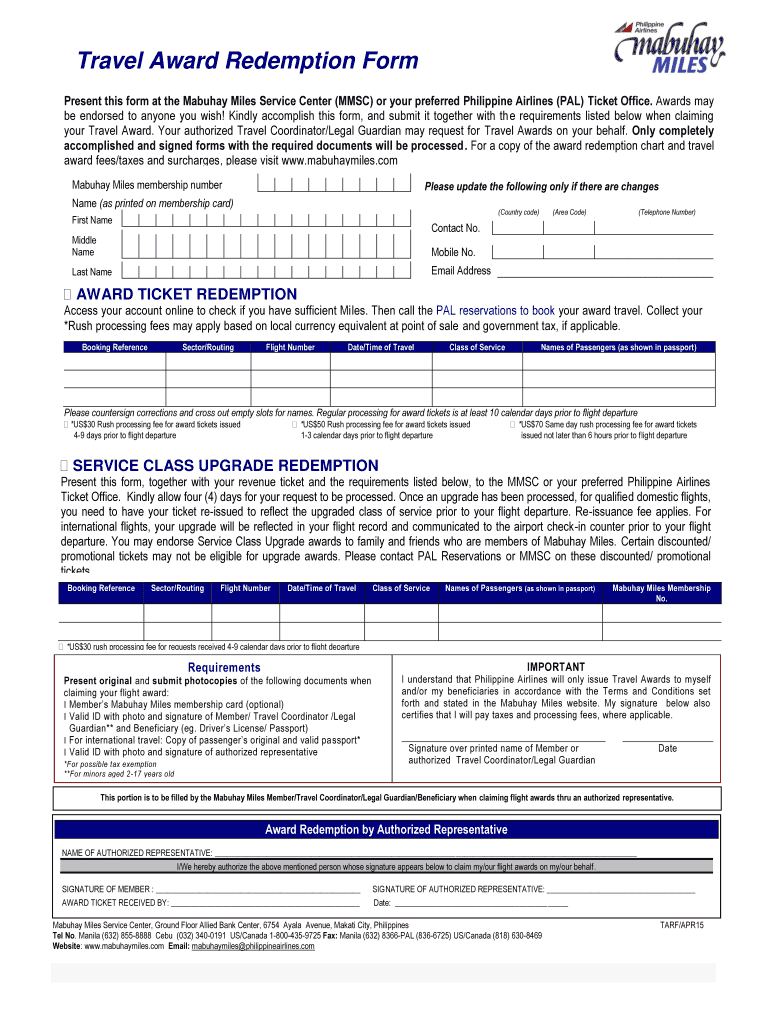
Travel Award Redemption Form 2015-2026


What is the Travel Award Redemption Form
The Travel Award Redemption Form is a document used by members of the Mabuhay Miles program to redeem their accumulated miles for travel-related benefits. This form allows members to request the conversion of their miles into airline tickets, upgrades, or other travel rewards. Understanding this form is essential for maximizing the value of your earned miles and ensuring a smooth redemption process.
How to use the Travel Award Redemption Form
Using the Travel Award Redemption Form involves several key steps. First, ensure you have an active Mabuhay Miles account with sufficient miles for redemption. Next, access the form through the official Philippine Airlines website or a designated service center. Fill in the required personal information, including your membership number and contact details. Specify the travel rewards you wish to redeem and double-check all entries for accuracy before submission. Once completed, submit the form according to the instructions provided, either online or via mail.
Steps to complete the Travel Award Redemption Form
Completing the Travel Award Redemption Form requires careful attention to detail. Follow these steps:
- Log in to your Mabuhay Miles account to check your available miles.
- Download or access the redemption form from the official source.
- Fill in your personal details accurately, including your membership number.
- Indicate the specific travel rewards you want to redeem.
- Review the form to ensure all information is correct and complete.
- Submit the form as directed, either online or by mailing it to the appropriate address.
Key elements of the Travel Award Redemption Form
Several key elements must be included in the Travel Award Redemption Form to ensure its validity:
- Member Information: Your full name, membership number, and contact details.
- Redemption Details: Specifics about the travel rewards you wish to redeem, including dates and destinations.
- Signature: A signature is often required to validate the request.
- Date of Submission: Ensure you include the date when you are submitting the form.
Legal use of the Travel Award Redemption Form
The Travel Award Redemption Form is a legally binding document when filled out correctly. It is essential to provide accurate information to avoid any potential legal issues. Misrepresentation or false information can lead to penalties or the denial of your redemption request. Always ensure compliance with the terms and conditions set forth by the Mabuhay Miles program.
Form Submission Methods
The Travel Award Redemption Form can be submitted through various methods. Members can choose to submit the form online via the Mabuhay Miles portal, which is often the quickest method. Alternatively, you can print the form and mail it to the designated address provided by Philippine Airlines. In some cases, you may also visit a local service center to submit the form in person, allowing for immediate confirmation of your submission.
Quick guide on how to complete hsbc reward points redemption form 2015 2019
A brief guide on how to prepare your Travel Award Redemption Form
Locating the appropriate template can turn into a hurdle when you require to produce official international paperwork. Even if you possess the necessary form, it may be taxing to swiftly prepare it according to all the specifications if you rely on printed copies instead of managing everything digitally. airSlate SignNow is the online electronic signature platform that assists you in overcoming all of that. It enables you to acquire your Travel Award Redemption Form and swiftly finalize and sign it on-site without reprinting documents in case of typographical errors.
Here are the steps you need to follow to prepare your Travel Award Redemption Form with airSlate SignNow:
- Click the Get Form button to immediately add your document to our editor.
- Begin with the first blank space, input your information, and proceed with the Next tool.
- Complete the empty fields using the Cross and Check tools from the panel above.
- Select the Highlight or Line options to mark the most essential details.
- Press on Image and upload one if your Travel Award Redemption Form requires it.
- Utilize the right-side panel to add extra fields for you or others to fill in, if needed.
- Review your responses and authorize the form by clicking Date, Initials, and Sign.
- Sketch, type, upload your eSignature, or capture it with a camera or QR code.
- Complete the editing process by clicking the Done button and selecting your file-sharing options.
Once your Travel Award Redemption Form is ready, you can distribute it however you prefer - send it to your recipients via email, SMS, fax, or even print it directly from the editor. You can also securely store all your finalized paperwork in your account, organized in folders according to your preferences. Don’t spend time on manual document completion; give airSlate SignNow a try!
Create this form in 5 minutes or less
Find and fill out the correct hsbc reward points redemption form 2015 2019
FAQs
-
How many forms are filled out in the JEE Main 2019 to date?
You should wait till last date to get these type of statistics .NTA will release how much application is received by them.
-
I am 2015 passed out CSE student, I am preparing for GATE2016 from a coaching, due to some reasons I do not have my provisional certificate, am I still eligible to fill application form? How?
Yes you are eligible. There is still time, application closes on October 1 this year. So if you get the provisional certificate in time you can just wait or if you know that you won't get it in time, just mail GATE organising institute at helpdesk@gate.iisc.ernet.in mentioning your problem. Hope it helps.
-
How much time does it take to get a yes/no answer for Canada Express Entry after filling out all the form & signing up? How many points are needed for a positive answer, i.e. how many points do the people that are getting accepted have on average?
The minimum that I know people got accepted is from 450 to 470 points.Usually when you fill up the information it tells you straight up if you are in the pool or not.By experience Canada’a express entry system is THE WORST THING EVER happened to the Canada’s immigration. It is literally a nightmare! The portal crashes, and sometimes only open between midnight and 3am. You literally need to be the luckiest person to have it work normally. What is worst about it: Is that the Canadian government keeps on saying they will fix issues, and in the same time calling it the best system ever, where it is the worst system I have ever seen. NO technical support whatsoever.Good luck in your application.My advice also, Canada is not as it advertises. It s quite hard out there, and people are racist (not to your face, but we a smile and in their mind, which is to the worst).I do not recommend Canada as a land for immigration, but I recommend Canada for studying. Schools there are pretty multicultural, and you do not feel the racism only when you go in the labour market or create your company.
Create this form in 5 minutes!
How to create an eSignature for the hsbc reward points redemption form 2015 2019
How to make an electronic signature for the Hsbc Reward Points Redemption Form 2015 2019 in the online mode
How to generate an eSignature for the Hsbc Reward Points Redemption Form 2015 2019 in Chrome
How to generate an electronic signature for putting it on the Hsbc Reward Points Redemption Form 2015 2019 in Gmail
How to make an electronic signature for the Hsbc Reward Points Redemption Form 2015 2019 straight from your smartphone
How to generate an eSignature for the Hsbc Reward Points Redemption Form 2015 2019 on iOS
How to make an eSignature for the Hsbc Reward Points Redemption Form 2015 2019 on Android devices
People also ask
-
What is a Travel Award Redemption Form and why do I need it?
A Travel Award Redemption Form is a specialized document used to redeem travel awards, such as airline miles or hotel points. This form streamlines the process of claiming your rewards, ensuring that your requests are processed quickly and accurately. Utilizing airSlate SignNow for your Travel Award Redemption Form simplifies the eSigning and submission process, making it easier for you to enjoy your travel benefits.
-
How does airSlate SignNow help with the Travel Award Redemption Form?
With airSlate SignNow, you can easily create, send, and eSign your Travel Award Redemption Form. Our platform offers a user-friendly interface that simplifies document management, allowing you to focus on your travel plans without the hassle of paperwork. Plus, you can track the status of your forms in real-time, ensuring a smooth redemption process.
-
What features does airSlate SignNow offer for managing Travel Award Redemption Forms?
airSlate SignNow provides a range of features specifically designed for managing Travel Award Redemption Forms, including customizable templates, electronic signatures, and secure cloud storage. You can also integrate your forms with various third-party applications to enhance productivity and streamline your workflow. These features ensure that your redemption process is efficient and hassle-free.
-
Is airSlate SignNow cost-effective for handling Travel Award Redemption Forms?
Yes, airSlate SignNow is a cost-effective solution for handling your Travel Award Redemption Form needs. Our pricing plans are designed to fit various budgets, providing businesses and individuals with a powerful tool to manage their documents without breaking the bank. With airSlate SignNow, you get high-quality service at an affordable price.
-
Can I integrate airSlate SignNow with other tools for my Travel Award Redemption Form?
Absolutely! airSlate SignNow offers seamless integrations with a variety of popular tools and software, enhancing your ability to manage your Travel Award Redemption Form efficiently. Whether you use CRM systems, cloud storage services, or project management tools, our platform can connect with them to ensure a smooth workflow and document handling.
-
How secure is my Travel Award Redemption Form with airSlate SignNow?
Security is a top priority at airSlate SignNow. When you use our platform to manage your Travel Award Redemption Form, your documents are protected with advanced encryption and secure cloud storage. We also provide features like audit trails and user authentication to ensure that your sensitive information remains confidential and secure.
-
What are the benefits of using airSlate SignNow for my Travel Award Redemption Form over traditional methods?
Using airSlate SignNow for your Travel Award Redemption Form offers numerous benefits compared to traditional methods. Our electronic signature capabilities expedite the signing process, saving you time and reducing paper waste. Additionally, our platform allows for easy tracking and management of your forms, enhancing overall efficiency and organization.
Get more for Travel Award Redemption Form
Find out other Travel Award Redemption Form
- Can I eSign New Jersey Plumbing Form
- How Can I eSign Wisconsin Plumbing PPT
- Can I eSign Colorado Real Estate Form
- How To eSign Florida Real Estate Form
- Can I eSign Hawaii Real Estate Word
- How Do I eSign Hawaii Real Estate Word
- How To eSign Hawaii Real Estate Document
- How Do I eSign Hawaii Real Estate Presentation
- How Can I eSign Idaho Real Estate Document
- How Do I eSign Hawaii Sports Document
- Can I eSign Hawaii Sports Presentation
- How To eSign Illinois Sports Form
- Can I eSign Illinois Sports Form
- How To eSign North Carolina Real Estate PDF
- How Can I eSign Texas Real Estate Form
- How To eSign Tennessee Real Estate Document
- How Can I eSign Wyoming Real Estate Form
- How Can I eSign Hawaii Police PDF
- Can I eSign Hawaii Police Form
- How To eSign Hawaii Police PPT