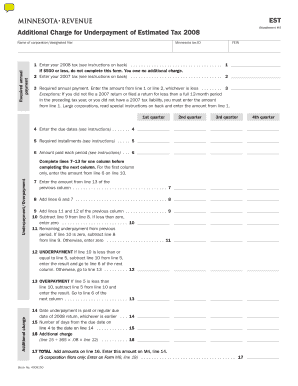
EST, Additional Charge for Underpayment of Estimated Tax to Be Used by Registered Manufacturers of Video Display Devices VDDs so Form


Understanding the EST Additional Charge for Underpayment of Estimated Tax
The EST, Additional Charge for Underpayment of Estimated Tax, is a specific tax obligation for registered manufacturers of video display devices (VDDs) sold to Minnesota households. This charge is implemented to ensure compliance with state tax regulations and to facilitate the payment of annual registration fees. Manufacturers must be aware of this charge to avoid penalties and ensure proper financial planning.
How to Utilize the EST Additional Charge
To effectively use the EST, manufacturers should first determine their estimated tax liability based on sales of VDDs. This involves calculating the expected tax amount owed over the fiscal year. Once the estimated tax is established, manufacturers can apply the additional charge for underpayment if they fail to meet the required payment thresholds. It is essential to maintain accurate records of sales and tax payments to ensure compliance.
Obtaining the EST Additional Charge Form
Manufacturers can obtain the EST Additional Charge form through the Minnesota Department of Revenue's official website or by contacting their office directly. The form is typically available in a downloadable format, allowing manufacturers to complete it electronically or print it out for manual submission. It is crucial to ensure that the most current version of the form is used to avoid any discrepancies.
Steps to Complete the EST Additional Charge Form
Completing the EST Additional Charge form involves several key steps:
- Gather necessary documentation, including sales records and previous tax filings.
- Accurately calculate the estimated tax liability for the year.
- Fill out the form, ensuring all required fields are completed.
- Review the form for accuracy before submission.
- Submit the form by the specified deadline to avoid penalties.
Legal Considerations for the EST Additional Charge
Understanding the legal framework surrounding the EST Additional Charge is vital for compliance. Manufacturers must adhere to state regulations regarding tax payments and reporting. Failure to comply with these regulations can result in penalties, including fines or additional charges. It is advisable for manufacturers to consult with a tax professional to navigate these legal requirements effectively.
Key Elements of the EST Additional Charge
The key elements of the EST Additional Charge include:
- The definition of underpayment as it relates to estimated tax obligations.
- The calculation methods for determining the additional charge.
- Specific deadlines for payment and form submission.
- Potential penalties for non-compliance.
State-Specific Rules for the EST Additional Charge
Each state may have unique rules governing the EST Additional Charge. In Minnesota, registered manufacturers must familiarize themselves with local tax laws, including any exemptions or specific reporting requirements. Staying informed about these rules helps manufacturers avoid legal issues and ensures timely compliance with state tax obligations.
Quick guide on how to complete est additional charge for underpayment of estimated tax to be used by registered manufacturers of video display devices vdds
Effortlessly Prepare [SKS] on Any Device
Digital document management has become increasingly popular among businesses and individuals. It offers an ideal eco-friendly substitute to conventional printed and signed paperwork, as you can easily access the required form and securely save it online. airSlate SignNow provides you with all the tools necessary to create, edit, and electronically sign your documents swiftly without delays. Manage [SKS] on any platform using airSlate SignNow's Android or iOS applications and enhance any document-focused process today.
The Easiest Way to Edit and eSign [SKS] without Hassle
- Find [SKS] and click Get Form to begin.
- Utilize the tools we offer to fill out your document.
- Highlight important sections of your documents or obscure sensitive details with features that airSlate SignNow provides specifically for this purpose.
- Create your electronic signature using the Sign tool, which takes just seconds and holds the same legal validity as a traditional ink signature.
- Review all the information and click the Done button to save your changes.
- Select your preferred method for sending your form, whether by email, SMS, invitation link, or download it to your computer.
Say goodbye to misplaced or lost documents, tedious form searching, or mistakes that necessitate printing new document copies. airSlate SignNow meets all your document management needs in just a few clicks from any device you choose. Edit and eSign [SKS] and ensure excellent communication at every step of the form preparation process with airSlate SignNow.
Create this form in 5 minutes or less
Related searches to EST, Additional Charge For Underpayment Of Estimated Tax To Be Used By Registered Manufacturers Of Video Display Devices VDDs So
Create this form in 5 minutes!
How to create an eSignature for the est additional charge for underpayment of estimated tax to be used by registered manufacturers of video display devices vdds
How to create an electronic signature for a PDF online
How to create an electronic signature for a PDF in Google Chrome
How to create an e-signature for signing PDFs in Gmail
How to create an e-signature right from your smartphone
How to create an e-signature for a PDF on iOS
How to create an e-signature for a PDF on Android
People also ask
-
What is the EST, Additional Charge For Underpayment Of Estimated Tax To Be Used By Registered Manufacturers Of Video Display Devices VDDs Sold To Minnesota Households To Pay Their Annual Registration Fee?
The EST, Additional Charge For Underpayment Of Estimated Tax To Be Used By Registered Manufacturers Of Video Display Devices VDDs Sold To Minnesota Households To Pay Their Annual Registration Fee is a fee imposed on manufacturers who do not meet their estimated tax obligations. This charge ensures compliance and supports the funding of state programs. Understanding this fee is crucial for manufacturers to avoid penalties.
-
How can airSlate SignNow help with managing the EST for my business?
airSlate SignNow provides a streamlined solution for managing documents related to the EST, Additional Charge For Underpayment Of Estimated Tax To Be Used By Registered Manufacturers Of Video Display Devices VDDs Sold To Minnesota Households To Pay Their Annual Registration Fee. With our eSigning capabilities, you can easily prepare, send, and sign necessary tax documents, ensuring timely compliance and reducing administrative burdens.
-
What features does airSlate SignNow offer to assist with tax documentation?
airSlate SignNow offers features such as customizable templates, secure eSigning, and document tracking, which are essential for handling tax documentation. These features help ensure that all documents related to the EST, Additional Charge For Underpayment Of Estimated Tax To Be Used By Registered Manufacturers Of Video Display Devices VDDs Sold To Minnesota Households To Pay Their Annual Registration Fee are completed accurately and efficiently.
-
Is there a cost associated with using airSlate SignNow for tax-related documents?
Yes, there is a cost associated with using airSlate SignNow, but it is designed to be cost-effective for businesses. The pricing plans are flexible and can accommodate various business sizes, making it easier to manage expenses related to the EST, Additional Charge For Underpayment Of Estimated Tax To Be Used By Registered Manufacturers Of Video Display Devices VDDs Sold To Minnesota Households To Pay Their Annual Registration Fee.
-
Can airSlate SignNow integrate with other software I use for tax management?
Absolutely! airSlate SignNow offers integrations with various accounting and tax management software. This allows you to seamlessly manage your documents and ensure compliance with the EST, Additional Charge For Underpayment Of Estimated Tax To Be Used By Registered Manufacturers Of Video Display Devices VDDs Sold To Minnesota Households To Pay Their Annual Registration Fee without disrupting your existing workflows.
-
What are the benefits of using airSlate SignNow for my business?
Using airSlate SignNow provides numerous benefits, including increased efficiency, reduced paperwork, and enhanced compliance. By utilizing our platform, businesses can effectively manage the EST, Additional Charge For Underpayment Of Estimated Tax To Be Used By Registered Manufacturers Of Video Display Devices VDDs Sold To Minnesota Households To Pay Their Annual Registration Fee, ensuring that all necessary documents are processed quickly and accurately.
-
How secure is airSlate SignNow for handling sensitive tax documents?
airSlate SignNow prioritizes security and compliance, employing advanced encryption and security protocols to protect sensitive tax documents. This ensures that all information related to the EST, Additional Charge For Underpayment Of Estimated Tax To Be Used By Registered Manufacturers Of Video Display Devices VDDs Sold To Minnesota Households To Pay Their Annual Registration Fee is kept confidential and secure.
Get more for EST, Additional Charge For Underpayment Of Estimated Tax To Be Used By Registered Manufacturers Of Video Display Devices VDDs So
Find out other EST, Additional Charge For Underpayment Of Estimated Tax To Be Used By Registered Manufacturers Of Video Display Devices VDDs So
- How To eSign South Dakota Construction Promissory Note Template
- eSign Education Word Oregon Secure
- How Do I eSign Hawaii Finance & Tax Accounting NDA
- eSign Georgia Finance & Tax Accounting POA Fast
- eSign Georgia Finance & Tax Accounting POA Simple
- How To eSign Oregon Education LLC Operating Agreement
- eSign Illinois Finance & Tax Accounting Resignation Letter Now
- eSign Texas Construction POA Mobile
- eSign Kansas Finance & Tax Accounting Stock Certificate Now
- eSign Tennessee Education Warranty Deed Online
- eSign Tennessee Education Warranty Deed Now
- eSign Texas Education LLC Operating Agreement Fast
- eSign Utah Education Warranty Deed Online
- eSign Utah Education Warranty Deed Later
- eSign West Virginia Construction Lease Agreement Online
- How To eSign West Virginia Construction Job Offer
- eSign West Virginia Construction Letter Of Intent Online
- eSign West Virginia Construction Arbitration Agreement Myself
- eSign West Virginia Education Resignation Letter Secure
- eSign Education PDF Wyoming Mobile