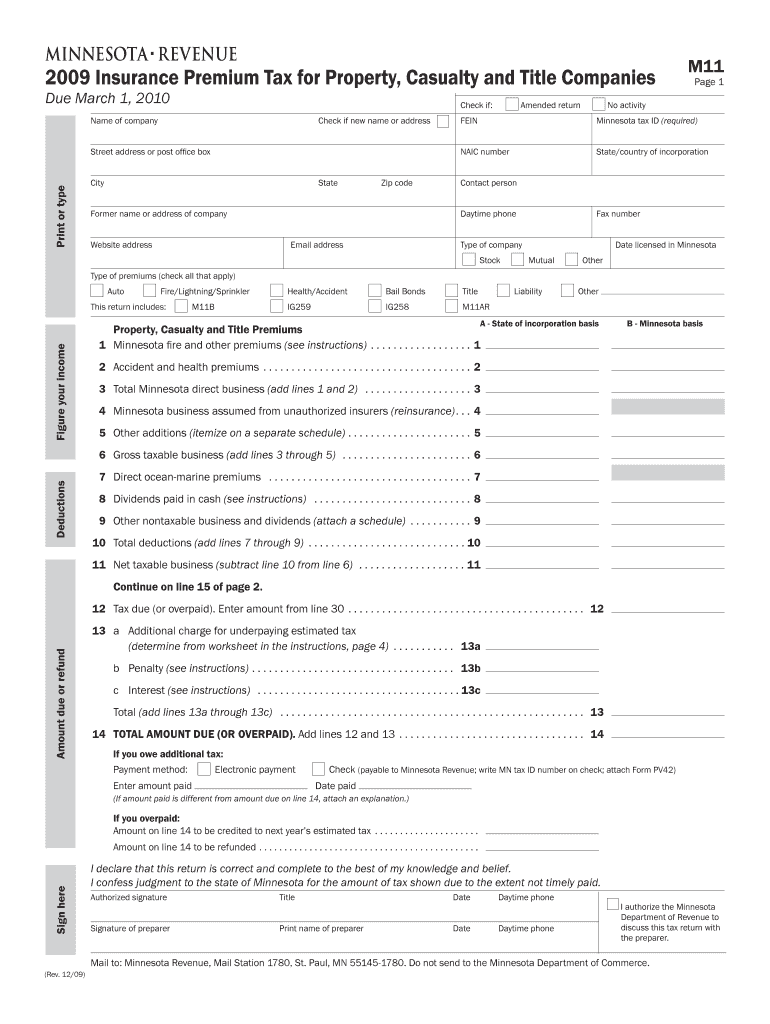
M11, Insurance Premium Tax for Property, Casualty and Title Companies to Be Used by Registered Manufacturers of Video Display De Form


What is the M11, Insurance Premium Tax for Property, Casualty and Title Companies?
The M11 form is a specific tax form that pertains to the Insurance Premium Tax for Property, Casualty, and Title Companies. This tax is particularly relevant for registered manufacturers of Video Display Devices (VDDs) sold to households in Minnesota. The funds collected through this tax are designated to cover the annual registration fee required by the state of Minnesota. Understanding the M11 form is essential for compliance and for ensuring that manufacturers meet their tax obligations accurately.
How to Use the M11 Form
Using the M11 form involves several steps to ensure proper completion and submission. Manufacturers must first gather the necessary information regarding their sales of VDDs to Minnesota households. This includes sales figures and any relevant tax identification numbers. Once the required data is compiled, manufacturers can fill out the form accurately, ensuring that all sections are completed to reflect their tax liability. After completing the form, it must be submitted to the appropriate state revenue department as per the guidelines provided.
Steps to Complete the M11 Form
Completing the M11 form requires careful attention to detail. Here are the steps to follow:
- Gather sales data for VDDs sold to Minnesota households.
- Obtain your tax identification number and any other required documentation.
- Fill out the M11 form, ensuring all fields are completed accurately.
- Review the form for any errors or omissions.
- Submit the completed form to the Minnesota Department of Revenue.
Key Elements of the M11 Form
Several key elements must be included in the M11 form to ensure compliance. These include:
- Identification of the manufacturer and their tax identification number.
- Details of VDD sales to Minnesota households.
- The total amount of tax due based on the sales figures.
- Signature of the authorized representative of the company.
Eligibility Criteria for the M11 Form
To be eligible to use the M11 form, manufacturers must be registered with the state of Minnesota and be involved in the sale of Video Display Devices to households within the state. Additionally, they must meet any specific state requirements regarding tax registration and compliance. It is important for manufacturers to verify their eligibility to avoid penalties or issues with their tax submissions.
Penalties for Non-Compliance
Failure to comply with the requirements of the M11 form can result in significant penalties. These may include fines, interest on unpaid taxes, and potential legal action from the state. Manufacturers should ensure that they submit the M11 form accurately and on time to avoid these consequences. Regular reviews of tax obligations and timely submissions are crucial for maintaining compliance.
Quick guide on how to complete m11 insurance premium tax for property casualty and title companies to be used by registered manufacturers of video display
Effortlessly Complete [SKS] on Any Device
Managing documents online has gained signNow traction among businesses and individuals. It offers an ideal environmentally friendly substitute to conventional printed and signed paperwork, allowing you to locate the right form and securely store it online. airSlate SignNow equips you with all the necessary tools to create, modify, and eSign your documents rapidly without any holdups. Manage [SKS] on any device using airSlate SignNow's Android or iOS applications and enhance any document-related processes today.
How to Modify and eSign [SKS] with Ease
- Locate [SKS] and then select Get Form to begin.
- Utilize the tools provided to complete your document.
- Emphasize relevant portions of your documents or obscure sensitive information with the tools specifically designed for that purpose in airSlate SignNow.
- Create your eSignature with the Sign tool, which takes mere seconds and holds the same legal validity as a conventional wet ink signature.
- Review all the details and then click on the Done button to save your modifications.
- Choose your preferred method to send your form, whether by email, SMS, or an invite link, or download it to your computer.
Eliminate concerns about lost or misplaced documents, tedious form searching, or errors that necessitate printing new document copies. airSlate SignNow addresses all your document management needs in just a few clicks from any device you prefer. Modify and eSign [SKS] to ensure outstanding communication at every stage of your form preparation with airSlate SignNow.
Create this form in 5 minutes or less
Create this form in 5 minutes!
How to create an eSignature for the m11 insurance premium tax for property casualty and title companies to be used by registered manufacturers of video display
How to create an electronic signature for a PDF online
How to create an electronic signature for a PDF in Google Chrome
How to create an e-signature for signing PDFs in Gmail
How to create an e-signature right from your smartphone
How to create an e-signature for a PDF on iOS
How to create an e-signature for a PDF on Android
People also ask
-
What is the M11, Insurance Premium Tax for Property, Casualty and Title Companies?
The M11, Insurance Premium Tax For Property, Casualty And Title Companies To Be Used By Registered Manufacturers Of Video Display Devices VDDs Sold To Minnesota Households To Pay Their Annual Registration Fee Revenue State Mn. is a tax structure designed to support registered manufacturers in Minnesota. This tax helps ensure compliance while providing necessary funding for state revenue.
-
How does airSlate SignNow help with M11 tax compliance?
airSlate SignNow offers features that streamline document management and eSigning processes, making it easier for businesses to handle M11, Insurance Premium Tax For Property, Casualty And Title Companies. By using our platform, companies can efficiently manage their tax-related documents and ensure timely submissions.
-
What are the benefits of using airSlate SignNow for M11 tax documentation?
Using airSlate SignNow for M11, Insurance Premium Tax For Property, Casualty And Title Companies documentation provides several benefits, including enhanced security, ease of access, and improved workflow efficiency. Our platform allows for quick eSigning and document sharing, which is crucial for meeting tax deadlines.
-
Is airSlate SignNow cost-effective for small businesses dealing with M11 tax?
Yes, airSlate SignNow is designed to be a cost-effective solution for businesses of all sizes, including small businesses managing M11, Insurance Premium Tax For Property, Casualty And Title Companies. Our pricing plans are flexible, ensuring that you only pay for what you need while benefiting from comprehensive features.
-
Can airSlate SignNow integrate with other software for M11 tax management?
Absolutely! airSlate SignNow offers integrations with various software solutions that can assist in managing M11, Insurance Premium Tax For Property, Casualty And Title Companies. This allows for seamless data transfer and improved efficiency in handling tax-related tasks.
-
What features does airSlate SignNow offer for document management related to M11 tax?
airSlate SignNow provides robust features such as customizable templates, automated workflows, and secure cloud storage, all of which are beneficial for managing M11, Insurance Premium Tax For Property, Casualty And Title Companies documentation. These features help streamline the process and reduce the risk of errors.
-
How can I ensure my documents are secure when using airSlate SignNow for M11 tax?
Security is a top priority at airSlate SignNow. We implement advanced encryption and authentication measures to protect your documents related to M11, Insurance Premium Tax For Property, Casualty And Title Companies. This ensures that your sensitive information remains confidential and secure.
Get more for M11, Insurance Premium Tax For Property, Casualty And Title Companies To Be Used By Registered Manufacturers Of Video Display De
Find out other M11, Insurance Premium Tax For Property, Casualty And Title Companies To Be Used By Registered Manufacturers Of Video Display De
- How To eSign Maryland Plumbing Document
- How Do I eSign Mississippi Plumbing Word
- Can I eSign New Jersey Plumbing Form
- How Can I eSign Wisconsin Plumbing PPT
- Can I eSign Colorado Real Estate Form
- How To eSign Florida Real Estate Form
- Can I eSign Hawaii Real Estate Word
- How Do I eSign Hawaii Real Estate Word
- How To eSign Hawaii Real Estate Document
- How Do I eSign Hawaii Real Estate Presentation
- How Can I eSign Idaho Real Estate Document
- How Do I eSign Hawaii Sports Document
- Can I eSign Hawaii Sports Presentation
- How To eSign Illinois Sports Form
- Can I eSign Illinois Sports Form
- How To eSign North Carolina Real Estate PDF
- How Can I eSign Texas Real Estate Form
- How To eSign Tennessee Real Estate Document
- How Can I eSign Wyoming Real Estate Form
- How Can I eSign Hawaii Police PDF