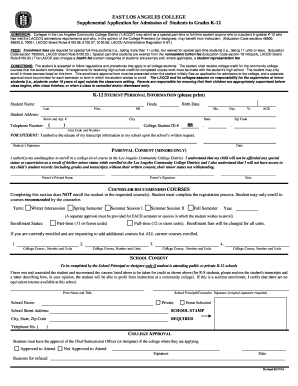
K 12 STUDENT PERSONAL INFORMATION Please Print 2016


Understanding the K 12 Student Personal Information Form
The K 12 Student Personal Information form is a critical document used by educational institutions in the United States to collect essential data about students enrolled in kindergarten through twelfth grade. This form typically includes sections for the student's name, date of birth, address, contact information, and emergency contacts. Accurate completion of this form is vital for maintaining student records and ensuring effective communication between schools and families.
Steps to Complete the K 12 Student Personal Information Form
Completing the K 12 Student Personal Information form involves several straightforward steps:
- Gather necessary information: Collect details such as the student's full name, date of birth, and current address.
- Fill out personal details: Enter the student's information accurately in the designated fields.
- Provide emergency contacts: Include names and phone numbers of individuals who can be reached in case of emergencies.
- Review the form: Double-check all entries for accuracy to avoid any issues.
- Submit the form: Follow the instructions for submitting the form, whether online or in person.
Legal Use of the K 12 Student Personal Information Form
The K 12 Student Personal Information form is subject to various legal regulations, including privacy laws that protect student data. Schools must ensure that the information collected is used solely for educational purposes and kept confidential. Compliance with the Family Educational Rights and Privacy Act (FERPA) is essential, as it governs the access and sharing of student records.
Key Elements of the K 12 Student Personal Information Form
Several key elements are essential in the K 12 Student Personal Information form:
- Student Identification: Full name, date of birth, and grade level.
- Contact Information: Home address, phone numbers, and email addresses.
- Emergency Contacts: Names and contact information for individuals authorized to be contacted in emergencies.
- Medical Information: Any relevant medical conditions or allergies that the school should be aware of.
How to Obtain the K 12 Student Personal Information Form
The K 12 Student Personal Information form can typically be obtained directly from the school district's website or the administrative office of the school your child attends. Many schools provide downloadable versions of the form that can be printed and filled out at home. Additionally, schools may offer online submission options, allowing parents to complete and submit the form digitally.
State-Specific Rules for the K 12 Student Personal Information Form
Each state may have specific regulations regarding the K 12 Student Personal Information form. It is important for parents and guardians to familiarize themselves with their state's requirements, as some states may require additional information or have different privacy laws governing the use of student data. Checking with local school authorities can provide clarity on any state-specific rules that apply.
Quick guide on how to complete k 12 student personal information please print
Complete K 12 STUDENT PERSONAL INFORMATION please Print effortlessly on any device
Web-based document management has gained traction among businesses and individuals alike. It offers an ideal eco-friendly alternative to traditional printed and signed materials, enabling you to locate the necessary form and securely store it online. airSlate SignNow equips you with all the tools you need to create, modify, and electronically sign your documents quickly and without delays. Manage K 12 STUDENT PERSONAL INFORMATION please Print on any device with the airSlate SignNow Android or iOS applications and streamline any document-related process today.
How to modify and electronically sign K 12 STUDENT PERSONAL INFORMATION please Print with ease
- Locate K 12 STUDENT PERSONAL INFORMATION please Print and click on Get Form to begin.
- Utilize the tools we provide to complete your form.
- Highlight pertinent sections of the documents or redact sensitive information with tools specifically designed for that function by airSlate SignNow.
- Create your signature using the Sign feature, which takes mere seconds and holds the same legal validity as a traditional handwritten signature.
- Review the information and click on the Done button to store your changes.
- Select your preferred method for sending your form, whether by email, text message (SMS), invite link, or download it to your computer.
Eliminate worries about lost or misplaced files, tedious form searching, or mistakes that necessitate printing new document copies. airSlate SignNow meets your document management needs in just a few clicks from any device you prefer. Modify and electronically sign K 12 STUDENT PERSONAL INFORMATION please Print to ensure effective communication at each stage of your form preparation process with airSlate SignNow.
Create this form in 5 minutes or less
Find and fill out the correct k 12 student personal information please print
Create this form in 5 minutes!
How to create an eSignature for the k 12 student personal information please print
How to create an electronic signature for a PDF online
How to create an electronic signature for a PDF in Google Chrome
How to create an e-signature for signing PDFs in Gmail
How to create an e-signature right from your smartphone
How to create an e-signature for a PDF on iOS
How to create an e-signature for a PDF on Android
People also ask
-
What is the process to print K 12 STUDENT PERSONAL INFORMATION?
To print K 12 STUDENT PERSONAL INFORMATION, simply log into your airSlate SignNow account, navigate to the document containing the information, and select the print option. This ensures that all necessary details are formatted correctly for easy printing. Make sure to review the document before printing to confirm accuracy.
-
How does airSlate SignNow ensure the security of K 12 STUDENT PERSONAL INFORMATION?
airSlate SignNow prioritizes the security of K 12 STUDENT PERSONAL INFORMATION by employing advanced encryption methods and secure cloud storage. Our platform complies with industry standards to protect sensitive data. You can trust that your information is safe while using our services.
-
Are there any costs associated with printing K 12 STUDENT PERSONAL INFORMATION?
While airSlate SignNow offers a cost-effective solution for managing documents, printing K 12 STUDENT PERSONAL INFORMATION may incur standard printing costs depending on your printer setup. We recommend checking your printer's specifications for any additional fees. The platform itself does not charge for printing.
-
Can I integrate airSlate SignNow with other tools for managing K 12 STUDENT PERSONAL INFORMATION?
Yes, airSlate SignNow offers seamless integrations with various tools and platforms to enhance your workflow. You can connect with popular applications to streamline the management of K 12 STUDENT PERSONAL INFORMATION. This integration helps in automating processes and improving efficiency.
-
What features does airSlate SignNow provide for handling K 12 STUDENT PERSONAL INFORMATION?
airSlate SignNow provides features such as electronic signatures, document templates, and secure sharing options specifically designed for handling K 12 STUDENT PERSONAL INFORMATION. These tools make it easy to collect, manage, and print necessary documents efficiently. Our user-friendly interface simplifies the entire process.
-
How can airSlate SignNow benefit schools managing K 12 STUDENT PERSONAL INFORMATION?
airSlate SignNow benefits schools by streamlining the process of collecting and managing K 12 STUDENT PERSONAL INFORMATION. With our platform, schools can reduce paperwork, enhance communication, and ensure compliance with regulations. This leads to a more organized and efficient administrative process.
-
Is there customer support available for issues related to K 12 STUDENT PERSONAL INFORMATION?
Absolutely! airSlate SignNow offers dedicated customer support to assist with any issues related to K 12 STUDENT PERSONAL INFORMATION. Our team is available to help you navigate the platform and resolve any concerns you may have. You can signNow out via chat, email, or phone for prompt assistance.
Get more for K 12 STUDENT PERSONAL INFORMATION please Print
Find out other K 12 STUDENT PERSONAL INFORMATION please Print
- Can I Electronic signature Colorado Bill of Sale Immovable Property
- How Can I Electronic signature West Virginia Vacation Rental Short Term Lease Agreement
- How Do I Electronic signature New Hampshire Bill of Sale Immovable Property
- Electronic signature North Dakota Bill of Sale Immovable Property Myself
- Can I Electronic signature Oregon Bill of Sale Immovable Property
- How To Electronic signature West Virginia Bill of Sale Immovable Property
- Electronic signature Delaware Equipment Sales Agreement Fast
- Help Me With Electronic signature Louisiana Assignment of Mortgage
- Can I Electronic signature Minnesota Assignment of Mortgage
- Electronic signature West Virginia Sales Receipt Template Free
- Electronic signature Colorado Sales Invoice Template Computer
- Electronic signature New Hampshire Sales Invoice Template Computer
- Electronic signature Tennessee Introduction Letter Free
- How To eSignature Michigan Disclosure Notice
- How To Electronic signature Ohio Product Defect Notice
- Electronic signature California Customer Complaint Form Online
- Electronic signature Alaska Refund Request Form Later
- How Can I Electronic signature Texas Customer Return Report
- How Do I Electronic signature Florida Reseller Agreement
- Electronic signature Indiana Sponsorship Agreement Free