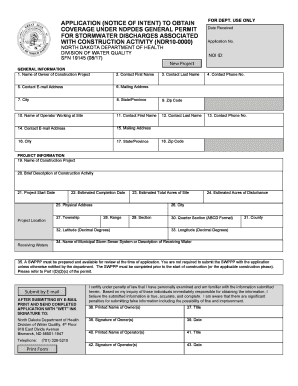
NDPDES Stormwater Construction General Permit Fact Sheet 2017-2026


What is the NDPDES Stormwater Construction General Permit Fact Sheet
The NDPDES Stormwater Construction General Permit Fact Sheet provides essential information regarding the requirements and regulations for stormwater discharges associated with construction activities in North Dakota. This fact sheet outlines the legal framework established by the North Dakota Department of Environmental Quality (NDDEQ) to manage stormwater runoff, ensuring that construction projects comply with environmental protection standards. It serves as a guide for developers and contractors to understand their responsibilities under the National Pollutant Discharge Elimination System (NPDES) program.
Steps to complete the NDPDES Stormwater Construction General Permit Fact Sheet
Completing the NDPDES Stormwater Construction General Permit Fact Sheet involves several key steps:
- Gather necessary project information, including site location, project description, and estimated start and end dates.
- Review the specific requirements outlined in the fact sheet to ensure compliance with state regulations.
- Complete the form accurately, providing all requested details to avoid delays in processing.
- Attach any required supporting documents, such as site plans or erosion control measures.
- Submit the completed fact sheet to the appropriate regulatory authority through the specified submission method.
Legal use of the NDPDES Stormwater Construction General Permit Fact Sheet
The legal use of the NDPDES Stormwater Construction General Permit Fact Sheet is crucial for ensuring compliance with environmental regulations. This document must be filled out correctly and submitted in accordance with the guidelines set forth by the NDDEQ. By adhering to these legal requirements, construction projects can mitigate the risk of penalties and ensure that they are contributing to the protection of water quality in North Dakota.
Key elements of the NDPDES Stormwater Construction General Permit Fact Sheet
The key elements of the NDPDES Stormwater Construction General Permit Fact Sheet include:
- Project Information: Details about the construction site and the nature of the project.
- Stormwater Management Practices: Required practices to control stormwater runoff and minimize environmental impact.
- Compliance Requirements: Specific legal obligations that must be met during the construction process.
- Monitoring and Reporting: Guidelines for tracking stormwater discharges and reporting to regulatory bodies.
How to obtain the NDPDES Stormwater Construction General Permit Fact Sheet
Obtaining the NDPDES Stormwater Construction General Permit Fact Sheet can be done through the North Dakota Department of Environmental Quality's website. The fact sheet is typically available for download in PDF format, allowing users to access the most current version. It is important to ensure that you are using the latest document to comply with any recent updates or changes in regulations.
Form Submission Methods
The NDPDES Stormwater Construction General Permit Fact Sheet can be submitted through various methods, including:
- Online Submission: Many forms can be submitted electronically through the NDDEQ's online portal.
- Mail: Completed forms can be printed and sent via postal service to the designated office.
- In-Person: Applicants may also choose to deliver the form directly to the NDDEQ office.
Quick guide on how to complete ndpdes stormwater construction general permit fact sheet
Discover the simpler method to manage your NDPDES Stormwater Construction General Permit Fact Sheet
The traditional methods of finalizing and approving documents require an excessive amount of time compared to modern document management tools. You once had to look for appropriate forms, print them, fill in all the information, and dispatch them via mail. Nowadays, you can obtain, complete, and sign your NDPDES Stormwater Construction General Permit Fact Sheet in a single browser tab with airSlate SignNow. Preparing your NDPDES Stormwater Construction General Permit Fact Sheet is easier than ever before.
Steps to finalize your NDPDES Stormwater Construction General Permit Fact Sheet with airSlate SignNow
- Access the relevant category page and locate your state-specific NDPDES Stormwater Construction General Permit Fact Sheet. Alternatively, utilize the search bar.
- Verify that the version of the form is accurate by viewing it.
- Hit Get form to enter editing mode.
- Fill in your document with the necessary information utilizing the editing tools.
- Review the provided details and click the Sign option to authorize your form.
- Select the most suitable method to create your signature: generate it, sketch your name, or upload an image of it.
- Click DONE to apply the changes.
- Save the document to your device or proceed to Sharing settings to deliver it electronically.
Robust online tools like airSlate SignNow simplify the process of completing and submitting your forms. Give it a try to discover how long document management and approval tasks are genuinely meant to take. You’ll save a considerable amount of time.
Create this form in 5 minutes or less
Find and fill out the correct ndpdes stormwater construction general permit fact sheet
FAQs
-
How do people with just one name get around this fact when filling out forms and stuff? Also hypothetically could I change my name to just one name if I wanted or something crazy like Disco Stu or something?
In the US you may absolutely change your name to pretty much anything you want to including single names such as Prince or Madonna. I don’t know what fact you’re referring to that people need to get around when filling out forms, but if a for requires both first and last name to be filled in then someone could be creative and fill in anything they choose, but whatever they fill in will go into the system as part of their name. I see that someone else indicated a common solution is to use the same name twice. That makes me think of the character Jimmy James (actually James James, but goes by Jimmy) from News Radio. Thanks for asking.
Create this form in 5 minutes!
How to create an eSignature for the ndpdes stormwater construction general permit fact sheet
How to create an electronic signature for the Ndpdes Stormwater Construction General Permit Fact Sheet in the online mode
How to create an electronic signature for the Ndpdes Stormwater Construction General Permit Fact Sheet in Chrome
How to create an electronic signature for signing the Ndpdes Stormwater Construction General Permit Fact Sheet in Gmail
How to make an eSignature for the Ndpdes Stormwater Construction General Permit Fact Sheet straight from your smart phone
How to create an eSignature for the Ndpdes Stormwater Construction General Permit Fact Sheet on iOS
How to generate an eSignature for the Ndpdes Stormwater Construction General Permit Fact Sheet on Android OS
People also ask
-
What is the NDPDES Stormwater Construction General Permit Fact Sheet?
The NDPDES Stormwater Construction General Permit Fact Sheet provides crucial information regarding the regulations for stormwater discharges during construction activities. This fact sheet outlines the requirements necessary for compliance, helping contractors and developers manage their water runoff responsibly. Understanding this document is essential for maintaining environmental standards throughout construction projects.
-
How can airSlate SignNow assist with the NDPDES Stormwater Construction General Permit Fact Sheet compliance?
airSlate SignNow streamlines the document signing process, enabling users to easily manage and eSign the NDPDES Stormwater Construction General Permit Fact Sheet. With its user-friendly interface, businesses can ensure timely submissions and compliance with stormwater management regulations. This efficiency helps avoid potential fines and project delays.
-
What features does airSlate SignNow offer for managing the NDPDES Stormwater Construction General Permit Fact Sheet?
airSlate SignNow offers features such as customizable templates, automated workflows, and secure cloud storage specifically for managing documents like the NDPDES Stormwater Construction General Permit Fact Sheet. These tools simplify the signing process, making it easier to track and manage compliance documents throughout your construction project.
-
Is airSlate SignNow cost-effective for handling the NDPDES Stormwater Construction General Permit Fact Sheet?
Yes, airSlate SignNow is a cost-effective solution for managing the NDPDES Stormwater Construction General Permit Fact Sheet. By reducing paper use and streamlining the signing process, businesses can save both time and money. The subscription model is designed to fit various budgets, making it accessible for companies of all sizes.
-
Can I integrate airSlate SignNow with other tools for NDPDES Stormwater Construction General Permit Fact Sheet management?
Absolutely! airSlate SignNow integrates seamlessly with various platforms such as Google Drive, Dropbox, and CRM systems, allowing for efficient management of the NDPDES Stormwater Construction General Permit Fact Sheet. These integrations enhance workflow efficiency, enabling users to access, share, and sign documents in one place.
-
What are the benefits of using airSlate SignNow for the NDPDES Stormwater Construction General Permit Fact Sheet?
Using airSlate SignNow for the NDPDES Stormwater Construction General Permit Fact Sheet ensures quick and secure document management. The platform enhances collaboration among teams and stakeholders, reduces administrative burdens, and maintains compliance with environmental regulations efficiently. This ultimately leads to smoother project execution.
-
How secure is airSlate SignNow for handling the NDPDES Stormwater Construction General Permit Fact Sheet?
airSlate SignNow prioritizes security, employing advanced encryption and secure cloud storage to protect documents like the NDPDES Stormwater Construction General Permit Fact Sheet. With features such as audit trails and access controls, users can ensure that their sensitive information remains confidential and secure throughout the signing process.
Get more for NDPDES Stormwater Construction General Permit Fact Sheet
- 760cg series grid virginia department of taxation tax virginia form
- Dhcs 5082 administrator or director information administrator or director information dhcs ca
- Unit owner information sheet condominium corporation clubcitadelle
- Wic prescription form
- Cedula form pdf
- Exercise plan for non commercial kennel dogs form
- Denver health referral form
- Club contract template form
Find out other NDPDES Stormwater Construction General Permit Fact Sheet
- Electronic signature Wisconsin Charity Lease Agreement Mobile
- Can I Electronic signature Wisconsin Charity Lease Agreement
- Electronic signature Utah Business Operations LLC Operating Agreement Later
- How To Electronic signature Michigan Construction Cease And Desist Letter
- Electronic signature Wisconsin Business Operations LLC Operating Agreement Myself
- Electronic signature Colorado Doctors Emergency Contact Form Secure
- How Do I Electronic signature Georgia Doctors Purchase Order Template
- Electronic signature Doctors PDF Louisiana Now
- How To Electronic signature Massachusetts Doctors Quitclaim Deed
- Electronic signature Minnesota Doctors Last Will And Testament Later
- How To Electronic signature Michigan Doctors LLC Operating Agreement
- How Do I Electronic signature Oregon Construction Business Plan Template
- How Do I Electronic signature Oregon Construction Living Will
- How Can I Electronic signature Oregon Construction LLC Operating Agreement
- How To Electronic signature Oregon Construction Limited Power Of Attorney
- Electronic signature Montana Doctors Last Will And Testament Safe
- Electronic signature New York Doctors Permission Slip Free
- Electronic signature South Dakota Construction Quitclaim Deed Easy
- Electronic signature Texas Construction Claim Safe
- Electronic signature Texas Construction Promissory Note Template Online