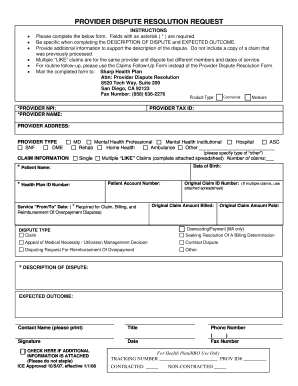
Provider Dispute Resolution Form Sharp Health Plan 2008


What is the Provider Dispute Resolution Form Sharp Health Plan
The Provider Dispute Resolution Form Sharp Health Plan is a specific document designed for healthcare providers to formally dispute claims or decisions made by the Sharp Health Plan. This form serves as an essential tool for providers who believe that a claim has been incorrectly processed or denied. By utilizing this form, providers can ensure that their concerns are documented and addressed in a structured manner, facilitating a more efficient resolution process.
How to use the Provider Dispute Resolution Form Sharp Health Plan
Using the Provider Dispute Resolution Form involves several key steps. First, providers should carefully fill out the form, ensuring that all required information is accurate and complete. This includes details about the claim in question, the reason for the dispute, and any supporting documentation that may strengthen the case. Once completed, the form should be submitted according to the guidelines provided by Sharp Health Plan, which may include online submission, mailing, or in-person delivery.
Steps to complete the Provider Dispute Resolution Form Sharp Health Plan
Completing the Provider Dispute Resolution Form involves the following steps:
- Gather all relevant information regarding the disputed claim.
- Download or obtain the Provider Dispute Resolution Form from Sharp Health Plan.
- Fill out the form with accurate details, including provider information, claim number, and dispute reasons.
- Attach any necessary documentation that supports the dispute.
- Review the completed form for accuracy before submission.
- Submit the form through the designated method, ensuring to keep a copy for your records.
Key elements of the Provider Dispute Resolution Form Sharp Health Plan
The key elements of the Provider Dispute Resolution Form include the following:
- Provider Information: Name, address, and contact details of the healthcare provider.
- Claim Details: Claim number, date of service, and patient information.
- Dispute Reason: A clear explanation of why the claim is being disputed.
- Supporting Documentation: Any relevant documents that support the dispute, such as medical records or previous correspondence.
Form Submission Methods
Providers can submit the Provider Dispute Resolution Form through various methods, depending on the guidelines set by Sharp Health Plan. Common submission methods include:
- Online Submission: Providers may have the option to submit the form electronically through the Sharp Health Plan provider portal.
- Mail: The completed form can be mailed to the designated address specified by Sharp Health Plan.
- In-Person: Providers may also choose to deliver the form in person at a local Sharp Health Plan office.
Eligibility Criteria
To utilize the Provider Dispute Resolution Form, healthcare providers must meet specific eligibility criteria. Generally, the provider must be contracted with Sharp Health Plan and must be disputing a claim related to services rendered to a patient covered by the plan. Additionally, the dispute must be filed within a specified timeframe following the claim denial or issue, as outlined in the Sharp Health Plan policies.
Quick guide on how to complete provider dispute resolution form sharp health plan
Complete Provider Dispute Resolution Form Sharp Health Plan effortlessly on any device
Digital document management has become increasingly favored by organizations and individuals. It offers an ideal eco-friendly alternative to traditional printed and signed documents, as you can locate the appropriate template and securely save it online. airSlate SignNow equips you with all the necessary tools to create, alter, and electronically sign your documents promptly without delays. Handle Provider Dispute Resolution Form Sharp Health Plan on any platform using airSlate SignNow Android or iOS applications and simplify any document-related process today.
How to alter and electronically sign Provider Dispute Resolution Form Sharp Health Plan effortlessly
- Locate Provider Dispute Resolution Form Sharp Health Plan and click Get Form to begin.
- Utilize the tools we provide to complete your document.
- Highlight important sections of the documents or redact sensitive information with tools that airSlate SignNow specifically offers for that purpose.
- Create your signature using the Sign tool, which only takes seconds and holds the same legal significance as a conventional wet ink signature.
- Review the information and click the Done button to save your changes.
- Select your preferred delivery method for your form, whether by email, text message (SMS), invite link, or download it to your computer.
Say goodbye to missing or lost documents, tedious form searches, or mistakes that necessitate creating new copies of documents. airSlate SignNow meets your document management requirements in just a few clicks from a device of your preference. Edit and electronically sign Provider Dispute Resolution Form Sharp Health Plan and ensure excellent communication at every stage of the form creation process with airSlate SignNow.
Create this form in 5 minutes or less
Find and fill out the correct provider dispute resolution form sharp health plan
Create this form in 5 minutes!
How to create an eSignature for the provider dispute resolution form sharp health plan
How to create an electronic signature for a PDF online
How to create an electronic signature for a PDF in Google Chrome
How to create an e-signature for signing PDFs in Gmail
How to create an e-signature right from your smartphone
How to create an e-signature for a PDF on iOS
How to create an e-signature for a PDF on Android
People also ask
-
What is the Provider Dispute Resolution Form Sharp Health Plan?
The Provider Dispute Resolution Form Sharp Health Plan is a document used by healthcare providers to formally dispute claims or decisions made by the Sharp Health Plan. This form ensures that providers can communicate their concerns effectively and seek resolution in a structured manner.
-
How can I access the Provider Dispute Resolution Form Sharp Health Plan?
You can easily access the Provider Dispute Resolution Form Sharp Health Plan through the Sharp Health Plan website or by contacting their customer service. Additionally, airSlate SignNow offers a streamlined process for filling out and submitting this form electronically.
-
What are the benefits of using the Provider Dispute Resolution Form Sharp Health Plan?
Using the Provider Dispute Resolution Form Sharp Health Plan allows healthcare providers to ensure their disputes are documented and processed efficiently. This form helps in expediting the resolution process, ultimately leading to quicker responses and better outcomes for providers.
-
Is there a cost associated with submitting the Provider Dispute Resolution Form Sharp Health Plan?
There is no fee for submitting the Provider Dispute Resolution Form Sharp Health Plan. However, providers should be aware of any associated costs related to the services or claims being disputed. Utilizing airSlate SignNow can help manage these processes at a low cost.
-
Can I integrate the Provider Dispute Resolution Form Sharp Health Plan with other tools?
Yes, the Provider Dispute Resolution Form Sharp Health Plan can be integrated with various document management and eSignature tools, including airSlate SignNow. This integration allows for seamless workflows and enhances the efficiency of the dispute resolution process.
-
What features does airSlate SignNow offer for the Provider Dispute Resolution Form Sharp Health Plan?
airSlate SignNow provides features such as electronic signatures, document tracking, and customizable templates for the Provider Dispute Resolution Form Sharp Health Plan. These features simplify the submission process and ensure that all necessary information is captured accurately.
-
How does airSlate SignNow ensure the security of the Provider Dispute Resolution Form Sharp Health Plan?
airSlate SignNow employs advanced security measures, including encryption and secure cloud storage, to protect the Provider Dispute Resolution Form Sharp Health Plan. This ensures that sensitive information remains confidential and secure throughout the submission process.
Get more for Provider Dispute Resolution Form Sharp Health Plan
Find out other Provider Dispute Resolution Form Sharp Health Plan
- How To Integrate Sign in Banking
- How To Use Sign in Banking
- Help Me With Use Sign in Banking
- Can I Use Sign in Banking
- How Do I Install Sign in Banking
- How To Add Sign in Banking
- How Do I Add Sign in Banking
- How Can I Add Sign in Banking
- Can I Add Sign in Banking
- Help Me With Set Up Sign in Government
- How To Integrate eSign in Banking
- How To Use eSign in Banking
- How To Install eSign in Banking
- How To Add eSign in Banking
- How To Set Up eSign in Banking
- How To Save eSign in Banking
- How To Implement eSign in Banking
- How To Set Up eSign in Construction
- How To Integrate eSign in Doctors
- How To Use eSign in Doctors