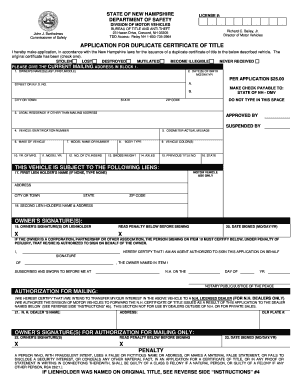
APPLICATION for DUPLICATE CERTIFICATE of TITLE NH Gov Nh 2022-2026


What is the application for duplicate certificate of title in New Hampshire?
The application for duplicate certificate of title in New Hampshire is a formal request made to the New Hampshire Department of Motor Vehicles (DMV) when an individual needs a replacement for a lost, stolen, or damaged vehicle title. This document is essential for proving ownership of a vehicle and is required for various transactions, including selling or transferring the vehicle. The form used for this purpose is known as the TDMV 17A form, which must be completed accurately to ensure a smooth processing experience.
Steps to complete the application for duplicate certificate of title
To successfully complete the application for a duplicate certificate of title, follow these steps:
- Obtain the TDMV 17A form from the New Hampshire DMV website or your local DMV office.
- Fill out the form with accurate information, including your name, address, and vehicle details such as the Vehicle Identification Number (VIN).
- Indicate the reason for requesting a duplicate title, whether it is lost, stolen, or damaged.
- Sign and date the application to certify that the information provided is correct.
- Submit the completed form along with any required fees, either online, by mail, or in person at your local DMV office.
Required documents for the application
When applying for a duplicate certificate of title in New Hampshire, you will need to provide specific documents to support your application. These may include:
- A completed TDMV 17A form.
- Proof of identity, such as a driver's license or state-issued ID.
- Any documentation that verifies the vehicle's ownership, such as a bill of sale or previous title.
- A payment for the applicable fee, which can vary based on the type of vehicle and the processing method.
Form submission methods
The application for a duplicate certificate of title can be submitted through various methods, providing flexibility for applicants. The options include:
- Online: If available, you may submit the application through the New Hampshire DMV's online portal.
- By Mail: Send the completed TDMV 17A form and supporting documents to the designated DMV address.
- In-Person: Visit your local DMV office to submit the application directly and receive assistance if needed.
Eligibility criteria for obtaining a duplicate title
To be eligible for a duplicate certificate of title in New Hampshire, applicants must meet certain criteria, including:
- The applicant must be the legal owner of the vehicle or an authorized representative.
- The vehicle must be registered in New Hampshire.
- All information provided in the application must be accurate and truthful.
Legal use of the duplicate title
The duplicate certificate of title serves a critical legal function in vehicle ownership. It is recognized by law as proof of ownership and is necessary for various transactions, such as selling, transferring, or registering the vehicle. Having a valid title ensures that the vehicle can be legally operated on public roads and can help prevent issues related to ownership disputes.
Quick guide on how to complete application for duplicate certificate of title nh gov nh
Complete APPLICATION FOR DUPLICATE CERTIFICATE OF TITLE NH gov Nh effortlessly on any gadget
Digital document management has gained traction among businesses and individuals alike. It serves as an ideal eco-friendly alternative to traditional printed and signed documents, allowing you to obtain the appropriate form and securely archive it online. airSlate SignNow equips you with all the necessary tools to create, modify, and electronically sign your documents swiftly and without issues. Manage APPLICATION FOR DUPLICATE CERTIFICATE OF TITLE NH gov Nh on any gadget using airSlate SignNow’s Android or iOS applications and enhance any document-centric procedure today.
How to amend and eSign APPLICATION FOR DUPLICATE CERTIFICATE OF TITLE NH gov Nh effortlessly
- Locate APPLICATION FOR DUPLICATE CERTIFICATE OF TITLE NH gov Nh and then click Get Form to begin.
- Utilize the tools we offer to complete your form.
- Emphasize key sections of your documents or conceal sensitive information with tools specifically designed for that by airSlate SignNow.
- Create your eSignature using the Sign tool, which takes mere seconds and carries the same legal validity as a conventional handwritten signature.
- Review all the details and click on the Done button to secure your changes.
- Select how you would like to submit your form, via email, text message (SMS), or invitation link, or download it to your computer.
Eliminate worries about lost or misplaced documents, tedious form navigation, or errors that require reprinting copies. airSlate SignNow accommodates your document management requirements in just a few clicks from any device of your preference. Modify and eSign APPLICATION FOR DUPLICATE CERTIFICATE OF TITLE NH gov Nh to ensure effective communication throughout your form preparation process with airSlate SignNow.
Create this form in 5 minutes or less
Find and fill out the correct application for duplicate certificate of title nh gov nh
Create this form in 5 minutes!
How to create an eSignature for the application for duplicate certificate of title nh gov nh
How to create an electronic signature for a PDF online
How to create an electronic signature for a PDF in Google Chrome
How to create an e-signature for signing PDFs in Gmail
How to create an e-signature right from your smartphone
How to create an e-signature for a PDF on iOS
How to create an e-signature for a PDF on Android
People also ask
-
What is the process for obtaining an NH application duplicate title?
To obtain an NH application duplicate title, you need to complete the appropriate application form and submit it to your local DMV. Ensure you have the necessary identification and any required fees ready. Using airSlate SignNow can streamline this process by allowing you to eSign and send documents quickly.
-
How much does it cost to get an NH application duplicate title?
The cost for an NH application duplicate title varies depending on the specific fees set by the New Hampshire DMV. Typically, there is a nominal fee for processing the application. Utilizing airSlate SignNow can help you manage these costs effectively by providing a cost-efficient solution for document management.
-
What features does airSlate SignNow offer for managing NH application duplicate titles?
airSlate SignNow offers features such as eSigning, document templates, and secure storage, which are essential for managing NH application duplicate titles. These features simplify the process of filling out and submitting your application. Additionally, you can track the status of your documents in real-time.
-
Can I integrate airSlate SignNow with other applications for my NH application duplicate title?
Yes, airSlate SignNow offers integrations with various applications, making it easy to manage your NH application duplicate title alongside other business processes. You can connect it with CRM systems, cloud storage, and more to streamline your workflow. This integration capability enhances efficiency and productivity.
-
What are the benefits of using airSlate SignNow for NH application duplicate titles?
Using airSlate SignNow for NH application duplicate titles provides numerous benefits, including faster processing times and reduced paperwork. The platform allows for easy collaboration and document sharing, ensuring that all parties can access the necessary information. This leads to a more efficient and hassle-free experience.
-
Is airSlate SignNow secure for handling NH application duplicate titles?
Absolutely, airSlate SignNow prioritizes security and compliance, ensuring that your NH application duplicate title documents are protected. The platform uses encryption and secure access controls to safeguard sensitive information. You can trust that your documents are handled with the utmost care and confidentiality.
-
How can I get started with airSlate SignNow for my NH application duplicate title?
Getting started with airSlate SignNow for your NH application duplicate title is simple. You can sign up for an account on their website and explore the user-friendly interface. Once registered, you can begin creating, signing, and managing your documents with ease.
Get more for APPLICATION FOR DUPLICATE CERTIFICATE OF TITLE NH gov Nh
Find out other APPLICATION FOR DUPLICATE CERTIFICATE OF TITLE NH gov Nh
- eSign Oregon Doctors LLC Operating Agreement Mobile
- eSign Hawaii Education Claim Myself
- eSign Hawaii Education Claim Simple
- eSign Hawaii Education Contract Simple
- eSign Hawaii Education NDA Later
- How To eSign Hawaii Education NDA
- How Do I eSign Hawaii Education NDA
- eSign Hawaii Education Arbitration Agreement Fast
- eSign Minnesota Construction Purchase Order Template Safe
- Can I eSign South Dakota Doctors Contract
- eSign Mississippi Construction Rental Application Mobile
- How To eSign Missouri Construction Contract
- eSign Missouri Construction Rental Lease Agreement Easy
- How To eSign Washington Doctors Confidentiality Agreement
- Help Me With eSign Kansas Education LLC Operating Agreement
- Help Me With eSign West Virginia Doctors Lease Agreement Template
- eSign Wyoming Doctors Living Will Mobile
- eSign Wyoming Doctors Quitclaim Deed Free
- How To eSign New Hampshire Construction Rental Lease Agreement
- eSign Massachusetts Education Rental Lease Agreement Easy