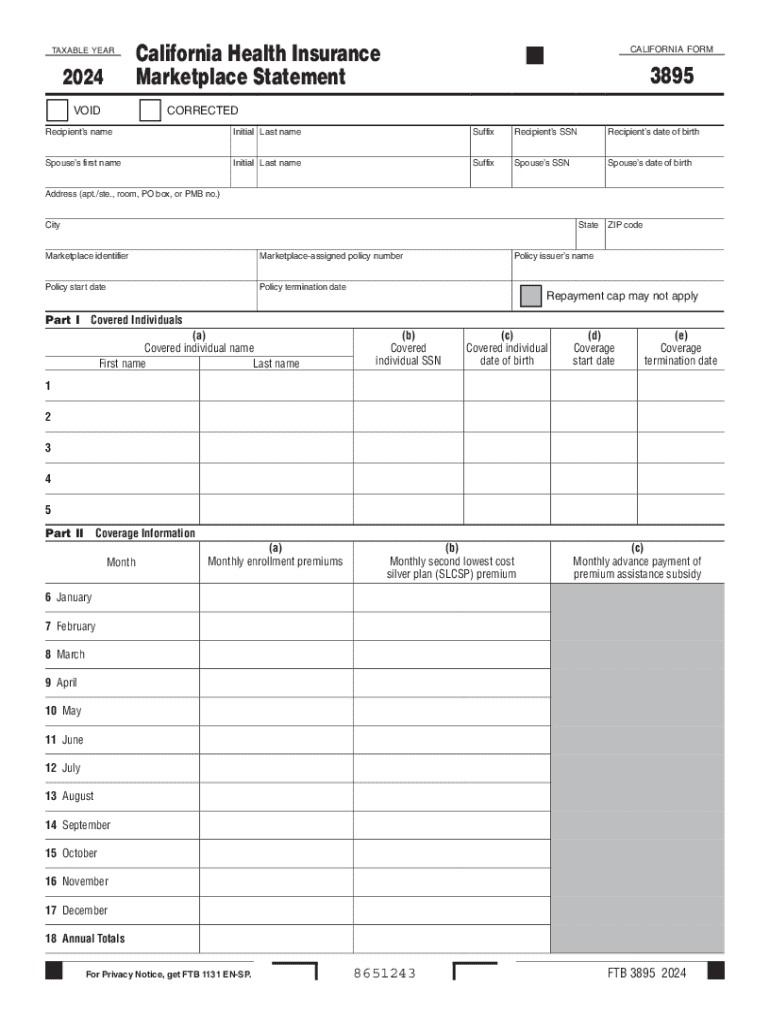
Form 3895 California Health Insurance Marketplace Statement 2024-2026


What is the Form 3895 California Health Insurance Marketplace Statement
The Form 3895, known as the California Health Insurance Marketplace Statement, is a crucial document issued to individuals who enrolled in a health plan through Covered California. This form provides essential information about the health coverage individuals had during the tax year, including the months of coverage and the type of plan. It is particularly important for taxpayers who are claiming premium tax credits or need to reconcile their health insurance coverage with their tax returns.
How to use the Form 3895 California Health Insurance Marketplace Statement
The Form 3895 is used primarily for tax purposes. Taxpayers must include this form when filing their federal income tax returns to report their health coverage status. The information on this form helps determine eligibility for premium tax credits and ensures compliance with the Affordable Care Act. Taxpayers should review the details on the form carefully to ensure accuracy before submission.
Steps to complete the Form 3895 California Health Insurance Marketplace Statement
Completing the Form 3895 involves several key steps:
- Gather necessary documents, including your health insurance information and any other relevant tax documents.
- Review the coverage details provided on the form, ensuring that all months of coverage are accurately reflected.
- Use the information from the Form 3895 to fill out your federal tax return, specifically in relation to premium tax credits.
- Keep a copy of the completed form for your records, as it may be required for future reference or audits.
Key elements of the Form 3895 California Health Insurance Marketplace Statement
The Form 3895 includes several key elements that are vital for tax reporting:
- Taxpayer Information: This section includes the name, address, and Social Security number of the insured individual.
- Coverage Period: Details about the months during which the individual was covered under a health plan.
- Plan Type: Information about the specific health plan selected, which can affect tax credit eligibility.
- Premium Tax Credit Information: If applicable, this section outlines the amount of premium tax credits received during the coverage period.
Who Issues the Form
The Form 3895 is issued by Covered California, the state's health insurance marketplace. Individuals who enroll in a health plan through this marketplace will receive the form automatically at the end of the tax year. It is essential for taxpayers to ensure that they have received this form before filing their tax returns, as it contains critical information needed for accurate reporting.
Filing Deadlines / Important Dates
When dealing with the Form 3895, it is important to be aware of key deadlines:
- The form is typically mailed to taxpayers by January 31 of the following year.
- Taxpayers should file their federal income tax returns by the April 15 deadline, ensuring that they include the Form 3895.
- Extensions may be available, but it is crucial to check specific state and federal guidelines regarding health coverage reporting.
Create this form in 5 minutes or less
Find and fill out the correct form 3895 california health insurance marketplace statement
Create this form in 5 minutes!
How to create an eSignature for the form 3895 california health insurance marketplace statement
How to create an electronic signature for a PDF online
How to create an electronic signature for a PDF in Google Chrome
How to create an e-signature for signing PDFs in Gmail
How to create an e-signature right from your smartphone
How to create an e-signature for a PDF on iOS
How to create an e-signature for a PDF on Android
People also ask
-
What is a health insurance marketplace statement?
A health insurance marketplace statement is a document that outlines the details of your health insurance coverage obtained through a marketplace. It typically includes information about your plan, coverage dates, and premium amounts. Understanding this statement is crucial for managing your health insurance effectively.
-
How can airSlate SignNow help with health insurance marketplace statements?
airSlate SignNow provides a streamlined solution for sending and eSigning health insurance marketplace statements. With our platform, you can easily manage and store these important documents securely. This ensures that you have quick access to your statements whenever needed.
-
What features does airSlate SignNow offer for managing health insurance marketplace statements?
Our platform offers features such as customizable templates, secure eSigning, and document tracking specifically for health insurance marketplace statements. These tools help you streamline the process of handling your insurance documents efficiently. Additionally, our user-friendly interface makes it easy for anyone to use.
-
Is airSlate SignNow cost-effective for handling health insurance marketplace statements?
Yes, airSlate SignNow is designed to be a cost-effective solution for managing health insurance marketplace statements. Our pricing plans are competitive, allowing businesses of all sizes to benefit from our services without breaking the bank. You can save time and resources while ensuring compliance with insurance documentation.
-
Can I integrate airSlate SignNow with other tools for health insurance marketplace statements?
Absolutely! airSlate SignNow offers integrations with various tools and platforms that can enhance your workflow for health insurance marketplace statements. Whether you use CRM systems or document management software, our integrations help you maintain a seamless process across your business operations.
-
What are the benefits of using airSlate SignNow for health insurance marketplace statements?
Using airSlate SignNow for health insurance marketplace statements provides numerous benefits, including increased efficiency, enhanced security, and improved document management. Our platform allows you to track the status of your statements and ensures that all documents are securely stored. This ultimately leads to better organization and peace of mind.
-
How secure is airSlate SignNow for handling sensitive health insurance marketplace statements?
Security is a top priority at airSlate SignNow, especially when dealing with sensitive health insurance marketplace statements. We implement advanced encryption and compliance measures to protect your documents. You can trust that your information is safe and secure while using our platform.
Get more for Form 3895 California Health Insurance Marketplace Statement
Find out other Form 3895 California Health Insurance Marketplace Statement
- Can I Electronic signature Hawaii Insurance PDF
- Help Me With Electronic signature Colorado High Tech Form
- How To Electronic signature Indiana Insurance Document
- Can I Electronic signature Virginia Education Word
- How To Electronic signature Louisiana Insurance Document
- Can I Electronic signature Florida High Tech Document
- Can I Electronic signature Minnesota Insurance PDF
- How Do I Electronic signature Minnesota Insurance Document
- How To Electronic signature Missouri Insurance Form
- How Can I Electronic signature New Jersey Insurance Document
- How To Electronic signature Indiana High Tech Document
- How Do I Electronic signature Indiana High Tech Document
- How Can I Electronic signature Ohio Insurance Document
- Can I Electronic signature South Dakota Insurance PPT
- How Can I Electronic signature Maine Lawers PPT
- How To Electronic signature Maine Lawers PPT
- Help Me With Electronic signature Minnesota Lawers PDF
- How To Electronic signature Ohio High Tech Presentation
- How Can I Electronic signature Alabama Legal PDF
- How To Electronic signature Alaska Legal Document